开始使用混合标签
上次更新时间:2026年9月17日 09:36
了解更多关于Hybrid Tabs的信息,这是我们新的测试功能,为您提供个人数字账单。您的服务员会开始您的订单,您可以在手机上轻松获取二维码。简化您的体验!
| 混合标签是Toast的新测试功能,为您提供个人数字标签。您的服务员会开始您的订单,您可以在手机上轻松获取二维码。如果您还没有看到此功能,请稍后查看更新! |
混合标签的好处
混合标签为您提供个人数字标签。您的服务员会开始您的订单,您可以在手机上轻松获取二维码。简化您的体验!
- 立即开始使用。 无需设置或物理二维码。如果您有POS机和收据打印机,今天就可以开始使用。
- 运行混合模式。利用员工和数字点餐来简化您的运营、点餐和付款。
- 避免长时间排队和等待。让客人跳过排队,重新点单或结账。
- 跑腿或柜台自取。您可以选择送餐方式。将账单分配给桌子,以便将订单送给客人,或在订单准备好自取时给他们发短信。
使用混合账单
员工、服务员和调酒师:
- 在POS机或Toast Go®上开始订单。
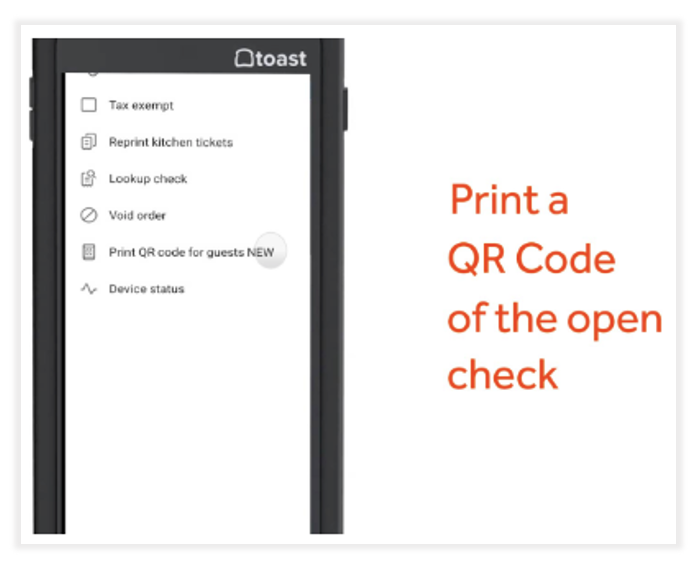
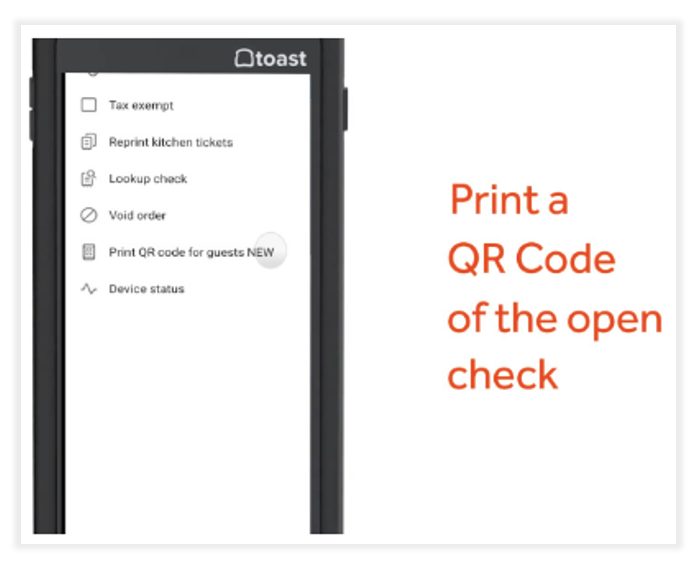
- 直接从收据打印机打印客人的二维码。
- 将二维码交给您的客人。
客人:
- 扫描二维码
- 再下一个订单。
- 薪酬
仅接受付款
如果您只想通过二维码接受移动支付,以便客人可以在不返回酒吧或柜台的情况下结账,我们可以设置这个功能。请发送电子邮件至 orderandpay-support@toasttab.com 并告知我们。
常见问题
如何启用混合标签?
混合标签处于测试阶段。请发送电子邮件至 orderandpay-support@toasttab.com 以注册。
我需要 Toast 移动订单与支付® 模块才能使用此功能吗?
是的,您必须拥有 Toast 移动订单与支付® 产品模块才能使用混合标签。
如何从 POS 打印混合标签二维码?
打开一个标签,选择 三点菜单 > 为客人打印二维码。这可以通过 POS 或 Toast Go® 完成。
我可以限制客人从手机上点哪些菜单或项目吗?
是的。您可以通过调整 订单与支付菜单可见性 在订单与支付设置页面上选择客人可以从手机上点的菜单和项目。
例如,您可以选择只允许客人从手机上点餐,但不允许点饮料。然而,客人仍然可以支付全额账单。
标签需要与桌子关联吗?
是的。订单必须在桌子上开始,以便混合标签正常工作。
我需要为订单与支付启用标签功能吗?
是的。您必须确保在 移动订单与支付 设置页面上启用 标签。Hybrid Tabs不支持按需付费配置。
我的客人会看到什么?
客人将被提示输入他们的姓名和电话号码以加入账单。一旦他们加入,我们会给他们发短信链接到账单。他们可以直接从手机上再下单并支付账单。


如果多个客人扫描同一个二维码,会发生什么?
如果多个客人扫描同一个Hybrid Tabs二维码,我们会自动将他们添加到一个组中。他们可以在最后分账。
如果我的客人丢失他们的二维码,会发生什么?
当客人第一次扫描二维码时,我们会询问他们的电话号码,并给他们发短信链接到他们的账单,以便他们随时访问。
Hybrid Tabs支持预授权吗?
如果客户想要预授权账单,必须在POS上进行。一旦在POS上启动账单,客人无法直接从手机上进行预授权。