翻译仅供参考。您与 Toast 签署的任何法律协议(包括但不限于《商户协议》和《终端用户许可协议》),其订立语言可能不同于以上页面所使用的语言,无论是否提供本页面其他语言的译文,均应以您所签署的协议条款为准
通过电话输入Toast配送服务®订单
上次更新时间:2026年8月5日 10:11
Toast配送服务®允许餐厅通过电话接收偏好致电餐厅的客人的配送订单。
您可以使用Toast配送服务®用餐选项在Toast POS上输入Toast配送服务®订单。这使您能够通过电话接受配送订单。这使您能够接受并完成更多订单,从而增加收入并提高员工生产力。
注意:在为Toast配送服务®电话订单收集支付信息时,建议您询问顾客是否愿意为司机留下小费。我们发现,如果附带小费,司机更有可能接受Toast配送服务®电话订单。此外,明确说明此小费是给司机的,而不是给餐厅的,可能是一个好主意。在POS上输入Toast配送服务®电话订单时,需要将司机的小费包含在原始支付授权中,以便发送给您的配送服务商。
注意:视频显示的是DoorDash配送用餐选项。请对这些订单使用Toast配送服务用餐选项。
Toast配送服务®电话订单
要输入通过电话呼入的Toast配送服务®订单,请按照以下步骤操作:
- 导航至 快速点餐 或 配送模式 以开始新订单。
- 选择 Toast配送服务 用餐选项并按照提示操作。这是一个重要步骤,否则订单将无法发送至您的Toast配送服务®提供商。
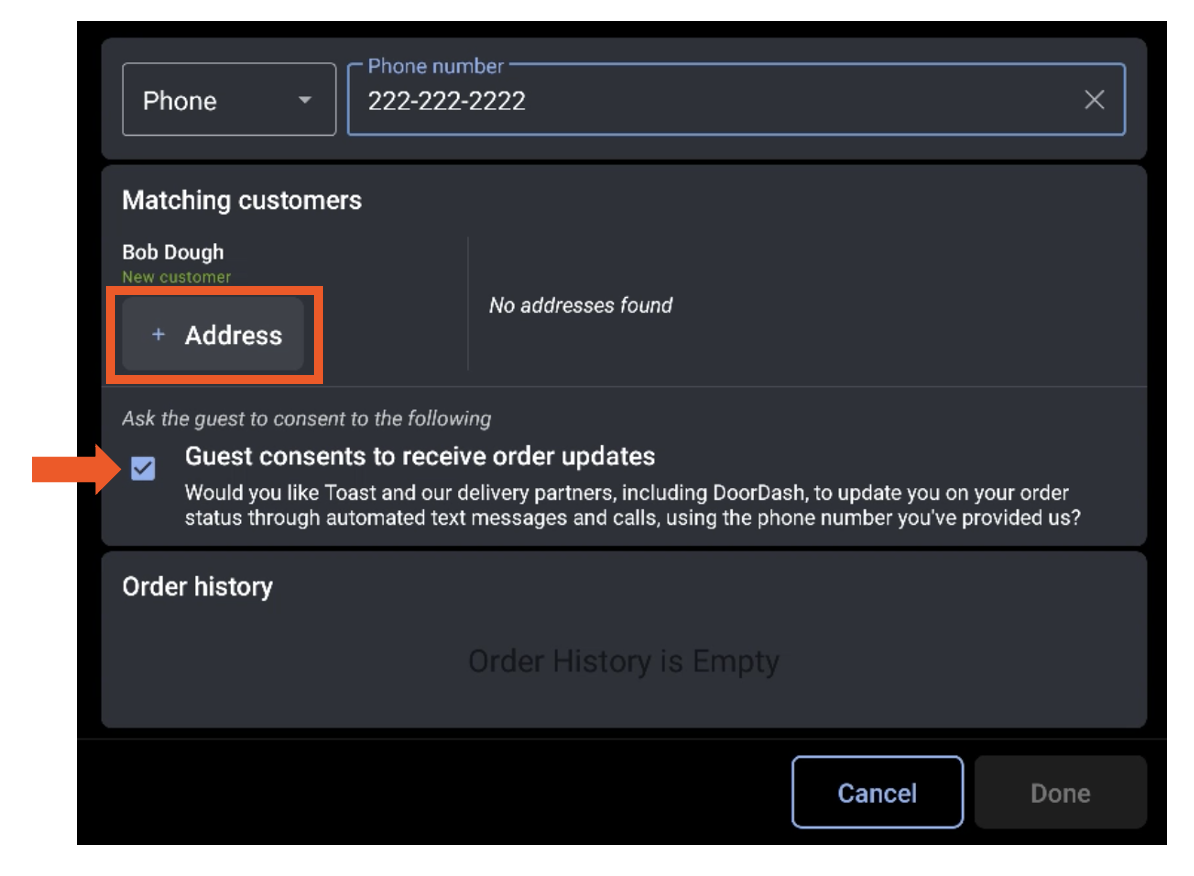
- 首先输入客户的电话号码。
注意: 确保这是一个有效的电话号码。
- 接下来,输入以下客户信息:
- 名字和姓氏
- 配送地址
- 配送特别说明
- 客户同意通过短信接收来自配送服务商的更新。
- 选择完成。
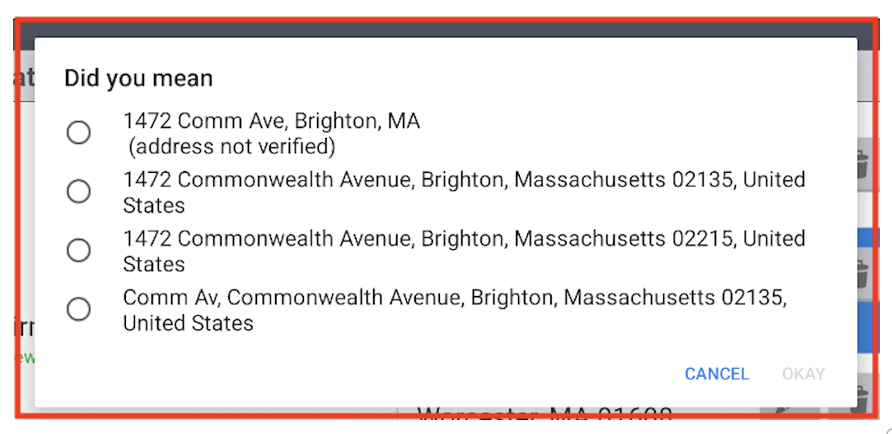
注意: 一旦您选择完成,我们将验证该地址是否未经核实。验证地址将通过我们的配送服务商核实配送地址,以确认其是否在服务范围内,并计算基于距离的配送费。
如果在地址验证过程中未找到完全匹配的地址,系统将提示您选择推荐地址之一。
如果地址和其他信息通过验证,您将被带到订单屏幕以继续下单。
如果地址或其他信息有误,将显示错误消息,且订单将无法继续。以下是可能的错误场景列表:
Toast 内部错误:- “第三方配送目前不可用”
- “来自配送服务商的配送目前已禁用”
- “餐厅的配送配置不完整或无效”
- “检查可用性时发生内部错误”
- “与配送服务商通信时出错”
配送服务商错误: - “配送服务商无法识别餐厅取货地址”
- “配送服务商不提供餐厅取货地址的配送服务”
- “配送服务商无法识别送达地址”
- “配送服务商不提供送达地址的配送服务”
- “配送服务商允许的最高订单金额为 $X”
- “配送服务商的取货时间必须至少在 X 分钟之后”
- “来自服务商的配送仅在 X 时间至 X 时间之间可用”
- 常规错误:
- “配送不可用,请联系配送服务商以获取更多信息”
- 在成功完成初步验证后,继续添加商品并下单。
如果您正在创建预约配送订单,请注意您将指定配送取货时间,而非送达时间。在为顾客设定预期时,您需要考虑此行为。
注意: 如果在此流程中出现错误(例如,订单金额过小或过大),系统将显示错误消息,并且订单将被取消。
- 添加商品后,进入付款屏幕。在此处,您将输入客人的付款信息以及适用的小费选项。
注意: 此功能仅接受信用卡。 - 输入信用卡信息并完成付款后,您可以像上述在线订单一样,在配送屏幕上查看订单状态。

在销售点 (POS) 进行Toast配送服务 (Toast配送服务®) 电话订餐时,必须将给配送员的小费包含在发送给您的配送服务提供商的原始付款授权中。
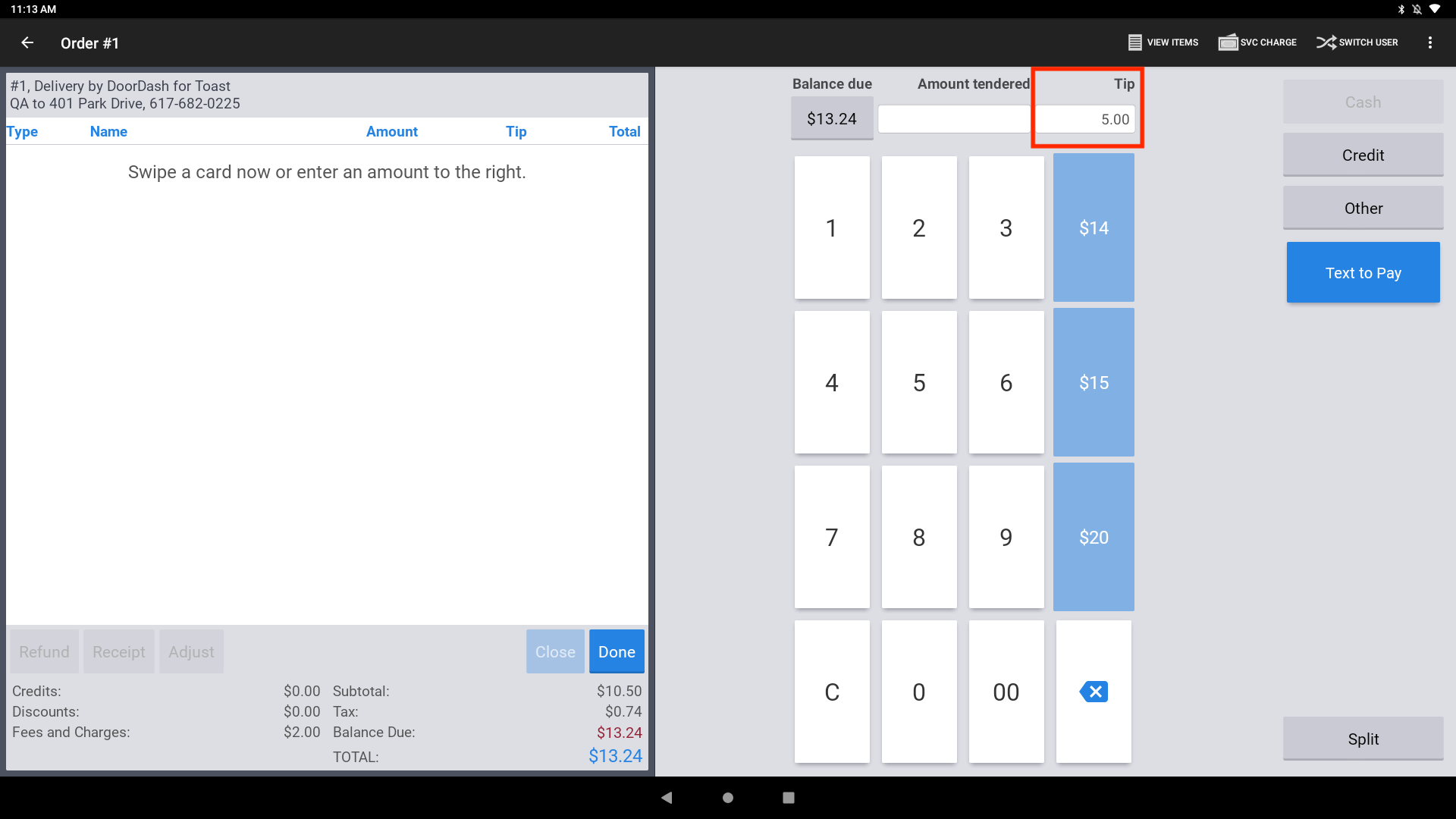
- 如果您使用的POS设备禁用了数字收据,则必须在点击“信用卡”并进行刷卡支付之前手动输入小费。
- 如果您使用的POS设备启用了数字收据,则需要在数字支付工作流程中点击信用卡按钮后的工作流程中输入小费。
Toast配送服务®数字收据设置
在未启用数字收据时输入Toast配送服务®小费
在POS上进行Toast配送服务®订单时,请遵循以下步骤。
- 在付款选择屏幕上的小费字段中输入小费,为配送员添加小费。
- 选择信用卡以输入客人的信用卡信息并提交订单。
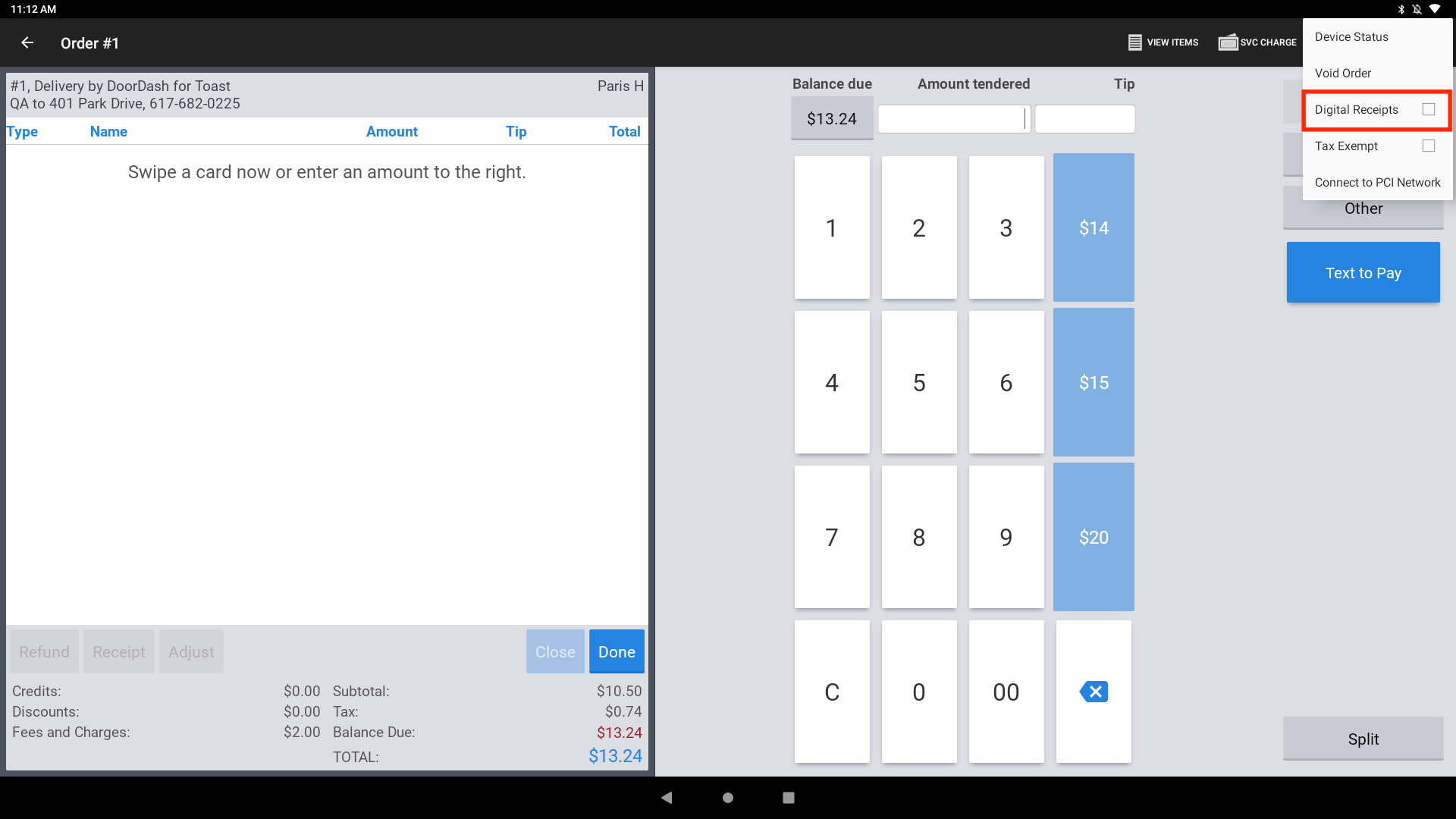
注意:您也可以在POS付款页面的溢出菜单中切换数字收据工作流程。在付款选择屏幕的溢出菜单中,您可以为单笔交易开启或关闭数字收据,而不会影响设备级别的设置。
在启用数字收据时输入Toast配送服务®小费
在POS上创建Toast配送服务®订单时,可通过选择预设小费金额之一,或通过数字收据工作流程输入自定义小费,为配送员添加小费。
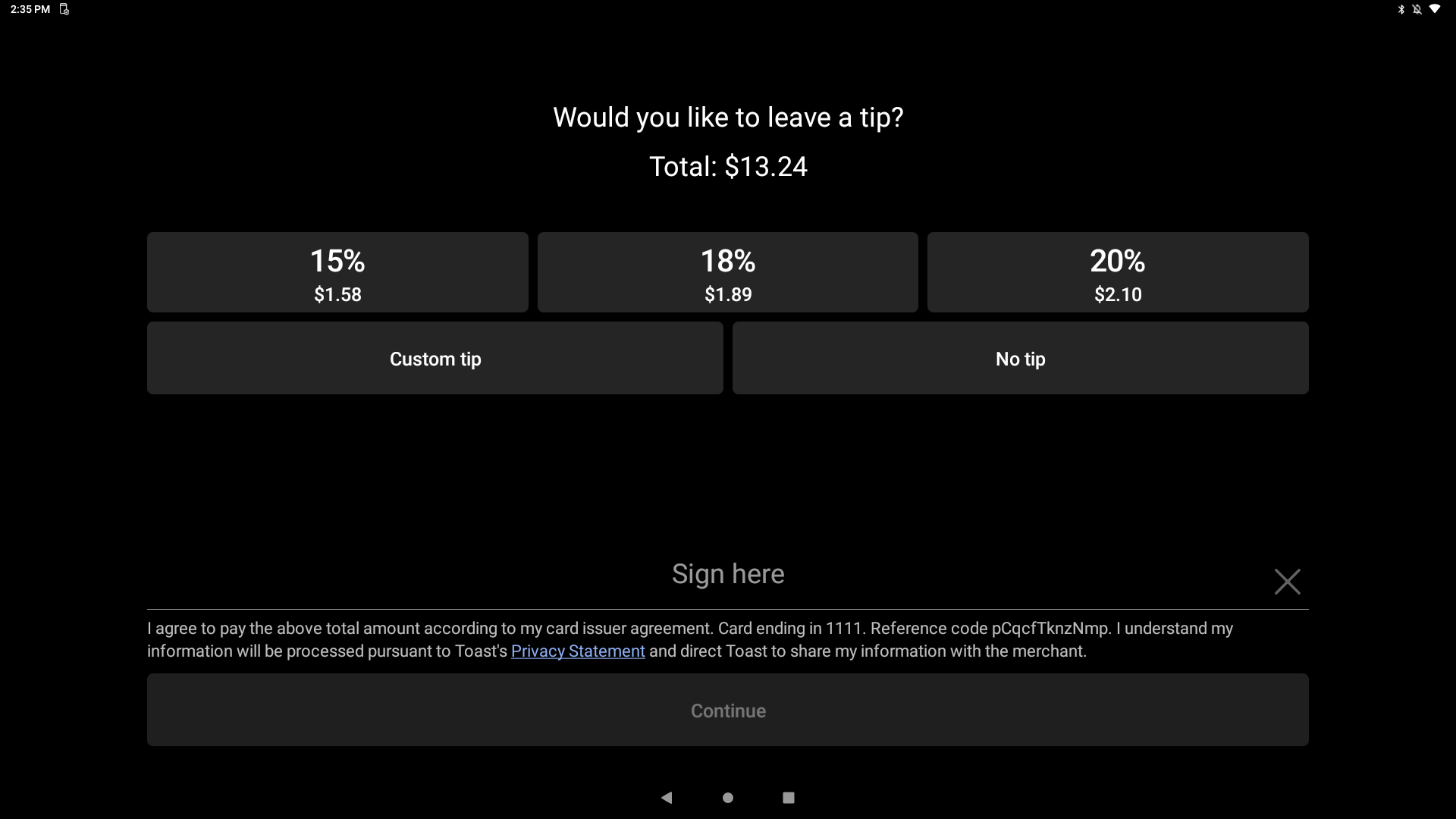
在POS设备上启用数字收据
您需要在每台POS设备上启用数字收据。
- 导航至POS设备的设置页面,然后向下滚动并从设置部分选择设备设置。
- 选择数字收据,然后选择是,使用数字收据。
- 请务必保存您的更改。
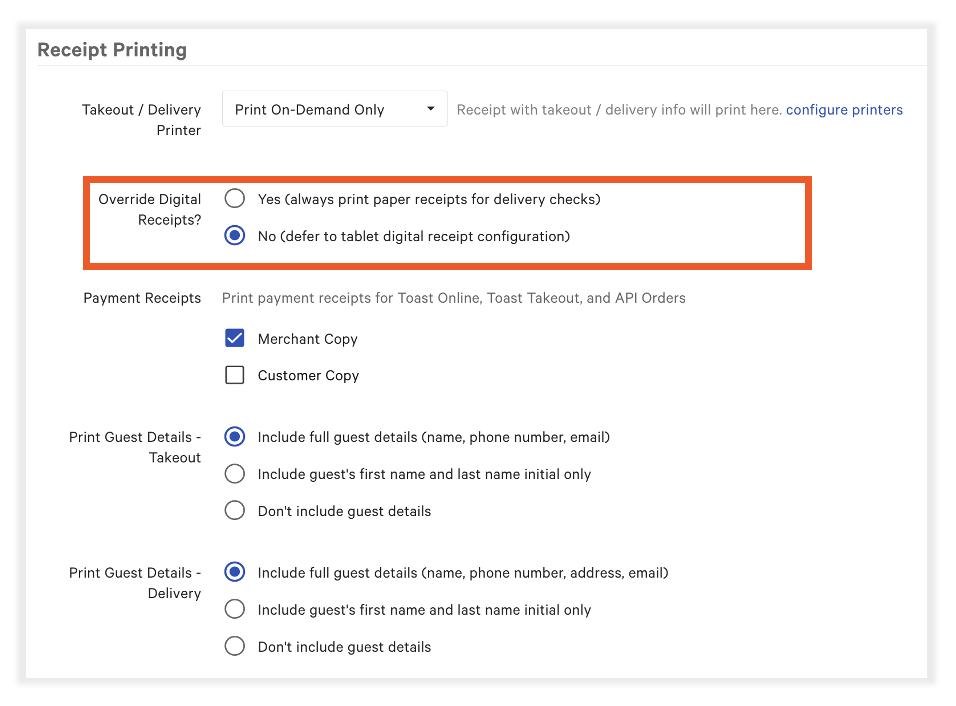
- 在Toast Web中,导航至外带与配送 > 可用性 > 外带/配送。向下滚动至收据打印并确认覆盖数字收据已设置为否。
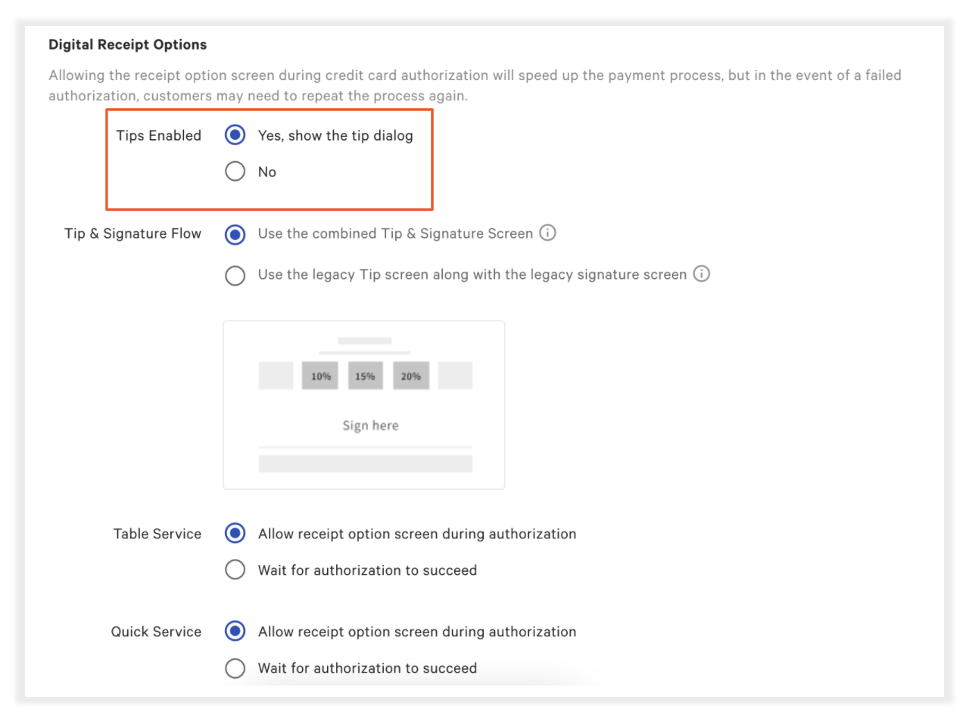
- 在Toast Web中,通过导航至付款方式 > 付款选项,启用数字收据上的小费功能。
- 在此处,导航至数字收据选项> 已启用小费,并选择是,显示小费对话框。
- 保存并发布您的更改!

注意:您也可以在POS付款页面的溢出菜单中切换数字收据工作流程。在付款选择屏幕的溢出菜单中,您可以为单笔交易开启或关闭数字收据,而不会影响设备级别的设置。