翻译仅供参考。您与 Toast 签署的任何法律协议(包括但不限于《商户协议》和《终端用户许可协议》),其订立语言可能不同于以上页面所使用的语言,无论是否提供本页面其他语言的译文,均应以您所签署的协议条款为准
管理忠诚度账户中关联的信用卡
上次更新时间:2026年9月17日 16:46
问题
- 客人可以在哪里管理其忠诚度账户的关联信用卡?
- 我该如何查看哪些信用卡关联到了客人的忠诚度账户?
- 我该如何从客人的忠诚度账户中移除关联的信用卡?
- 我可以禁用信用卡关联功能吗?
回答
客人可以通过导航至其忠诚度账户页面来识别并移除关联的信用卡。此账户页面的链接会通过欢迎电子邮件或短信发送给他们。您也可以通过 Toast Web 中“餐厅信息”(Restaurant Info) 下的“查找”(Lookup) 页面找到该链接。客人的账户页面底部会显示一个 管理关联信用卡 选项。选择关联卡片旁边的“垃圾桶”图标即可将其移除。当该卡片稍后再次使用时,它将不会重新关联。
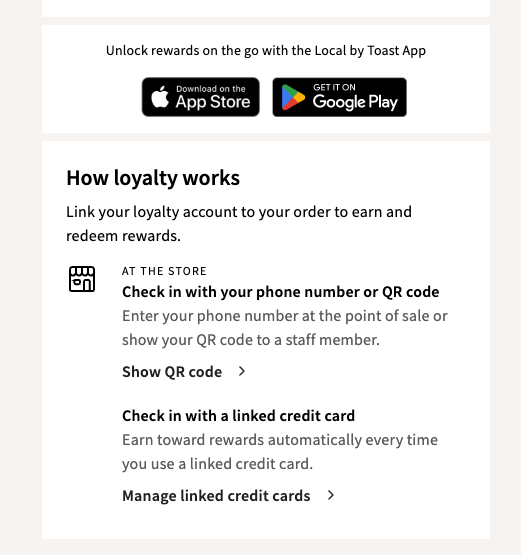
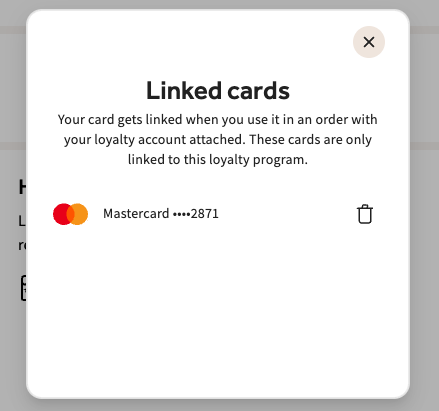
您可以按照以下步骤查看哪些信用卡关联到了客人的奖励账户:
- 在 Toast Web 中,导航至 报告 > 营销 > 奖励账户。
- 使用电子邮件地址、电话号码或忠诚度卡号查找客人的账户。
- 选择该奖励账户。
- 在 卡片详情 窗口中,选择 关联信用卡 选项卡。
只有顾客(使用其忠诚度账户页面)或 Toast 客户支持部门才能为顾客移除此卡。目前无法禁用信用卡关联功能。如果您的卡关联到了非您本人的忠诚度账户(非您的电子邮箱或电话号码),您将无法自行打开或编辑该账户。请联系 Toast 客户支持部门,以便他们代表您将该卡从其他顾客的账户中移除。
目前无法手动将信用卡添加到忠诚度账户。当顾客下次使用该卡支付与其实名忠诚度账户(例如,通过电话号码或会员卡)关联的订单时,卡片会自动关联。
如果新卡或补办的卡在用于关联忠诚度账户的订单后没有自动关联,这偶尔会因交易技术问题而发生,并非顾客操作有误。请联系客户服务部门,以便他们手动将该卡关联到忠诚度账户。