Toast Payroll: Complete Boxes 14, 15, and 16 of Form 1095-C
Last updated: Apr 8, 2026, 9:59 AM
- What Are ACA Codes?
- Box 14
- Box 15
- Box 16
- Enter Box 14, 15, and 16 Information Into Toast Form 1095-C
What Are ACA Codes?
While each field of the form is requesting a specific piece of information, when completing Form 1095-C, it can also be important to consider how the different fields may relate to one another. In Form 1095-C, the IRS provides two separate sets of codes for Boxes 14 and 16, respectively. Employers can then reference these ACA codes to report to the IRS the scenarios and situations surrounding what minimum essential coverage looked like for a specific employee.
Although Box 15 information does relate to the information contained within Boxes 14 and 16, Box 15 information is not reported as a code. Instead, Box 15 asks employers to specify the cost of the lowest-priced, self-only minimum essential coverage providing minimum value that is offered to an employee.
Collectively, Boxes 14, 15, and 16 exist to provide an employer with an avenue they can utilize to report to the IRS how they have complied with their minimum essential coverage obligations for employees under the ACA.
You can find the complete list of IRS Codes for Boxes 14 and 16 and their definitions here. Want to learn more about how the codes in Boxes 14 and 16 interact? Check out our Common Combinations Table that helps highlight some commonly utilized code combinations.
Box 14
Box 14 asks employers to specify the type of coverage, if any, offered to an employee, the employee's spouse, and the employee's dependents for each month in the calendar year.
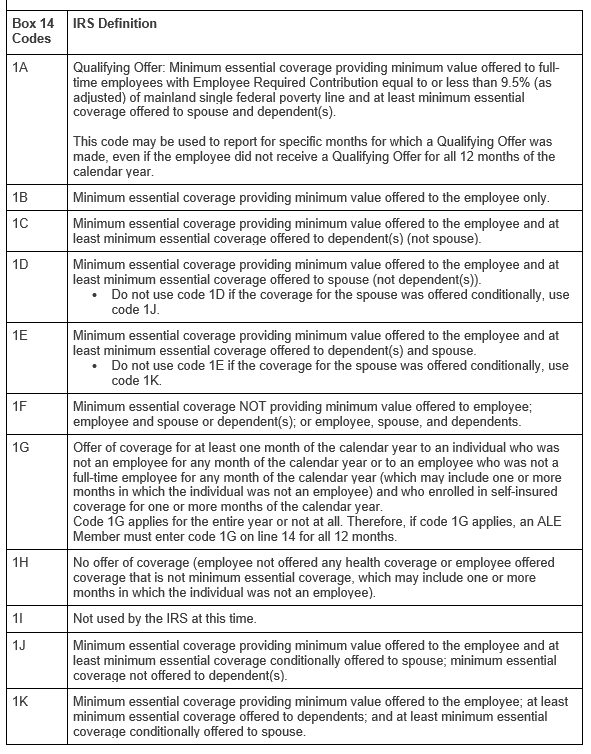
The IRS provides a set of codes for Box 14, where each code corresponds to a different offer of coverage scenario. For example, entering code "1B" for a specific month in Box 14 would indicate that minimum essential coverage providing minimum value was offered to the employee only for the month indicated. Below you can find the list of Box 14 codes and what each Box 14 code represents.
Note: Understanding which Box 14 code to indicate can be a complicated question. We recommend contacting a licensed professional for help to determine what code response would be most appropriate for your business.
Box 15
Box 15 asks employers to provide the amount of the employee's required contribution.
The IRS states that an employee's required contribution is generally the employee's share of the monthly cost for the lowest-cost, self-only minimum essential coverage providing a minimum value that is offered to the employee. If you choose any code other than 1A in Box 12, you will be required to enter a non-zero value in Box 15. If the cost of the coverage that you offered to an employee was $0 and you are not using code 1A, you will need to manually enter this amount in each employee's ACA Filing Data page on the employee's profile under the Benefits tab.
Note: We recommend contacting a licensed professional for help to determine what amount would be most appropriate to list for your business.
Box 16
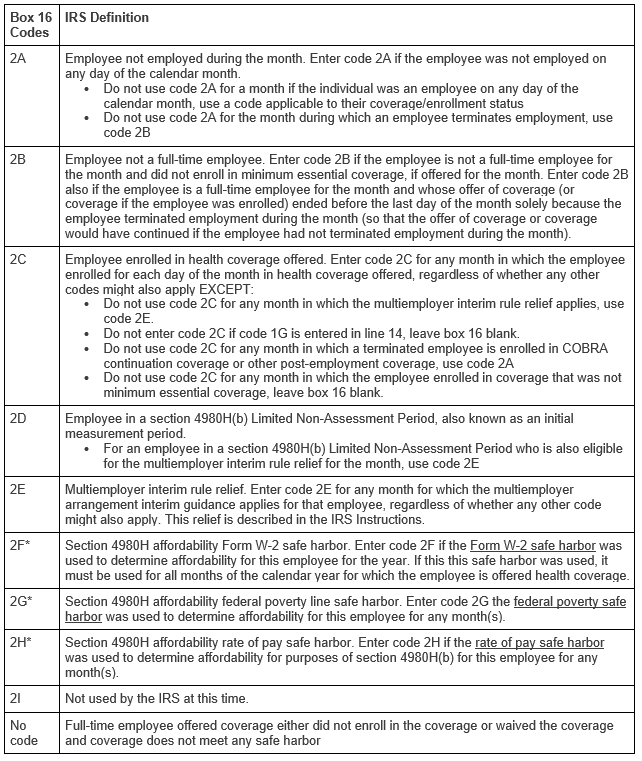
Box 16 asks employers to indicate whether the following situations applied to an employee for one or more months during the calendar year:
- Whether the employee was not employed or was not a full-time employee;
- Whether the employee enrolled in the minimum essential coverage offered;
- Whether the employee was in a Limited Non-Assessment Period with respect to section 4980H(b);
- Whether the ALE Member met one of the section 4980H affordability safe harbors with respect to this employee; or
- Whether the ALE Member was eligible for multi-employer interim rule relief for this employee.
Below you can find the list of Box 16 codes and what each Box 16 code represents.
Note: Understanding which, if any, Box 16 situation may have applied can be a complicated question. We recommend contacting a licensed professional for help to determine what code response would be most appropriate for your business.
Enter Box 14, 15, and 16 Information Into Toast Form 1095-C
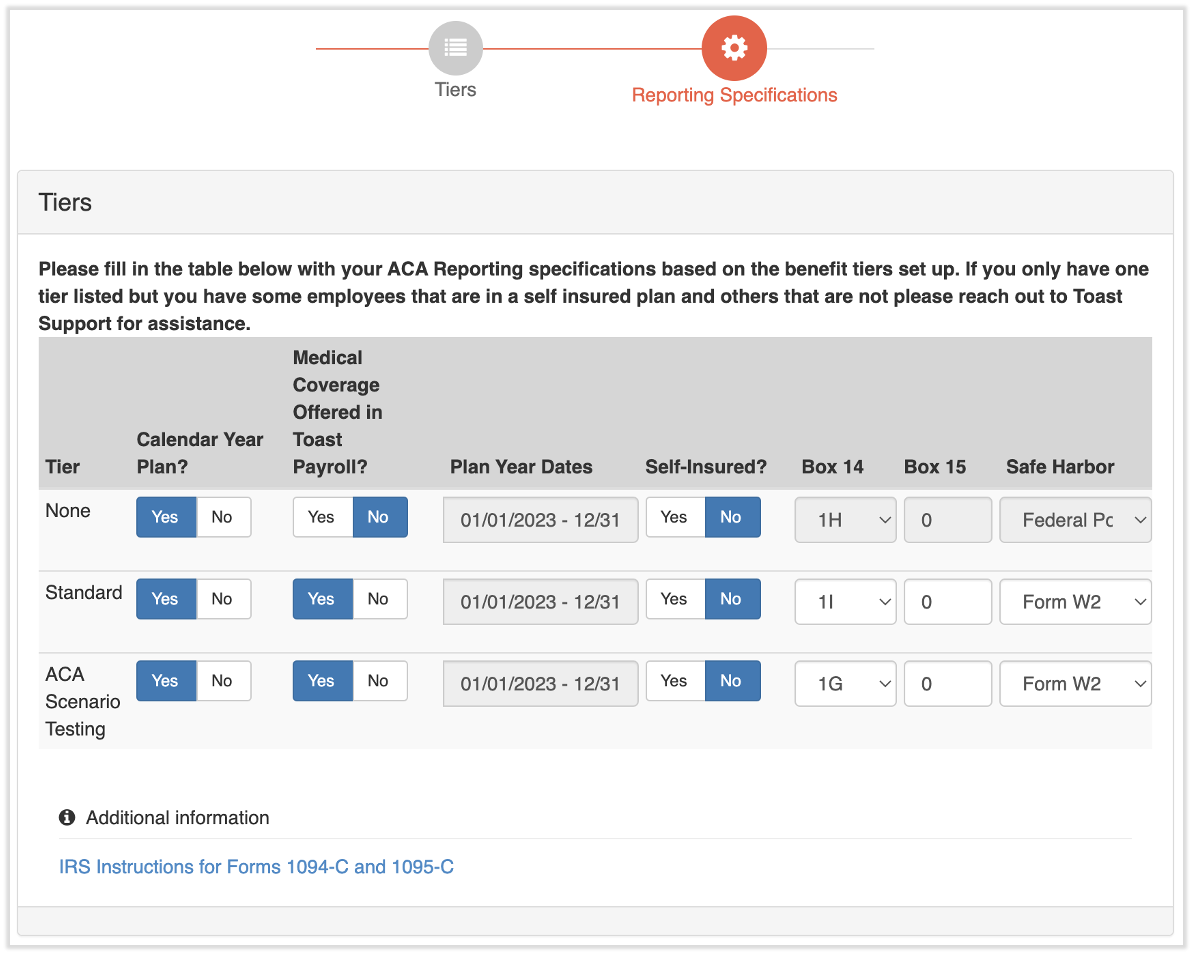
For employers who have utilized the Toast benefit module for the entire year, the Toast system provides a Specification Tool to assist employers by automatically generating and populating Box 14 codes for each employee based on the information the employer has entered into the Toast system. The employer is then able to review the codes generated for each employee for accuracy before instructing Toast to submit ACA filings on their behalf.
To access the Specification Tool:
- Navigate to Benefits > View and manage health benefits > Apply for ACA filing.
- Select the yellow edit pencil next to Specification Form in the right-hand tile.
- Follow these instructions to enter information in Boxes 14, 15, and 16.
Back to top
This content is for informational purposes and is not intended as legal, tax, HR, or any other professional advice. Please contact an attorney or other professional for advice.