Accept Event Deposits With Toast POS
Last updated: Aug 18, 2026, 11:37 AM
Occasionally, your guests may make a reservation through a third-party partner or book an event with your restaurant that requires a deposit made in advance. Once the guest arrives at your restaurant, use the following steps to create a payment option that can be used to subtract the deposit value from the check total.
This method could work for other kinds of deposits including rentals (e.g. kegs) in addition to events.
| Customers using Toast Credit Card Surcharging should not implement the method outlined below for accepting event deposits. Doing so may in a miscalculated surcharge on those transactions. Instead, use Toast Invoicing to collect event deposits; see Send an Invoice to Your Guests. |
Note: Toast Invoicing allows you to easily create and send invoices to your guests. This feature can be used for large catering orders or for private event payments. To learn more about this new feature, check out this Support Center article, Send an Invoice to Your Guests.
In this Article:
- Create a Payment Option for Deposits
- Apply a Payment Option for Deposits on Toast POS
- Collect and Defer Event Deposits In-House
Create a Payment Option for Deposits
- In Toast Web, navigate to Finance > Related > Settings > Other payment options.
- Select + Add to create a new payment option.
- Enter a name and description as desired. Then, for the Treat as Discount setting, select Yes.
- When finished, select Save and Publish now to finalize your changes.
Apply a Payment Option for Deposits on Toast POS
After the guest has completed their event or is paying for a meal that requires an advanced registration deposit through a third-party reservation system, use the other payment option created to subtract the deposit value from the check total. Note: Depending on the settings selected for the payment option, the following instructions may need to be completed by an employee with manager-level permissions.
- Navigate to the order in Toast POS. Select Pay ($).
- Use the keypad to enter the value ($) of the prepaid deposit in the Amount tendered field. Then, select Other payments.
- Choose the appropriate deposit option from the list of other payment types and select No Tip when prompted.
- Then, the balance remaining will appear on the screen. Use another payment method such as cash or the guest's credit card to close out the balance due on the check.
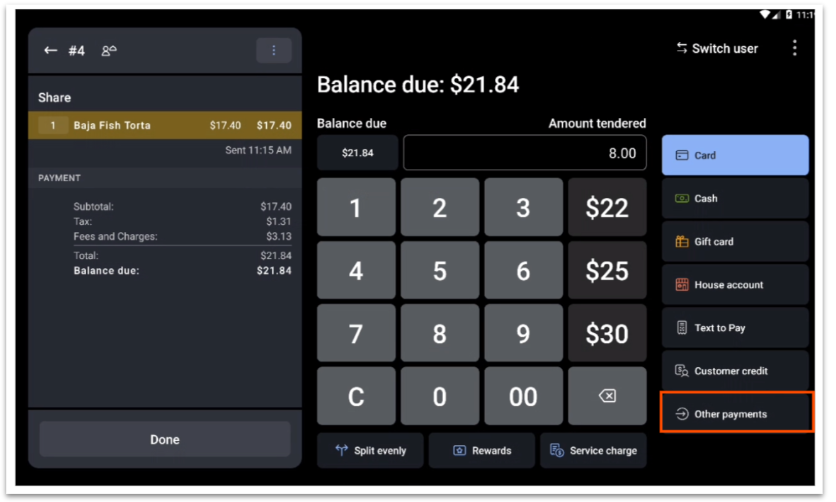
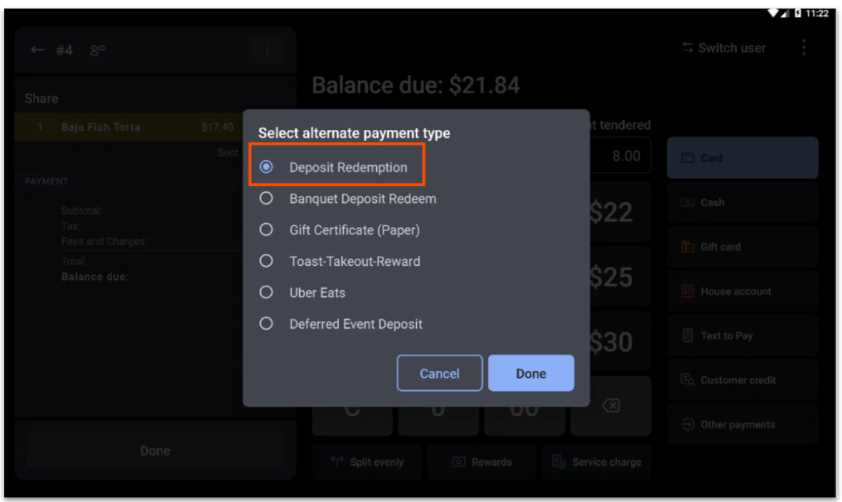
Note: When it comes time for the guest to enter a tip, the recommended tip selections will be based on the pre-deposit check total.
Collect and Defer Event Deposits In-House
Sometimes you may want to collect or hold a deposit in-house (not through a third party), but want to make sure it doesn't track in your sales reports. This is where you may find deferring event deposits helpful.
- In Toast Web, navigate to Menus > Menu management > Open items.
- Select the +Add button to create a new open item.
- Give the open item a Name such as "Event Deposit" and fill out the Taxes and Preparation sections.
- Under Reporting, make sure that for the Defer Revenue setting, you select Yes.
- If you'd like to make sure this deposit cannot be discounted, scroll down to Can it be discounted? and select No.
On the event date, you'll want to have an "other payment option" (called "Event Deposit", for example) that can be added to a check for reporting purposes.