Add Details to Kitchen Tickets
Last updated: Sep 17, 2026, 10:59 AM
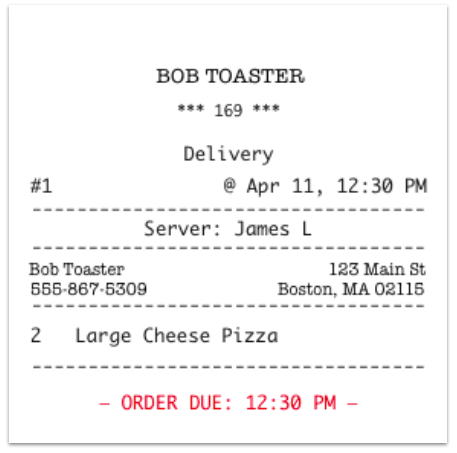
When the items in an order get sent to several different prep stations, it may help to show each station what the total count of tickets is for the order, and what items are included on each ticket. In addition, when takeout and delivery orders are placed, it may help the kitchen when order due times are printed on the kitchen ticket.
- Add Due Times to Printed Kitchen Tickets
- Add a Count of Tickets to Printed Kitchen Tickets
- Add Payment Status to Printed Kitchen Tickets (Takeout and Delivery Only)
- Add Guest Name to Printed Kitchen Tickets
- Additional Resources
Note: These options are only available for printed tickets. Payment status and due times are displayed on KDS tickets if they are available.
Add Due Times to Printed Kitchen Tickets
To add due times to the footer of your kitchen tickets, follow the steps below:
- In Toast Web, navigate to Kitchen > Printers, tickets, & KDS devices > Kitchen and ticket setup.
- Scroll down to the Printed Tickets section and locate the Ticket Footer setting.
- Here you can choose to enable tickets to include a Scheduled Order Due Time for your Prep Station, Expediter, or both.
- Save and publish your changes.
Tickets with due times displayed will look like this:
Add a Count of Tickets to Printed Kitchen Tickets
Numbered kitchen tickets assist restaurants by allowing them to keep track of all items in a single order. This ensures their customers receive all parts in their order.
In fast casual or quick-service restaurants, a single order may include multiple items on different tickets. Numbers in the ticket footer help you keep track of all printed tickets related to that order.
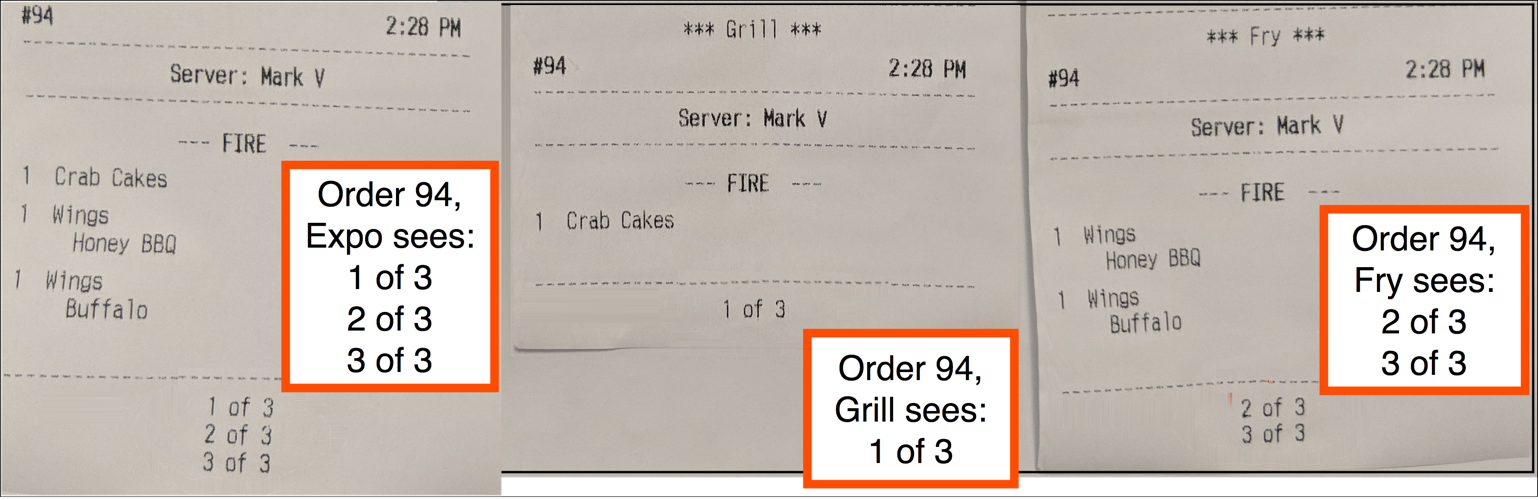
Numbering the items on an order and adding them to the footer of kitchen tickets helps the kitchen (and expo) ensure no items are missing from a single order.
For example: In a breakfast cafe, a customer may order multiple breakfast sandwiches to go for themself and their coworkers. If the restaurant configures kitchen tickets to print individual tickets for every item in the order and includes a count of tickets as well, they can use the tickets to label which sandwich belongs to which coworker.
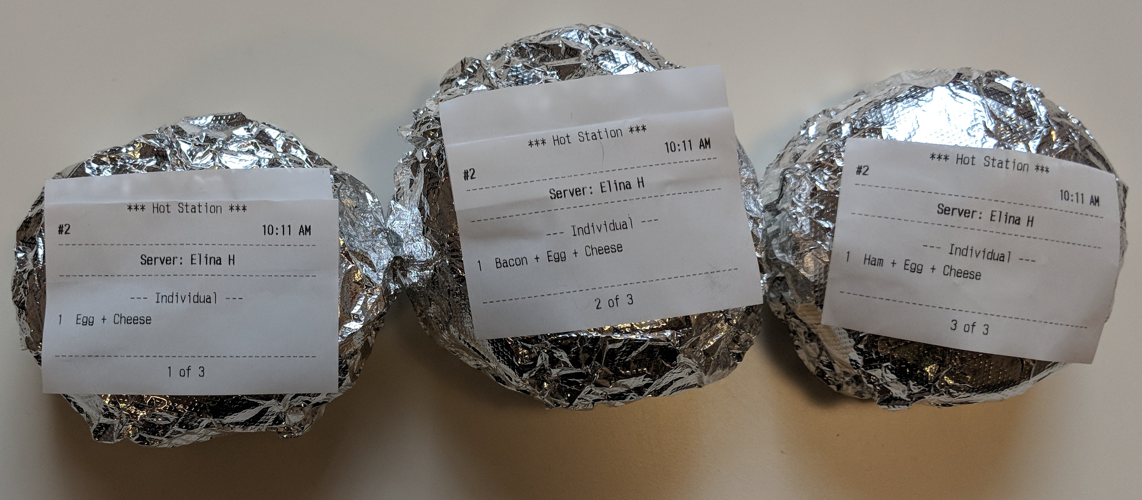
To add item numbers and total counts for an order to the footer of your kitchen tickets:
- First, ensure that your tickets are configured to print individual tickets for each item. Learn more in this Support Center article, Configure KDS for Individual Tickets per Item.
- Then, navigate to Kitchen > Printers, tickets, & KDS devices > Kitchen and ticket setup.
- Scroll down to the Printed Tickets section and locate the Ticket Footer setting.
- Here you can choose to enable tickets to include a Count of Tickets for your Prep Station, Expediter, or both.
- Save and publish your changes.
Add Payment Status to Printed Kitchen Tickets (Takeout and Delivery Only)
- Navigate to Kitchen > Printers, tickets, & KDS devices > Kitchen and ticket setup.
- Scroll down to the Printed Tickets section and locate the Ticket Footer setting.
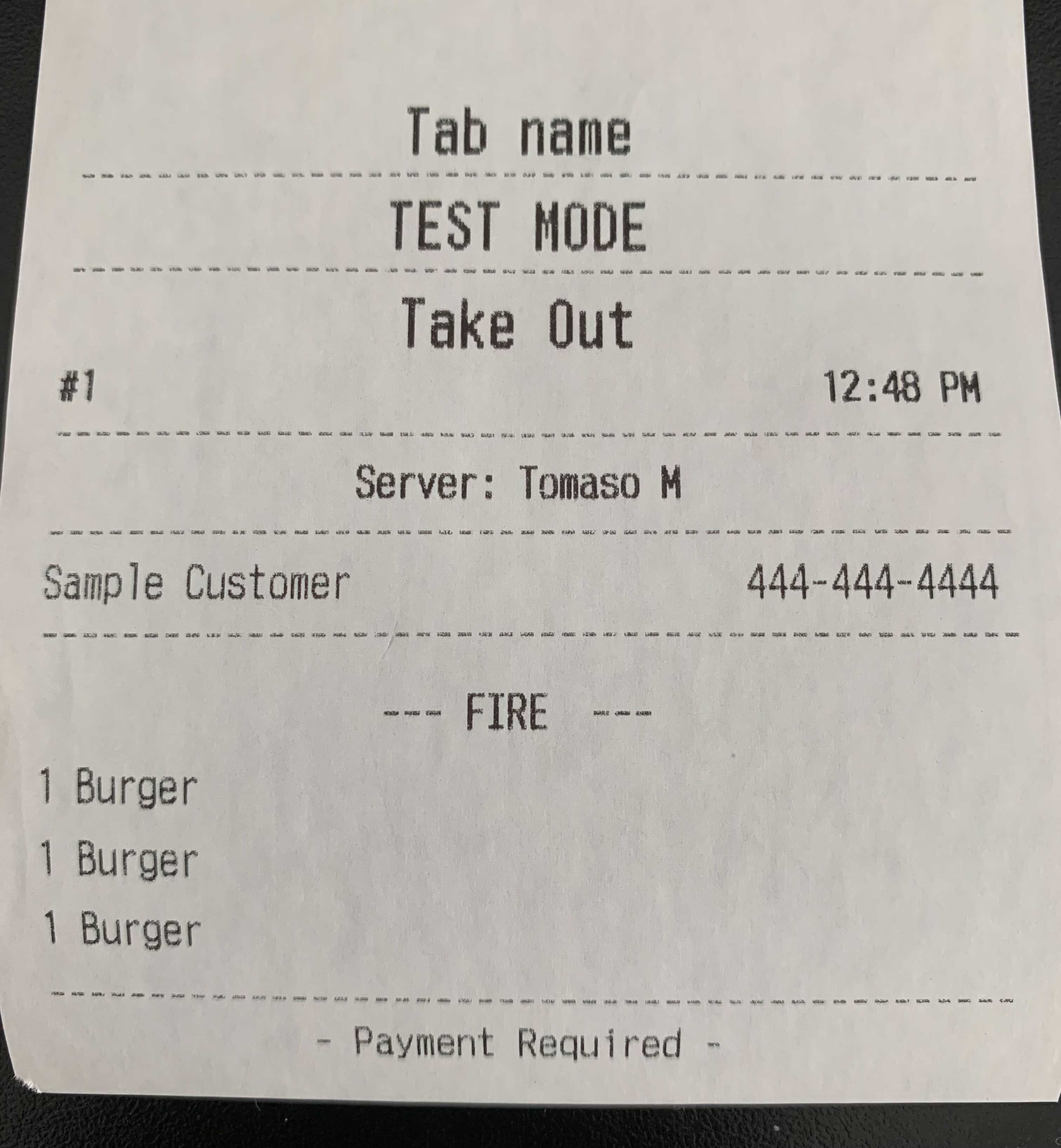
- Here you can choose to enable tickets to include Payment Status (Takeout and Delivery only) for your Expediter.
- Save and publish your changes.
Add Guest Name to Printed Kitchen Tickets
- Navigate to Kitchen > Printers, tickets, & KDS devices > Kitchen and ticket setup.
- Scroll down to the Expediter section and locate the Show Guest Name in Bold on Expediter Tickets setting.
- Select Yes, print guest name in bold on top of expediter tickets.
- Save and publish your changes.
In order for tickets to be sent to an expediter printer, you must define the prep station screens that send tickets on to the expediter screen on the Kitchen > Kitchen stations > Prep stations page.
Additional Resources
- Display Server Names on Kitchen Tickets: Learn how to configure your kitchen tickets to display server names. Displaying server names on kitchen tickets is a feature only supported in Table Service mode and when tickets are on dynamic view layout.
- Configure Item Fire by Prep Time: Learn how to configure your individual menu items to be sent to your kitchen based on their prep time.
Back to top