Log in to Toast Web Securely Using reCAPTCHA
Last updated: Sep 17, 2026, 5:37 PM
If you are logging into Toast's back-end and you see a reCAPTCHA security check, read this article for more information.
Toast has implemented an additional layer of security called reCAPTCHA that you may encounter when logging into Toast Web at https://www.toasttab.com/login. The reCAPTCHA feature is legitimate and helps enhance customer account security at Toast.
In this Article:
What is reCAPTCHA?
CAPTCHA (Completely Automated Public Turing test to tell Computers and Humans Apart) is a standard security measure used in many programs and websites online. It puts forth a question that a computer, bot, or malware service wouldn't be able to answer correctly. In our case, we use a simple checkbox that a non-human isn't able to click, but there are other varieties of reCAPTCHAs as well.
As you enter your email and password, you may see the following prompt:
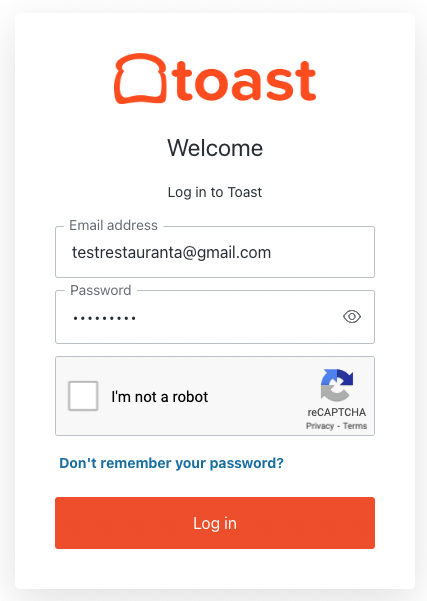
Selecting the checkbox next to "I'm not a robot" will approve you as an authorized user. The algorithm then judges the risk of the user and may ask you to do a “select all images” reCAPTCHA verification. Once complete, you'll be logged in to Toast Web.
At this time, reCAPTCHA cannot be turned off, but Toast is working to limit the number of times users see a reCAPTCHA. If you feel you're receiving a large number of reCAPTCHA prompts, try these recommendations:
- Avoid repeatedly refreshing the login or other web pages from the same device.
- Avoid accessing the login screen from network anonymizers or proxies.
- Make sure that your web browser is up to date and running the latest version.
- Disable any blocking of third-party cookies on www.toasttab.com.
Note: reCAPTCHA is not available on Elo V1 devices. This doesn't affect Toast's POS, only the login to Toast Web.
Frequently Asked Questions
Can I be sure reCAPTCHA is a legitimate feature in Toast?
Yes. This check was implemented by our security team to improve security for our customer's accounts and their data.
Do I need to run an anti-virus scan on my computer? Is my device or network infected?
Receiving the reCAPTCHA on its own doesn't necessarily mean that your device or network is infected. While being infected with malware is one possible reason that the prompt could have been displayed, there are a number of other factors that could result in a reCAPTCHA challenge. Receiving the CAPTCHA on its own does not necessarily mean that your device or network is infected.
How can I reduce the number of times I have to solve a reCAPTCHA?
Some techniques that may help reduce the number of reCAPTCHAs issued include:
-
- Avoiding repeatedly refreshing the login or other webpages from the same device
- Avoiding accessing the login screen from network anonymizers or proxies
- Making sure that your web browser is up to date and running the latest version
- Disabling any blocking of third-party cookies on www.toasttab.com
For users of desktop web browsers, we also recommend trying the Privacy Pass browser extension, which should reduce the number of reCAPTCHAs that a specific device needs to solve. More information on Privacy Pass and how it works is available at https://www.hcaptcha.com/privacy-pass.
Additional Resources