Reactivate a Deactivated Gift Card
Last updated: Sep 18, 2026, 11:00 AM
Question
- Can I reactivate a deactivated gift card?
- How do I change a gift card's status from "De-activated" to "Active"?
- What steps should I take to reactivate a gift card?
Answer
In order to sell a deactivated gift card, you must first change its status from Deactivated to Active. Follow these steps to proceed:
- In Toast Web, navigate to:
- Reports > Payments > Gift Card Balances, or
- Reports > Payments > Inactive Gift Card
- Select the gift card that you wish to reactivate from the list.
- In the Card Details pop-up window, select Edit next to Card Info.
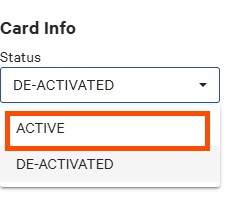
- Under the Status dropdown box, select Active.
- Save your changes.
After the gift card number has been changed back to Active, the gift card number can then be sold again on the POS.