Cash Drawer Reports Overview
Last updated: Mar 25, 2026, 1:53 PM
| This article covers legacy Cash Drawer functionality. An updated version of Cash Drawer functionality is currently in limited release with select customers. If the Cash Drawer experience on your Toast POS differs from what is described here, please refer to the Cash Drawers Technical Documentation for details on the new functionality. |
Cash Drawer Reports Introduction
Cash drawer reports in Toast Web give you insight into all cash activity and drawer activity.
| Available Reports | Description |
| This report displays all cash activity over a chosen date range.* | |
| This report displays cash activity across multiple restaurants on a single day. This report will not populate unless you are part of a restaurant group with multiple locations. | |
| This report provides an overview of all cash activity at a single location on a single day. |
Note: If you're looking for reports from before the last 24 months, please start a chat in Toast Now with Customer Support.
Back to top
Navigate to Cash Drawer Reports
Below are the two ways to access the Cash Drawer reports:
- Cash Overview
-
-
- Cash activity audit: Allows you to share any cash-specific reports from one or more restaurant locations with an accountant or bookkeeper
- Cash drawer overview report: View cash activity across multiple restaurants on a single day
- Cash drawer history report: View cash activity at a single location on a single day
-
- Cash and Loss Management
- In Toast Web, navigate to Reports > Cash and loss management.
- From the left-hand report navigation menu, select the cash drawer report you'd like to view. You can also search directly using the search bar.

Breakdown of Cash Drawer Reports
Cash Activity Audit Report
To view cash activity over a date range, use the Cash Activity Audit report. This report allows you to share any cash-specific reports from one or more restaurant locations with an accountant or bookkeeper.
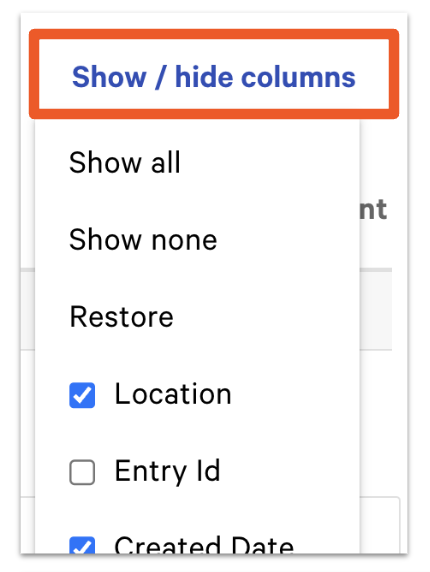
You can filter this report by selecting the Show/hide column button. This will help to customize things at your restaurant to better suit your individual needs.
Cash Drawer Overview Report
Use this table to view cash activity across multiple restaurants on a single day. This is especially useful for managing restaurant groups. Please keep in mind that data in the Cash Drawer Overview report will not populate unless there are multiple locations.
Back to top
Drawer History Report
The Drawer History report provides an overview of all cash activity at a single location on a single day. Each column is a summary of either a physical cash drawer, the House, or an individual server. The Total column will equal the sum of cash collected into all cash drawers and the House.
Here you can view data and details on a cash drawer:
- Status: Whether a cash drawer is opened or closed.
- Time opened/closed: The time a cash drawer is opened or closed.
- Locked to: This shows which employees have access to cash drawers. Toast makes it easy to hold your employees accountable because you'll know exactly who is making cash transactions.
- Closed by: The employee that last closed a cash drawer.
- Starting Cash: Any cash drawer can be set to automatically open with a set amount. You can toggle ecash drawer settings to either Manual, which requires a user to manually set the cash drawer starting balance each time the drawer is opened, or Automatic, which automatically sets the cash drawer to the starting cash drawer balance at the end of each night. This is recommended by Toast.
- Cash Payments: Payments made with cash.
- Cash collected: The amount of money the employee owes the restaurant (equivalent to the employee's cash sales). Cash collected is used to collect cash in hand from a server and add it to the cash drawer.
- Undo Pay Out: A payout removes cash from active or open drawers to pay for goods or services. You can reverse a pay out and this will show a row of that data.
- Cash In: Adds cash into the restaurant. Selecting the Cash In button adds cash to active and open drawers.
- Tips Paid: The tips that were paid in cash.
- Cash Out: Used to remove cash from active and open drawers. This is typically done when there is too much cash in the drawers and some cash needs to be removed to a safe or another secure location.
- Pay Out: Functions as cash out but is tied to a specific reason. Example: reimbursing an employee who bought supplies or cash paid to a vendor. For more information, check out this Support Center article: Pay Outs Overview.
- Cash Drop: Moves cash from a cash drawer to the house. This is a security feature for when a cash drawer has too much cash and allows you to drop a specified amount into a more secure location (e.g. a safe in the office).
- Expected Closeout Cash: This includes the amount of cash expected based on the starting cash and the cash taken in and out of a given cash drawer.
- Actual Closeout Cash: The amount of cash that you have counted and recorded into Toast via the Cash Drawer section.
- Cash Overage/Shortage: Cash Overage/Shortages are calculated from the Expected Closeout Cash amount minus the Actual Closeout Cash amount. If there is no data for the Actual Closeout Cash, the Overage/Shortage will read N/A.
- Expected Deposit: The Expected Deposit amount is taken from the Actual Closeout Cash minus the starting cash balances of all cash drawers.
- Actual Deposit: The total cash deposit, that you have counted and recorded into Toast via the Deposit section.
- Deposit Overage/Shortage: Deposit Overage/Shortages are calculated from the Expected Deposit amount minus the Actual Deposit amount. If there are no Actual Deposits, the Overage/Shortage column will read N/A
While viewing your report, you can also adjust your drawer's balance. This is useful if you need to fix some discovered cash discrepancies (between expected and actual closeout cash/deposits) when looking over numbers. For additional information on how to adjust a cash drawer (even if it has been closed), check out this Support Center article: Adjust a Closed Cash Drawer.