Configure Cash Payments
Last updated: Oct 1, 2026, 1:56 PM
- Enable the Fast Cash Button
- Use Quick Cash Buttons on the POS
- Disable Cash Payments on a Device
- Disable Cash Permissions for an Employee
For instructions on how to take cash payments on the POS (Point of Sale), see this Support Center article: Take Payments on the POS.
Enable the Fast Cash Button
Fast cash will automatically close a check with exact cash. It's used when transactions are quick and when the customer does not expect to receive change.
You can enable or disable the fast cash button in Toast Web by following the steps below:
- Navigate to Front of house > Quick order.
- Scroll down to the Fast cash button setting, and toggle it to the On position.
- Select Save.
- Select Publish all changes.
Once enabled in Toast Web, you'll see a Fast $$ button appear at the bottom of a check on the order screen.
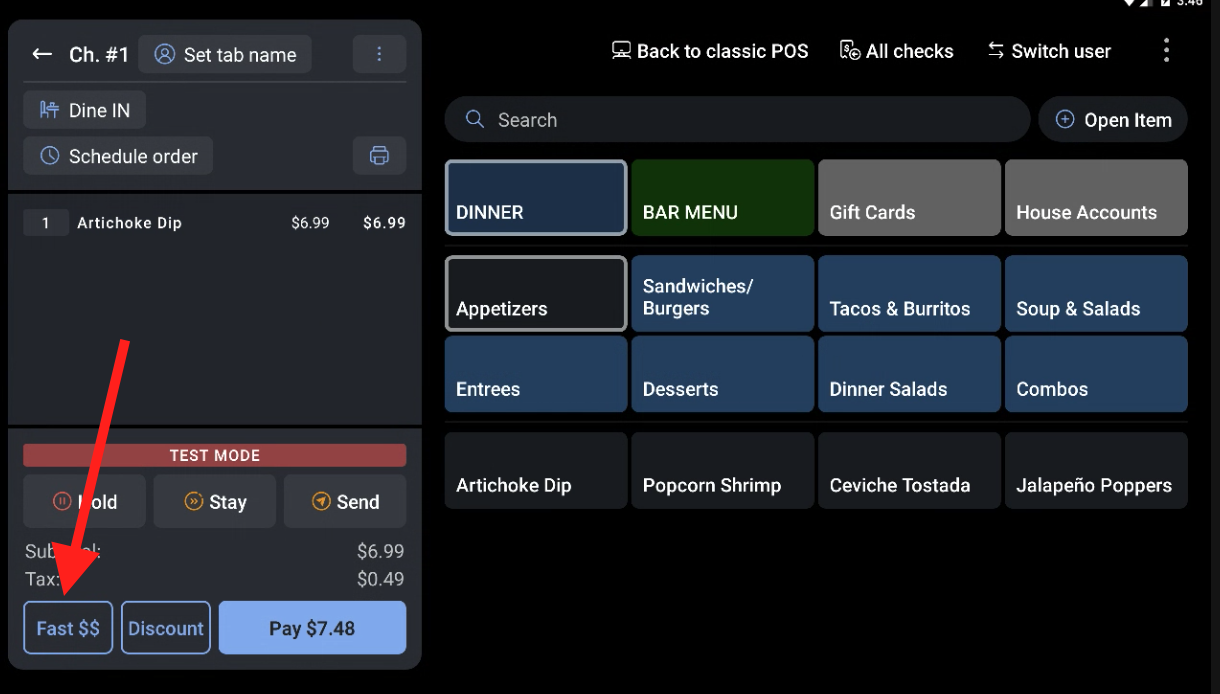
After selecting the Fast $$ button to close an order, the receipt options screen will display as normal.
Use Quick Cash Buttons on the POS
Quick cash buttons expedite cash transactions when a standard dollar amount is used. To enable this feature, follow these steps:
- On a check with a cash payment, select Pay $.
- The cash amounts on the right side of the number pad are the quick cash amounts. They are calculated according to the check's total amount. Select the amount that matches the guest's cash payment.
- On the next screen, you might see a couple of different options:
- If the cash payment made was more than the total balance, you'll see the amount of change owed to the guest.
- If the cash payment made was less than the total balance, the remaining balance is displayed.
- A Void option at the bottom of the screen will only be displayed when there is no change due or a remaining balance.
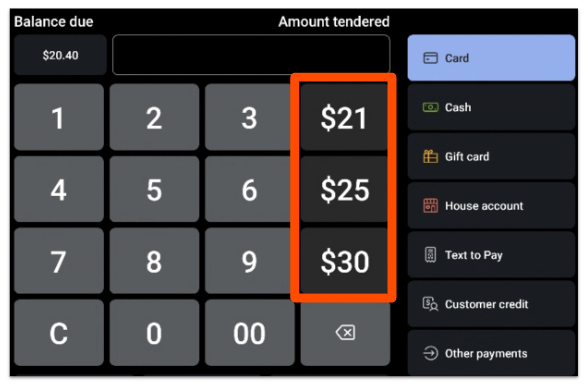
Disable Cash Payments on a Device
There may be times when a manager wants to configure whether or not a device or employee has access to taking cash payments. To disable cash payments on a device, follow the steps below:
- On the device, navigate to the main menu of the Toast app and select Device Setup from the Setup section.
- Scroll down and select Allow Cash Payments.
- Select No cash payments.
- Select Save.
On the payment screen, you'll see the cash button and quick cash buttons are disabled.
Disable Cash Permissions for an Employee
To disable cash permissions for an employee, follow the steps below:
- In Toast Web, navigate to Team > Employees.
- Search for the name of the employee you'd like to change permissions for, and then edit their profile.
- Under POS Access, disable the 1.6 Apply Cash Payment permission to stop the employee from being able to take cash payments.
- Save and publish your changes.
You can also do this on the job level if you want to disable an entire job type from accepting cash payments.