Combine Checks
Last updated: Sep 17, 2026, 9:13 AM
Question
How do I combine checks on the POS?
Answer
You are only able to combine checks that are in Open status (not Paid or Closed) and have not had a payment applied to them.
Note: If checks are Open, but have pre-authorized cards attached, you will need to run a new payment method after combining the checks as the pre-authorized cards only apply to the original checks authorized.
- Select Payment Terminal from the main menu of the Toast app. You can select the back arrow in the top left corner of the screen if you need to return to the main menu. The first screen you see on the Payment Terminal will be all open checks.
- Select the three-dot overflow menu in the top right corner of the screen, and then select Combine checks.
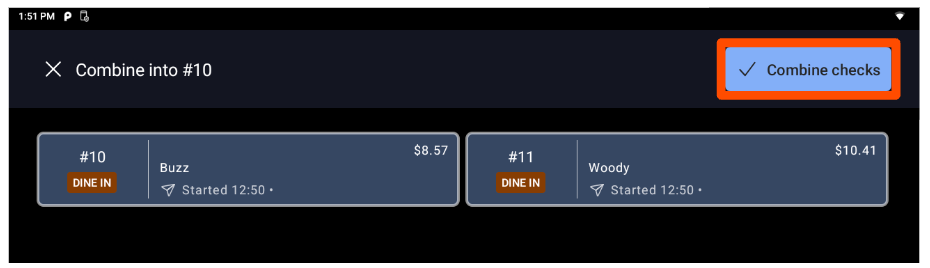
- Select the checks you'd like to combine, and then select the blue Combine checks button in the top right corner of the screen.
The first check you select is the destination check, and the other check(s) you select will be merged into this one. The banner at the top of the page will indicate which check is the destination check ("Combine into #10" in the example below).
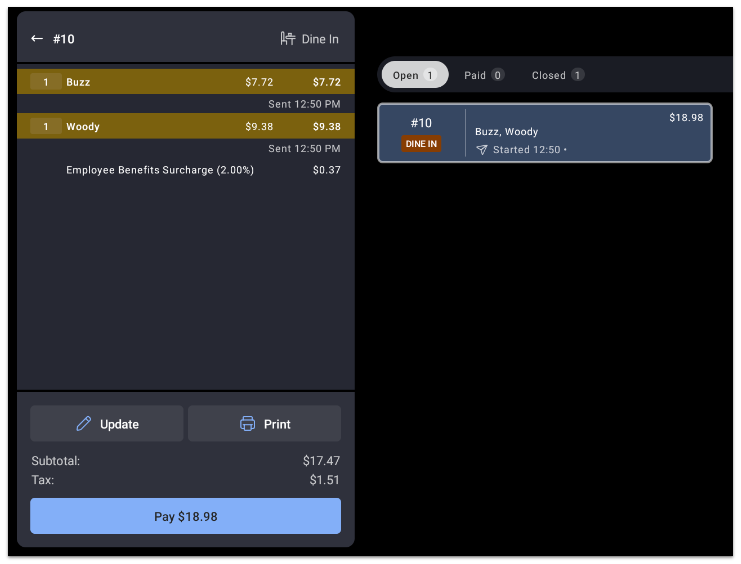
Below is what the combined check in this example would look like:
Additional Information
Alternatively, if you're in Table Service mode, you can drag an order from one table to another in order to combine them. If you combine checks this way, you'll be merging the checks onto one order, but keeping the checks separate. To learn more about this workflow, see the Move Orders to Another Table section of this Support Center article, New POS: Manage Tables.