Consolidate Menu Items on the POS
Last updated: Sep 16, 2026, 12:33 PM
Question
How do I group items together on a POS order?
Answer
In Toast Web, you can determine whether similar menu items on an order are combined or separated when displayed on an order on the POS.
Note: When taking an order on the POS, if you increase the quantity of an item (rather than adding the item separately multiple times), they will always appear together on the order screen. The Consolidate menu items setting described below affects items that are added separately to the same order.
- In Toast Web, navigate to Front of house > Order screen setup > UI options.
- Find the Consolidate menu items setting and choose your desired configuration.
- Toggle this setting on if you want similar items to combine into one line on the order screen with a larger quantity. For example, adding two Chicken Thai Curry dishes with the same modifiers will combine both into one line item with a quantity of "2".
- Toggle this setting off if you want items with the same modifiers to stay separate.
- Save and publish your changes.
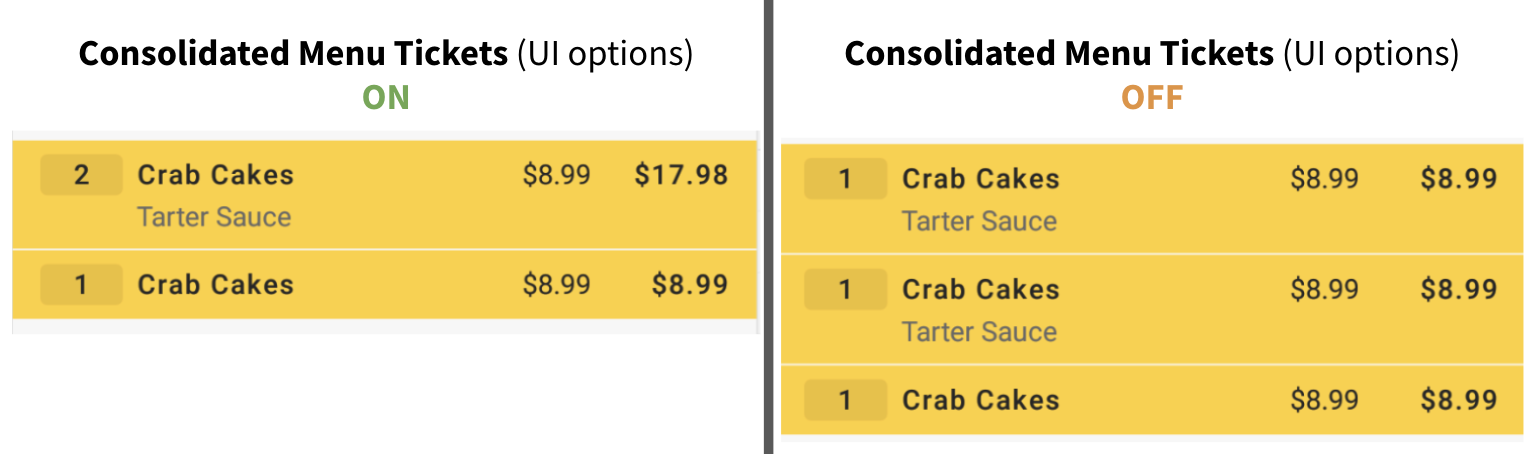
This feature only applies to POS orders. Items from an online order that were specifically ordered with a quantity greater than one will appear consolidated on kitchen ticket and receipts.
Additional Information
On its own, this setting will also combine similar menu items on your Kitchen Display System (KDS) screen and on printed kitchen tickets.
However, if your restaurant uses the Individual Tickets for Every Item in an Order setting (common for tapas restaurants), and you want to group items together on your KDS and printed tickets, you'll want to adjust the Consolidate Items with Multiple Quantities setting on the Kitchen page in Toast Web.
Learn more here: