Create a Welcome Offer With Toast Offers
Last updated: Aug 26, 2026, 2:01 PM
Learn how to create a Welcome Offer in Toast Offers — a discount available only to first-time online ordering guests.
- Overview
- Before You Begin
- Create a Welcome Offer
- What Guests See
- Track Your Welcome Offer
- Frequently Asked Question
- Related Articles
Overview
A Welcome Offer is a discount that only first-time online ordering guests can use. Unlike other offers, a guest must sign in or create a Toast account to redeem it — Toast automatically checks whether they've ordered from your location online before, and only applies the offer if they haven't.
Use a Welcome Offer to turn first-time visitors into first-time customers, without worrying about existing guests using a new-customer discount.
Before You Begin
Applies to: Toast Web, Toast Online Ordering
What you'll accomplish: Create a Welcome Offer that automatically applies a discount to first-time online ordering guests at checkout.
Note: You can only run one Welcome Offer at a time. To change your Welcome Offer, pause or deactivate your current one before creating a new one.
Create a Welcome Offer
- Log in to Toast Web and select Marketing > Offers using the left-hand navigation, or search Offers from the home page.
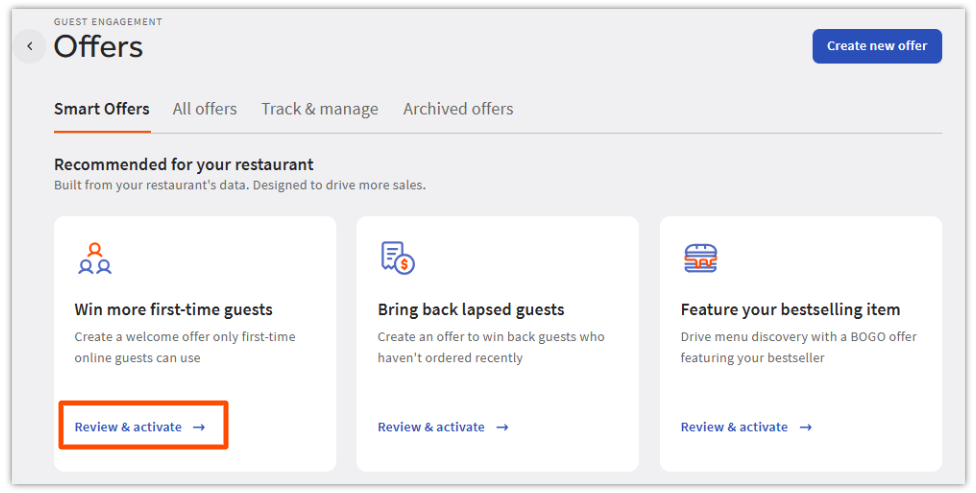
- Select the Smart Offers tab.
- Find the card labeled Win more first-time guests and select Review & activate.
- Note: You must start from this card. Selecting Create new offer in the top right does not include the first-time-guest targeting step and can't be used to create a Welcome Offer.
- Note: You must start from this card. Selecting Create new offer in the top right does not include the first-time-guest targeting step and can't be used to create a Welcome Offer.
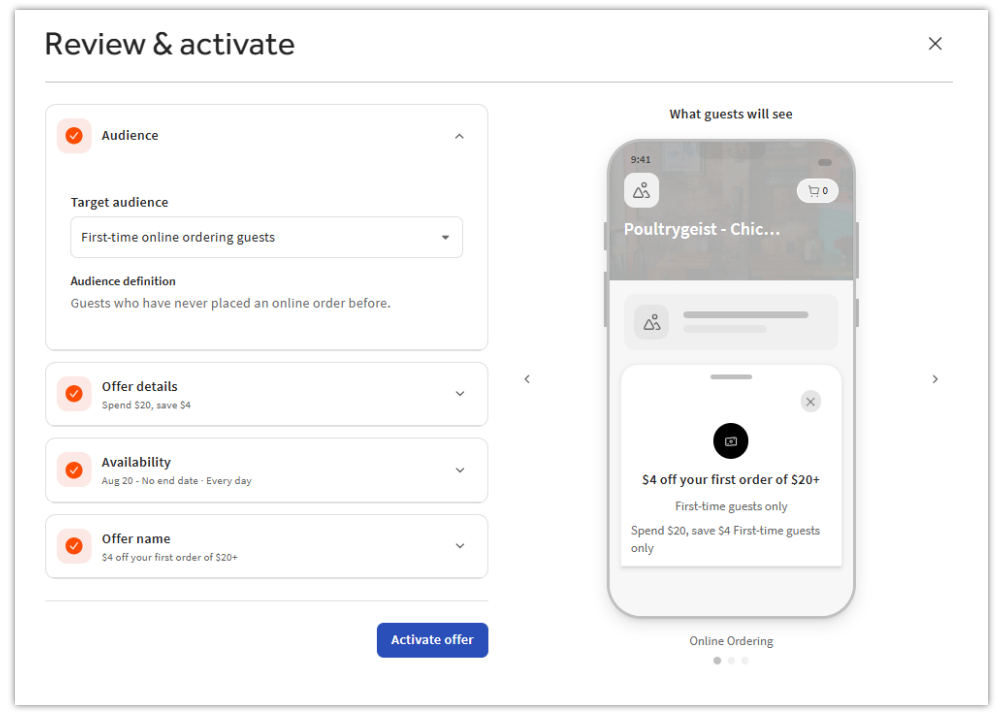
- On the Audience screen, under Target audience, confirm First-time online ordering guests is selected. This is what makes a Welcome Offer different from a standard offer — Toast automatically verifies eligibility at checkout, so you don't need to track it manually.
- On the Offer details screen, under Offer type, set your minimum spend and discount amount.
- Complete the rest of the builder the same way you would for any offer: choose your availability (days, dates, and times), then enter your offer name and promo code.
- Select Activate offer, then Publish all changes.
What Guests See
When a guest visits your online ordering page, they'll see a Welcome Offer banner (for example, "$5 off your first order"). This banner is visible even to guests who haven't signed in yet.
When a guest tries to redeem the offer, they're prompted to sign in or create a Toast account. Toast then checks whether they've ordered online from your location before:
- First-time guests can apply the offer to their order automatically at checkout — no promo code entry needed.
- Returning guests see a message explaining the offer is only available to first-time guests, and can't apply it to their order.
Track Your Welcome Offer
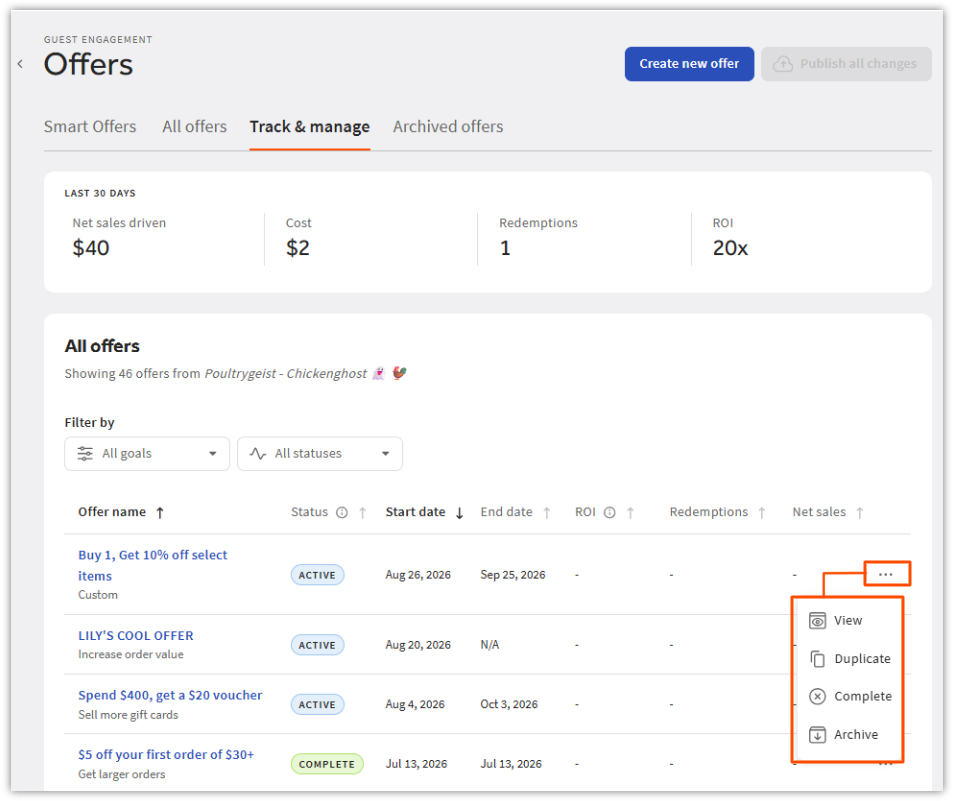
Navigate to Marketing > Offers > Track & manage in Toast Web and select your active Welcome Offer to view:
- Number of offer redemptions
- Total discount value applied
- Revenue generated from first-time guest orders
- Current offer status (active, paused, or expired)
Frequently Asked Questions
Can Welcome Offers be used for in-person (POS) orders?
Welcome Offers can't be used for in-person (POS) orders. They're for online ordering only in the current release.
How does Toast determine whether a guest qualifies as "first-time"?
Already compliant as written — "Toast checks the guest's phone number against your Guestbook" already functions as the declarative restatement. No change needed.
For multi-location restaurants, is first-time status location-specific or chain-wide?
First-time status is location-specific. A guest who has ordered at one of your locations may still qualify as a first-time guest at a different location.
Can I run multiple Welcome Offers at the same time?
You can only run one Welcome Offer at a time. Pause or deactivate your current Welcome Offer before creating a new one.
Can I pause or deactivate a Welcome Offer?
You can pause or deactivate a Welcome Offer at any time. Navigate to Marketing > Offers, select the offer, and update its status.
Will guests who aren't signed in still see the Welcome Offer?
Guests who aren't signed in will still see the Welcome Offer banner. They'll be prompted to sign in or create an account when they try to redeem it.
Related Articles