Add a Promo or Discount eGift Card Sales
Last updated: Sep 17, 2026, 7:17 PM
Encourage guests to purchase physical or eGift cards for the holidays or other promotions by offering exclusive discounts activated via promo codes.
- Set Up a Discount for Physical or eGift Card Sales
- How Guests Redeem eGift Card Discounts
- Manage and Track Promo Code Usage
- Physical and eGift Card Discount FAQ
- Additional Resources
Set Up a Discount for Physical or eGift Card Sales
| You will need to verify the setting to allow gift cards to be discounted is also enabled. To make sure it is marked "Yes" in Toast Web, navigate to Finance > Payments > Gift cards > Allow Gift Cards to be Discounted. |
Follow the steps below to set up eGift card discounts:
- In Toast Web, navigate to Marketing > Offers.
- Select Sell More Gift Cards.
- Select Save X% on Gift Cards.
- Configure an optional minimum spend. Guests must reach this subtotal for the offer to apply
- Configure your gift card save amount. This can either be set as a dollar amount or percentage off.
- Configure the availability for your gift card discount. By default, these offers are available at any point during business hours, but you can set specific dates or times if you'd prefer.
- Select Continue.
- Name your offer and create your promo code.
- Select Create Offer.
- Select Publish All Changes.
- Copy your promo code to share via email or social media.
Notes:
- All gift card promo codes will begin with GC. This can not be changed.
- Gift card promo codes cannot be configured as “single-use.” Customers who are used to creating single-use promo codes in Discounts & Promotions should not attempt to set a gift card promo code as single-use, as this will cause guest checkout issues.
How Guests Redeem eGift Card Discounts
| eGift Card Promos are not currently supported on the Toast Websites eGift Card Module page. |
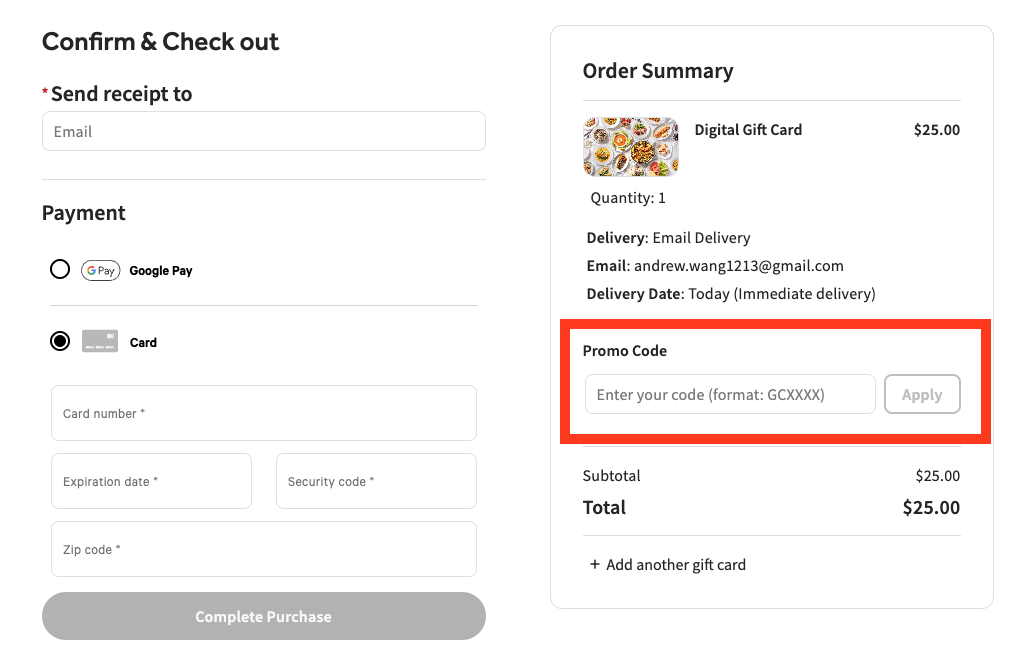
To redeem a gift card discount or promo code online, a guest can enter the promo code for their discount in the Coupon Code or Promo Code field as seen in the image below and select Apply.
Apply a promo code in the new eGift Card Shop:
Apply a promo code in the legacy eGift Card Shop:
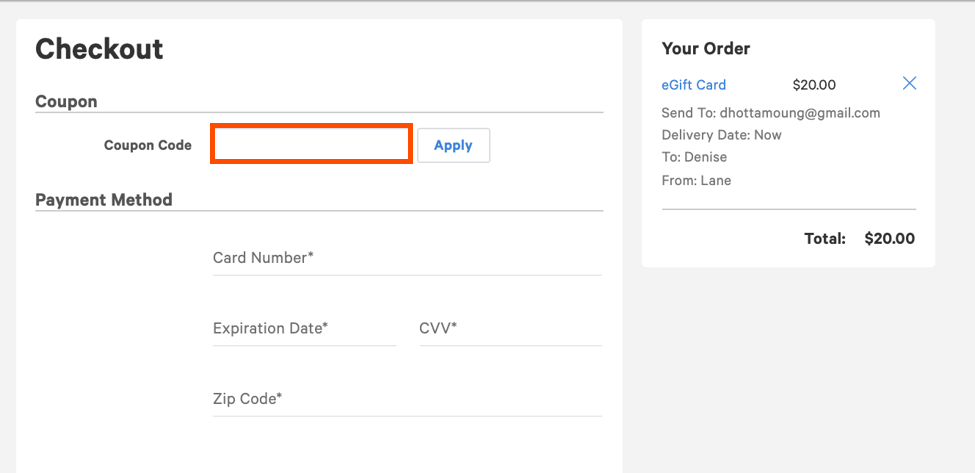
Note: Only promo codes beginning in "GC" can be applied to gift card sales. Other promo codes without the letters "GC" will not be applicable here.
To redeem a gift card discount or promo code on the POS:
- Select the three dots in the top right corner of your check.
- Select Promo Code.
- Select Apply Code, and enter the promo code.
Alternatively, staff can also find the associated discount by selecting Discount on any check.
Note: If you do not see Promo Code as a drop down item go to UI Options > Enable promo code search and ensure the setting is turned on.
Back to top
Manage and Track Gift Card Promo Code Usage
To manage and track usage of your gift card promo codes:
- Navigate to Marketing > Offers.
- Select Track & Manage from the top menu.
On this page you can review the following information for each offer:
- Status
- Start Date and End Date
- Return on Investment (ROI)
- Number of Redemptions
- Net Sales
You can also cancel or archive your offers if the campaign has ended and you no longer need to review the usage.
Physical and eGift Card Discount FAQ
Can my guests apply multiple discounts to a gift card purchase?
No, guests will be limited to one promo code on their gift card purchase at this time.
Will guests be able to use this promo code multiple times?
The promo code can only be used once on a single gift card transaction. However, a guest can use it multiple times if they purchase multiple gift cards. We cannot limit the number of times the guest can use this promo code on separate purchases at this time.
Will guests be able to use this promo code elsewhere?
If you have selected all menus in your restaurant to be excluded from your discount, you can ensure that the promo code can only be used for gift card purchases.
How do I comp an eGift card purchase?
If you want to send a guest an eGift card without taking payment information, follow the instructions to set up a discount for gift cards. If the discount is set to 100%, a payment will not be processed (even if payment information needs to be entered, for example when placing an eGift card order online).