Enable Auto-Close or Auto-Void for Unpaid Checks
Last updated: Jun 11, 2026, 1:24 PM
Learn how to configure auto-close or auto-void settings on your Toast POS to easily reconcile unpaid checks at the end of the day.
Configure auto-close or auto-void on Toast POS to automatically close or void unpaid checks at the end of your business day.
- About Auto-Close, Auto-Void, and Manual Closure
- Before You Begin
- Enable Auto-Close or Auto-Void Settings
- Configure Settings for Multiple Locations
- Reporting on Auto-Close and Auto-Void Orders
- Frequently Asked Questions
- Related Articles
About Auto-Close, Auto-Void, and Manual Closure
When you complete your end of day activities, you may occasionally find unpaid checks that need to be reconciled. You can configure your Toast POS to handle these unpaid checks in one of three ways: automatically close them, automatically void them, or require manual intervention. By default, all restaurants are set to require manual intervention to close unpaid checks.
The right choice depends on what your open checks usually represent at the end of the day.
Auto-Close
Unpaid checks automatically close at your business day cutoff time to a dedicated other payment type named Auto-Close. This payment type is created for you when you enable auto-close. For more information on other payment types, see Set Up Other Payment Options.
Auto-closing preserves your labor and void metrics and ensures every transaction is recorded clearly, even when no payment was captured. It is most helpful when open checks represent actual sales activity, such as when food was made and a guest was served but payment was never completed due to staff or operational error. These orders are recorded as paid with the Auto-Close payment type and counted in inventory and sales.
Auto-closed checks can be recorded as a loss or matched to a cash management discrepancy, helping you highlight training opportunities for your staff.
Note: Auto-close only closes orders from the current day, not previous days. If an order is partially paid, the auto-close payment is applied only to the remaining unpaid balance. Completed partial payments are not overwritten or removed.
Auto-Void
Unpaid checks automatically void at your business day cutoff time. Auto-voided checks are tracked in the Voided Orders report. For more information, see Cash and Loss Management Reports Overview.
Auto-voiding is most helpful when open checks do not represent real sales. Common examples include:
- Staff running test orders for pricing checks or training purposes
- No make / no waste checks
When an order is auto-voided, no revenue or tax is recorded, and the associated items are not deducted from inventory.
Manual Check Closure
Unpaid checks remain open indefinitely unless you manually void or close them. Toast still auto-batches at your business day cutoff and completes the following actions:
- Closes out any unclosed checks that were in Paid status but not closed
- Auto-captures all uncaptured credit card payments from the previous business day (in most cases, all the payments from the day)
Any unpaid orders remain unclosed until they are resolved by payment or manually voided.
Note: By default, your business day cutoff is 4 a.m. relative to your time zone. If you would like to adjust your business day cutoff, contact Toast Customer Care.
Before You Begin
Applies to: Toast POS, Toast Web
Permissions needed:
- 3.31 Configure Auto-Close Orders at End of Day
What you'll accomplish: Enable auto-close or auto-void so that unpaid checks are handled automatically at the end of each business day, or keep manual closure for full control over how unpaid checks are resolved.
Note: For customers with Multilocation Management, the ability to configure auto-close or auto-void is only available to employees who have the required permission across all stores within a group. If an employee has permission for only some stores within a group, the configuration can be viewed but not edited. If an employee does not have this permission at any location, the configuration settings are hidden.
Enable Auto-Close or Auto-Void Settings
To enable auto-close or auto-void for your restaurant:
- In Toast Web, navigate to Finance > Related > Settings > Auto-close orders.
- Select Auto-close orders at end of day.
- Select Auto-close or Auto-void based on your preferred configuration.
- Select Save, then select Publish.
Expected outcome: Your restaurant is now configured to automatically close or void unpaid checks at your business day cutoff. The change applies starting at the next end of day.
Configure Settings for Multiple Locations
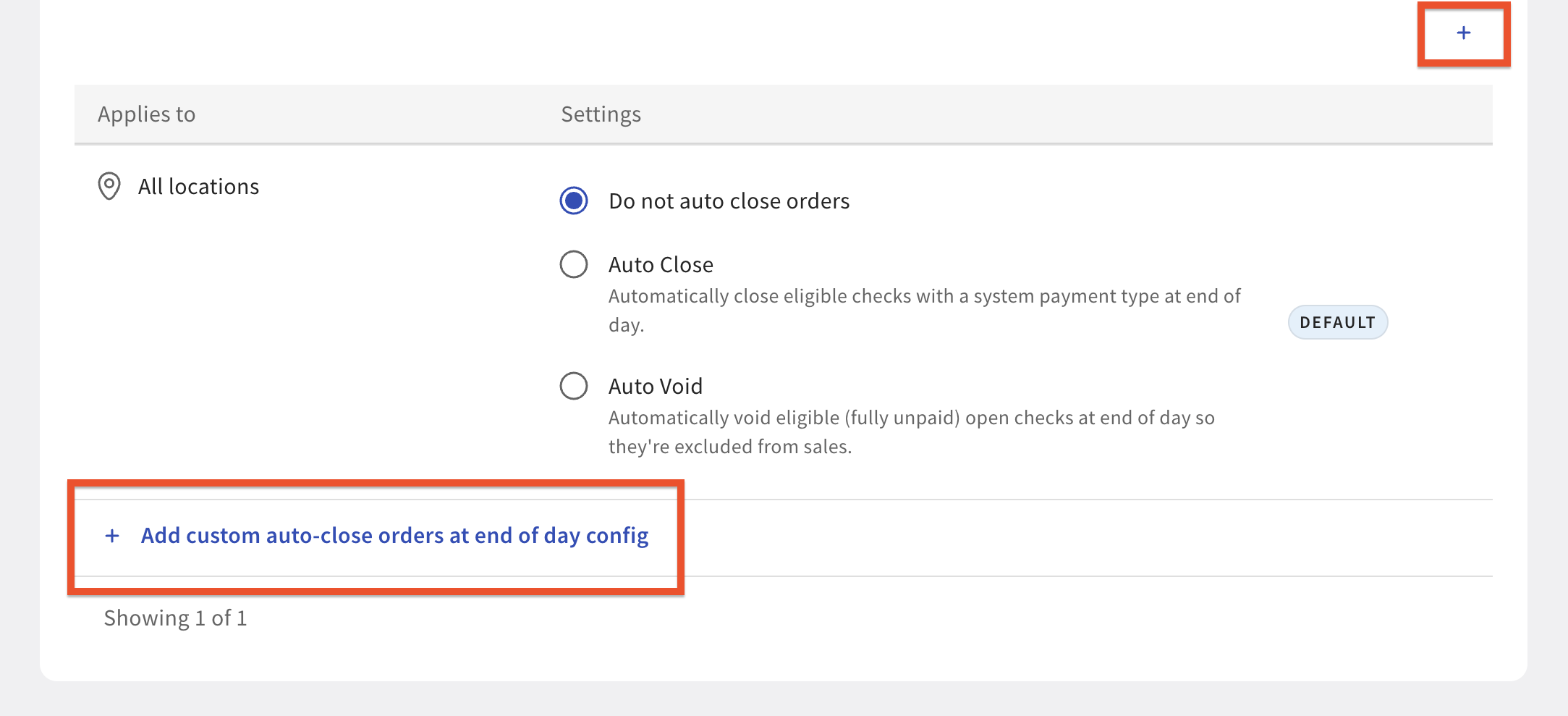
If you have Multilocation Management, you can apply the same setting to every location at once, or you can apply different settings to specific locations or groups.
To apply the setting to all of your locations, ensure all locations are selected in the Selected Locations dropdown.
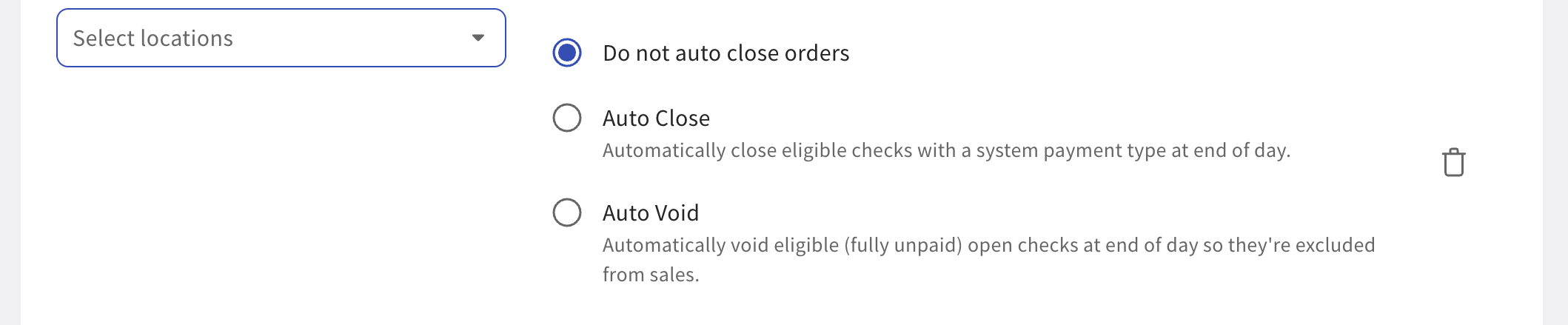
If you want different settings per store or per group of stores, select + Add custom auto-close orders at end of day config to choose settings for a secondary individual location or group of locations.
Reporting on Auto-Close and Auto-Void Orders
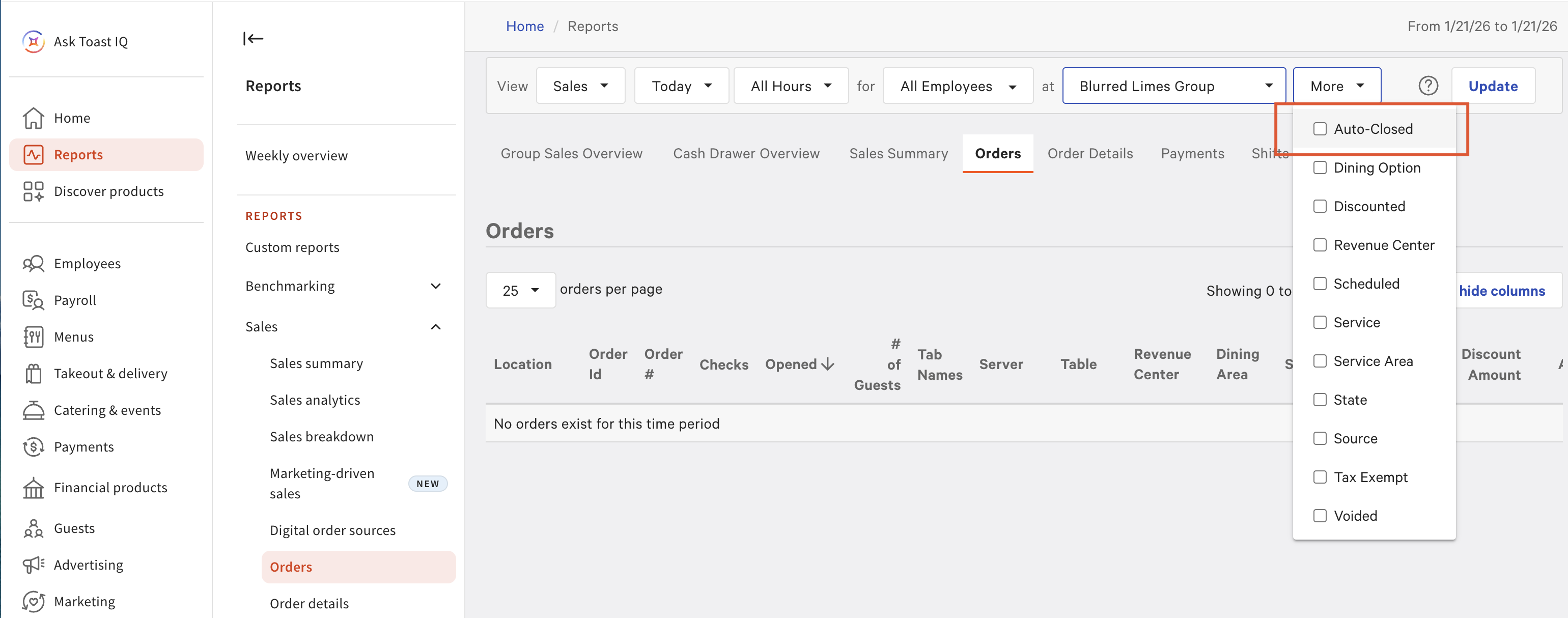
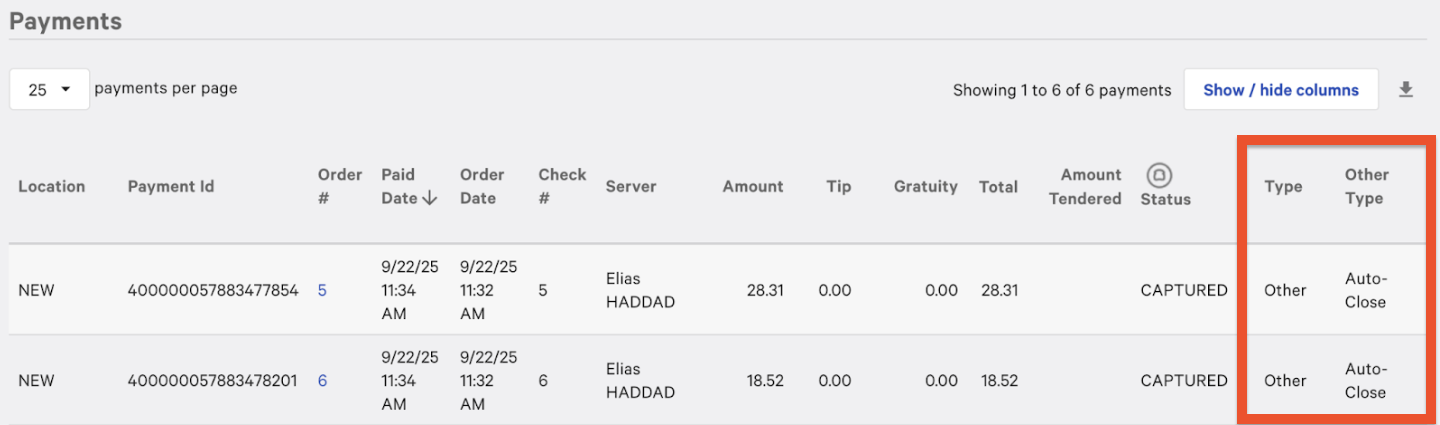
Reporting for auto-close and auto-void orders is the same as for any other closed or voided orders, with one addition: the dedicated Auto-Close other payment type. Auto-closed also appears as a selection within the reporting filters dropdown on your Orders report.
When an order is auto-voided, no revenue or tax is recorded, and items are not deducted from inventory — as if the order never occurred. Auto-voided orders always appear in the Voided Orders report.
When an order is auto-closed, the unpaid order remains visible and is counted as a completed sale. The full ticket amount is recorded as revenue, tax is applied as usual, and items are deducted from inventory. Because no real payment was received, the Auto-Close other payment type acts as an accounting placeholder. This allows you to treat those amounts as losses or map them to a cash over / short account for reconciliation.
Frequently Asked Questions
Where is the setting to auto-close orders?
The setting to auto-close orders is in Toast Web at Finance > Related > Settings > Auto-close orders. Select Auto-close orders at end of day, then choose Auto-close or Auto-void.
Also asked as:
-
- Where do I turn on auto-close?
- How do I find the auto-close setting?
What happens to unpaid checks at the end of the day?
What happens to unpaid checks at the end of the day depends on which setting your restaurant uses. With auto-close enabled, unpaid checks close to the Auto-Close other payment type at your business day cutoff. With auto-void enabled, unpaid checks are voided and tracked in the Voided Orders report. With manual check closure (the default), unpaid checks remain open until you close or void them.
Also asked as:
-
- What happens to open checks at end of day?
- How are unpaid orders handled overnight?
Can I change the time auto-close runs?
You cannot change the time auto-close runs from the Auto-close orders settings page. Auto-close runs at your business day cutoff, which is 4 a.m. by default. To adjust the business day cutoff for your restaurant, contact Toast Customer Care.
Also asked as:
-
- How do I change the time of auto-close?
- Can I set a different cutoff for auto-close?
Does auto-close close orders from previous days?
Auto-close does not close orders from previous days. It only closes unpaid checks from the current business day at your business day cutoff. Unpaid checks from earlier days must be resolved by payment or manually voided.
Also asked as:
-
- Will auto-close clear my old unpaid orders?
- Does auto-close apply to past days?
Does auto-close affect partial payments?
Auto-close does not affect partial payments. If an order is partially paid, the auto-close payment is applied only to the remaining unpaid balance. Completed partial payments are not overwritten or removed.
Also asked as:
-
- What happens to a partial payment when auto-close runs?
Should auto-closed amounts count as actual sales in my reports?
Auto-closed amounts are recorded as revenue in your reports because the order is treated as a completed sale, but no real payment was received. Many restaurants treat the Auto-Close other payment type as a loss or map it to a cash over / short account. Review your reporting needs with your accountant to decide how to categorize these amounts.
Also asked as:
-
- Should I count auto-close amounts as money received?
- Are auto-close orders real sales?
How do I void an auto-close payment on a specific check?
To void an auto-close payment on a specific check after the check has been auto-closed and you want to enter a real payment, contact Toast Customer Care.
Also asked as:
-
- How do I undo an auto-close on one check?
- Can I reverse an auto-close payment?
Related Articles
- Close Out Day, Z Report, and Auto-Capture Overview
- Get Help With Checks That Will Not Close on POS
- Set Up Other Payment Options
- Cash and Loss Management Reports Overview
- Void Items, Payments, and Checks