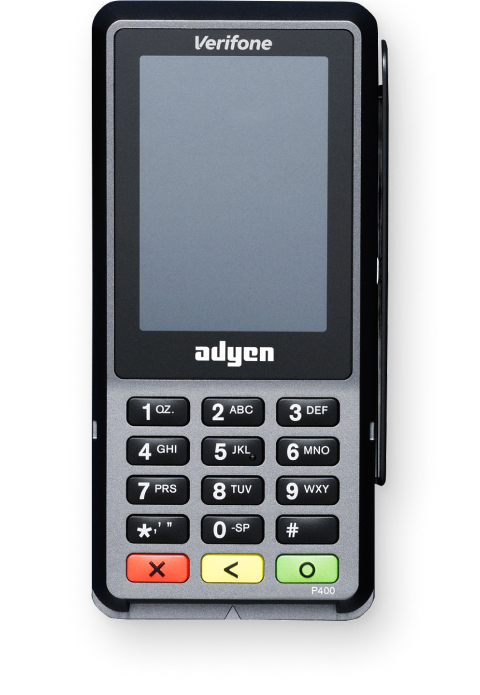
Get Help With Your P400 Card Reader
Last updated: Sep 17, 2026, 1:28 PM
- Device Is in Offline Mode
- Device Is in Tamper Mode
- Restart the Device
- After Clearing the Cache and App Data on Your POS
- Connect to Local Network
- Retrieving IP address
- Device Is in Service Mode
- Re-board to a New Location
P400 Device is in Offline Mode
When Toast enters offline mode, the card readers will automatically store the processed payment locally on the reader. When the internet returns, the devices will automatically sync with the host. The pending icon indicates that there are payments that the terminal hasn't been able to send to the card reader host for completion (capture and settlement).
Note: P400's are usually connected to Ethernet. If both Ethernet and Wifi are turned on, this can cause issues with connection/taking payments. Please ensure the Wi-Fi is turned off if it is connected via Ethernet. You can do this by going into your POS devices Settings > Network & Internet > WIFI and confirm the slider is OFF. Also check the wifi on the P400 card reader by tapping on (9) and then the green button > Network (Password is 8678) > Wifi > Switch off.
Device is in Tamper Mode
Do not use this card reader. When the display of the payment terminal shows the word 'TAMPER' or 'TAMPERED', stop using the device and contact Toast immediately for a replacement device.
Restart the Device
- Press and hold (9) and the green button at the same time.
- Enter the admin pin (found in card reader's Backoffice).
- Restart/power off.
After Clearing the Cache and App Data on Your POS
Clearing the cache and app data on your POS will unpair the reader from the device. You will be required to repair the device and follow the setup instructions again. See this Support Center article, P400 Card Reader Setup Guide.
Connect to Local Network
- Connect the power supply to the Ethernet dongle and the dongle via Ethernet to the Toast network. Be sure to connect to the port that says “ETH”.
- Once the dongle has power and Ethernet connected, plug the other end of the dongle into the power port located at the bottom of the card reader.
- As soon as you connect the dongle to the device, you will see the card reader power on and have an Ethernet connection in the top right. This process can take 1-2 minutes.
- On your P400, press 5 and then the green circle button.
- You will then receive an information box with a QR code and IP address. If there is no IP address, continue with network cable troubleshooting.
- Reseat the Ethernet cable at the adaptor.
- Trace the cable to the source and reseat it there if needed.
- If connected to a Toast Printer, confirm the printer has a network connection using Printer Setup.
When the terminal shows the message Terminal in Service Mode, this indicates that the terminal is running in safe mode. Usually, the cause is that the terminal has an incorrect configuration.
- Power cycle the card reader.
- Open the Admin menu (9 + green circle button).
- Enter the admin passcode: 8678 (TOST)
- Go to the Config Menu and remove the configuration named “you will need to board the terminal again."
- If you are still stuck in a loop or cannot access the admin menu, kindly contact us so we can assist in replacing the terminal.
You can’t initiate a payment if the card reader is not correctly connected to the card reader store connected with the Toast Web account on your Flex.
If a payment is initiated in a store that the card reader is registered to;
- An error message will show at the bottom of the card reader or on the Kiosk when you try to start a payment on a wrongly boarded card reader, saying "The card reader isn’t set up for this location - Pair it correctly or contact Toast."
- Under the device setup in Flex, the Card reader status will show as "Device registered to another location. Card payments are possible only when the Card reader status says Connected."
If you wish to use the device at a new location, contact Customer Care so we can re-board the reader to the new location for you!