Contact Customer Support
Last updated: Oct 8, 2026, 12:35 PM
- Are You a Guest?
- Start a Support Chat on the Toast Now Moblie App
- Start a Support Chat on the Web (Toast Now, Support Center, or Toast Payroll)
- Call Customer Care
- Track the Status of a Support Case
- Get a Copy of Your Toast Contract
- Get Help from Your Toast Device
- Share Your Screen from Toast Web
- Contact Toast Payroll
Are You a Guest?
This article is for restaurants that use Toast. If you're a guest (for example, you order from or dine at a restaurant that uses Toast), note that loyalty rewards, including birthday rewards, are set up and managed by each restaurant. A restaurant can change or turn off its rewards at any time, and Toast can't add rewards on a restaurant's behalf.
For questions about a specific reward, kindly contact the restaurant.
Start a Support Chat on the Toast Now App
Toast Now is a mobile app designed to run your restaurant from your phone with easy access to real-time reporting and key controls at your fingertips. To learn more, see this Support Center article: Get Started With the Toast Now App.
On Toast Web, select the blue button on the bottom right corner of any page to start chatting with Customer Care. Chat support is available 24/7!
You can start a chat on the Toast Now app with Customer Care by following these steps:
- Log in to the Toast Now app.
- Select the Support icon at the bottom of the main screen in the main navigation bar, which will open Toast Support.
- Select Chat with us to start a chat with Customer Care, or Messages to view an existing chat conversation.
Notes:
- Chat messages that begin in the Toast Now app will be automatically saved and can be continued wherever chat is available, including Support Center in Toast Web and Toast Payroll. Always having access to your support messages while on the go via the app makes it a convenient option for continuing conversations with support when it is most convenient for you. Start a chat on the web, take it with you on the go, and vice versa.
- Chat is a secure option for you and your team. Because you are logged in, you are automatically authenticated and our team can begin helping you immediately.
- If your issue requires speaking to an agent, our AI agent will assist in routing you to a human agent.
- Chat offers the ability to share your screen as well as pictures and video, helping our Care Representatives assist you better.
Start a Support Chat on the Web (Toast Web or Toast Payroll)
Chat support is available 24/7. To start a support chat on the web, follow these steps:
- Log in to Toast Web or Toast Payroll.
- Select the blue support icon in the bottom right corner of any page.
- Select Contact support to start a chat with Customer Care.
You can also start chat support via Support Center in Toast Web. Navigate to Support Center in the left rail of Toast Web to get started. To learn more about Support Center, see Get Started With Support Center.
Note: Chat messages that begin on the web will be automatically saved and can be continued in the Toast Now app (See Start a Support Chat on the Toast Now Mobile App). Start a chat on the web, take it with you on the go, and vice versa.
Call Customer Care
U.S. Customers: Call Toast Customer Care at (617) 682-0225. Phone support is available from 7 a.m. to 12 a.m. ET, seven days a week.
International Customers: Call Toast Customer Care at the following numbers:
- Canada: +1 343 451 6295
- Ireland: +353 1 913 1083
- U.K.: +44 2045 713302
- Australia: +61 879 478 066
Track the Status of a Support Case
When interacting with Toast support, you will receive a case number for your support request. Case numbers are important because:
- They serve as a unique identifier for your support request.
- They help track the progress of your case.
- You can reference them in future communications about the same issue.
You can request a case number during any support interaction for your records and future reference. You can easily track support cases in Toast Web within Support Center. To access the Support Center:
- Log in to Toast Web.
- Select Support Center from one of the following places:
- In the left menu, select Support Center.
- Select the Support Center (question mark button) in the upper-right corner.
To view details about your case, simply select the case you'd like to view in Support Center. Here you can add a comment or attachment directly to your case, or chat with an agent in real-time about the case if the issue needs immediate assistance.
Get a Copy of Your Toast Contract
You can't download a copy of your signed Toast contract from Toast Web. To get a copy, contact Toast Customer Care in one of these ways:
- Start a support chat while logged in to Toast Web or the Toast Now app.
- Call Customer Care. Phone numbers for each country are in the Call Customer Care section of this article.
Tell Customer Care which agreement you need, for example your Toast Merchant Agreement or a hardware lease.
Get Help from Your Toast Device
To get help from Customer Support on your Toast device, start by navigating to the Support section of your Device Menu.

You'll see three sections: Support Site, Status Page, and Start Screen Share.
- Support Site: This section will take you directly to Support Center where you can search for articles in our knowledge base or contact our Customer Care team.
- Status Page: This page will show you a status report of the most critical functions of the POS. On this page, you will also have access to retroactive data of past incidents.
- Start Screen Share: This allows you to share your screen with a Customer Care representative when speaking to them on the phone. To use the screen share feature, select Start Screen Share within the Support menu. A unique code will be displayed on your screen. Share your unique code with the support agent who is assisting you; the agent will then use this code to connect to your screen.
Alternative ways to access screen sharing:
- Enter "Screen Share" into the search bar on your Toast POS, then follow the on-screen instructions to generate and share your code.
- Select the top-left arrow to access the overflow menu, then scroll to the bottom and select Support > Start Screen Share
- On some POS terminals, you can swipe up from the bottom of the screen to find the Start Screen Share option.
Notes:
- The above steps will be the same on both terminals and handheld devices. This will not work if the network is down on devices.
- You can start a chat with Customer Care by selecting the Support icon at the bottom of the screen on the Toast Now app.
- For successful screen sharing sessions:
- Verify the generated code is accurately shared with the support agent.
- If the first code does not connect properly, generate a new code and provide it to the agent.
- Ensure you have a stable internet connection for smooth screen sharing.
Share Your Screen from Toast Web
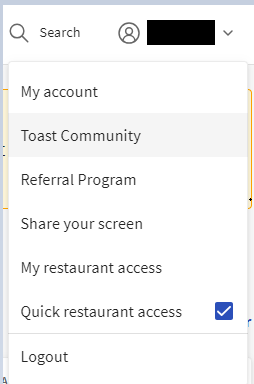
While you're chatting or on the phone with a Customer Care representative, you can also conduct a screen share from Toast's back-end (Toast Web). Here are the steps to do so:
- In Toast Web, navigate to the User Icon and Select it to open the drop-down.
- Select Share your screen. A code will populate, and you'll give that code to the agent.
- You will then be able to share your screen of Toast's back-end with the Customer Care representative.
Contact Toast Payroll
You can contact Toast Payroll Customer Care in the following ways:
- Toast Payroll phone number: (312) 252-7341
- Start a chat with a Toast Payroll agent by selecting the blue chat button in the lower-right corner of any Toast Payroll page.
Toast Payroll Customer Care hours are Monday - Friday, 8:30 a.m. - 10:00 p.m. ET.
Note: While onboarding consultants may assist you with payroll setup, they do not have a direct phone line.