Get Help With the Toast Now App
Last updated: Oct 1, 2026, 5:48 PM
- Before You Begin
- Quick Fix
- Toast Now App Not Loading or Working
- Account and Login Issues
- Data and Reporting Issues
- "Error Fetching Data" Message
- View a Custom Date Range or Combined Totals
- View a Week's Total Sales for a Store
- Feature Availability Questions
- Return to a Previous Support Chat
- Send a Product Suggestion or Feedback
- Before You Contact Customer Care
- Related Articles
Before You Begin
Applies to: Toast Now app, Toast Web
Permissions needed:
Permissions in the Toast Now app inherit from Toast Web. The specific permissions you need depend on the data or feature you want to use. See the Required permissions for Toast Now section of Get Started With the Toast Now App for the full table.
What you'll accomplish: Resolve the most common Toast Now app issues without contacting Customer Care, or arrive at Customer Care with the right information to speed up resolution.
For an introduction to the Toast Now app and an overview of its features and navigation, see Get Started With the Toast Now App.
Quick Fix
Use the table below to find the symptom you are seeing and the most common fix. The sections that follow walk through each scenario in more detail.
| Symptom | Most Common Cause | Quick Fix | Self-Service? |
|---|---|---|---|
| Toast Now app isn't loading or working at all | App version, device, or cache issue | Restart your device, update the app, or reinstall the app | Yes |
| "Error fetching data" message | App or device needs a refresh | Force-close the app, update all apps, and reinstall if needed | Yes |
| SPLH card is missing or blank | Missing required permissions | Assign 4.1 Sales Reports, 4.3 Labor Reports, and 4.10 Employee Jobs & Wages for each location | Yes |
| Other reports or sales data are missing | Missing 4.1 Sales Reports or 4.3 Labor Reports permission for that location | Have an admin assign the required permissions for each location | Yes |
| One of your locations isn't showing | Missing permissions for that location, or the location is in a different restaurant group | Confirm permissions for the location; if the location is in another restaurant group, contact Customer Care | Sometimes |
| Multi-location overview shows dashes for some stores | Display issue or missing labor data for the day | Pull down to refresh, log out and back in, update the app; if the data shows on the individual store, contact Customer Care | Sometimes |
| Comparison dates look off by one day | Year-to-year comparisons match by day of the week, not by date | This is expected behavior — to change the comparison, toggle the Comparison setting, and pick a different time period | Yes |
| "Invalid number" error when logging in to a location | Missing permissions for that location | Have someone with permissions for that location grant you access | Sometimes |
| Forgot your password | Toast Web password is also your Toast Now password | Select Forgot password? on the sign-in screen | Yes |
| Inventory or Toast Retail features are missing on Android | Toast Retail features are available only in the Toast Now app for iOS | Log in to Toast Web in a mobile browser, such as Chrome, and select Retail | Yes |
Toast Now App Not Loading or Working
If your Toast Now app isn't working properly or isn't loading at all, try the following in order:
- Restart your phone or device.
- Make sure your Toast Now app is updated to the latest version.
- Delete the Toast Now app and reinstall it from the App Store or Google Play.
Expected outcome: The app launches and loads your homepage data for the selected location.
If the app still isn't working after these steps, see "Error Fetching Data" Message below or Before You Contact Customer Care.
Account and Login Issues
Forgot Your Password
The email and password you use to sign in to the Toast Now app are the same credentials you use to sign in to Toast Web or to the Toast app on your POS device. If you don't remember your password, select Forgot password? on the sign-in screen after entering your email.
Expected outcome: You receive an email with instructions to reset your password.
"Invalid Number" Error for a Specific Location
If you see an "invalid number" error when logging in to a specific location in the Toast Now app, you may not have the necessary permissions for that location. To access this location, ask someone who has permissions for that location to grant you the required permissions in Toast Web.
For the full list of permissions needed for the Toast Now app, see the Required permissions for Toast Now section of Get Started With the Toast Now App.
Generic Email Address Blocks Access
If an employee has a generic email address or an @example.com email address, the Toast Now app may not allow access. Check for a duplicate profile in Toast Web by navigating to Team > Employees. Search for the employee's name.
If there is no duplicate profile, replace the generic email address with the employee's real email address and have them sign in to the Toast Now app again.
If there is a duplicate profile with a generic email address, archive that profile during a time when the employee is not clocked in, then have the employee sign in to the Toast Now app with their real email address attached to the other Toast Web profile. The POS passcode may be different for the other profile — confirm it before they sign in.
Note: If you use Toast Payroll and you've archived a profile, verify the employee's mapping so tips and timesheet data continue syncing to Toast Payroll. See the Individual Employee Mapping section of Toast Payroll: Manage Employee Mapping.
Create a Separate Login for Other Employees
You can create a separate Toast Now login for other employees at your restaurant. To give someone access to the app, set them up with an account in Toast Web and assign the permissions they need. The email address and password used to sign in to Toast Web are the same credentials used to sign in to the Toast Now app.
For step-by-step instructions, see Add and Manage Employees in Toast Web.
Data and Reporting Issues
Sales Per Labor Hour (SLPH) or Labor Data Not Showing
If sales per labor hour (SPLH) or labor data isn't showing in the Toast Now app, the most common cause is missing permissions. SPLH requires three permissions assigned to the user for every location where they need to see SPLH.
Required permissions for SPLH:
- 4.1 Sales Reports
- 4.3 Labor Reports
- 4.10 Employee Jobs & Wages
These permissions must be assigned at every location where the user needs to see SPLH. To verify and update permissions:
- In Toast Web, navigate to Team > Employees.
- Select the employee's last name to open their profile.
- Select the Jobs & Permissions tab.
- Confirm the View restaurant/group permissions drop-down is set to the correct location.
- In the Permissions & Access tile, confirm 4.1 Sales Reports, 4.3 Labor Reports, and 4.10 Employee Jobs & Wages are selected. If any are not selected, toggle the permission slider to Override and select the missing permission boxes.
- Select Save.
- Have the employee log out of the Toast Now app and log back in.
Expected outcome: The SPLH card appears on the homepage of the Toast Now app for the selected location.
If SPLH still isn't showing after all three permissions are assigned and the user has logged out and back in, see Multi-Location Overview Shows Dashes for Some Locations below, or Before You Contact Customer Care.
No Data Appears After Login
If you can't see any data in the Toast Now app, or a location you should have access to isn't showing, you may be missing required permissions. Have your admin verify that you have the right permissions for each location.
For the full list of required permissions by feature, see the Required permissions for Toast Now section of Get Started With the Toast Now App.
Expected outcome: Cards and data appear on the homepage for each location you have permissions for.
Some Reports Are Missing
If some reports aren't showing up in the Toast Now app, the most likely cause is missing permissions for the data behind those reports. You need the required permissions at every location you want to see in the Toast Now app.
For the full list of required permissions by feature, see the Required permissions for Toast Now section of Get Started With the Toast Now App.
Can't See Data for One of Your Locations
If you can't see data for one of your locations, the most likely cause is that you don't have the required permissions at that location. An administrator at your restaurant should sign in to Toast Web and assign you the required permissions for each location you need to access.
If you have confirmed the correct permissions, try the following in order:
- Log out of the Toast Now app and log back in.
- Check the App Store or Google Play for any updates to the Toast Now app.
- If no update is available, delete and reinstall the app (last resort).
Expected outcome: The missing location appears in the multi-location view of the Toast Now app.
If the location still doesn't appear, it may be in a different restaurant group from your other locations. You can request that the Toast support team move it into the correct restaurant group. See Before You Contact Customer Care.
Multi-Location Overview Shows Dashes for Some Locations
If the multi-location overview shows dashes (—) for labor cost percentage or SPLH on some locations, but the data appears correctly when you open an individual location, try the following in order:
- Pull down on the multi-location overview screen to refresh data.
- Log out of the Toast Now app and log back in.
- Check the App Store or Google Play for app updates.
- Confirm permissions are assigned at every affected location (see SPLH or Labor Data Not Showing above).
Expected outcome: The labor cost percentage and SPLH values are displayed in the multi-location overview for every location you have access to.
If the values still show as dashes in the multi-location overview after these steps, see Before You Contact Customer Care. This scenario sometimes requires Customer Care to investigate a display issue or backend data refresh.
Comparison Dates Don't Match What You Expect
If the comparison dates in the Toast Now app appear to be off by one day, this is expected behavior for year-to-year comparisons. The Toast Now app compares the day of the week, not the exact calendar date. For example, if you use the Same day last year comparison on Wednesday, March 6, 2024, you'll see "Today vs. Wed, Mar 8, 2023" — the same day of the week from the previous year.
"Today" always refers to the current date. The date listed for the comparison range is the corresponding day of the previous time frame.
To change the comparison so it points to a different day or period, see Change the Default Comparison Period below.
Change the Default Comparison Period
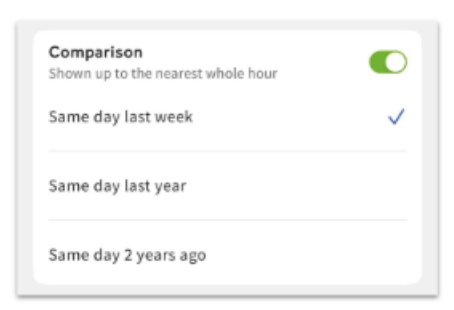
The Toast Now app's date selection bar includes a Comparison setting that controls what date your selected day is compared against. To change the comparison period:
- On any screen with the date selection bar, select the down arrow on the left side to open the date and comparison panel.
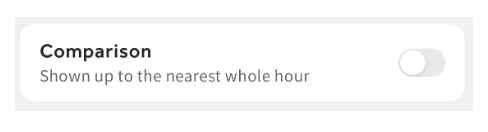
- Confirm the Comparison toggle is enabled.
- Choose what date your data is compared against:
- The same day last week
- The same day last year
- The same day two years ago
Expected outcome: The Toast Now app now shows your selected day's data compared against the period you chose. To disable the comparison entirely, toggle Comparison off — the app will show data for the selected date only.
"Error Fetching Data" Message
If you see "error fetching data" in the Toast Now app — sometimes shown as not being able to view today's data — try force-closing the app and reinstalling it. If the error persists:
- Force-close the Toast Now app and any other apps running in the background. Swipe up, left, or right depending on your device to view running apps, then swipe up to close the Toast Now app.
- Open the App Store on your device.
- Select your profile icon near the upper right of the screen.
- If any apps need updates, they appear toward the bottom of the screen. Select Update All or select the individual app you want to update.
- Reopen the Toast Now app.
Expected outcome: The Toast Now app loads data for the selected date and location.
If the error continues after these steps, see Before You Contact Customer Care and include a screenshot of the error message.
View a Custom Date Range or Combined Totals
The Toast Now app displays one calendar day of data at a time. You can't choose a custom date range (such as current week, last week, or a specific month) in the app, and you can't view combined totals across multiple locations together.
For custom-range reporting, sign in to Toast Web and use the Sales Analytics or Sales Summary reports. See Can I Compare Annual Total Sales Year-to-Year? for more on year-over-year comparisons.
In the multi-location view of the Toast Now app, you can see net sales, labor percentage, and SPLH percentage for each location separately, but there is no combined view of all locations together.
View a Week's Total Sales for a Store
The Toast Now app does not show a single "week total" sales number for a store. The app shows sales for one calendar day at a time and can compare that day to another single day. To view a weekly breakdown by store, select the Net Sales card on the homepage and use the Weekly filter on the detail view. This shows a weekly pattern breakdown but does not aggregate the week into a single total.
To see a full weekly total for a store, sign in to Toast Web and use the Sales Summary report. The Sales Summary report supports custom date ranges, including weekly views.
Expected outcome: You can compare daily sales within a week from the Toast Now app, and view a full weekly total from the Sales Summary report in Toast Web.
Feature Availability Questions
View Open Checks
Yes — the Toast Now app supports searching and viewing your restaurant's open checks and other check information for the day you choose. Use the open checks feature to:
- Monitor and manage table turnover and pacing
- Track and manage kitchen capacity and firing orders
- View open delivery checks to monitor deliveries
- View pickup checks to organize orders for pickup
View Cash Drop or Deposit Amounts
Cash drop totals are not included in the Toast Now app. You can view this information on the Sales Summary report in Toast Web.
To request this feature for the Toast Now app, see Send a Product Suggestion or Feedback below.
See Which Tables Are Open
The Toast Now app does not show which tables at your restaurant are open or occupied.
Use Toast Retail Features on Android
Toast Retail features are available only in the Toast Now app for iOS. This includes Inventory, cycle counts, the Item Catalog, and Smart Scan, and there is no timeline for Android support yet. On an Android device, open a mobile browser such as Chrome, log in to Toast Web, and select Retail to use these features. For more information, see Can I access Toast Retail on the Toast Now app? To request this feature in the app, see Send a Product Suggestion or Feedback below.
Return to a Previous Support Chat
To view your previous support conversations or start a new support chat in the Toast Now app, select Support at the bottom of the page.
Send a Product Suggestion or Feedback
To send feedback or a feature request about the Toast Now app, select Account at the bottom right corner of your screen. From the Account page, you can send feedback to improve the app experience or request new features. Toast reviews every request submitted through this channel and works on app updates accordingly.
Before You Contact Customer Care
If the steps in this article do not resolve your issue, contact Toast Customer Care. Have the following information ready to speed up the resolution:
- Description of the issue and the screen where it appears
- Restaurant location affected (if multi-location)
- Toast Now app version (from your device's App Store)
- Phone operating system version (iOS or Android, and version number)
- Steps you've already tried from this article
- Screenshot of the error message or affected screen
Related Articles
- Get Started With the Toast Now App
- Toast Now App Version & Operating System Requirements
- Permissions Reference Guide
- Can I Compare Annual Total Sales Year-to-Year?
- Manager Log Overview