Get Started With Brand Hub
Last updated: Jan 23, 2026, 6:10 PM
Create a distinct brand identity for your location or location group with Brand Hub.
Brand Hub Overview
A brand is the distinct identity that sets a business apart from its competitors. It’s leveraged to build recognition and a consistent experience across all touch points.
Brand Hub makes it easy to create a consistent brand across your Toast digital experiences.
With Brand Hub, you can:
- Define your brand with colors, fonts, a brand profile, a shared image library, and more.
- Apply branding at any level across your entire business, specific groups of locations, or individual restaurants.
- Save time on setup: branding is built directly into Email Marketing, so campaigns are automatically branded by default.
- Power your Toast products, starting with Email Marketing and expanding to more guest touchpoints over time.
Brand Organization
Each business can create multiple brands and assign them to different locations. Some businesses use the same brand across all locations, while others manage multiple concepts with distinct brands for specific locations.
Each brand includes shared settings that apply across products using Brand Hub, helping to maintain a consistent experience. Other settings are product-specific and can be customized locally, such as button styling.
- Single location Brand - one restaurant location, one brand
- Multi-location Brand - multiple restaurant locations, shared brand
- Multi-concept Brands - brands are created per concept, assigning one or more restaurant locations to each.
Brand Hub Set up
Brand Hub Base Brand
When you set up your account for the first time, Toast automatically creates a Base brand for you. First-time users should go to the brand hub onboarding to set up their brand(s). We will prefill all the defaults from your Toast Web settings.
In Toast Web, navigate to Marketing > Brand Hub. Here you will be able to edit the following:
- Brand info:
- Description: Customers will see this on your public pages as an introduction to the location(s) in this brand.
- Tone of voice: Helps with suggested copy to match your brand.
- Cuisine Type: Multiple selections can be made
- Price point
- Public profiles: Link your social media accounts to your brand by selecting Connect Meta Business Account or manually adding the links in each field. These links will appear in public-facing places like the footer of your emails.
- Logos:
- Brand Logo: Select Upload new logo to upload, or drag and drop your file. Note: Logo images must be jpg, jpeg, png, or webp. Max file size 2MB.
- Favicon: This image appears in your webpages and the browser’s tab bar. Select Upload new icon to upload or drag and drop your file. Note: Logo images must be jpg, jpeg, png, or webp. Max file size 2MB.
- Colors: Manually select your primary color or enter your color hex code. Next, choose a color theme to drive how you want your color applied across surfaces.
- Fonts: Choose from a selection of custom or preset fonts.
- Media: Upload images for your brand by selecting +Upload file or dragging and dropping your file.
Note:
-
- By uploading any content, you confirm that you own all legal rights to the content and have permission to share the asset with Toast for your use, or use on your behalf, in advertising or for other commercial purposes.
- Logo images must be jpg, jpeg, png, or webp. Max file size 2MB.
Once all selections have been made, select Save changes.
Brand Hub Location Assignments
Each restaurant location can be assigned to one brand at a time. A single brand, however, can be used across multiple locations. You can assign or change a location’s brand during onboarding or at any time in Settings > Individual Brands within the Brand Hub. Here, you can select the locations to which you want to apply your branding.
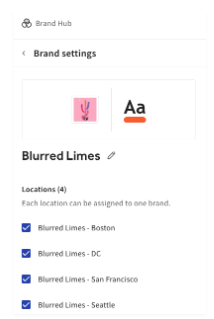
Once all selections have been made. Select Save changes.
Now that you have built your brand, see Get Started with the Email Marketing Campaign Builder to send our branded email campaigns to your guests.