Get Started With the Email Marketing Campaign Builder
Last updated: Sep 28, 2026, 3:59 PM
With the Email Marketing Campaign Builder, create better email marketing campaigns that drive guest demand across your Toast-powered channels.
Marketing Campaign Builder Overview
With the Email Marketing Campaign Builder, create better email marketing campaigns that drive guest demand across your Toast-powered channels.
The Email Marketing Campaign Builder can be accessed via Marketing Hub pages, our AI Marketing Assistant, our template gallery, or in Toast Web. Navigate to Marketing > Campaign.
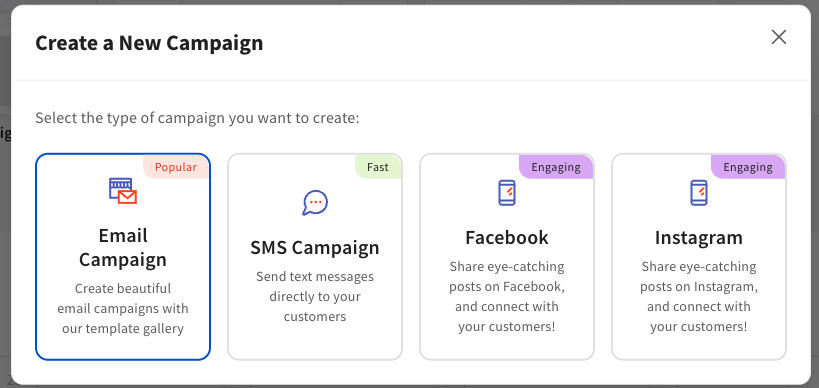
From there, you can select Create campaign. You will be prompted to select your campaign type:
- Email Campaign
- SMS Marketing
Note: Add a clarifying line right after the campaign type list: "Each campaign uses one channel at a time — for example, an Email Campaign and an Instagram post are set up as two separate campaigns, not combined into one. To reach guests on multiple channels for the same promotion, create a separate campaign for each channel (Email, SMS, Facebook, Instagram)."
Email Marketing Campaign Builder
You can use the search bar to find a template or leverage Categories, which include:
- Holidays and observances
- Events
- Offers and promotions
- Basic templates
You also have the option to select a template by Goals, which includes:
- Celebrate an occasion
- Keep guests engaged
- Drive sales
- Announce something new
- Promote online orders
- Build brand loyalty
Select Use this template to start building your campaign. Complete the following Settings fields:
Email Campaign Builder Settings
- Campaign name: This is for your own reference and will not be visible to guests.
- Sending from: This controls your branding (logo, footer), sender name, reply-to email address, default links, and available audiences. Location settings can be configured in marketing settings. Changing the location will reset your campaign defaults.
- Sending to: The audience who will receive this campaign. Choose a saved list, send to all guests, or select Smart segments to target a behavior-based audience — Big spenders, Lapsed, Super fans, New, Regulars, Loyalty members, House accounts, or guests who have or haven't ordered online. The segment stays current automatically, so guests who newly qualify are included the next time the campaign sends.
- Subject line: This is the first thing your recipients see in their inbox. It should grab attention and give them a reason to open your email. Keep it clear, concise, and relevant to the content inside. Tip: Keep your subject line short and engaging, ideally under 50 characters, to ensure it's fully visible on mobile devices.
- Preview text: The preview text is a short summary that appears next to or below the subject line in most email clients. Use it to provide additional context or tease the content of your email, enticing the recipient to open it. Tip: Use the preview text to provide a bit more detail or intrigue, making sure it complements the subject line without repeating it.
Note: If you need assistance with building your Subject line and Preview text, leverage the Marketing AI tool icon.

Email Campaign Builder Content
Next, navigate to Content. Here you can edit and/or add to your campaign.
Email Campaign Builder Content: Basic Blocks
- Title: Adjust the font type, size, color, orientation, and add a hyperlink to your campaign title.
- Paragraph: Adjust the font type, size, color, and orientation, and add a hyperlink to your campaign title.
- Image: Add images to your campaign by uploading from your computer, dragging and dropping an image, or selecting an image from your Media library.
- Button: Add a Call to Action (CTA) button to your campaign by selecting from the Button link type drop-down menu of Toast product options. You can format your button to fit your preferred campaign style: color, font, shape, border, and spacing.
- Divider: Create a divider line between sections and format the color, width, style, and spacing.
- Spacer: Add spacers to your campaign and format to include background color and spacer height.
- Logo: Add your logo to the campaign and format the link from the drop-down menu of Toast products, spacing, and border radius.
- Section: Create additional sections of the campaign from the basic block options above. This could be single, double, or triple blocks.
Email Campaign Builder Content: Layouts
Toast Layouts
- Promotions: Drive sales by adding promotions
- Menus: Increase awareness of specific menu items
- Loyalty Sign-up: Drive Loyalty sign-ups
- Gift cards: Drive physical and eGift card sales
- Reservations: Drive reservations
- SMS marketing sign-up: Drive SMS marketing sign-ups
The available layouts let you create campaigns with predefined layouts that include images and written copy.
Email Campaign Builder Branding
The brand is selected based on your sending location. Here you can select:
- Title font
- Paragraph font
- Text color
- Background color
- Menu items background color
- Accent color
- Button text color
For more information on building your brand, see Get Started With Brand Hub.
Note: Not all fonts are supported in email. If your chosen font isn’t available, we’ll use a fallback. Fonts may also look different across email apps and devices.
Save an email template. After designing your email, select Save as template from the same drop-down menu to store the layout for reuse. Saved templates appear alongside Toast's own templates when you start a new campaign, so you can build from your own design instead of starting over.
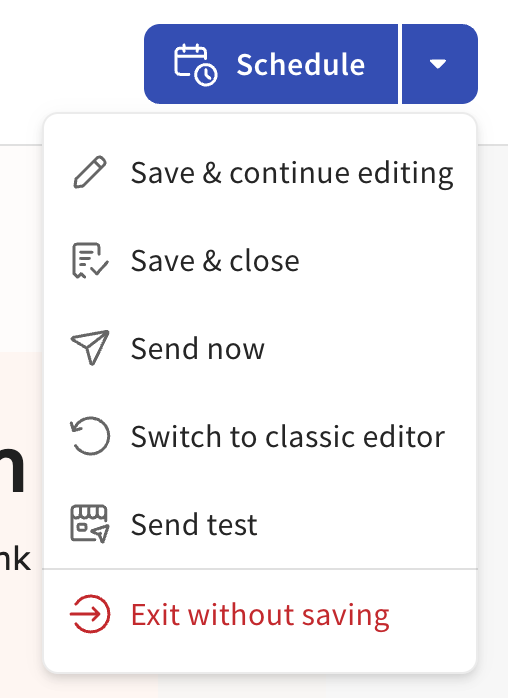
Once your email campaign settings are complete, select how you would like to send the campaign: Schedule or one of the following options from the drop-down menu. Note: It is strongly encouraged to leverage the Send test option to test links, device views (desktop and mobile preview), and email audience.