Get Started With the Branded Mobile App
Last updated: Sep 22, 2026, 2:45 PM
- Overview
- Branded Mobile App Compliance
- Set Up the Branded Mobile App
- Complete Branded Mobile App Setup
- Branded Mobile App Store Settings
- Promote Your Branded Mobile App
- Location Favoriting
- Additional Resources
Branded Mobile App Overview
Launch your own mobile app (on iOS or Android)—build your brand with your logo and choice of fonts, colors, and imagery. The app will be integrated with Toast, easily customized by you, and synced with Toast branded ordering and loyalty for a simple set-up.
Branded Mobile App onboarding overview.
Branded Mobile App Setup Timelines
- App store registrations: Approximately four weeks
- Toast Web customization: Approximately 30 minutes
- App publication by Toast: Approximately two weeks
Branded Mobile App Prerequisites
Before getting started with the Branded Mobile App, you must create developer accounts with the app stores:
Apple App Store
Apple app store Branded Mobile App setup.
- Cost: $99 annually
- Log in/create your Apple account.
- Register as an organization, input DUNS number, and invite brandedmobileapp@toasttab.com with these Admin permissions.
Google Play Store
Google Play Store Branded Mobile App setup.
- Cost: $25 (one-time fee)
- Log in/create your Android account
- Follow along with this setup video
Branded Mobile App Compliance
Ensure compliance is completed within Apple and Google Developer consoles, and you’ve added a privacy policy URL to Toast Web during the setup workflow.
The app stores require you to publish a statement describing how your business manages user data. This should be unique to your business, and we encourage you to seek legal counsel if you need assistance in drafting. For more information, see the Branded Mobile App Privacy Policy section in this article.
Set Up the Branded Mobile App
- In Toast Web, navigate to Takeout & delivery > Branding & customization > Branded Mobile App.
- You will start with the onboarding wizard and complete the four steps listed below:
- How to get started
- Basic info
- Launch process checklist
- Review
Branded Mobile App - Step 1: How to get started
- In the Branded Mobile App onboarding wizard, select the blue Get started button.
- Next, select which app store you will publish to: Google Play Store or Apple Store, and select if you have an existing app.
- Note: If you have an existing app, your current users will not be asked to redownload your app.
- Select Save & Continue.
Branded Mobile App - Step 2: Basic info
Complete the basic information fields for your Branded Mobile App. Note that changing your app name will require waiting for a new release, so be sure to review the app name before submitting.
- Name of your app
- URL
Branded Mobile App Privacy Policy
In Step 2: Basic info section, you will also complete your Branded Mobile App Privacy Policy. If you have an existing privacy policy, you can select I already have a Privacy Policy. If not, you can follow the steps below for the privacy policy generator tool if you don't have an existing privacy policy.
Toast provides this tool as a courtesy to help you get started on drafting your own privacy policy. Before publishing your policy, it is your responsibility to ensure your compliance with laws and regulations and ensure that the policy reflects your organization's unique business practices.
- Select Generate my Privacy Policy and enter your email.
- Select Generate privacy policy.
- Next, select Download privacy policy. A .txt file with your business information pre-filled will be downloaded to your computer. Once reviewed, you can add this information to your Toast Website or third-party website. For more information, see the supporting articles below:
- Paste your privacy statement URL.
- Once the information entered is reviewed, select Save & continue.
Branded Mobile App - Step 3: Launch process checklist
Apple Store Launch Process
- Log into your Apple Developer account.
- Register location. Be sure to register as an organization rather than an individual. Apple will require you to enter a DUNS number for your organization, which can be looked up here.
- Enter your Connect Team ID information as instructed.
- Select Invite brandedmobileapp@toasttab.com as a user and give Admin permissions as described here (external link).
- If you are setting up your app with the Google Play Store, move on to the Google Play Store Launch Process. If not, select Save & Continue.
Google Play Store Launch Process
- Log in to your Android Developer account
- Follow along with the linked setup video here.
- Once your account has been created, navigate to the Users and Permissions tab on the left navigation.
- Select brandedmobileapp+googleplay@toasttab.com and give administrator permissions as described here (external link).
Branded Mobile App - Step 4: Review
It can take up to two weeks for your newly created app to be completed. During this time, we encourage you to do the following:
- Check with Apple and/or Google to confirm there are no compliance issues, which appear as banners at the top of the developer consoles.
- Create marketing materials (graphics, signage, etc.) to educate your customers and staff about the app and how it works.
Complete Branded Mobile App Set Up
To complete your setup, you will need to use the app editor. Edit images and Announcements and push notifications from within this module.
Branded Mobile App Push Notifications
To add or edit a push notification, follow the steps below while in the app editor:
- Select +Add a push notification.
- Here, you can enter notification details and schedule when to send it.
- Select Schedule.
- Lastly, select Publish.
Automate Push Notifications Based on Guest Behavior
On the Branded Mobile App page, scroll to Push notifications, then to Keep your guests engaged with automations. Each automation has its own card:
- Bring Back Lapsed Guests: Sends when a guest hasn't ordered in a set number of days (14–150; default 30).
- Reward Frequent Guests: Sends once a guest reaches a set number of orders (default three).
- Recognize Big Spenders: Sends once a guest's average spend reaches a set dollar amount (default $100.00).
Select Preview on a card to open it, then:
- Customize the Title (50-character limit) and Body (230-character limit). Both have an emoji picker and a Re-write with AI option.
- Optionally turn on an Image or a Promotion.
- Choose a Push destination — where guests land when they tap the notification.
- Select Turn on notification. You'll be asked to acknowledge the terms of use first.
Once turned on, you'll see a confirmation: "Congratulations, your automated push is live. We'll send it to your guests automatically whenever the trigger happens."
You can turn any combination of automations on or off independently from their cards. If a guest qualifies for more than one automation within the same seven-day window, only the first one sends.
Configure Branded Mobile App Announcements
- In Toast Web, navigate to Takeout & delivery > Branding & customization > Branded Mobile App.
- In the Design your app section, select Edit design.
- On the left side panel, select Announcements, and from the drop-down options, select +Add another Announcement.
- Here you will be able to do the following:
- Announcement image: You can upload an image from your computer or drag & drop a file.
- Announcement header: Enter a catchy title to highlight your announcement or special message.
- Announcement description: Provide details about your announcement, featured content, or any important information you'd like to share.
- Edit Background color
- Edit Text color
- Edit Button color
- Edit Button Text
- Link to: Link either to Rewards, Menu, or an external URL page, or a menu item where you can select a specific location and the menu item.
- Here you will be able to do the following:
- Select Save Announcement once you've completed the edits, then select Save changes to update your Branded Mobile App in real time.
Customize the text, colors, and links within the announcement to highlight key offerings, announcements, or special messages.
- Menu Page: Direct users to your menu page to encourage them to explore your full menu or discover featured items.
- URL: Link to an external page, such as catering and events, gift card purchases, or any relevant section of your website.
- Items: Spotlight a specific menu item, whether it’s a bestseller, a limited-time offer, or something you want to promote to capture attention and drive interest.
Configure Loyalty for Branded Mobile App
Right in the editor, you can configure how guests earn and redeem loyalty rewards — for example, sending guests to the rewards page to view past orders or reminding them of their favorites. Guest sign-up itself is done by mobile number and isn't a configurable option in this editor.
Create Design and Marketing for the Branded Mobile App
Once the initial setup is complete, you can continue editing in the design and marketing section of the Branded Mobile App settings. Here, you can make edits to the following:
- Home Page: Use the Homepage Layout editor in the Look & Feel section to reorder homepage elements — Logo, Widgets/Announcements, Featured Items, and Order Button — using the up/down controls. You can also switch widget display between Regular and Compact modes, and between carousel and vertical list layouts. A live phone preview updates in real time as you make changes.
- Featured Items lets you highlight up to five popular menu items — with images, names, and descriptions — in a horizontal carousel on the app's home screen, so guests see specific items before they even open the menu. Toggle it on and position it using the same drag-and-drop controls you use for the other home screen elements.
- For single-location brands, featured items come from that location's menu.
- For multi-location brands, the widget surfaces popular items that are available at most of your locations, so guests see items they can order no matter which location they choose.
- Tapping a featured item takes the guest straight into ordering that item.
- Available to every restaurant with a Branded Mobile App — no additional setup or entitlement required beyond opting in through the layout editor.
- Note: All defaults maintain current behavior unless you act to change them.
- Featured Items lets you highlight up to five popular menu items — with images, names, and descriptions — in a horizontal carousel on the app's home screen, so guests see specific items before they even open the menu. Toggle it on and position it using the same drag-and-drop controls you use for the other home screen elements.
- Menu:
- Logo: Logo position and size can now be customized directly from the Branded App admin. Choose from five preset logo positions (Top Center, Top Left, Top Right, Center Large, Subtle Corner) and adjust logo size from 30px to 120px using a slider. Changes preview in real time and publish immediately to the mobile app. Note: No existing apps are affected unless you actively edit them.
- Home screen background image: 1284 px × 2778 px
- Hero Image: 640 px × 256 px
- Allergen display: Menu item detail screens show each item's calorie count, along with allergen badges (for example, "Contains: Peanuts, Milk, Gluten") below it. If a guest customizes their order with modifiers, the allergen list updates automatically to reflect their full selection. Badges reflect the allergen data already set up for your menu items — there's no image or asset to configure here, unlike the settings above.
- Account: When a guest places an order or signs up in your Branded Mobile App, they see marketing consent checkboxes. The email option ("Email me news and offers from this restaurant or group") is pre-checked. Where SMS marketing is enabled, an SMS option ("Text me recurring marketing messages including special offers...") also appears, unchecked. Only guests who leave the email box checked or check the SMS box are added to your marketing audience.
- Rewards
Note: Brand fonts, colors, and even icon styles can be customized in your Branded Mobile App admin page. These choices are smartly adopted from your online ordering branding setup in the Branding & Customization Configuration section of Toast Web; however, you can always have app-specific branding should you prefer.
Branded Mobile App Store Settings
You can update the information in the Branded Mobile App's App Store settings at any time. Note that these changes do not reflect immediately and must go through a review process before publication.
You can track the status of your app directly in Toast Web, in the Branded Mobile App admin. If a build or submission runs into an issue, the status tracker now tells you specifically what happened:
- If it's something you can fix — for example, a missing permission in your Google Play account, or an issue with your Apple certificate — you'll see a specific message describing the issue and the steps to resolve it, instead of a generic alert.
- If it's an issue on Toast's side — for example, something in our build process — you'll see a "No action needed, we're on it" message. You don't need to do anything or contact support for these; our team is already handling it.
You can also still confirm review status directly in your Apple and Google Developer accounts if you'd like a second source.
Understand Your Branded Mobile App Status
While your app is being built and submitted, the Branded Mobile App admin shows its current status and flags anything that needs attention.
Status types
- In progress — your app is being built or is under review with the app store.
- Action needed — something requires your attention. The message will name the specific issue (for example, a Google Play permission that hasn't been granted, or an Apple signing certificate that needs to be renewed) and the steps to fix it.
- No action needed — Toast has identified an issue on our side and is resolving it. You don't need to do anything.
- Live — your app has been approved and published to the app store.
Branded Mobile App - App Store Icon
Note: The size requirement for the Brand Mobile App icon is 1024 x 1024 px.
The app store icon will be the image that displays on the home screen of guests' phones. If a transparent background is used, it will be substituted with the brand background color. In this section, drag and drop your app logo. This image can be uploaded, or you can drag and drop the file info in this module.
Branded Mobile App - Additional Settings
Additional settings available to you for your Branded Mobile App:
- App name (required)
- Subtitle
- Description
- Announcement text
- Marketing URL (required)
- Privacy policy URL
- Terms of service URL
- Keywords
- App Connect Team ID
- Dev Portal Team ID
- Apple App Store bundle identifier
- Google Play app package name
Promote Your Branded Mobile App
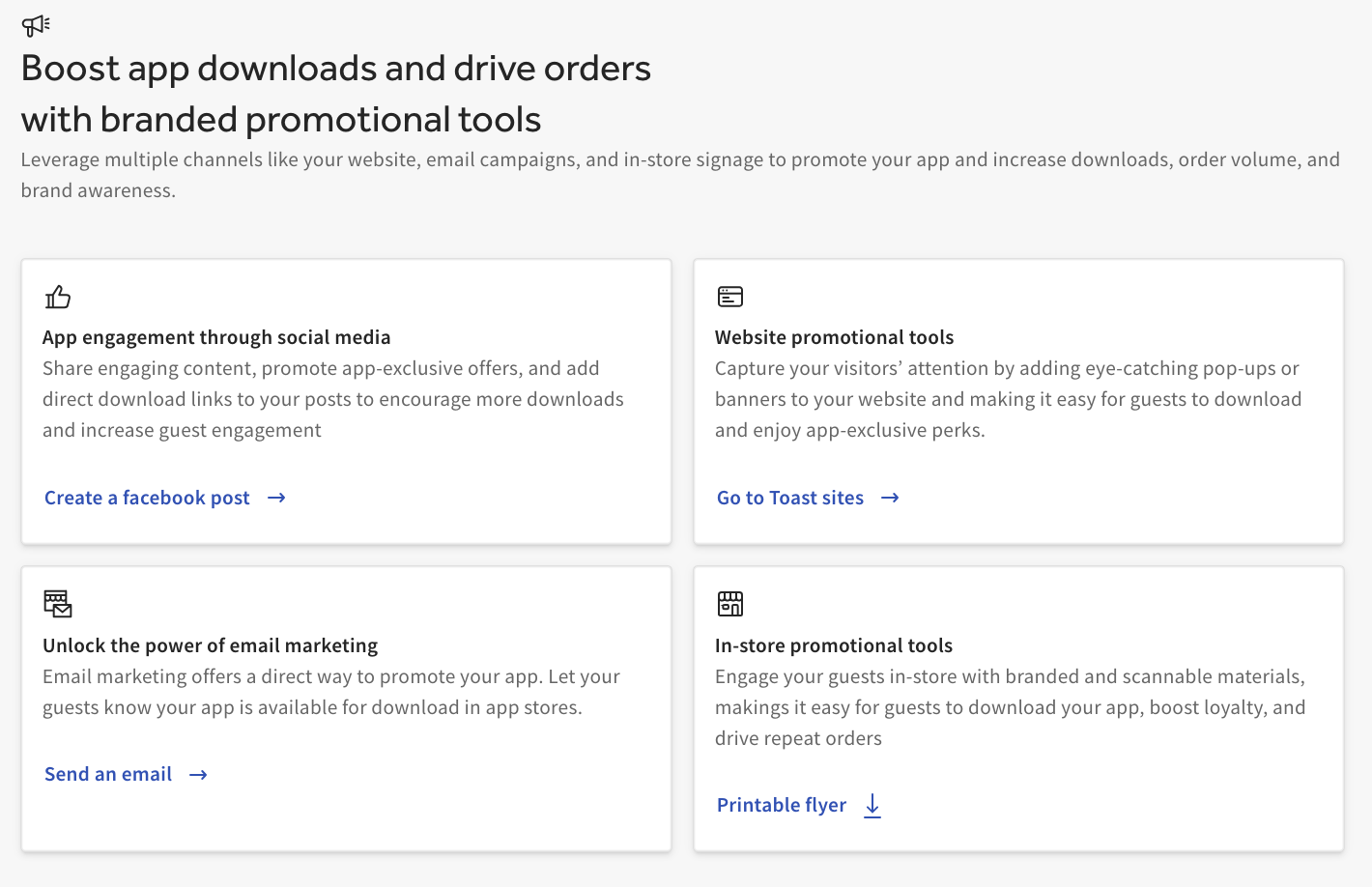
Leverage multiple channels like your website, email campaigns, and in-store signage to promote your app and increase downloads, order volume, and brand awareness.
In Toast Web, navigate to Takeout & delivery > Branding & customization > Branded Mobile App. Here, you can levage the options below to promote your Branded Mobile App.
- App engagement through social media
- Website promotional tools
- Email marketing
- In-store promotions
Location Favoriting
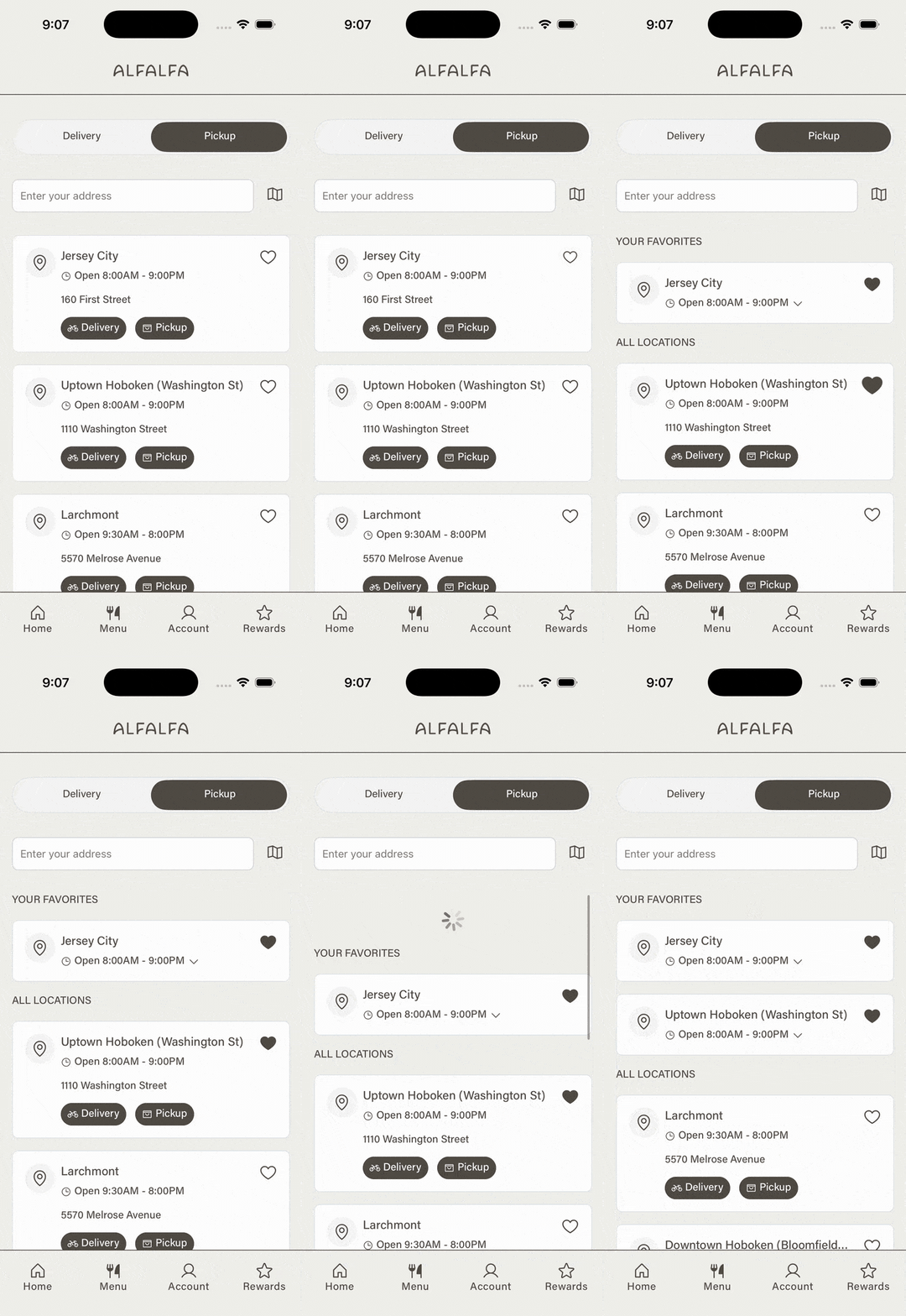
Guests can now favorite specific locations in the branded app. To favorite a location, tap the heart icon on the location card. Favorited locations appear at the top of the location picker list, regardless of distance from the guest. Tap the heart again to unsave a location.
- Guests navigate to Menu > Delivery or Pickup.
- Then select the heart icon for the appropriate location. The selected location appears in the Your Favorites section for the guest.
This article and its content are provided for informational purposes only and are not intended as legal, tax, or other professional advice. You are responsible for your own compliance with applicable laws and regulations. We recommend that you contact your attorney or other relevant professional advisor for advice specific to your circumstances and ensure compliance with relevant laws and regulations.