Get Started With the Campspot Integration
Last updated: Sep 22, 2026, 5:06 PM
The Campspot hotel property management system (PMS) integration, powered by Omniboost, allows restaurants and retail locations operating within hotels to accept room charges.
The Campspot integration, powered by Omniboost, is an online marketplace and reservation system primarily for campgrounds and recreational vehicle (RV) resorts, and also includes cabins, glamping, and more.
Note: This integration requires a Hotel Property Management System (PMS) Integration subscription, which can be purchased on Toast Shop.
- Campspot Integration: Onboard With Omniboost
- Toast Web Campspot Payment Setting
- Key Features
- Campspot Integration: Troubleshooting and Support
Campspot Integration: Onboard With Omniboost
In order to integrate Campspot, you must first onboard with Omniboost by adding the Omniboost tile in Toast Integrations (see Set Up Toast Partner Integrations). (If you're completely new to Campspot, you must also visit Campspot's demo page to request a demo.) Once this is done, Omniboost will contact you within five business days to schedule an onboarding call and a testing session. Onboarding calls may take about 45 to 60 minutes. After the integration has been mapped, Toast will add the Room Charge (this would apply to your camping, RV, glamping, etc., reservations) and Other Payment Option to your account in Toast Web. This will also enable your staff to look up Campspot guest reservations directly through the Toast POS system and automatically charge on-site transactions to their specific reservation. For more information on payment options, see Set Up Other Payment Options.
Some considerations to be made:
- The Toast and Omniboost systems should be configured and communicating before the testing session starts.
- Prior to the interface testing session, a Toast POS technician will confirm that Room Lookup and Posting messages can be sent to Omniboost, or a Toast POS technician and an Omniboost technician will both attend the interface testing session.
- If the Omniboost technician needs a program to test connectivity to the PMS (such as Postman), the program should be installed prior to the testing session.
- Access to a Toast POS terminal/device and knowledge of Toast POS is required for interface testing, unless a Toast POS technician with access to the client system is attending the interface testing.
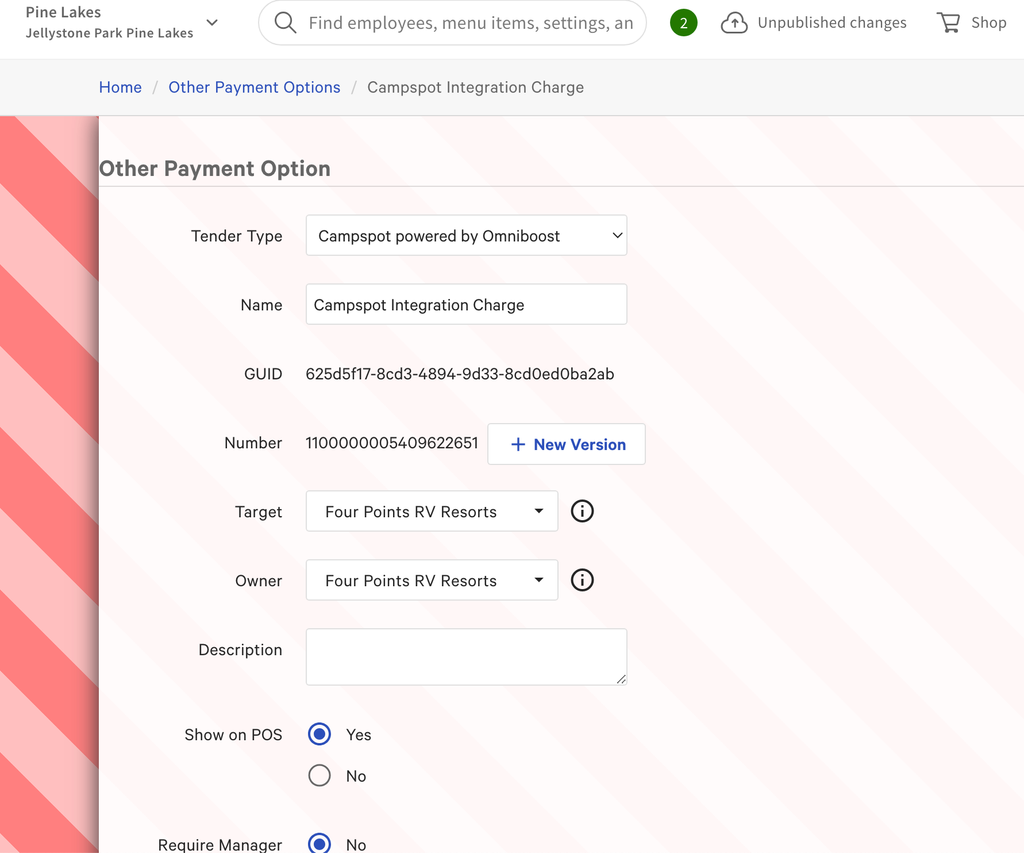
Toast Web Campspot Payment Setting
When completing a transaction payment, your alternate payment type list will now include Campspot powered by Omniboost. Here's what it looks like in Toast Web:
Campspot Key Features
- Staff can look up guest reservations directly through the Toast POS system and automatically charge restaurant transactions to their specific reservation. This reduces the need for manual entry, minimizes errors, and saves administrative time, allowing staff to focus more on hospitality.
- Guests benefit from the ability to have their dining expenses directly charged to their Campspot reservations without needing cash or credit cards on hand. Campspot simplifies the billing process and elevates overall guest satisfaction by consolidating payments.
Campspot Integration: Troubleshooting and Support
If you have any questions or technical issues relating to the Campspot integrations, please contact them through one of these methods:
- Support Ticketing: Support tickets can be filed directly with Campspot on their support page.
- Chat: Visit support.campspot.com to start a live chat when an agent is available.
- Phone: Call them at (616) 226-5500 or toll-free at (800) 724-8620 Ext. 2. Phone support is available:
- Monday-Friday from 9 a.m.-8 p.m. EST
- Saturday-Sunday from 9 a.m.-6 p.m. EST