Get Started With the Navori STiX 3800 Media Player for Delphi Indoor Digital Menu Boards
Last updated: Sep 16, 2026, 5:23 PM
Delphi (by Toast) provides various hardware and software solutions for enterprise and SMB customers. These solutions include, but are not limited to:
- Digital menu boards (indoor and outdoor)
- Drive-thru communication products
- Custom display solutions and digital signage
- Professional creative services
The Navori STiX 3800 media player is the latest version of the STiX media player. The previous version is the 3700. The STiX 3800 media player is used to power Delphi indoor digital menu boards.
This article covers how to install, set up, and mount the media player to/on a Delphi indoor digital menu board.
| If you have a screen that you would like to use to display your menu, you can purchase the media player and a license to the Insight Engage Platform separately. You do not need to purchase a Delphi digital menu board to use the media player and the Insight Engage Platform. |
If you have further questions or require technical support, please contact Delphi directly from M-F 6:00 a.m.-3:00p.m. PT at +1 (800) 456-0060, option 1.
- Pre-Installation Requirements
- Navori STiX 3800 Media Player Package
- Set Up and Connect the STiX 3800 Media Player
- Mount the STiX 3800 Media Player
- FAQ
- My screen is working, but stopped showing content and is displaying the Delphi welcome message?
- I installed my media player, but no content is showing on my screen?
- My media player is showing a red connection status in the Insight Engage Platform. What does this mean and how do I fix it?
- I published new content in the Insight Engage Platform, but the new content is not showing on my screen?
- Why is my screen black?
Pre-Installation Requirements
Prior to installing and configuring the Navori STiX 3800 media player, a sales agreement must be fully paid by the Delphi customer.
Navori STiX 3800 Media Player Package
| You do not have to use a Navori STiX 3800 media player to display your Delphi digital menu board. There are other options available to display your menu. For more information, contact your Toast account manager. |
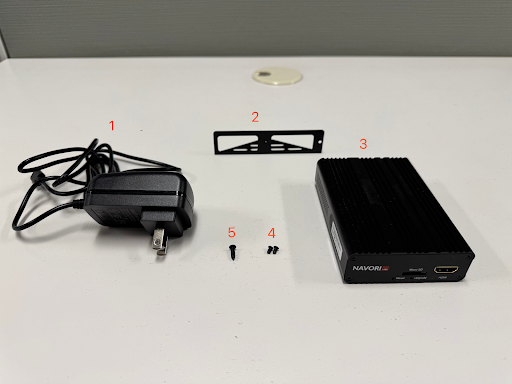
The Navori STiX 3800 media player package contains the following components:
- 12VDC USB-C power adapter (At the time of publication, this component can be purchased separately)
- Navori STiX 3800 mounting bracket
- Navori STiX 3800 media player
- 2 CSK Philips device mounting screws
- 1 Philips flat head mounting screw
- 3' HDMI m/m cable (photo not available) (At the time of publication, this component can be purchased separately)
Set Up and Connect the Navori STiX 3800 Media Player
| Delphi Support recommends that once you are given access to the Insight Engage Platform, that you start adding, scheduling, and publishing content to prepare for when you connect your media player to your screen. |
The instructions listed below may vary depending on your screen's design and layout.
- Open your media player package. Set all the components to the side.
- Connect one end of the HDMI cable to the HDMI port on the Navori STiX 3800 media player.
- Connect the other end of the HDMI cable to the indoor digital menu board.
- Connect the Navori STiX 3800 media player to internet/Wi-Fi. Confirm that your network is online and connected to the internet. There are two methods to connect your STiX media player:
- Toast recommended: Connect the ethernet cable to the WAN port on the STiX player. Do not connect to the LAN port. Once connected, the STiX player should automatically configure the server URL and license.
- Connect via Wi-Fi: Navigate to the Android Settings on STiX player to connect to Wi-Fi. Once connected, reboot the STiX player. Once successfully rebooted, the STiX player should automatically configure the server URL and license.
-
If the board does not automatically configure the server URL and license, and a blank activation screen is displayed, reboot the STiX player. If the player does not automatically configure the server URL and license, reach out to Delphi support for assistance.
- If the internet connection is successful and the server URL and license are automatically configured, plug the USB-C power adapter into the STiX 3800 media player. This automatically powers on the media player and starts the setup process on your digital menu board. During the setup process, the media player automatically activates, reboots, and displays a cloud background on the indoor digital menu board. No user interaction is required during the setup process. The STiX 3800 media player will automatically handle activation and content loading.
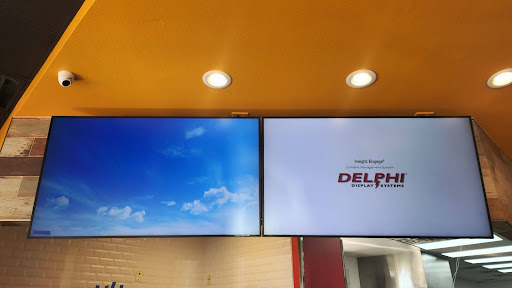
After 5 minutes, the indoor digital menu board switches to the menu content that has been scheduled on the Insight Engage Platform. For more information, see Get Help With Scheduling and Publishing in the Insight Engage Platform. If the indoor digital menu board does not switch to the menu content, reach out to your IT or Marketing department to ensure that content has been created and scheduled to publish on the Insight Engage Platform.
Mount the Navori STiX 3800 Media Player
You can mount the STiX 3800 media player on various surfaces and locations within your store location, such as on the digital menu board or on a wall. If mounting on a wall, Toast support recommends you use a wall stud finder to locate a stud to securely mount the media player.
Mounting Components
| The mounting components are included in the Navori STiX 3800 Media Player package. |
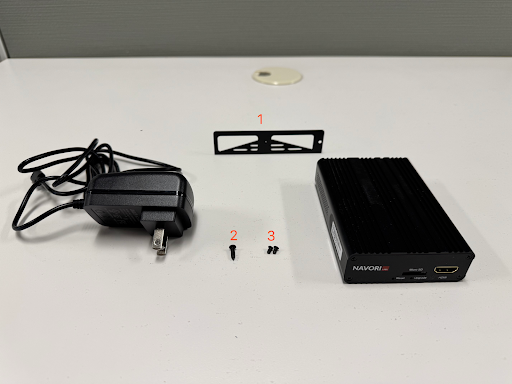
The mounting components are:
- 1 mounting bracket
- 1 Philips flat head mounting screw
- 2 CSK Philips device mounting screws
Tools needed:
- 1 Philips screw driver
- (Optional) 1 wall stud finder
Mounting Instructions
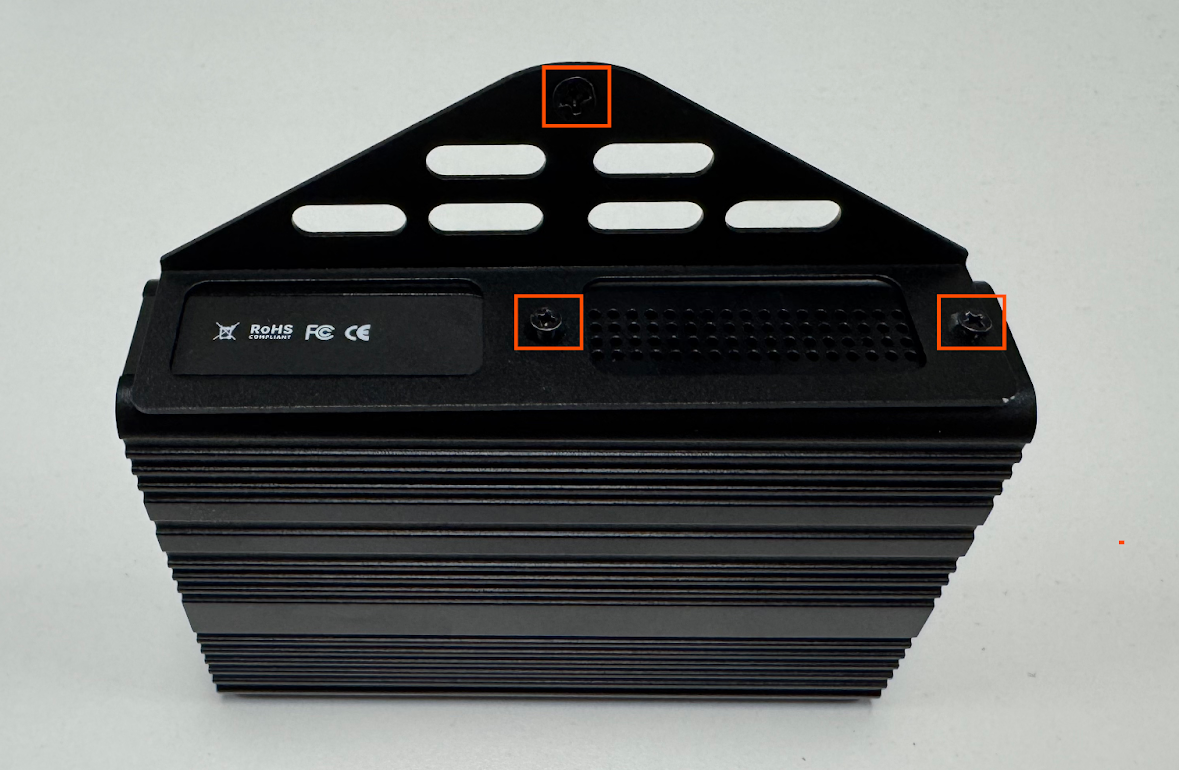
- Place the 2 CSK Philips device mounting screws in the screw holes on the mounting bracket.
- Place the mounting bracket on the STiX 3800 media player.
- Align the mounting bracket so that the 2 CSK Philips device mounting screws are placed above the screw holes.
- Use a Philips screw driver to screw the 2 CSK Philips device mounting screws into the STiX 3800 media player.
- Align the Philips flat head mounting screw to the screw hole at the top of the mounting bracket.
- Use a Philips screw driver to screw the Philips flat head mounting screw into the mounting bracket.
FAQ
My screen is working, but stopped showing content and is displaying the Delphi welcome message?
Check that you have content scheduled in the Scheduling Grid in the Insight Engage Platform. If no content is scheduled, your screen will default to showing the Delphi welcome message.
I installed my media player, but no content is showing on my screen?
Check that you have uploaded, scheduled, and published content in the Insight Engage Platform.
My media player is showing a red connection status in the Insight Engage Platform. What does this mean and how do I fix it?
If your media player in the Insight Engage Platform is showing a red status, this indicates that the media player is offline or is encountering a network issue. To resolve the issue, try the following:
-
- Trace your ethernet cable connection to make sure your media player is connected to your screen.
- Check that the ethernet cable is not connected to the Toast router. The ethernet cable should not be connected to the Toast router and should be connected to your main router.
- Confirm that you have a hardwired connection to your main router.
- Check the lights on your router. Confirm that your router is ready and working.
- [If applicable] Confirm engage.delphidisplay.com is white-listed on your firewall. If none of these steps resolve the issue, reach out to Delphi support.
I published new content in the Insight Engage Platform, but the new content is not showing up on my screen?
In the Insight Engage Platform, check that your media players are selected and that content has been uploaded, scheduled, and published.
Why is my screen black?
In the Insight Engage Platform, check that you have content scheduled and published.