Get Started With the Toast HDBT Media Player for Delphi Outdoor Digital Menu Boards
Last updated: Sep 16, 2026, 5:24 PM
Delphi (by Toast) provides various hardware and software solutions for enterprise and SMB customers. These solutions include, but are not limited to:
- Digital menu boards (indoor and outdoor)
- Drive-thru communication products
- Custom display solutions and digital signage
- Professional creative services
This article covers how to install and set up the Toast HDBT media player for use with a Delphi outdoor digital menu board.
| If you have a screen that you would like to use to display your menu, you can purchase the media player and a license to the Insight Engage Platform separately. You do not need to purchase a Delphi digital menu board to use the media player and the Insight Engage Platform. |
If you have further questions or require technical support, please contact Delphi directly from M-F 6:00 a.m. - 3:00 p.m. PT at +1 (800) 456-0060, option 1.
- Pre-Installation Requirements
- Toast HDBT Media Player Package
- Set Up and Connect the Toast HDBT Media Player
- FAQ
Pre-Installation Requirements
Prior to installing and configuring the Toast HDBT media player, a sales agreement must be fully paid by the Delphi customer.
At least one Delphi digital menu board with an HDBT receiver installed is required. Each digital menu board must be equipped with a HDBT receiver.
| For a list of preferred digital menu boards, please reach out to the Delphi Sales team. |
Toast HDBT Media Player Package
| You do not have to use a Toast HDBT media player to display your digital menu board. There are other options available to display your menu. For more information, contact your Toast account manager. |
The Toast HDBT media player package contains the following components:
- 2 antennas. Toast support recommends connecting an Ethernet cable to the LAN port on the Toast HDBT media player instead of attaching and using the antennas.
- 1 Toast HDBT media player
- 1 power cable and plug
Not included: CAT 5 or 6 cable
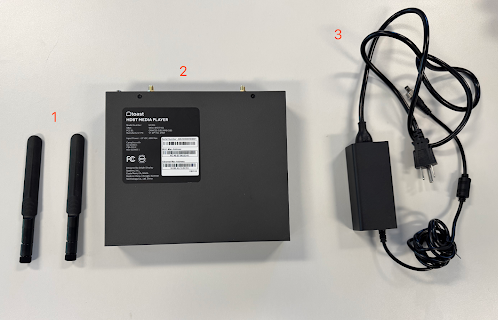
Set Up and Connect the Toast HDBT Media Player Package
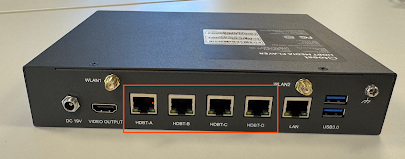
| You can connect up to 4 outdoor digital menu boards using a Toast HDBT media player. The Toast HDBT media player has 4 ports that can be used to connect to outdoor digital menu boards. |
- Connect one end of the CAT 5 or 6 Ethernet cable to the LAN port on the Toast HDBT media player.
- Connect the other end of the CAT 5 or 6 Ethernet cable to the store's network switch.
- Plug the digital menu board(s) into the appropriate ports on the Toast HDBT media player using a CAT 5 or 6 Ethernet cable. Ports are labeled in the order that the screens should be displayed, from left to right. For example, if you have 4 screens, plug the first screen's cable into port HDBT-A, the second screen's cable into port HDBT-B, and so on.
- Plug the power cable into the power port on the Toast HDBT media player.
- Plug the power adapter into a direct power outlet. This automatically powers on the Toast HDBT media player and starts the setup process. During the setup process, the Toast HDBT media player automatically, activates, reboots, and then displays a cloud background on the outdoor digital menu board. No user interaction is required during the setup process. The Toast HDBT media player will handle activation and content loading automatically. The image below depicts the cloud background on an indoor digital menu board.
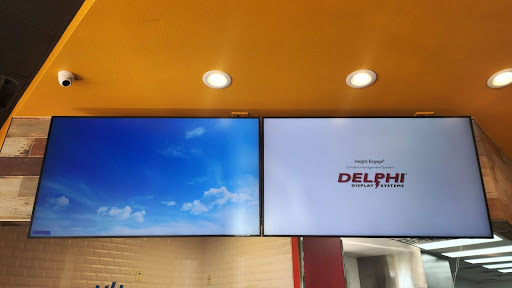
After 5 minutes, the outdoor digital menu board switches to the menu content that has been scheduled on the Insight Engage Platform. For more information, see Get Help With Scheduling and Publishing in the Insight Engage Platform. If the outdoor digital menu board does not switch to the menu content, reach out to your IT or Marketing department to ensure content has been created and scheduled to be published on the Insight Engage Platform.
| The default orientation of the outdoor digital menu board is landscape. To change the orientation to portrait, contact Delphi support. |
FAQ
Where should I install the Toast HDBT media player in my store?
Toast support recommends you install the Toast HDBT media player in your IT rack or closet.
What should I do if my outdoor digital menu board is black or not showing content?
Toast support recommends you check the following:
-
- Check that each port's lights on the back of the HDBT media player are flashing yellow and showing a solid green color.
- If that does not resolve the issue, check that there is power going to the digital menu board.
- If that does not resolve the issue, check that the network cables are seated correctly in the media player.
- If that does not resolve the issue, contact a Delphi technician to check that the cables are crimped correctly and are in good condition.
As needed, contact Toast to get a replacement HDBT media player.