Get Started With the Kickfin Integration
Last updated: Aug 28, 2026, 4:46 PM
Key Features of Kickfin
- No more spreadsheet math: The Kickfin integration makes it easy to customize tip pools and automate calculations so managers never have to hassle with spreadsheets.
- Cut out cash: By removing cash from the tip-out process, Kickfin reduces admin hours, mitigates risk, streamlines accounting and reporting, and eliminates bank trips to fund tip-outs.
- Hire more staff: Employees prefer to receive their tips instantly, streamed directly to their bank accounts. This gives Kickfin customers a competitive hiring advantage.
- Built for scale and compliance: Kickfin works for enterprise, independents, and everything in between to help ensure compliance with complicated, ever-changing tipping regulations.
Requirements of Kickfin Integration
This integration requires access to Toast Partner Integrations. To learn more, see Set Up Toast Partner Integrations. If you are using the Kickfin integrations tip distribution feature and Toast Payroll with tip makeup enabled, you run the risk of duplicate tip payments to your employees. Please work with your Payroll consultant or Customer Care to disable tip makeup and avoid duplicate tip payments.
Enable Kickfin With Toast
- To enable Kickfin with Toast, log into Toast Web and navigate to Integrations > Browse & purchase integrations.
- Enter Kickfin in the Search field and select Add Now.
- Note: Your restaurant must have access to Toast Partner Integrations to add this integration. To learn more, see Set Up Toast Partner Integrations.
- Review the data scope visibility terms and conditions and select Confirm to accept. See the Data Scope Visibility article for more information.
Troubleshoot and Support for Kickfin
If Kickfin is attempting to import your information and food sales are being imported but not the drinks (or vice versa), you may need to assign Sales Categories.
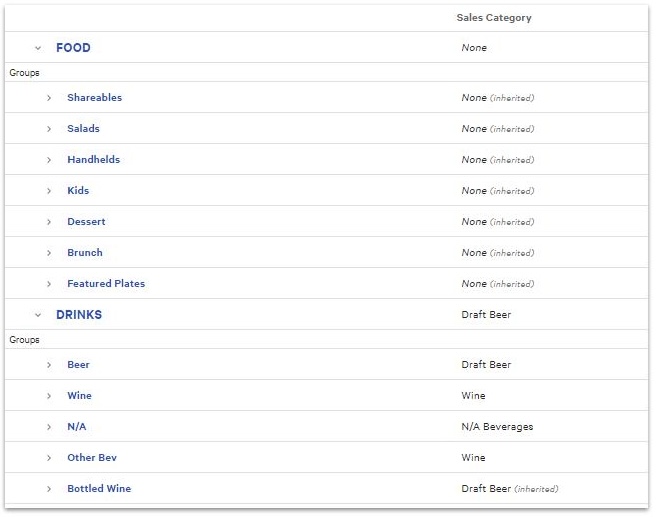
- In Toast Web, navigate to Menus > Bulk management > Advanced properties.
- From the Show/Hide drop-down menu, make sure Sales Category is selected.
- Expand you menus, groups, and menu items by using the > caret icons.
- Assign a Sales Category to any menu items without one.
- Save and publish any changes you make.
If other troubleshooting issues arise, email the Kickfin support team directly at support@kickfin.com for any Kickfin integration issues unrelated to Toast products (software or hardware) or network/connectivity issues. They can also be reached via phone at (737) 252-6785. Their phone line is open Monday through Friday from 9 a.m. to 9 p.m. EST and on Sundays from 12 p.m. to 6 p.m. EST.