Publish Changes in Toast Web
Last updated: Sep 15, 2026, 10:30 AM
In Toast Web, edits to menus, devices, printers, and other settings are saved as unpublished changes until you publish them. This article explains how to publish changes, review what is pending, see your publish history, and coordinate publishing across multiple locations.
- About Publishing in Toast Web
- Permissions Needed to Publish
- Review and Publish Pending Changes
- Publishing Center - History
- Publishing for Multi-Location Management
- Scheduled Publishing
- If a Published Change Doesn't Appear on the POS
- Frequently Asked Questions
- Related Articles
About Publishing in Toast Web
Publishing pushes your saved Toast Web edits to your POS devices, online ordering, and other connected surfaces. Saving and publishing are two different actions:
- Saving stores your change in Toast Web so other admins can see it, but it does not push the change to your POS. Saved-but-not-published edits are called unpublished changes.
- Publishing finalizes those saved changes and sends them to your POS and other connected surfaces.
For example, if you save changes to your menu prices but do not publish them, the new prices do not appear at the terminal until you publish.
The cloud icon at the top of Toast Web shows your current publishing state:
| State | Icon | What it means |
|---|---|---|
| Cloud with checkmark |  | All changes have been published |
| Cloud with up arrow |  | There are changes waiting to be published |
| Cloud with rounded arrows |  | Publishing in progress |
| Cloud with exclamation mark and red dot |  | Publishing error; publishing incomplete |
| Cloud with nothing inside |  | Unknown or still loading |

Selecting the cloud icon opens the Publish Config page, where you can see every unpublished change, who made it, and publish them. You can also reach the same page from Toast account > Publishing > Publish Config.
Permissions Needed to Publish
Publishing changes in Toast Web requires two permissions on your employee account:
- 4.5 Edit Full Menu — required to make most menu and configuration changes
- 6.4 Publishing — required to push saved changes to the POS
If you are in a restaurant group with multiple locations, you need both permissions at every location where you want to publish. If you can publish at one location but get a permissions error at another, your permissions are not aligned across locations. For step-by-step troubleshooting, see Unable to Publish Changes in Toast Web and Why can't I publish menu changes?.
Review and Publish Pending Changes
To review what is waiting to be published and finalize the changes, follow these steps:
- In Toast Web, navigate to Toast account > Publishing > Publish Config V2, and select the checkbox next to your restaurant/business name under the Unpublished Changes section.
- A window will appear at the bottom half of the screen that displays the changes made, the previous configuration and the new configuration, as well as the user who saved the changes.
- When you are ready to push the changes to your POS, select Publish.
Expected outcome: The cloud icon changes to the rotating-arrows state while publishing runs, then to the checkmark state when publishing completes. Your changes are now live on the POS.
Note: If you save a change on one day but do not publish it until a later date, the change appears on the Publish Config page on the day it was published, not the day it was saved.
For smooth publishing, follow these recommendations:
- Regularly check the Publish Config page for unpublished changes and publish them, including Quick Edits made on the POS.
- Coordinate with other admins so you do not publish each other's in-progress edits.
- If your changes still are not appearing on the POS after publishing, resync all data on the device. See Resync All Data on Your Devices.
Publishing Center - History
The Publishing Center - History page shows every publish event for your restaurant. Use it to answer "Who made this change?" or to investigate a recent change that caused unexpected behavior at your restaurant.
To open Publishing Center - History, navigate to Toast account > Publishing > Publishing Center - History.
Note: Restaurants using Toast Multi-Location Management (MLM) do not have a location drop-down on this page. To view a specific location's history, log in to that location first. You must have the 6.4 Publishing permission to view the page.
Use the date and entity type drop-downs at the top of the page to filter results. The entity type filter narrows history to publishes that include a specific action or setting type.
Each row in the table represents one of three event types: a Full publish, Quick edit, or Scheduled publish. Each row shows:
- Time — the time of the publish, displayed in the time zone of whoever is viewing it. For example, if your restaurant is in California and you are viewing the page from Massachusetts, the time shows in Eastern time.
- Publisher — the user who published the change. This is not necessarily the user who made the original edit. Select the event to see the user who made each individual edit.
- Changes — the total number of changes included in the event. Select the event to see each individual change.
Select any row to open the action details. From there, select an individual action to see the specific fields that were changed and the user who made the last edit.
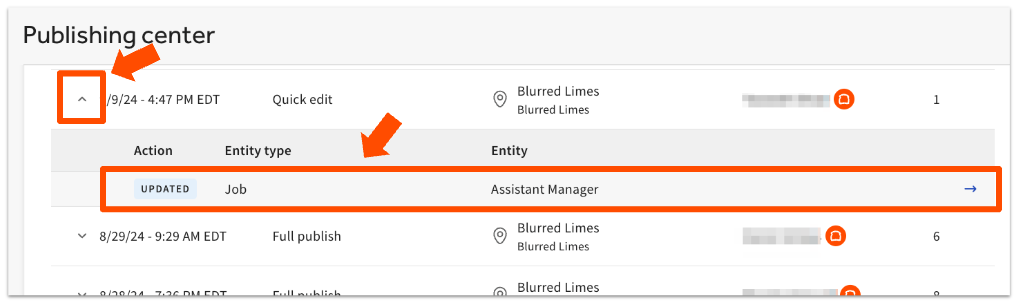
A few things to know about Publishing Center - History:
- The page uses infinite scroll, so you can keep scrolling to see older publishing events.
- If a Toast employee made a change to your location, their name appears in the Publisher column with a Toast logo next to it.
- Toast Automation appears as the publisher for programmatic changes Toast makes on your behalf, such as compliance updates or online ordering snooze adjustments.
- If you have published changes by mistake, you can roll them back by updating the settings manually and republishing.
You may see No details are available for this change when reviewing a specific action. A few things can cause this:
- In large publishes, one setting can "touch" many related settings. The system records that a change happened on the linked settings even though their values did not change. For example, some online ordering settings affect UI options settings.
- For MLM restaurants, this can also indicate that the Target of a setting was changed. Target changes are not currently shown in Publishing Center - History, but the publish event itself is still recorded.
Note: Some historical changes are not viewable in Publishing Center - History. For example, the user who changed an employee's profile is not recorded on this page.
Publishing for Multi-Location Management
MLM customers publish changes for multiple locations from the Publish Config page at Toast account > Publishing > Publish Config.
The Previous Config Changes table on this page provides a log of every prior publish and which user published it. You can see who published, but you cannot see the contents of the change from this table. To inspect individual changes, open Publishing Center - History.
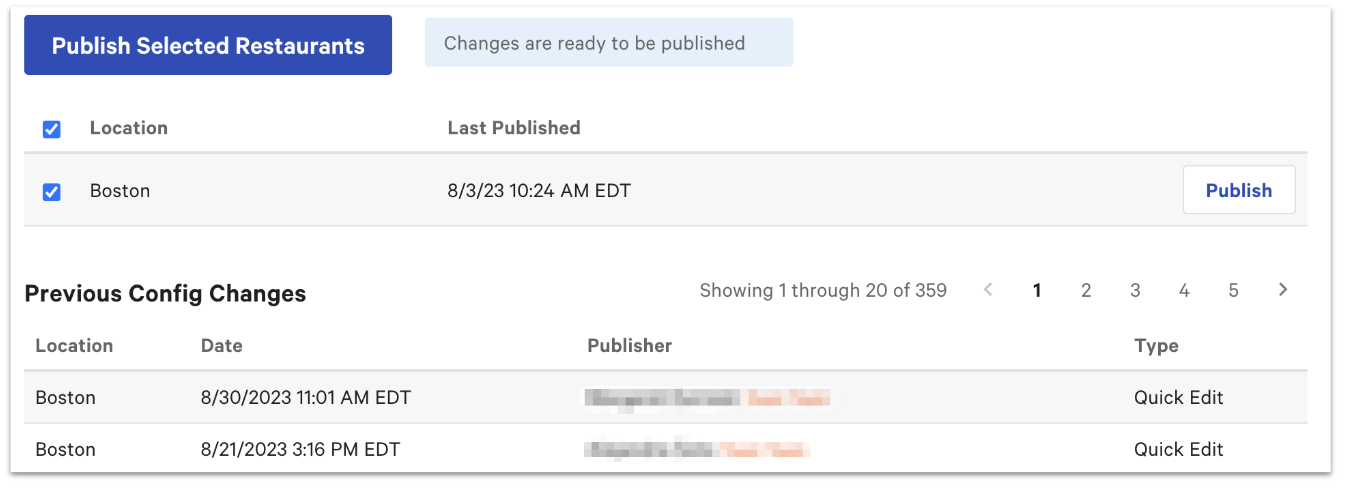
Practical tips for MLM publishing:
- Coordinate with team members so you do not overlap edits at the same location.
- You may sometimes see pending changes in Publish Config that do not appear to have anything to publish. Cross-location MLM activity or restaurant-group-wide settings can produce these entries.
- If menu or configuration changes are not appearing at certain locations in an MLM group, open Publish Config at the affected location, confirm no changes are still pending, and then resync the location's devices. See Resync All Data on Your Devices.
Scheduled Publishing
Scheduled publishing lets you group menu changes into a change set and have them publish automatically at a future date and time. It is available for restaurants on Toast Multi-Location Management (MLM) or one of the Restaurant Management suites.
For setup and use, see Set Up Scheduled Publishing With the Menu Manager and Get Started With Menu Manager.
If a Published Change Doesn't Appear on the POS
If you published a change in Toast Web but the device does not show the update, work through these checks:
- Open Publish Config and confirm that no changes are still listed as unpublished. Sometimes only part of a planned change was actually published.
- Confirm the change was published at the location the device is connected to. In MLM groups, a change published at one location does not affect another.
- Resync the affected device. See Resync All Data on Your Devices.
Expected outcome: After the resync completes, the change is visible on the device.
If the change still does not appear after a resync, contact Toast Customer Care.
Frequently Asked Questions
What's the difference between saving and publishing?
Saving and publishing are separate actions. Saving stores your change in Toast Web so other admins can see it; publishing pushes the saved change to your POS and other connected surfaces. A saved change is not active until you publish it.
Also asked as:
-
- Do I have to publish my changes?
- If I save my edits, are they live?
- Is just saving them fine?
How do I see what's in my unpublished changes?
To see your unpublished changes, navigate to Toast account > Publishing > Publish Config V2. A window will appear at the bottom half of the screen that displays every saved change that has not yet been published, along with the user who saved each one.
Also asked as:
-
- Where do I see my unpublished changes?
- How do I find unpublished items?
- Can I view what's in the queue to be published?
Can I cancel or undo an unpublished change before publishing?
At this time there is not an undo or unpublish action to revert published changes. The changes will need to manually be reverted back to what they were before. It's recommended to view the publishing history by by navigating to Publish Config or Publish Center-History, select the published change and view the Before or Old column to see the previous values that were set.
Also asked as:
-
- How do I delete unpublished menu changes?
- How do I discard saved changes?
- How do I reset my unpublished changes?
Why can't I publish my changes?
You cannot publish a change without both the 4.5 Edit Full Menu and 6.4 Publishing permissions on your employee account at the location you are trying to publish. The most common cause of a publishing-permission error is that one of those permissions is missing for one or more locations. For step-by-step troubleshooting, see Why can't I publish menu changes? and Unable to Publish Changes in Toast Web.
Also asked as:
-
- Why do I need additional permission to publish?
- Why can't my manager publish?
- Why can't my employee publish menu changes?
Why did I get the "Your restaurant has unpublished changes that are preventing you from saving changes on this device" error?
The "Your restaurant has unpublished changes that are preventing you from saving changes on this device" error appears on a device when there are pending changes in Toast Web that have not been published yet. To clear the error, navigate to Toast account > Publishing > Publish Config and publish the pending changes, then try the action again. If the error continues, see Get Help With Error Message: Unpublished Changes Preventing Saving.
Also asked as:
-
- Why is my printer saying it has unpublished updates?
- How do I clear unpublished changes preventing saving?
Who is "Toast Automation" in my publish history?
Toast Automation is the publisher name that appears when Toast makes programmatic changes on your behalf. Common examples are compliance updates and adjustments to online ordering snooze settings. If you also see a Toast employee's name with a Toast logo next to it, that indicates a manual change made by a Toast employee at your location.
Also asked as:
-
- What is Toast Automation in my publish logs?
- Who are the Toast Team people in my publish history?
Does Publishing Center - History show every change?
Publishing Center - History does not show every change. Some changes, such as edits to an employee's profile, are not recorded on this page. In addition, No details are available for this change can appear when a large publish touched many related settings or, for MLM restaurants, when the Target of a setting was changed.
Also asked as:
-
- Why don't I see who changed my employee's profile?
- Why does it say no details are available for this change?
Related Articles
- Resync All Data on Your Devices
- Why can't I publish menu changes?
- Unable to Publish Changes in Toast Web
- Get Help With Error Message: Unpublished Changes Preventing Saving
- Set Up Scheduled Publishing With the Menu Manager