How Guests Earn Points With Toast Loyalty
Last updated: Sep 18, 2026, 9:39 AM
Looking for a Toast Loyalty training? Select the button below to start!
Drive repeat visits with a simple, integrated loyalty program that rewards regulars- whether in-store or online.
Add Toast Loyalty
- What Do Guests Earn?
- How Do Guests Earn Points?
- Split Loyalty Points Between Multiple Accounts on a Shared Order
- Loyalty Point Accrual Notifications
What Do Guests Earn With Toast Loyalty?
Guests will earn points for every dollar they spend. The amount of points they earn depends on how you have configured your point structure. Guests will cumulatively earn points -- meaning they will earn fractions of points for every cent spent on your point system.
For example, if your point structure is set up to earn one point per $15 spent, if a guest spends $10 in one visit, they will have earned 0.66 points towards their account. They do not need to spend the full $15 in one order to earn the points.
Points are only earned on pre-taxed, non-discounted amounts. Guests do not earn points on tips, taxes, or gift card purchases.
Learn how to set up your Toast Loyalty program with Get Started With Toast Loyalty!
How Do Guests Earn Points With Toast Loyalty?
Guests can earn points when their loyalty account is attached to the order on:
- POS, Toast Go® 2, Toast Go® 3 or Guest-Facing Display
- Online Ordering
- Toast Local
- Note: Toast Local is not available for locations outside of the US.
- Kiosk
- Mobile payments
- Toast Mobile Order & Pay®
Earn Loyalty Points on POS, Toast Go® 2, Toast Go® 3 or Guest-Facing Display
Earn loyalty points through a linked card: When our guests pay for an order in-store with a credit card that has been linked to their loyalty account, they will automatically earn points for their order.
Check out Linking a Credit Card or Debit Card To a Loyalty Account for more information.
To add a loyalty account to an order:
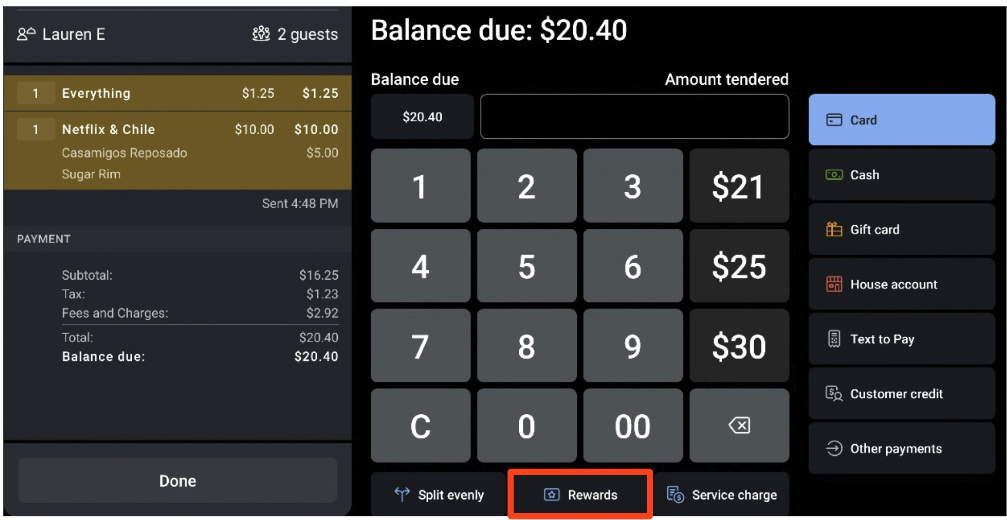
- On the POS, Toast Go® 2, or Toast Go® 3 a staff member can add a guest's loyalty account to the check so that the guest can earn points.
- On the payment selection screen, select the Rewards at the bottom of the screen.
- A pop-up window will appear where your staff can look up the guest's rewards account number using the following:
- Key In: Manually enter the guest's 16-digit number. The guest can find this number on their digital loyalty card.
- Scan: Use the tablet's camera on your scanner to scan the customer's QR code.
- Swipe: If the loyalty account is linked to a physical gift card, you can swipe it to look up the account.
- Lookup: Search by the customer's name, phone number, or email.
Earn loyalty points through sign-in flows: Guests can also attach their rewards accounts via the sign-in flows. If a guest tries to sign up with an email address or phone number that already has a loyalty account attached to it, instead of signing up for a new account, the points will be earned towards the existing account.
Learn more: Enroll Guests in Toast Loyalty.
Earn Loyalty Points Through Digital Ordering (Toast Online Ordering, Toast Local, Mobile Payments, and Toast Mobile Order & Pay®)
Note: Toast Local is not available for locations outside of the US.
Suppose a guest places an order through Toast Online Ordering, Toast Local, Toast Mobile Order & Pay®, or mobile payments and uses an email or phone number that has a loyalty account connected to it. In that case, the guest will earn points from that order toward their loyalty account.
Guests can now redeem their loyalty points using mobile payments. During the payment workflow, if a guest has the required number of points for a loyalty reward, they will see an option to apply and redeem it.
Earn Loyalty Points on Kiosk
On a Toast Self-Ordering Kiosk, guests will be prompted to look up or create a loyalty account when they start to place an order. Once connected to their Toast Loyalty account, they'll be able to accrue points for the orders they place on kiosk. Learn more in this Support Center article, Kiosk: Place Orders and Make Payments.
Split Loyalty Points Between Multiple Accounts on a Shared Order
If a group of guests with multiple loyalty accounts places a shared order, they may want the loyalty points from the order split across their separate accounts. To ensure that points are accrued properly, it is important to split the order at the check level rather than at the payment level. If the payment is split rather than the check, guests may not earn the correct amount of points.
To split the check correctly, simply use the Split feature on your POS device before selecting Pay, and then enter each guest's individual loyalty account when taking their payment.
Note: If a guest has two separate loyalty accounts (for example, one tied to their phone number and one to their email address), see Merge Reward Balances to combine them. Note: the self-service merge tool requires at least one matching identifier between the two accounts — if both the phone number and email differ, a restaurant staff member will need to manually transfer the balance instead.
Loyalty Point Accrual Notifications
When guests have the Toast Local app installed and are logged in to their account, they will receive a push notification when they make a payment on an order and earn points via the POS, Online Ordering, Toast Mobile Order & Pay®, mobile payments, Toast Local, and kiosk.
Note: If a guest uses different emails or accounts for Toast Local and Toast Loyalty, push notifications will not show up for the guest as a result. If guests would like to disable push notifications for Toast Local, they need to do so via their phone settings.