Get Started With Toast Loyalty
Last updated: Sep 11, 2026, 12:42 PM
Toast Loyalty lets your guests enroll, earn points, and redeem rewards at your restaurant. This article walks you through first-time setup of your loyalty program in Toast Web.
- About Toast Loyalty
- Before You Begin
- Step 1: Open Loyalty Settings in Toast Web
- Step 2: Choose Your Program Type
- Step 3: Set Up Your First Reward
- Step 4: Personalize Your Program
- Step 5: Review and Create Your Program
- Step 6: Save, Publish, and Promote Your Program
- Train Your Staff
- Optional Setup
- Multi-Location Loyalty
- Frequently Asked Questions
- Related Articles
About Toast Loyalty
Toast Loyalty lets your guests easily enroll, earn, and redeem rewards at your restaurant. Guests can sign up when paying at the register, signing the check at their table, placing an online order, or through the Local by Toast app. Once signed up, guests earn points with every purchase or visit. Points are recorded through a phone number, email address, or credit card linked to their loyalty account. There is no maximum number of points a guest can earn on a transaction, and no maximum balance a loyalty account can hold.
Once guests have earned enough points, they can redeem them for rewards you choose — for example a free beverage or a dollar discount. Read on to learn how to set up and start using your program.
If you have a full service restaurant and want to learn Toast's tips to maximize the potential for your loyalty program at your restaurant, check out the article Toast Loyalty Best Practices for Full Service Restaurants.
Before You Begin
Applies to: Toast Web, Toast POS, Kiosk, Toast Online Ordering, Local by Toast app, Guest-Facing Display
Permissions needed:
- 4.8 Marketing Info — required to set up and configure the Toast Loyalty program
- 4.4 Gift/Rewards Card Reports — required to review sales data for gift and rewards cards
For more information on each access permission, see the Permissions Reference Guide.
What you'll accomplish: Activate Toast Loyalty for your restaurant with at least one reward configured, your signup method selected, and the program live across the ordering channels you choose.
Note: Guests cannot earn or redeem Toast Loyalty points on orders submitted through online ordering integrations such as DoorDash, Grubhub, or Uber Eats.
Note: If you don't see Toast Loyalty in Toast Web, your account may not have an active Toast Loyalty subscription. Navigate to Toast Shop and search Marketing Essentials to purchase the subscription bundle or contact Care to add the individual Toast Loyalty subscription.
Step 1: Open Loyalty Settings in Toast Web
- Log in to Toast Web.
- Navigate to Toast Web > Marketing > Loyalty > Settings.
Expected outcome: You'll see the Toast Loyalty setup page. If you've never enrolled before, the page will walk you through program creation.
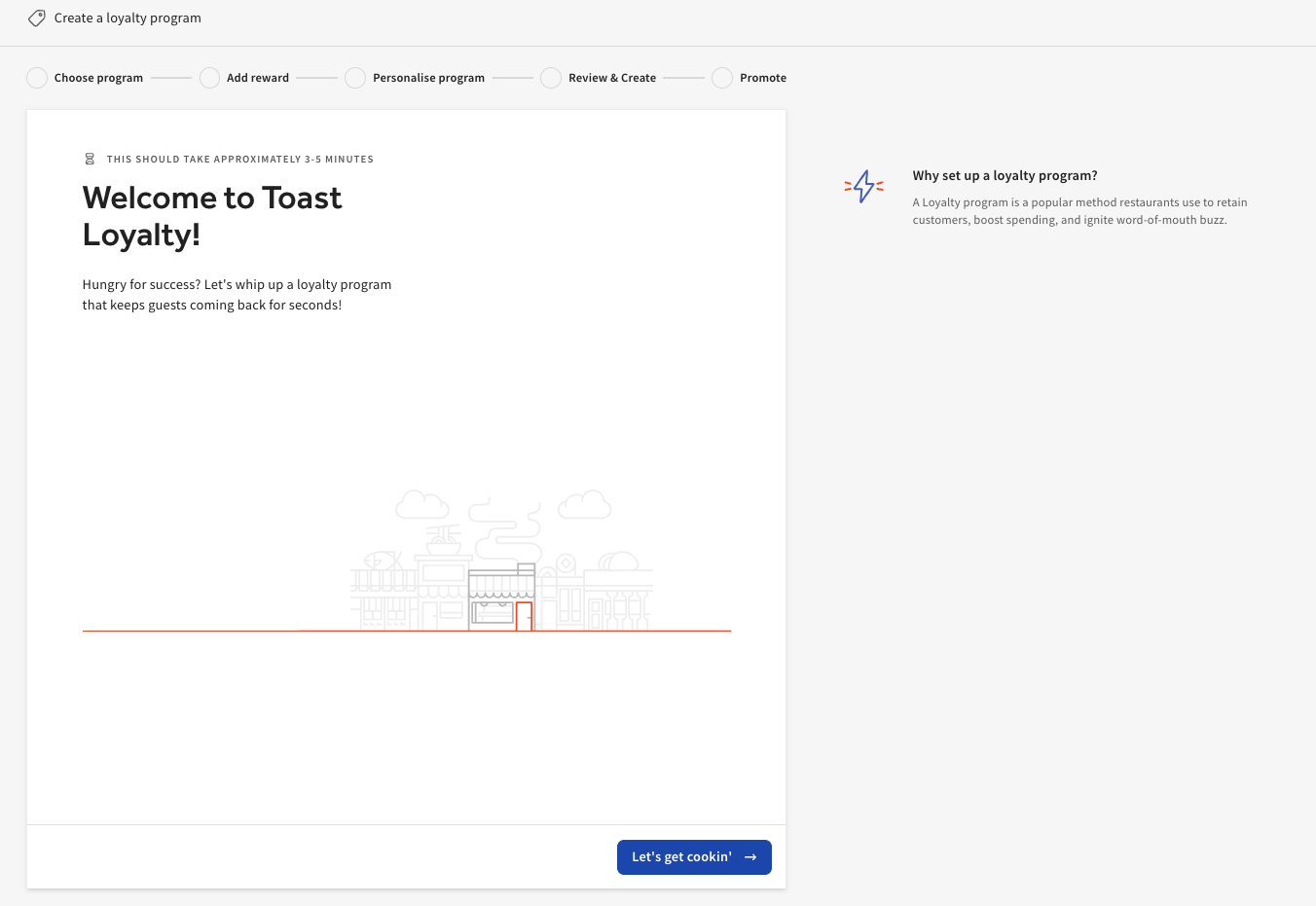
Step 2: Choose Your Program Type
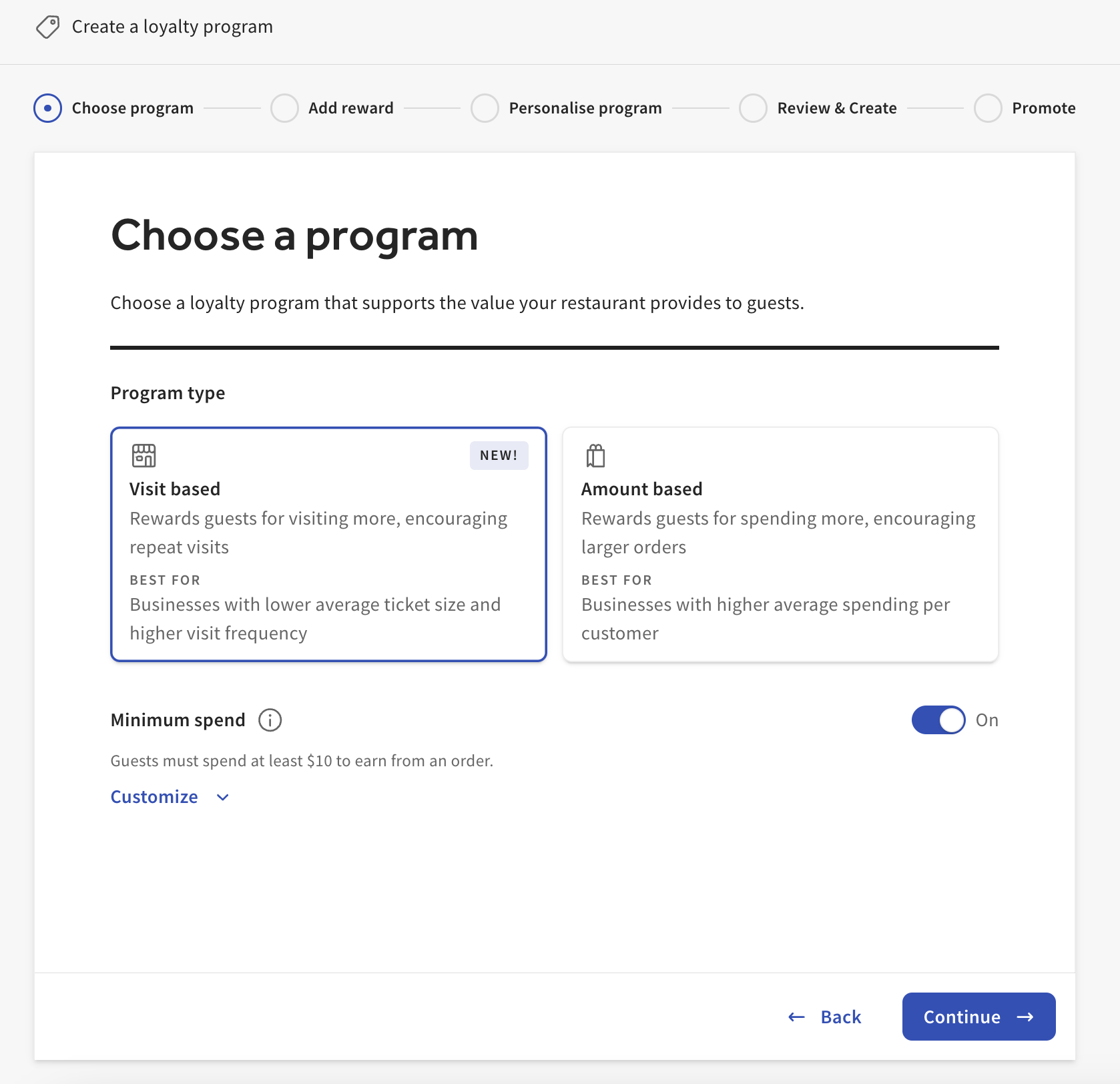
Choose the program type that fits your business, then select Continue.
- Visit based — Guests earn at a flat rate for each visit. You can set the minimum amount a guest has to spend to earn a visit. After a set number of visits, the guest earns either a free item or a discount reward.
- Amount based — Guests earn points for each dollar they spend, rewarding total spend rather than order frequency. You configure how many points a guest earns per dollar.
For advanced configurations such as tiered cash rewards and item-based rewards, see Optimize Toast Loyalty With Item-Based Rewards and Configure and Redeem Tiered Rewards for Toast Loyalty.
Expected outcome: Your selected program type is highlighted, and the reward setup screen opens.
Step 3: Set Up Your First Reward
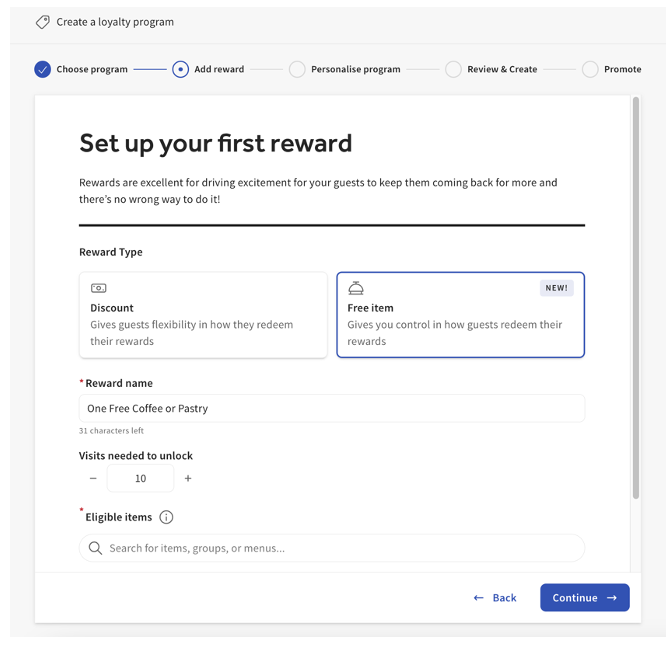
Configure your first reward by entering the following:
- Reward type — Discount or Free item
- Reward name and Points needed — the name guests will see and how many points they must earn to unlock it
- Eligible items — the menu items the reward can be applied to
Reward type options:
- Discount — Provides a cash discount on the guest's next order. Choose Value per point (how much each earned point is worth) and Points needed (the total points required to unlock the reward). To limit how much a guest can redeem at one time, enable the Redemption limit option.
- Free item — Promotes a specific menu item that guests will earn after reaching the points threshold. Set the Reward name, Points needed to unlock, and Eligible items.
Note: For restaurants in a multi-location group, save and publish the free-item selections at each location in your group.
Once your reward is entered, select Continue.
Toggling Redemption limit on prevents a guest from redeeming high amounts in one visit. Be sure to enter the points a guest can redeem at once — we recommend setting it as the earned reward amount.
Expected outcome: Your first reward is saved and the personalization screen opens.
Step 4: Personalize Your Program
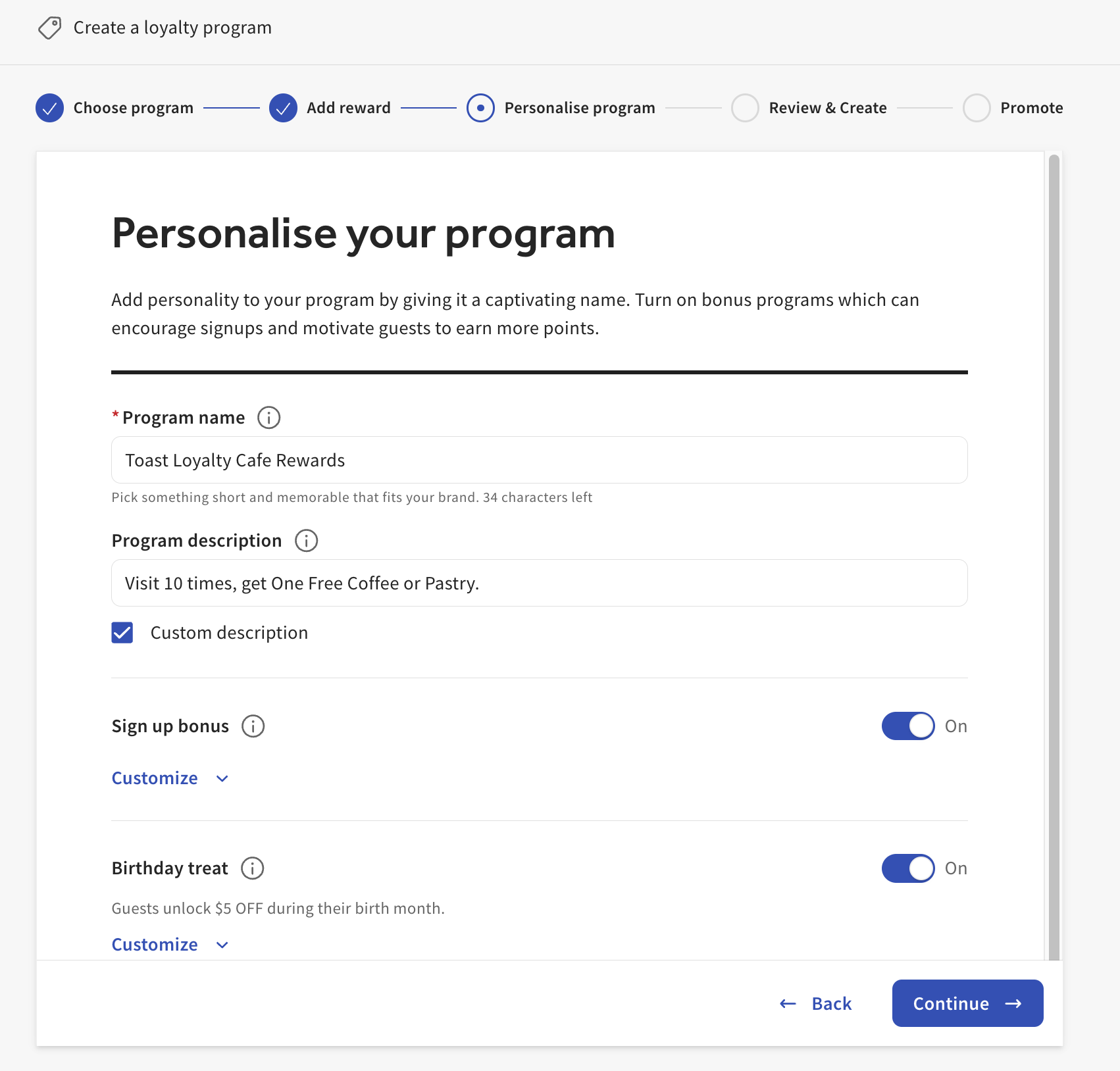
Personalize your program with the following:
- Program name — Appears in automated email and SMS notifications, on the guest's online loyalty card, and on your online signup page.
- Program description — Appears on the guest's online loyalty card and on your online signup page.
- Signup method — Choose email or phone number. The signup method determines how guests receive loyalty messages (welcome message, reward available, account link).
- Ordering channels — Determine where guests can sign up and redeem. Accrual is allowed on every channel when loyalty is enabled. Lookup lets servers look up a guest by name, email, or phone number using customer search on the POS.
Expected outcome: Your program name, description, signup method, and ordering channels are saved, and the review screen opens.
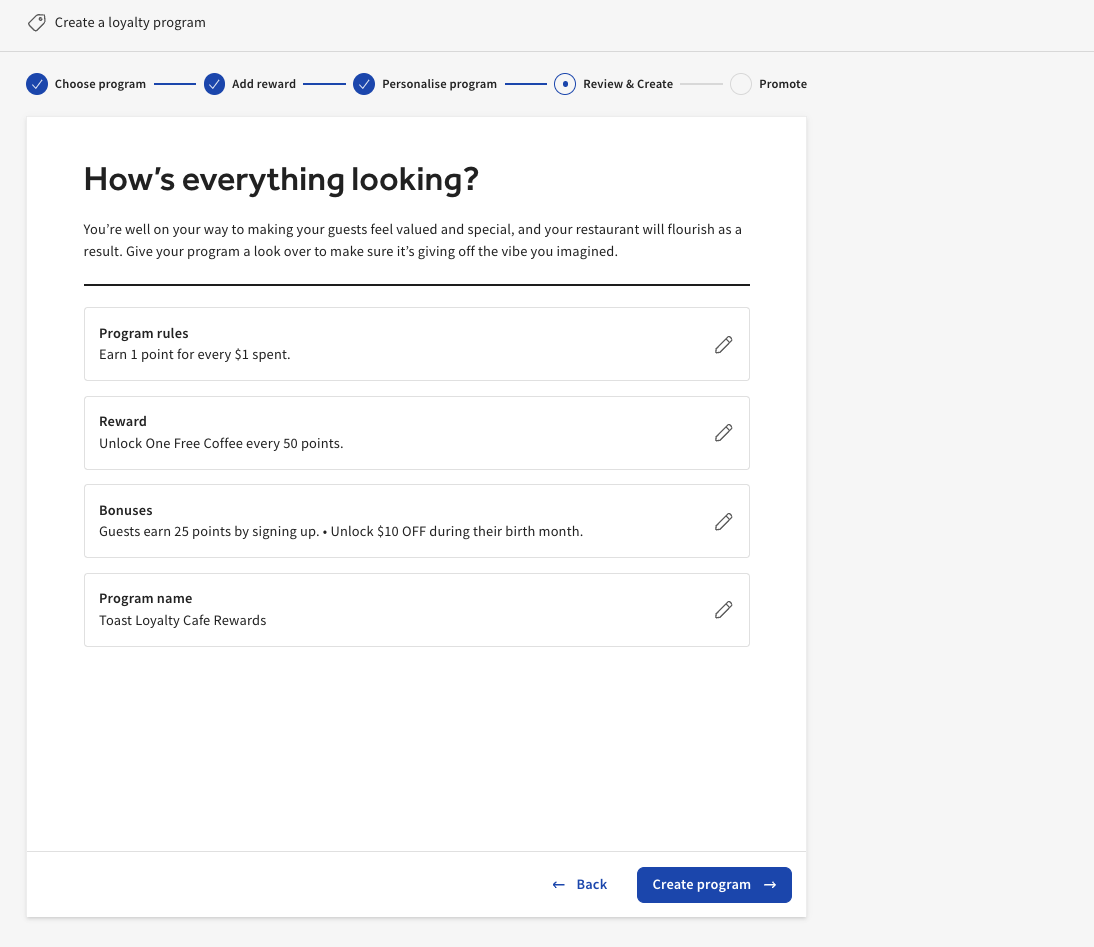
Step 5: Review and Create Your Program
Review every selection on the summary page and confirm accuracy. Select Create program.
Expected outcome: Your program is created and the activation screen opens with a shareable program link.
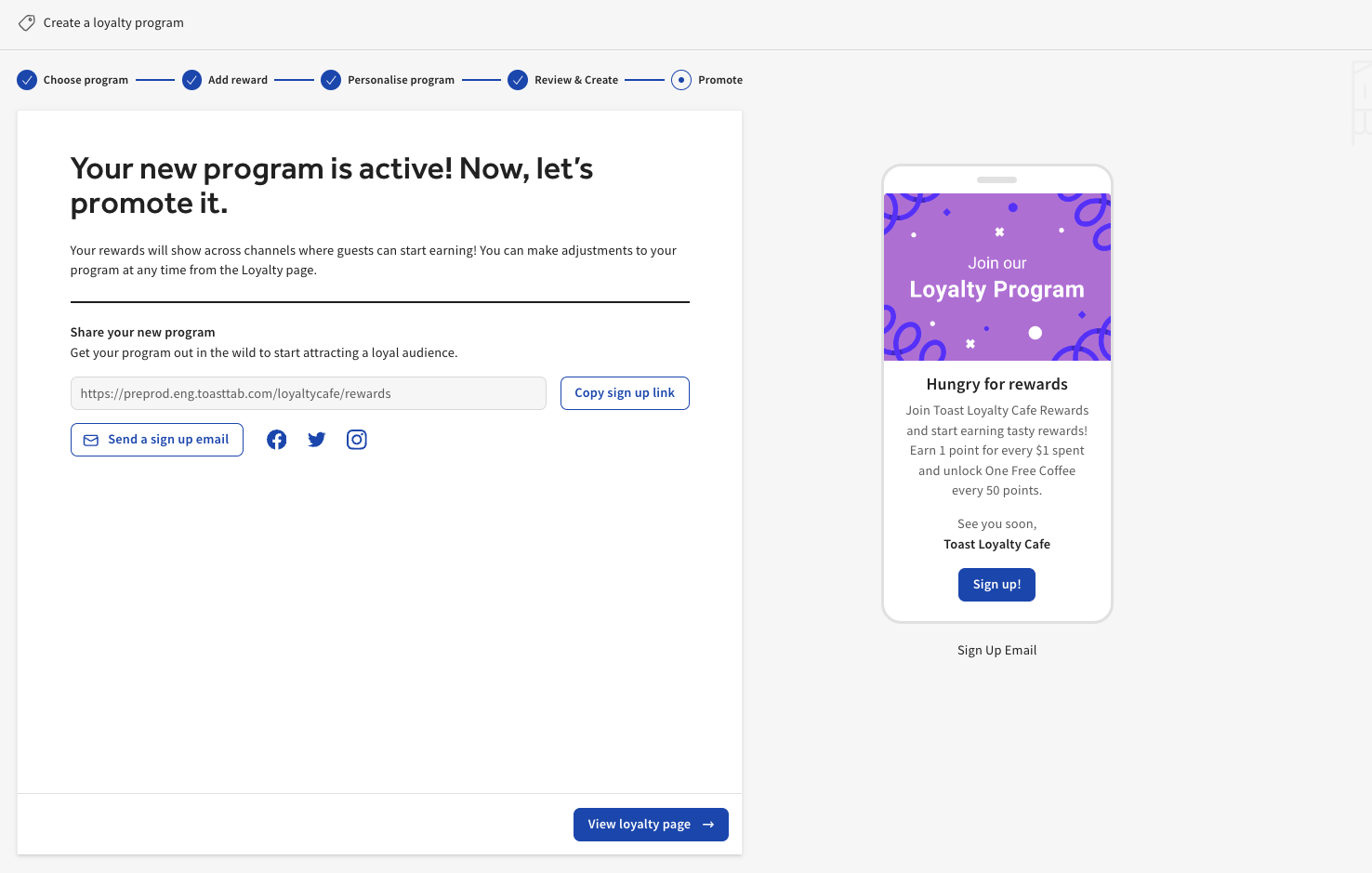
Step 6: Save, Publish, and Promote Your Program
Your program is now active. Use the provided link to promote your new program through social media or email.
To finalize your settings and push them to your devices, select Save and then Publish.
To get links for your website, social media, email marketing, and in-store visuals, navigate to Toast Web > Marketing > Loyalty > Settings > Promote your program.
Expected outcome: The program is published to your devices. Guests can sign up at the register, on the Guest-Facing Display, through online ordering, and on the Local by Toast app.
Train Your Staff
Share the staff training video with your team to help them encourage guests to sign up. Your restaurant staff should be the cheerleaders of your loyalty program — their belief in the program's value encourages guests to participate.
Optional Setup
Disable POS Signup Prompts
The automatic loyalty enrollment prompts on the POS can be disabled for the cash payment and credit card payment flows. To disable them, navigate to the Payment Options section of Toast Web. Select ‘No’ for Rewards Signup option under the Cash and Credit sections.
Expected outcome: The Loyalty signup prompt no longer appears on the POS during cash or credit card payments.
Exclude Menu Items From Loyalty
To prevent specific menu items from earning Loyalty points, navigate to the Advanced Properties section of Toast Web.
Note: Toast currently supports only one Rewards Program at any given time.
For full configuration steps, see Exclude Menu Items From Earning Loyalty Points.
Expected outcome: Selected items no longer earn loyalty points when ordered.
Multi-Location Loyalty
If your restaurant is part of a multi-location group, your Toast Loyalty program can be shared across multiple locations. Guests then sign up, accrue, and redeem with a single loyalty account across every participating location.
Program sharing across locations is managed within the Gift / Rewards Card Group. To set up or modify the group, navigate to Location Groups in Toast web and select Loyalty.
Note: Toast currently supports only one program group at a time. Locations removed from the Gift / Rewards Card Group establish an independent loyalty program.
Frequently Asked Questions
Can guests earn or redeem loyalty rewards on DoorDash, Grubhub, or Uber Eats orders?
No. Guests cannot earn or redeem Toast Loyalty points on orders placed through online ordering integrations such as DoorDash, Grubhub, or Uber Eats. Points and redemption are available on Toast Online Ordering and direct ordering channels only.
Can I share my loyalty program across multiple locations?
Yes. If your restaurant is part of a multi-location group, your loyalty program can be shared across participating locations using the Gift / Rewards Card Group in Location Groups. Guests then accrue and redeem against one account across every participating location. See Multi-Location Loyalty above.
Can I have separate loyalty programs for two locations in the same group?
Toast supports only one program group at a time. To run independent programs at separate restaurants, remove the location you want independent from the Gift / Rewards Card Group; that location will then have its own loyalty program.
How do I receive alerts for suspicious rewards activity?
Toast offers weekly alerts for suspicious rewards activity. To enable them, navigate to Toast Web > Marketing > Loyalty > Settings, enable the alerts toggle, and enter your email address. Alerts arrive each Monday. For full details and how to respond to alerts, see Get Help With Suspicious Rewards Activity.
How do I disable my Toast Loyalty program?
To disable Toast Loyalty across all your locations, navigate to Toast Web > Marketing > Loyalty > Settings > Program Availability and toggle the program off. For what happens when the program is off — and how to disable Loyalty at a single location only — see the disabling-Loyalty entry in Toast Loyalty FAQ.
What permission do I need to edit loyalty settings?
You need the 4.8 Marketing Info permission to configure the Toast Loyalty program. The 4.4 Gift/Rewards Card Reports permission is required to review sales data for gift and rewards cards. See Before You Begin above for the full list.
I'm a Guest, and My Loyalty Points Are Missing - What Do I Do?"
Guests can view and manage their Toast Loyalty points and rewards in the Rewards tab of the Toast app. If points from a recent purchase aren't showing up, or you think your account should be merged with another, contact the restaurant directly - restaurant staff can look up and merge loyalty accounts on your behalf. Toast Customer Care does not manage individual guest loyalty accounts directly. See our guest-facing support site here.
Related Articles
- Toast Loyalty FAQ
- Enroll Guests in Toast Loyalty
- How Guests Earn Points with Toast Loyalty
- Redeem Points on Toast Loyalty
- Manage Birthday Rewards for Toast Loyalty