Verify Your Identity in Toast Web
Last updated: Sep 17, 2026, 1:31 PM
Toast requires customers to verify their identity using an ID verification process to access select sensitive information. Learn more in this article.
- Before You Begin
- About Identity Verification
- Quick Fix
- Complete the ID Verification Steps
- Check Your Verification Status
- If Your Photo or ID Is Rejected
- If the Selfie or Face Scan Fails
- If the Camera Won't Open
- If Your Verification Link Has Expired
- If Your Identity Is Under Review or Has Failed
- If You're Verified but Still Can't Add a Card or Bank Account
- Before You Contact Customer Care
- Frequently Asked Questions
- Related Articles
Before You Begin
Applies to: Toast Web
Permissions needed:
No special permission is required. Any user who is prompted to verify their identity can complete this process.
What you'll accomplish: Confirm your identity through Persona so you can access sensitive information and complete protected actions, such as setting up instant deposit or updating your bank account.
About Identity Verification
In certain situations, Toast asks you to verify your identity before you can access sensitive information or complete a protected action. This is an added layer of security for your account and your restaurant. The flow asks you to take a live selfie and a photo of your government-issued ID.
You'll usually see this prompt when you try to perform a gated action, such as adding a debit card for instant deposit or updating banking details, or when you visit toasttab.com/reset to reset your credentials.
Toast uses Persona, a third-party tool, for the verification and photo upload process. Toast does not store any information uploaded to Persona.
Note: You'll typically only need to verify your identity once. You'll be asked to verify again only if you change the name or phone number associated with your identity.
Quick Fix
Use this table to match what you're seeing to the most common cause and a fast fix. Detailed steps for each situation follow below.
| Symptom | Most Common Cause | Quick Fix |
|---|---|---|
| "It keeps saying it can't verify me" after several tries | The ID photo or selfie isn't clear enough to read | If verification keeps failing after several tries, the ID photo or selfie usually isn't clear enough to read. Retake it in bright, indirect light, hold your device still, and keep all corners and text of the ID visible. |
| ID photo rejected | Glare, blur, shadows, or cropped edges | If your ID photo is rejected, it's usually glare, blur, shadows, or cropped edges. Place the ID on a solid, dark background, use bright indirect light, and keep the full ID in frame. |
| Selfie or face scan failed | A hat, mask, or glasses, or low lighting | If your selfie or face scan fails, remove anything covering your face (hat, mask, or glasses), face a light source, and follow the on-screen prompts. |
| Camera won't open | The browser doesn't have camera permission | If the camera won't open, your browser likely doesn't have camera permission. Allow camera access, close other apps using the camera, or select Continue on another device. |
| "My Persona link has expired" | Verification links are time-limited | Verification links are time-limited, so an expired Persona link is expected after enough time passes. Contact Toast Customer Care to request a new one. |
| Status shows "Identity verification under review" | Toast is reviewing a failed attempt | "Identity verification under review" means Toast is reviewing a failed attempt. Wait for Toast to reach out with results, and check your status anytime under My account. |
| Verified, but can't add a debit card or bank account | A separate permission or setup step is needed | Being verified doesn't automatically grant debit card or bank account access — that needs a separate permission or setup step. See the instant deposit and bank account articles below, or contact Toast Customer Care. |
Complete the ID Verification Steps
When you're prompted to verify your identity, follow these steps. You'll need a government-issued photo ID and a device with a camera.
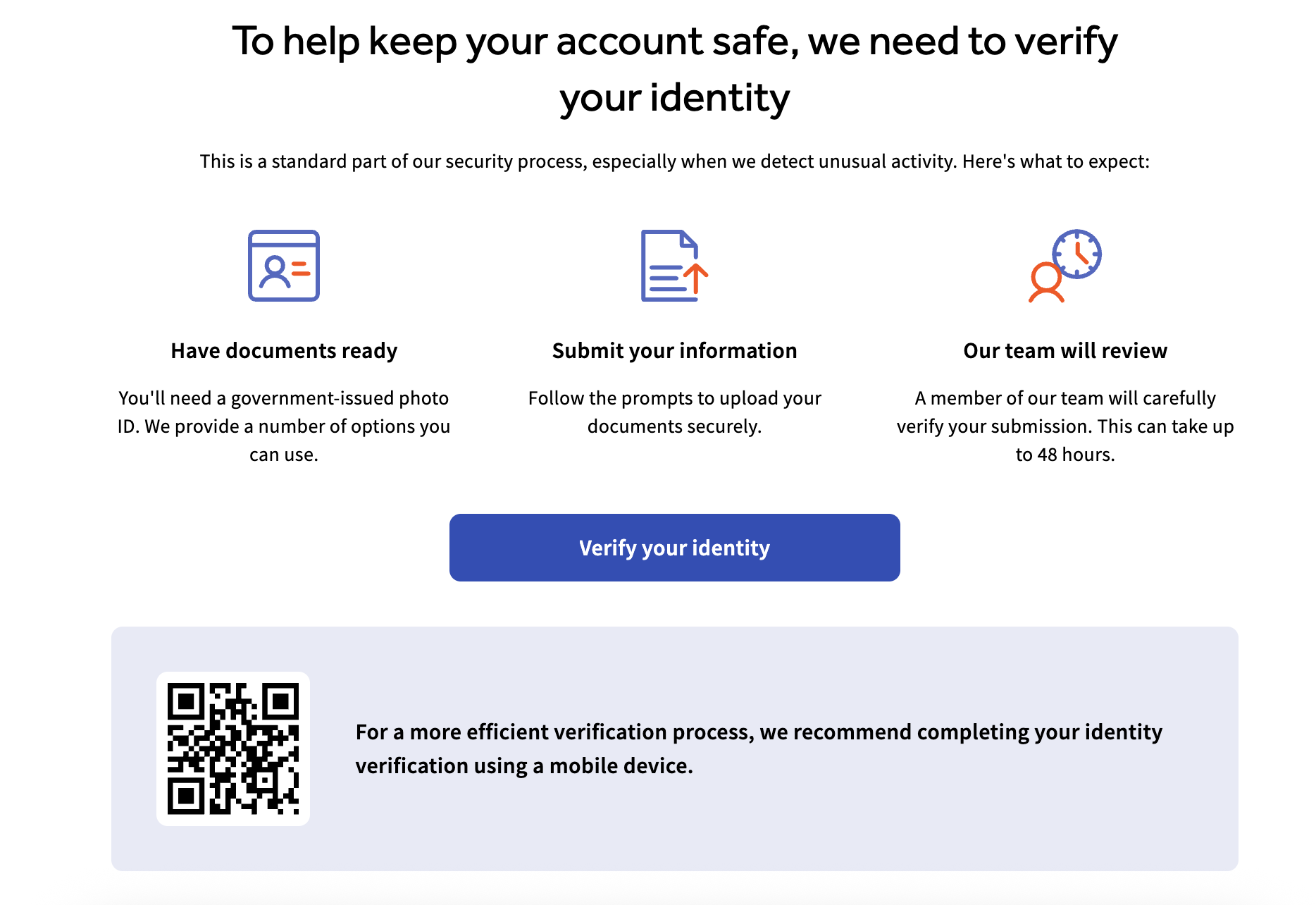
- On the welcome screen, confirm you have a government-issued photo ID ready, then select Verify your identity.
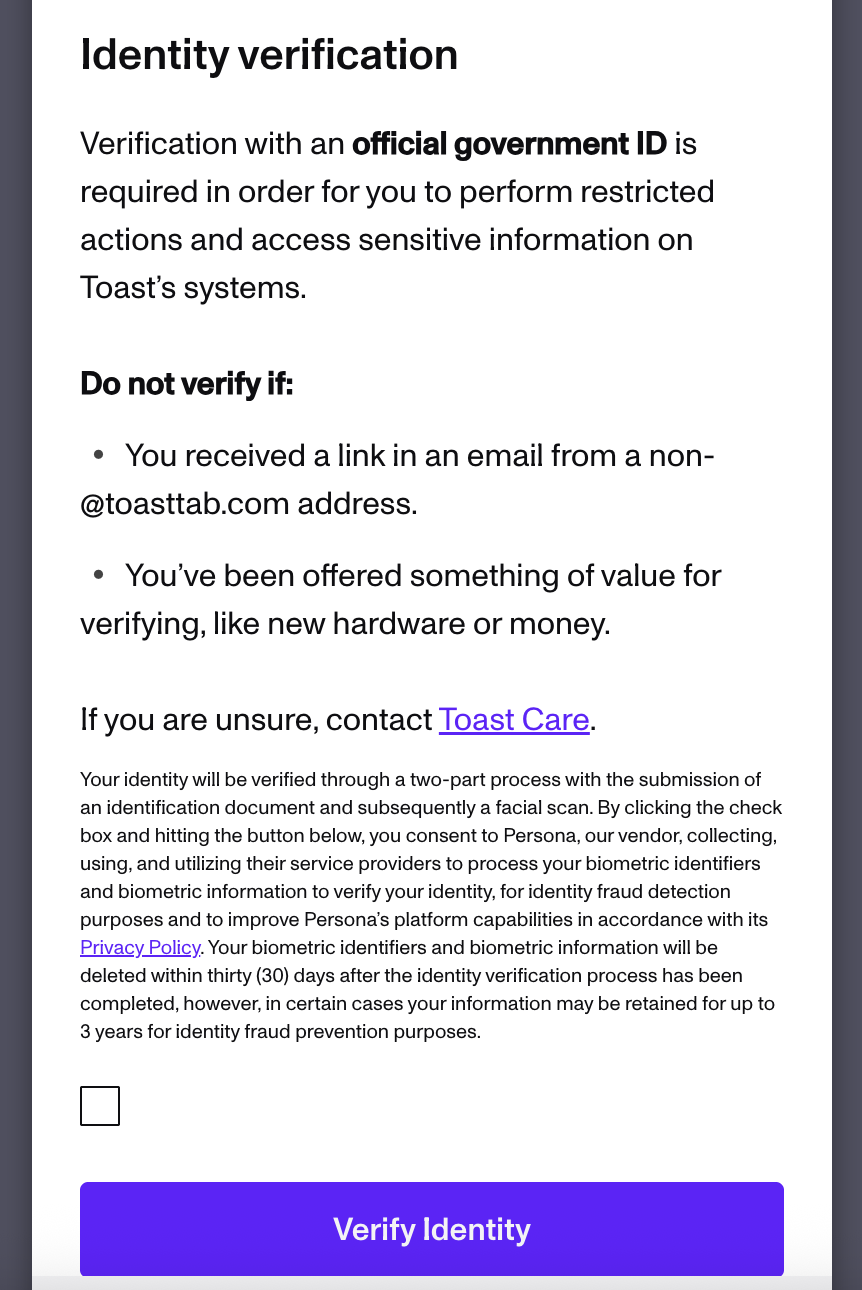
Note: Toast uses Persona, a third-party tool, for verification. Toast does not store any information uploaded to Persona.
- Select the checkbox, then select Verify Identity.
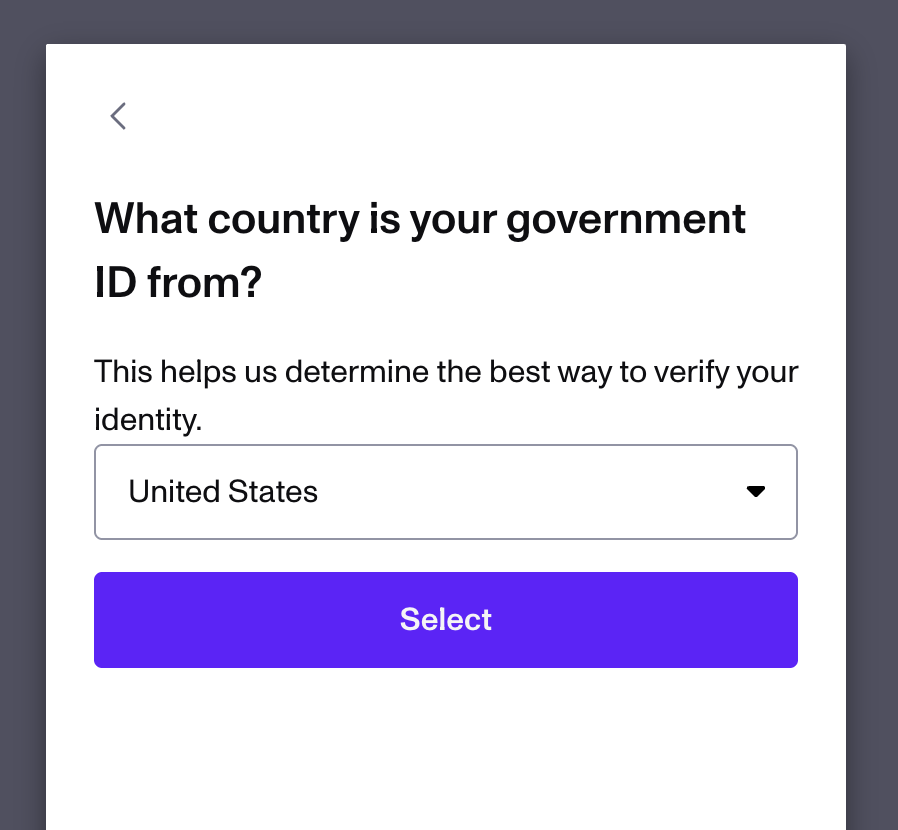
- Select your country of origin.
- From the list of ID card types, select the one that matches the ID you're providing.
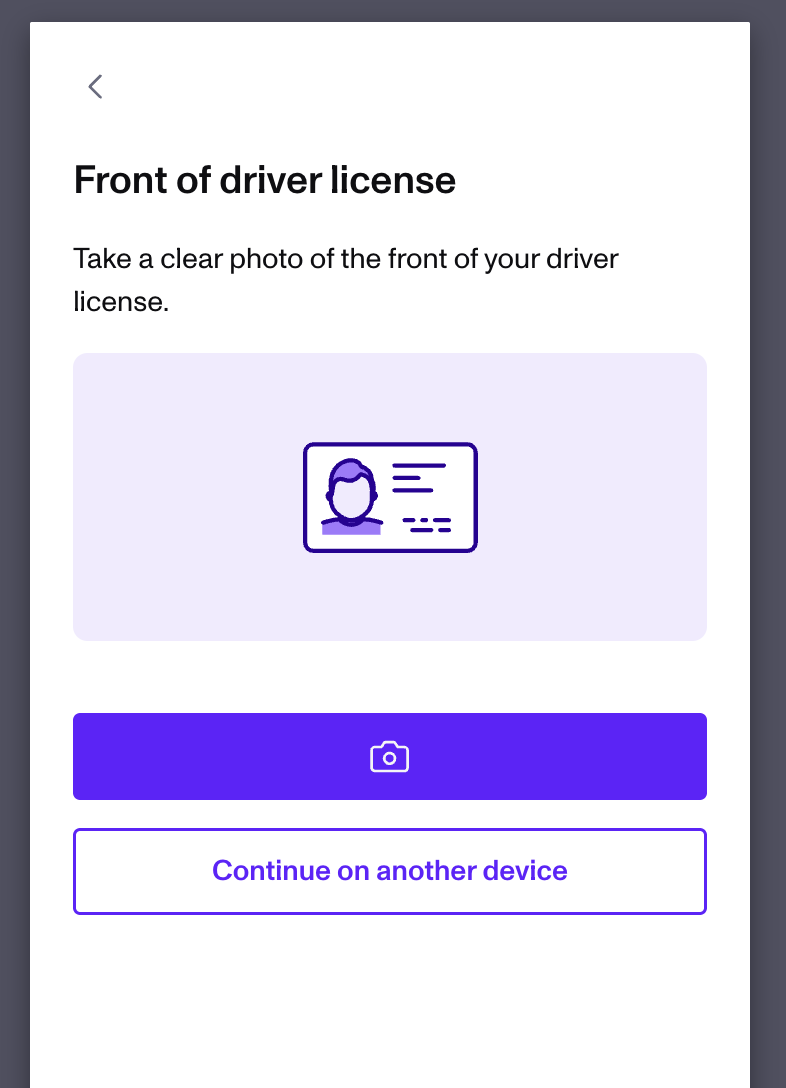
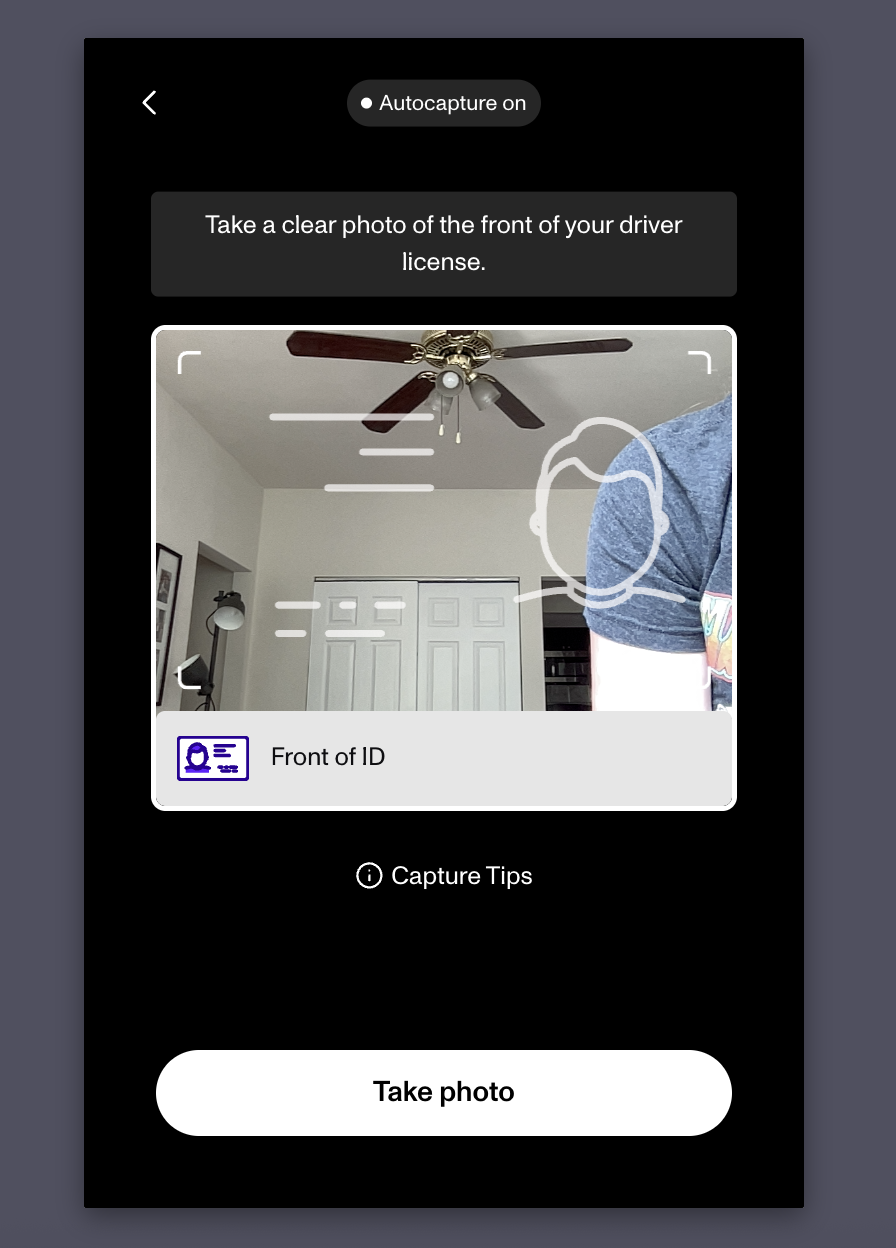
- Take a new photo of your ID using your device's camera. You cannot upload a photo you took earlier. Select the camera icon to open your camera and take the photo. If your device doesn't have a camera, select Continue on another device to email yourself a secure link and finish on a different device. If you're asked to update your camera permissions and can't enable them, use the Continue on another device option.
- Center your ID in the frame. For the clearest photo, place your ID on a solid, dark background, use bright indirect light, avoid glare and shadows, and keep all corners and text visible without cropping the edges. Hold your device still, bracing your arms on a table if needed. The app captures the photo automatically once the ID is centered. If auto-capture doesn't work, select Take photo. You can also select the Capture Tips tooltip for more guidance, or review these tips from login.gov on taking a clear photo.
- Repeat the process for the back of your ID.
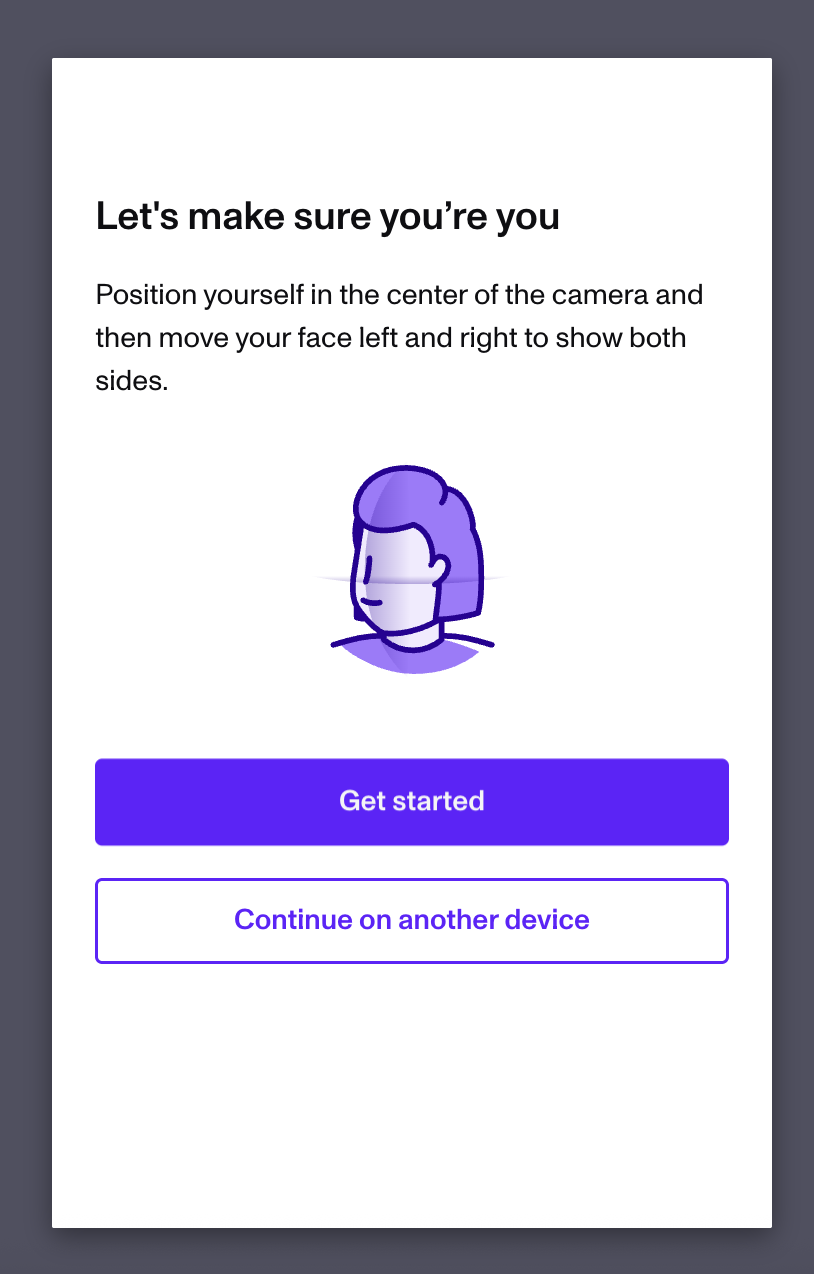
- When you see the Processing ID screen, wait for the upload to finish. You'll then be asked to take a selfie with the same camera. Center your face, then turn left and right to scan as instructed. You can use Continue to use other device here as well.
- When you see the Verifying... screen, your part is complete. The Toast team reviews your information and reaches out with the results. Resolution times vary depending on your request, and a member of the team will keep you updated along the way.
Expected outcome: Your ID and selfie are submitted, and your verification status updates in Toast Web once Toast finishes its review.
Check Your Verification Status
If you can still log in to Toast Web, you can check your verification status at any time. Navigate to My account and find the status in the Personal Information section. This status appears whether your verification was triggered automatically or manually.
The possible statuses are:
- A green "Identity verified" badge means you successfully passed ID verification.
- A blue "Identity verification under review" badge means your verification failed and Toast is reviewing it.
- A yellow "Identity verification failed" badge means your verification failed, Toast reviewed it, and it was rejected.
Once your identity is verified, the first and last name fields become read-only. To change them, you'll need to go through re-verification by navigating to My account > Personal information and selecting Update verified identity.
If you can't log in but want to check your verification status, contact Toast Customer Care with the case number you received when you submitted your original request.
If Your Photo or ID Is Rejected
If Persona can't accept your ID photo, the image is usually too blurry, too dark, or cropped.
- Retake the photo in bright, indirect light.
- Avoid glare and shadows, and keep the entire ID in frame.
- Make sure the image is in focus and all text is readable.
Expected outcome: A clear, well-lit photo with all four corners and text visible is accepted, and the flow moves on to the next step.
If the Selfie or Face Scan Fails
If the selfie or face scan won't complete, lighting or something covering your face is usually the cause.
- Face a light source and remove any hat, mask, or sunglasses.
- Keep your face centered and follow the liveness prompts on the screen.
Expected outcome: The face scan completes and your selfie is submitted with your ID for review.
If the Camera Won't Open
If the flow can't access your camera:
- Make sure your browser has permission to use the camera.
- Close other apps that may be using the camera, such as video calls or QR scanners.
- Refresh the page and try again, or switch to a different browser like Google Chrome or Safari.
If you still can't use your camera, select Continue on another device during the flow to finish on a device that has a working camera.
Expected outcome: The camera opens so you can capture your ID and selfie, or you continue on another device.
If Your Verification Link Has Expired
Persona verification links are time-limited, so a link sent to you earlier may no longer work.
- If your link has expired or no longer opens, contact Toast Customer Care to request a new verification link.
Expected outcome: You receive a new, working link and can restart the verification flow.
If Your Identity Is Under Review or Has Failed
If your status shows "Identity verification under review," your earlier attempt didn't pass and Toast is reviewing it. The Toast team will reach out with the results, and resolution times vary depending on your request.
If your status shows "Identity verification failed," Toast reviewed your attempt and it was rejected. Before reaching out, retake your ID and selfie photos following the tips in the sections above, since a clearer submission often resolves the issue.
If your status doesn't update or you need help, contact Toast Customer Care.
Expected outcome: Your status updates to "Identity verified" after a successful submission, or Toast contacts you with next steps.
If You're Verified but Still Can't Add a Card or Bank Account
If your status shows "Identity verified" but you still can't add a debit card or bank account, identity verification isn't the remaining blocker. The next step depends on what you're trying to do.
- To add or replace a debit card for instant deposit, see Update Debit Card for Instant Deposit.
- To add or update a business bank account, see Update or Add a New Bank Account in Toast Web.
- If you're the business owner and still can't access the Instant Deposit page or change the card, the cause is often a user permission level. See Instant Deposit FAQ, or contact Toast Customer Care.
Expected outcome: You complete the card or bank account update, or you learn which permission or setup step is still needed.
Before You Contact Customer Care
You can resolve most photo, selfie, and camera issues yourself using the sections above. Contact Toast Customer Care when your verification link has expired, your status stays under review or failed after a clear submission, you need to change a verified name and can't, or you can't log in to check your status.
To help Toast assist you faster, have this information ready:
- The case number you received when you submitted your original request, if you have one.
- Which step the flow fails on, such as the ID photo, the selfie, or the camera.
- The verification status shown under My account, if you can log in.
Frequently Asked Questions
How long does identity verification take?
Identity verification time varies depending on your request. After you submit your ID and selfie, the Toast team reviews your information and reaches out with the results, and a member of the team keeps you updated along the way.
Also asked as:
-
- "How long does the ID verification review take?"
- "When will my identity be verified?"
- "When can I start using instant deposit after verifying?"
Can I upload a photo of my ID that I already took?
No, you cannot upload a photo of your ID that you already took. Persona requires you to take a new photo with your device's camera during the flow. If your device doesn't have a camera, select Continue on another device to finish on a device that does.
Also asked as:
-
- "Can I use a saved photo of my license?"
- "Why won't it let me upload my ID picture?"
Why do I have to verify my identity?
You have to verify your identity because Toast requires it to protect access to sensitive information and certain protected actions, such as setting up instant deposit or changing banking details. This adds a layer of security for your account and your restaurant.
Also asked as:
-
- "Why is Toast asking me to verify my ID?"
- "What is this Persona page I'm seeing?"
Do I have to verify my identity more than once?
No, you generally do not have to verify your identity more than once. You'll only be asked to verify again if you change the name or phone number associated with your identity.
Also asked as:
-
- "Do I have to do ID verification every time?"
- "Why am I being asked to verify again?"
I finished verification but still can't add my debit card or bank account. What do I do?
If you finished verification but still can't add your debit card or bank account, identity verification is no longer the blocker, and the remaining step depends on your task. To replace a card for instant deposit, see Update Debit Card for Instant Deposit. To update a bank account, see Update or Add a New Bank Account in Toast Web. If you're the owner and still can't change the card, this is often a permission level, so see Instant Deposit FAQ or contact Toast Customer Care.
Also asked as:
-
- "I'm verified but it won't let me add my card"
- "I did the ID verification but still can't add bank info for instant deposit"
Related Articles
- Update Debit Card for Instant Deposit
- Get Started With Instant Deposit
- Instant Deposit FAQ
- Update or Add a New Bank Account in Toast Web
- Log in to Toast: Update Your Account