Set Up Order Auto-Firing
Last updated: Sep 17, 2026, 1:23 PM
Set up order auto-firing on one device so your online and scheduled orders fire automatically to the kitchen.
Set up order auto-firing on one device so your online and scheduled orders fire automatically to the kitchen.
- Before You Begin
- Assign an Auto-Firing Device on Your POS
- Enable Order Auto-Firing in Toast Web
- Set Approval Rules, Thresholds, and Minimums
- Change or Confirm Your Auto-Firing Device
- Frequently Asked Questions
- Related Articles
Before You Begin
Applies to: Toast POS, Toast Web
Permissions needed:
- Access to online ordering settings in Toast Web
What you'll accomplish: Designate one device at your restaurant to automatically fire online and scheduled orders to the kitchen, so guests can place online orders successfully.
Order auto-firing is a setting in Toast POS that sends scheduled and online orders to the kitchen automatically when they are ready. You must enable order auto-firing for your restaurant to receive online orders.
Enable auto-firing on only one device at your restaurant location. If auto-firing is set up on more than one device, the same order can print more than once.
Note: Choose a device that stays on whenever the restaurant is open, and connect it with Ethernet rather than Wi-Fi. A wired connection keeps the device online so orders fire reliably.
Assign an Auto-Firing Device on Your POS
- From the main menu of the Toast app on your device, select Setup > Device Setup.
- Locate and select the Order Auto Firing option.
- Select Assign, then select Save.
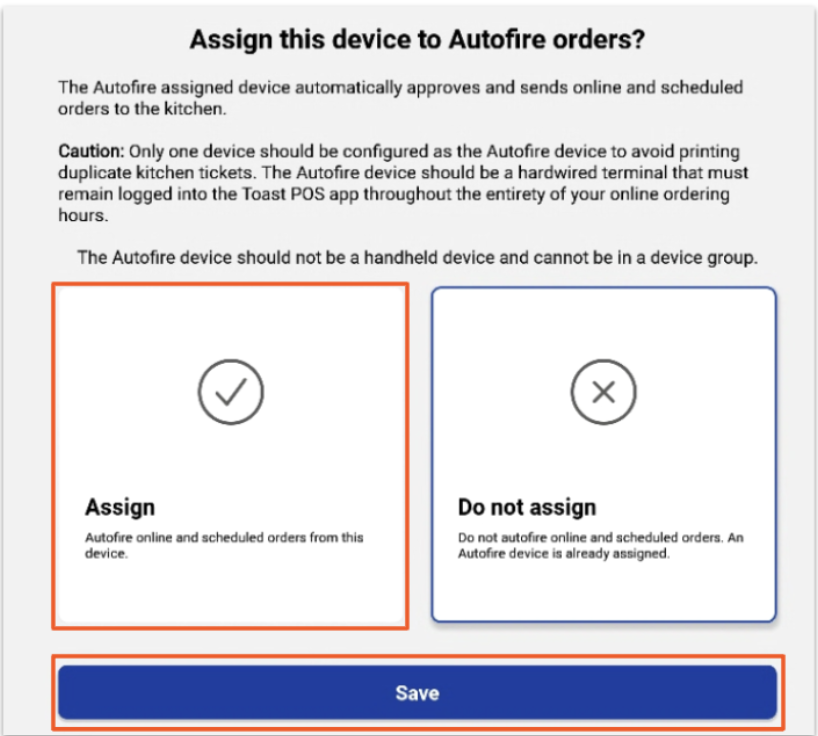
Expected outcome: The device is now set as your auto-firing device and will fire online and scheduled orders to the kitchen.
Enable Order Auto-Firing in Toast Web
- In Toast Web, navigate to Takeout & delivery > Ordering setup > Online Ordering.
- Scroll down to the Approval section and find the Approval Mode setting. When Send orders directly to kitchen or Use rules is selected, the option to select an auto-firing device appears.
- Select Change device (or Update) to continue.
- Toast recommends a configured POS device to auto-fire. Select Update to accept the recommended device, or choose another device from the list. The recommended device is the one with the best wired connection for online orders.
- Confirm your selected device appears next to Current Selection, then select Save and publish to finalize your changes.
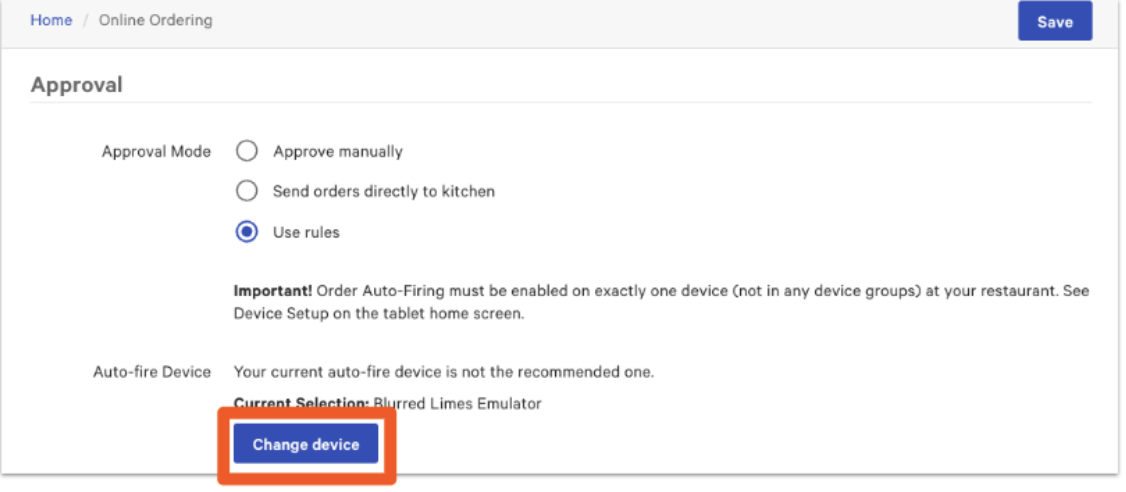
Expected outcome: Your chosen device appears next to Current Selection, and online orders fire to the kitchen through that device.
Note: Send orders directly to kitchen pushes incoming orders to the kitchen when they are ready to be prepared. When Use rules is selected, orders must be approved through Pending Orders mode or they are automatically rejected.
Set Approval Rules, Thresholds, and Minimums
When Use rules is selected as the Approval Mode, you can set thresholds and minimums that decide whether an order requires manual approval or is automatically rejected. Using approval rules also requires order auto-firing to be configured on one Toast device.
- Navigate to Takeout & delivery > Ordering setup > Online Ordering.
- Scroll down to the Approval section and select Use rules for the Approval Mode setting.
- In the Approval Rules section, select the checkbox for each rule you want to enable:
- Cash Threshold: Online cash orders over the trigger amount require manual approval or are automatically rejected.
- Credit Minimum: Online credit orders under the trigger amount require manual approval or are automatically rejected.
- Delivery Minimum: Prevents online delivery orders below a minimum total from being placed.
- Total Amount: Applies to orders whose post-tax total is at or above a set amount.
- For each rule you enable, select the Enforcement behavior: Approval Needed or Reject.
- For each rule you enable, enter the Trigger Amount.
- Select Save and publish your changes.
Expected outcome: Your approval rules are active, and orders that meet the criteria appear in Pending Orders for approval before they fire.
Change or Confirm Your Auto-Firing Device
You can change or confirm your auto-firing device from Toast Web or on the device itself under Device Setup. When you select a new auto-firing device, Toast Web updates automatically.
To confirm which device is currently selected, view the Approval section on the Online Ordering page in Toast Web. Your current device appears next to Current Selection.
If you select a second auto-firing device, this message appears: You currently have 2 devices set to auto-fire instead of the single recommended device. This causes duplicate tickets to print. If you choose another device, Toast unassigns all other auto-fire devices in the restaurant.
Note: Only one auto-firing device is recommended. Two devices can cause multiple tickets to print for the same order.
Frequently Asked Questions
Why are my online orders not firing to the kitchen?
Online orders may not fire to the kitchen when the auto-firing device is offline, connected to Wi-Fi instead of Ethernet, or connected to both Ethernet and Wi-Fi at the same time. If both connections are enabled, disable Wi-Fi and use only the Ethernet or USB-C connection. Confirm one device is assigned as the auto-firing device, that it is powered on, and that it is connected by Ethernet. Power cycling the auto-firing device often brings it back online. If orders are waiting in Pending Orders, check that your Approval Mode is set to Send orders directly to kitchen. For more steps, see Troubleshoot Online Orders Not Firing.
Also asked as:
- Why are my online orders not printing to the kitchen?
- Why aren't online orders sending to the kitchen?
- Why didn't my online order fire automatically?
- How do I assign a device to auto-fire online orders?
Why do guests see "There was an error placing your order" or "Restaurant is currently offline"?
Guests see "There was an error placing your order" or "Restaurant is currently offline" most often when no auto-firing device is assigned or the assigned device is offline. Assign or confirm one auto-firing device using the steps above, and make sure that device is powered on and connected by Ethernet.
Also asked as:
- Why can't my guests place online orders?
- Why does my online ordering say the restaurant is offline?
- Why are my guests seeing these error messages while trying to place their online orders?
- What could be causing my guests to be unable to place their online orders?
Can I have more than one auto-firing device?
You should not have more than one auto-firing device. Only one device should be set to auto-fire, because two devices cause duplicate tickets to print for the same order. If you select a new device, Toast unassigns all other auto-fire devices in the restaurant.
Also asked as:
- Can I set two devices to auto-fire?
- Why are my orders printing twice?
Which device should I choose as the auto-firing device?
Choose a device that stays on whenever the restaurant is open and is connected by Ethernet for the most stable connection. Toast recommends a device based on the best wired connection. Selecting a kitchen display device may cause online orders to be attributed to a kitchen team rather than a server, so a front-of-house device is a good choice when server or tip attribution matters.
Also asked as:
- What device should auto-fire online orders?
- Which device is best for auto-firing?
Related Articles
- Troubleshoot Online Orders Not Firing
- Check and Manage Auto-Fire Devices in Your Restaurant
- Printing Behaviors for Online Orders Overview
- Get Started With Online Ordering