Download the Payroll Export Report in Toast Web
Last updated: Oct 6, 2026, 11:08 AM
Download a .csv file containing hourly payroll data broken down by employee for a selected pay period in Toast Web.
- Before You Begin
- Download the Payroll Export
- What's Included in the Payroll Export
- Frequently Asked Questions
- Related Articles
Before You Begin
Applies to: Toast Web
Permissions needed:
- 4.3 Labor Reports—to view the Labor summary report and Employee Summary section
- 3.12 Shift Review—to download the Payroll Export file
What you'll accomplish: Download a .csv file containing hourly payroll data broken down by employee for a selected pay period.
Download the Payroll Export
- In Toast Web, navigate to Reports > Labor > Labor summary.
- At the top of the page, select the date dropdown and choose Custom Date.
- Enter the start and end dates for your pay period in the date fields next to Custom Date, then select Update.
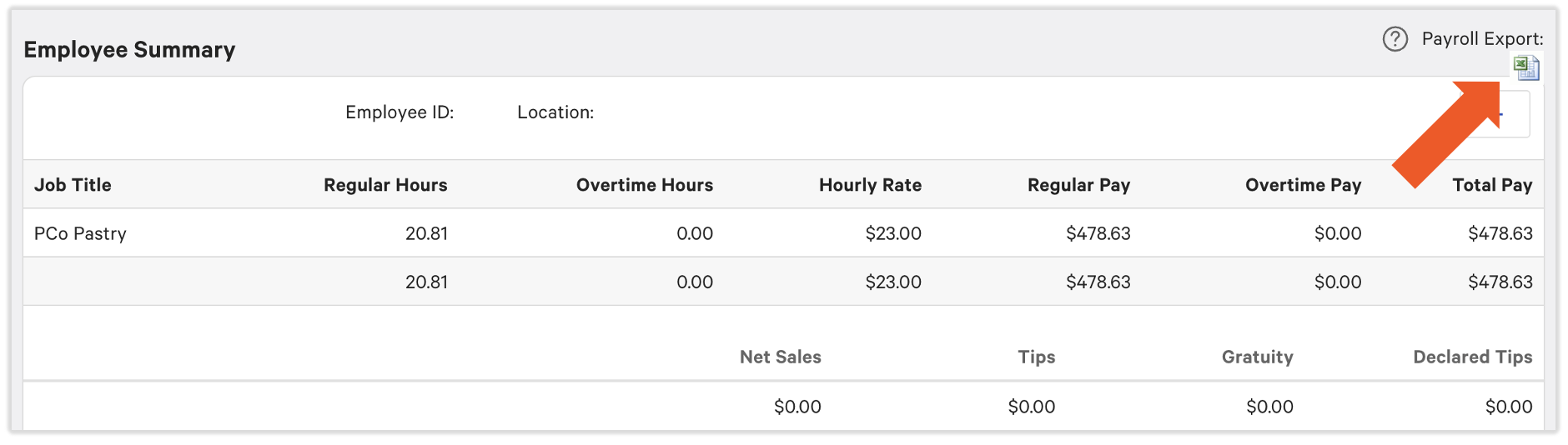
- Scroll down to the Employee Summary section.
- Select the Excel icon under Payroll Export on the right to download a .csv file.
Expected outcome: A .csv file downloads to your device containing payroll data for each employee within the selected date range.
What's Included in the Payroll Export
The Payroll Export is the best report for gathering hourly payroll information in Toast Web. It includes the following data broken down by employee:
- Regular worked
- Overtime hours
- Pay rates
- Net sales
- Tips
- Gratuity
Notes:
- The Payroll Export only captures data from completed shift reviews—it is not updated in real time. If a shift review was not run, tips were charged on a check, or a check was transferred to another server, the Payroll Export may not match the Labor summary total. If you use Toast Payroll, this data is imported automatically—you do not need to download the Payroll Export manually.
If you are not a Toast Payroll customer and want to learn more, head to Toast Shop and search Toast Payroll for more information and product availability (available to US customers only).
Frequently Asked Questions
Can I export payroll data for a specific employee only?
Also asked as:
-
- Is there a labor report I can upload into my payroll software?
- I need to export timesheets and pay info for a specific employee
- How to export timesheets reports with clock in clock out and the hours all written out?
At this time the Payroll Export can only pull all employee data. However, you can filter the report after it's downloaded.
Why doesn't my Payroll Export match my Labor summary?
Also asked as:
-
- wages not coming through on payroll export
- when I export labor summary reports I saw there is hours of 10.75 for Thursday but I didn't see in payroll
The Payroll Export only captures data from completed shift reviews. The Labor summary updates in real time. Discrepancies occur when:
- A shift review was not completed for the pay period
- Tips were charged on a check after the shift review was run
- A check was transferred to another server during the shift
To resolve: confirm all shift reviews for the pay period are complete, then re-download the Payroll Export.
If discrepancies persist after all shift reviews are complete, contact Customer Care for assistance.
Why is an employee missing from the Payroll Export?
Also asked as:
-
- why didn't my employee roll over for the payroll export
- employee hours are not showing on labor reports
- is there a way to bring back an employee to look at their labor charges in toast without re-hiring them
Common reasons an employee may not appear in the Payroll Export:
- Their shift review was not completed for that period
- Their job is configured to exclude hours from labor reporting—to verify, check the job settings in Toast Web under the employee's profile
Can I pull historical payroll data for an audit?
Also asked as:
-
- We need labor summary reports for January, May, June, and December 2023 for an audit
- can I pull an annual labor distribution
- Labor report from 04-21-2025 to 04-21-2026 for audit purposes
Yes. Use the Custom Date filter in the Labor Summary to set any start and end date for the pay period you need.
For data that cannot be accessed through the report, contact Customer Care.
What permissions do I need to view and download the Payroll Export?
Also asked as:
-
- What job permissions are needed to access labor reports
- I need to add permission for [employee name] to be able to access 4.3 Labor Reporting and 3.14 Edit Time Entries
- 4.3 Labor Reports—required to view the Labor summary and access the Employee Summary section
- 3.12 Shift Review—required to download the Payroll Export file
Note: If you manage more than one location, you need 3.12 Shift Review on each location you export from. If you do not have it on a location, the export may contain data from your other locations instead of the one you selected. Ask your manager to add the permission in Toast Web.
If you cannot see the Labor summary or the Payroll Export download button, ask your manager to review your permissions in Toast Web.
Related Articles
- Labor Reports Overview
- Unable to Download the Payroll Export
- Labor Cost Breakdown Report Overview
- Toast Payroll: Export Employee Data
This content is for informational purposes and is not intended as legal, tax, HR, or any other professional advice. Please contact an attorney or other professional for advice.