Factory Reset an Epson Printer (M30, U220)
Last updated: Sep 16, 2026, 1:26 PM
Question
- How do I factory reset my Epson printer?
- How do I factory reset my Epson M30 printer?
- How do I factory reset my Epson U220 printer?
Answer
To factory reset an Epson M30/U220 printer, follow these steps:
- Turn your Epson printer off.
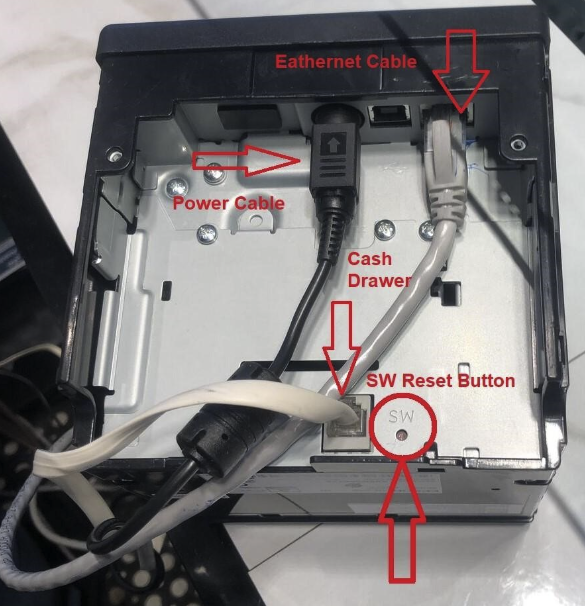
- Use a paper clip or the tip of a pen to press and hold the reset button (pictured below) on the back of the printer.
- While holding the reset button, turn the printer on. Continue to hold the reset button.
- After about five seconds, a warning will print out. Release the reset button.
- After about five more seconds, another sheet will print showing the factory reset IP address of the printer.
Epson U220 Printer
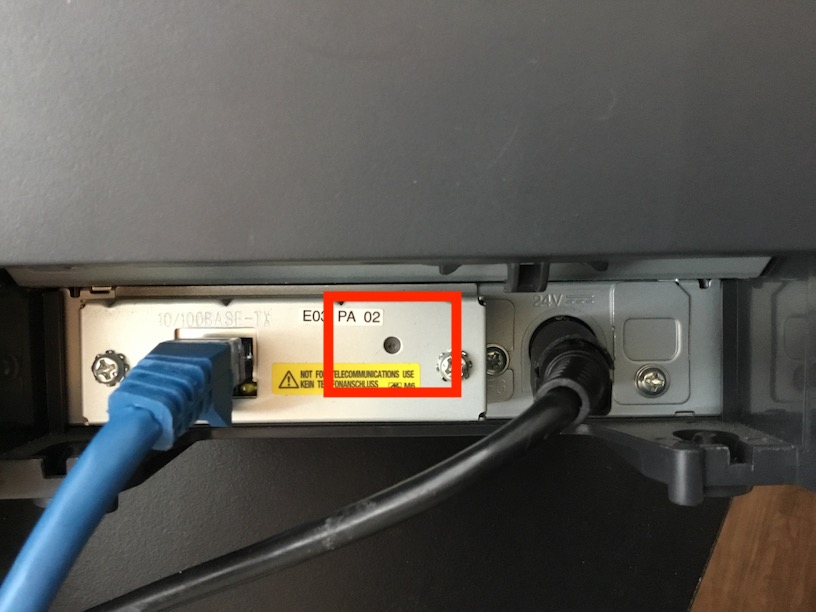
Epson M30 Printer