Configure Popular Items, Featured Items, and Upsells
Last updated: Aug 26, 2026, 9:53 AM
Question
- Can I edit featured items and upsells for online ordering?
- Can I configure featured items for Mobile Order & Pay?
- How do I enable or disable popular and featured items for Mobile Order & Pay?
Answer
There are multiple ways you can utilize popular items, featured items, and upsells to highlight items on your menu. These items will appear as a special menu with enlarged images designed to drive more orders. To learn more about Menu Upsells on devices, see Get Started With Menu Upsells On The POS.
To set up Featured Items and Upsells for Online Ordering:
- Log in to Toast Web and navigate to Takeout & delivery > Branding & customization > Branding & customization configuration.
- Under Menu Management, select Featured menu items & upsells.
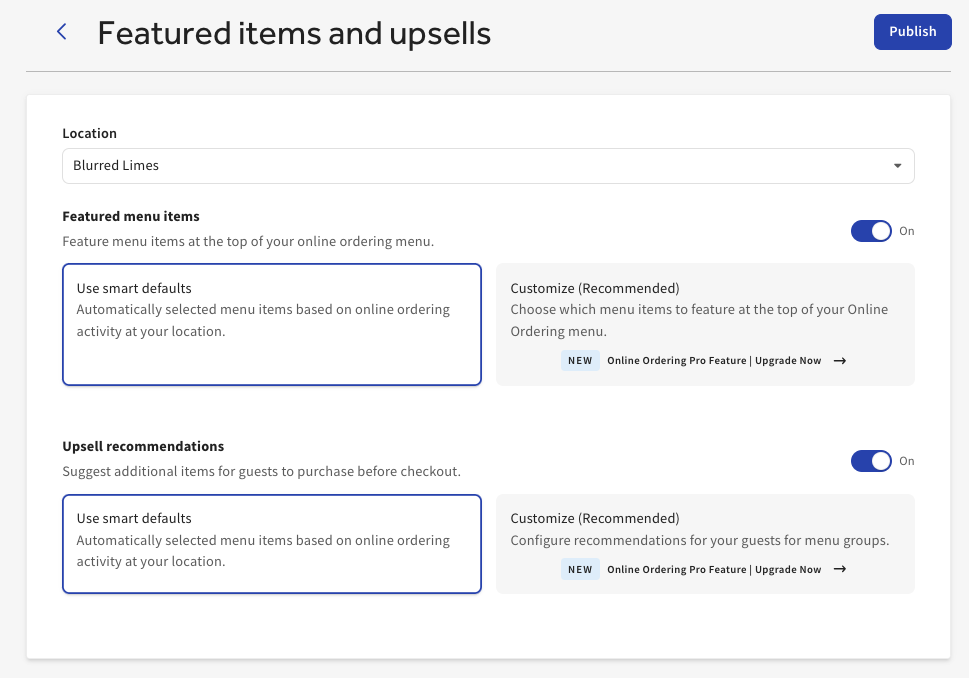
- Here, you can toggle Featured menu items and Upsell recommendations On or Of as seen in the image below.
If you use the Smart Defaults option, the feature items or upsell recommendations will automatically be selected based on online ordering activity. If you select customize, you can manually select any items on your menu for feature.
Notes:
- You must have Online Ordering Pro in order to utilize the customization option for Featured menu items & upsells. For more information, see Get Started With Online Ordering Pro.
- All featured items require images.
To setup Featured Items or Popular Items in Mobile Order & Pay:
- Log in to Toast Web and navigate to Front of house > Mobile dining solutions > Toast Mobile Order & Pay® > Menus.
- Scroll down to Popular and Featured Items. Here, you can toggle each feature On or Off.
- Popular items: Display your most popular items based on your sales history and present them as a menu category. This is determined by Toast's algorithm
- Featured items: A special menu with enlarged images to drive more orders.
- Save and publish your changes.
Note:
- For Mobile Order & Pay usage, featured items must have an image and an associated Featured item tag. If an item has a tag but no image, or an image but no tag, Toast will default to displaying your most popular items that include an image. For more information, see Use Menu Item Tags to Maximize Reporting.
- International accounts do not currently have the option to customize which items are recommended (available to US accounts with Online Ordering Pro); recommendations are determined automatically by Toast's algorithm in all markets.