Color-Code Additional Modifiers on Printed Kitchen Tickets
Last updated: Sep 17, 2026, 12:23 PM
Question
How can I make additional modifiers stand out from default modifiers on my printed kitchen receipts?
Answer
- In Toast Web, navigate to Kitchen > Printers, tickets, & KDS devices > Kitchen and ticket setup.
- In the Printed Tickets section, select Yes for the Print Default Modifiers Black setting.
- Save and publish your changes.
Note: This setting only works when two other settings are configured: Vertical Mode (Advanced Modifier Configuration) and Showing Default Modifiers (Modifier Groups and Modifier Options).
Additional Information
After enabling this setting, your receipts will look something like this, with default modifiers in black followed by additional modifiers in red:
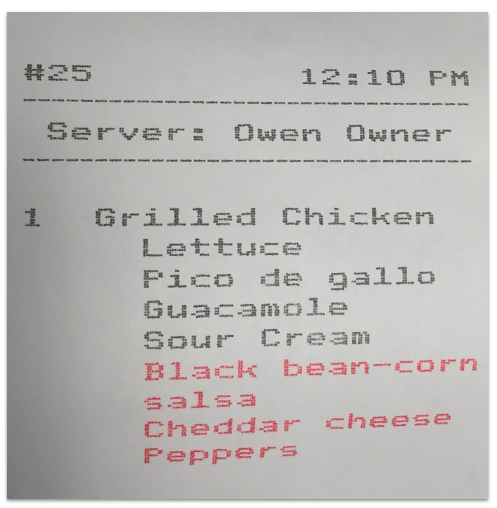
This setting can be particularly useful for alerting your kitchen staff that an item has been ordered with more than its standard ingredients.
At this time, it's not possible to change the color of a specific modifier on a printed kitchen ticket. It is possible to change colors for specific modifiers when using KDS.