Manage Allergens on POS and KDS
Last updated: Nov 7, 2026, 6:51 AM
Configure UI options, record allergens on POS devices, and route allergen tags to KDS screens and printed kitchen tickets.
| Toast Allergens is currently in open beta. Features and settings are subject to change as we continue to improve the experience. |
- Before You Begin
- Overview
- Enable Allergens in UI Options
- Archive Existing Allergen Modifier Groups
- Record Allergens During an Order
- Make Allergens Required
- View Allergens in the Kitchen
- Review Allergens on Current and Past Orders
- Related Articles
Before You Begin
Applies to: Toast Web, Toast POS, Toast Go® 2, Kitchen Display System (KDS)
Requirements: New KDS Grid View (Allergen callouts do not display on the Legacy Dynamic KDS)
Permissions needed:
- 6.6 Restaurant Operations Setup - Required to change UI Options. See the Permissions Reference Guide for help granting this permission.
What you'll accomplish: Activate allergen prompts on POS ordering screens, log dietary alerts during table service, and display allergen badges on kitchen tickets and KDS displays.
Overview
Toast Allergens provides a standardized workflow for front-of-house staff to log guest dietary alerts and route them directly to kitchen stations. Tag menu items in Menu Builder before enabling POS prompts. Refer to Configure Allergens on Menu Items.
Once enabled:
- Servers record allergens per item or for the whole table on POS terminals and Toast Go® handhelds.
- Highlighted alerts warn servers when an ordered item contains a guest's flagged allergen.
- Allergen badges route automatically to New KDS Grid View screens and printed kitchen tickets.
- Allergen details remain attached to checks for historical auditing.
Enable Allergens in UI Options
- In Toast Web, navigate to Front of house > Order screen setup > UI options.
- In the Order screen section, locate Additional modifier groups.
- Locate Allergens and select the Enabled checkbox.
- Select Save, then select Publish all changes.
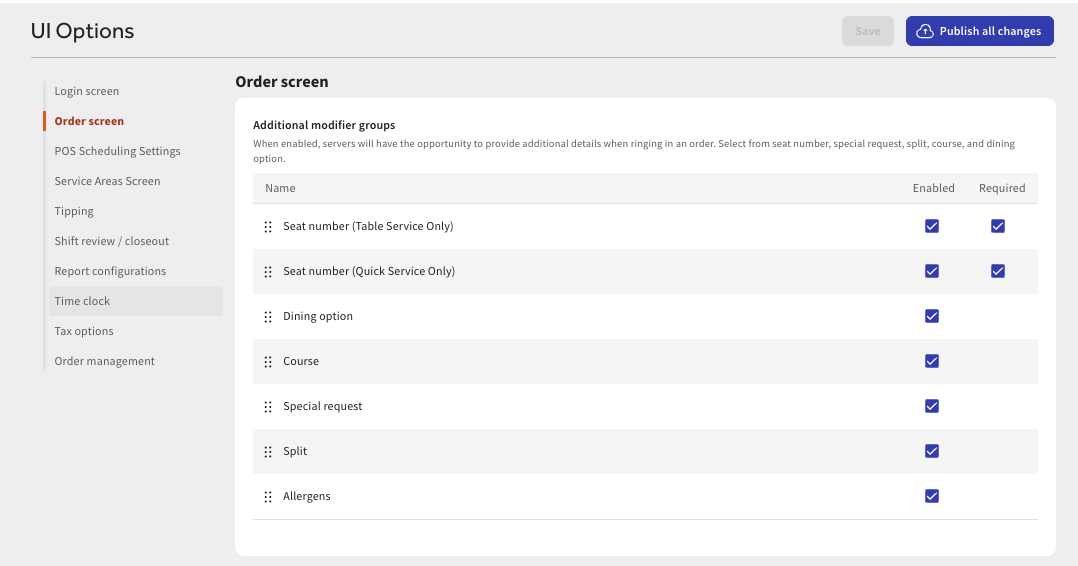
Expected outcome: An Allergens tab displays in the modifier area on POS order screens for every menu item.
If the Allergens tab does not display on POS screens:
- Confirm that Allergens is marked as Enabled in UI options and that you selected Publish.
- Confirm your Toast POS terminal, handheld or Toast Go® app is updated to the latest software version.
- If the tab still does not display, contact Toast Customer Care.
Archive Existing Allergen Modifier Groups
If your restaurant previously created custom modifier groups to track allergies (such as "Allergen Info"), archive them before using the built-in workflow. Maintaining both creates duplicate server prompts and confuses kitchen staff.
- In Toast Web, navigate to Menus > Modifier groups.
- Select your existing custom allergen modifier group.
- If the group is configured as required on any menu items, remove the requirement setting first.
- Select Archive.
- Select Save, then select Publish.
Expected outcome: Legacy modifier groups are archived and no longer display on the order screen.
Record Allergens During an Order
Front-of-house staff record allergens directly from the check screen on Toast POS terminals and Toast Go® handheld devices.
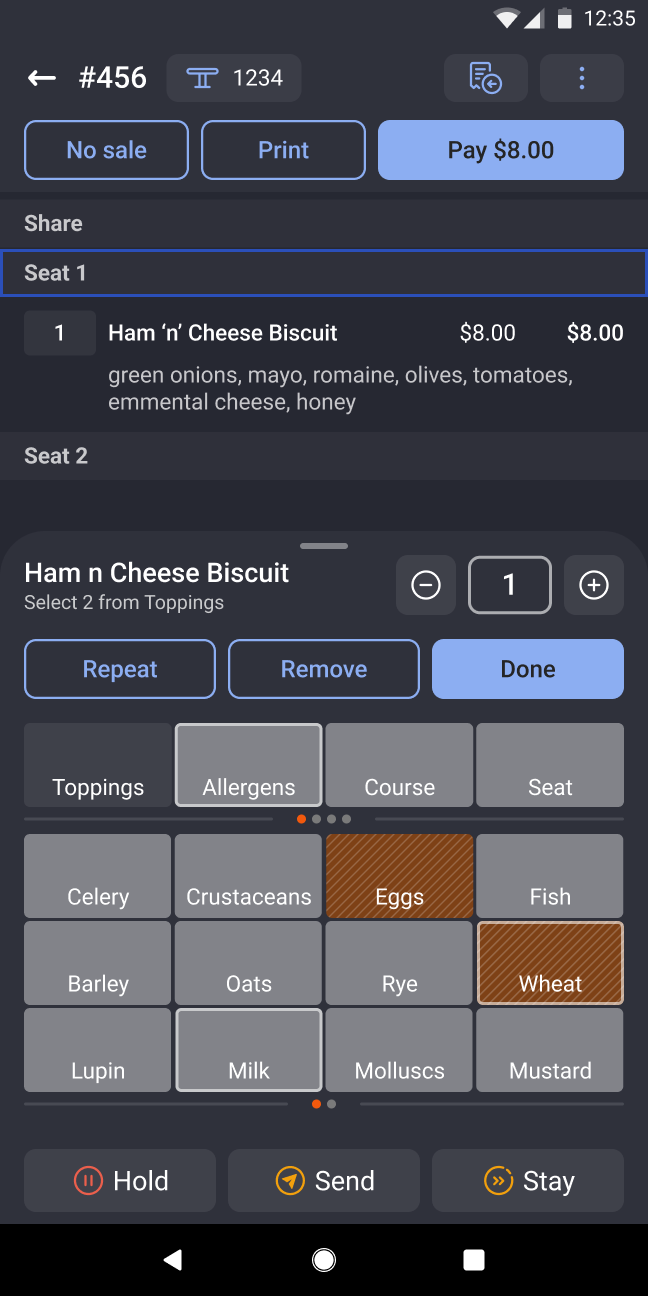
- On the order check screen, select the menu item.
- Select the Allergens tab in the modifier section.
- Select each allergen that applies to the guest.
- Select Done.
Expected outcome: Selected allergens highlight on the check screen. If the item was tagged with a matching allergen in Menu Builder, the item highlights automatically to alert the server.
Record allergens for the whole table
For banquet or shared table service, apply allergens across the entire check:
- On the order screen, select the table-level allergen action.
- Select all allergens that apply to the party.
- Select Done.
Expected outcome: Every item added to the check carries the assigned allergen alert.
Confirm a guest has no allergens
To log that dietary needs were actively verified, servers can select No allergens. This records confirmation on the check, verifying the question was asked rather than skipped.
Add or modify allergens during service
Allergens captured from online bookings or previous order rounds serve as an open baseline. Servers can select the item or check at any point during service to add or remove allergen tags before or after sending tickets to the kitchen.
Make Allergens Required
You can prevent servers from sending orders to the kitchen until they have opened and completed the Allergens prompt.
- In Toast Web, navigate to Front of house > Order screen setup > UI options.
- In the Order screen section, locate Additional modifier groups.
- Locate Allergens and select both Enabled and Required.
- Select Save, then select Publish.
Expected outcome: POS terminals require staff to select an allergen or choose No allergens before sending a check.
Note: Setting allergens as required adds a mandatory prompt to every order, including orders for guests without dietary restrictions. Train staff to select No allergens to complete the prompt quickly.
View Allergens in the Kitchen
Recorded allergens route automatically to kitchen stations once the order is sent.
Kitchen Display System (KDS)
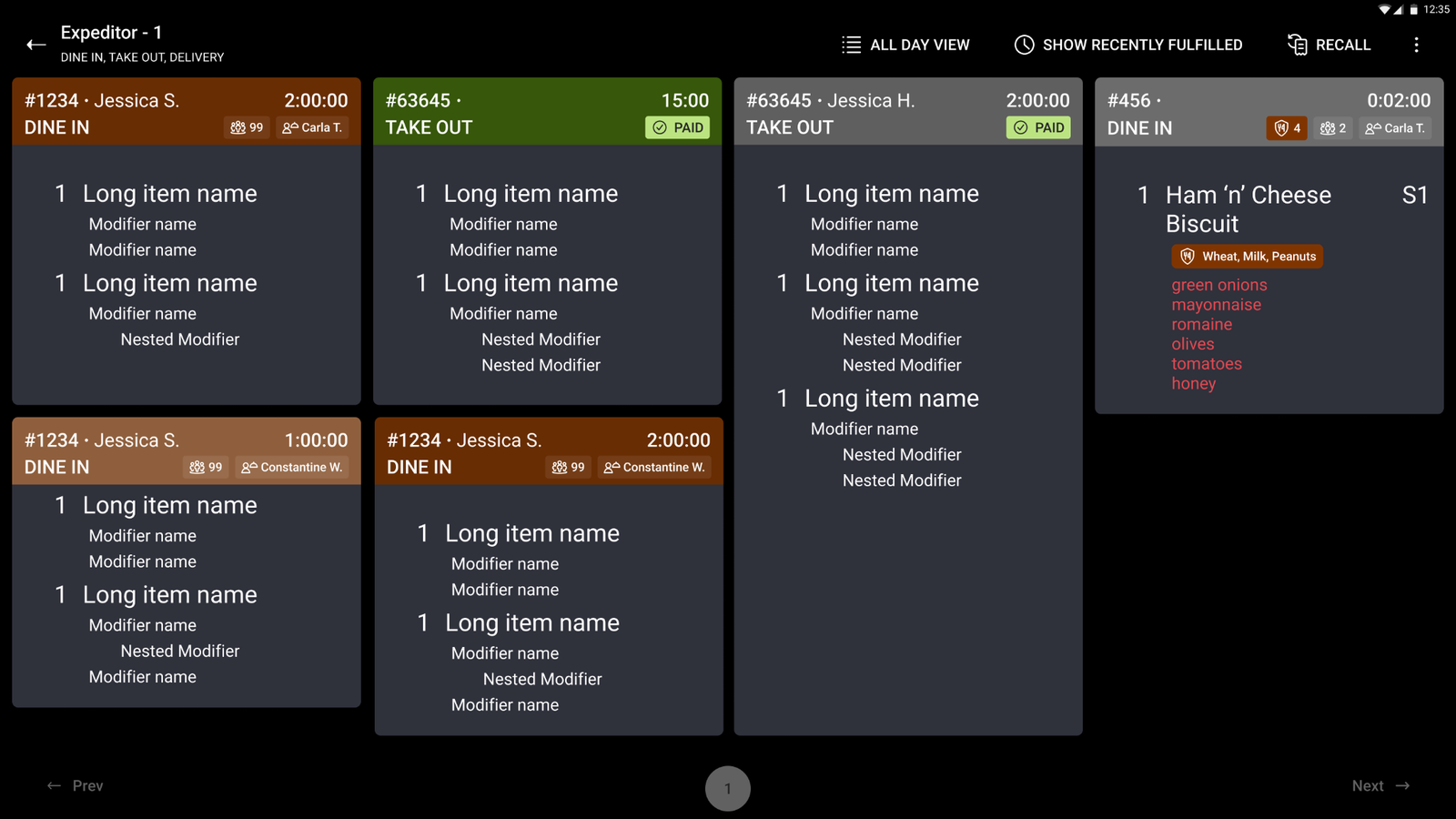
Allergens display automatically on devices running the New KDS Grid View with no secondary setup:
- Order-level header badge: Displays at the top of the ticket showing the total count of allergens on the order. Select the badge to view the full list.
- Per-item section: Displays dedicated allergen callouts below each affected menu item, visually separated from regular preparation modifiers.
Allergen alerts route to all configured KDS stations, including the line, expediter, and service bar.
If allergens do not appear on kitchen screens:
- Confirm your display hardware is running the New KDS Grid View.
- Note: The Legacy Dynamic KDS does not support allergen badges.
Printed Kitchen Tickets
Allergens print automatically on kitchen chits in a dedicated labeled section, positioned separately from standard item modifiers. Printed tickets require no configuration beyond enabling Allergens in UI options.
Review Allergens on Current and Past Orders
Allergen data remains linked to the guest check after service:
- Open checks: Open the active check on the POS to review assigned allergen tags.
- Past checks: In Toast POS, navigate to Find Checks and search by table number, server name, or check number to review allergen records.
Note: Allergen tags remain permanently attached to the check even if the order is transferred to another server.
Related Articles
- Configure Allergens on Menu Items
- Manage Guest Allergens in Toast Tables
- New KDS Experience Overview