New KDS Experience Overview
Last updated: Sep 17, 2026, 5:07 PM
Learn about Toast's new KDS experience, designed to optimize the kitchen in high-volume quick service and drive-thru restaurants.
| The new KDS experience is not compatible with Elo v1. It is compatible with portrait orientation for Elo v2 and Elo v4 devices. |
- New KDS Experience Overview
- Enable the New KDS Experience
- Customize Your Ticket Layout
- Use the New KDS Experience
- Frequently Asked Questions
- Additional Resources
New Kitchen Display System (KDS) Experience Overview
Toast's new KDS experience helps kitchen teams keep service moving with a clearer, more flexible ticket experience. The New KDS Experience has the features and functionality of the Legacy KDS, as well as new features that are only available on the New Experience. New KDS will be the singular KDS view moving forward for all customers allowing more flexibility and specificity within your kitchen systems.
After enabling the new KDS experience, your team may notice that some parts of the KDS look slightly differently than before, but this update is designed to make that adjustment worthwhile by including the following features to help your kitchen team:
- Grid View: A KDS ticket layout that displays tickets on a fixed grid. This provides a grid layout for kitchen tickets with a maximum number of tickets on a screen.
- Payment status: Displays whether the order was paid or unpaid.
- Preview tickets: Also known as "fire on next", see items as they are being inputted on the POS before the order is complete so the kitchen can start preparation even sooner. To learn more, see Enable Preview Tickets on KDS Device.
- Dark Mode: Minimize brightness of the KDS screen at bars and reduce eye strain.
- Runner fulfillment: An additional level of item fulfillment at Expeditor to track individual item status. To learn more, see Food Runner Fulfillment on KDS.
- Partial fulfillment indicator: An orange check mark that indicates when an item has been started or when an item that is routed to multiple prep stations is fulfilled by one prep station.
- Assembly lines: The ability to sequence tickets from one prep stations to another. To learn more, see Use Assembly Lines With KDS.
- Load balancing and start queue: The ability to indicate when you start working on a ticket and dividing work between multiple prep stations. To learn more, see Set Up KDS Start Queue and Load Balancing.
- Bump bars: Use a bump bar with your KDS to make it easy to fulfill tickets when the KDS device is far away. To learn more, see Use a Bump Bar With Toast KDS.
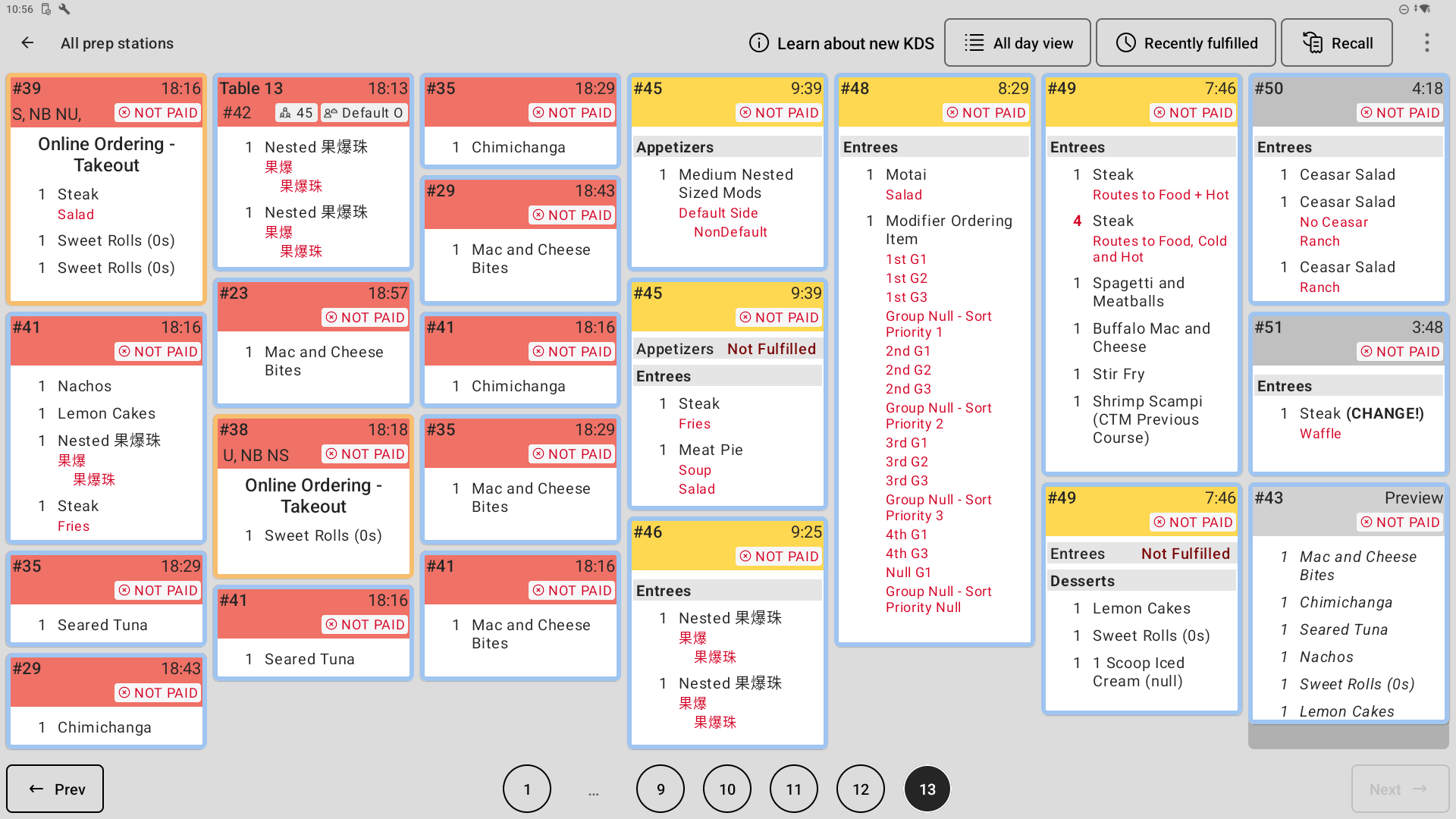
Here is an image of the New KDS Experience configured with Dynamic layout, light mode and seven columns:
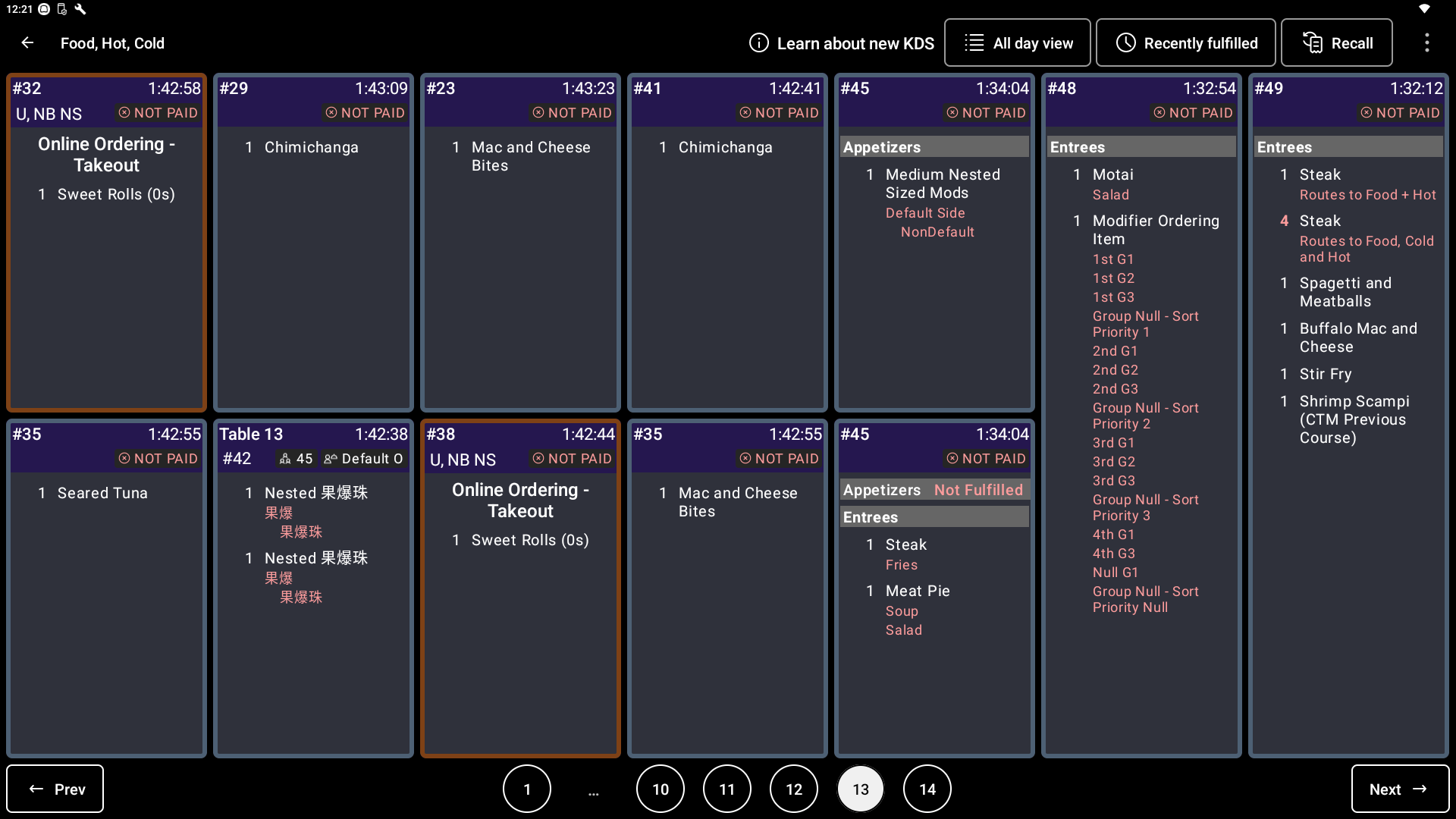
Here is an image of the New KDS Experience configured with Grid layout, dark mode, seven columns and two rows:
Enable the New KDS Experience
The new KDS experience is the default option for all new customers. If you are an existing customer and you would like to determine which of your devices can utilize the new KDS experience, navigate to Reports > Kitchen operations > Kitchen overview in Toast Web. To enable the new KDS experience for multiple devices at your location, you can select Upgrade Remaining Devices on this page.
To enable the new KDS experience from your KDS device, follow these steps:
- From your POS main screen, navigate to Setup > Device Setup.
- Under the Device Setup section, change the KDS View setting to New KDS.
- Note: Some customers may still see New Grid View.
- Note: Some customers may still see New Grid View.
Customize Your Ticket Layout
After the new KDS experience is enabled, you'll be defaulted to Dynamic as the ticket layout. You can further customize how your tickets are displayed in the KDS Appearance pane within the overflow menu (three vertical dots) in the top right corner of your KDS.
There are several customization options to choose from as seen in the image below:
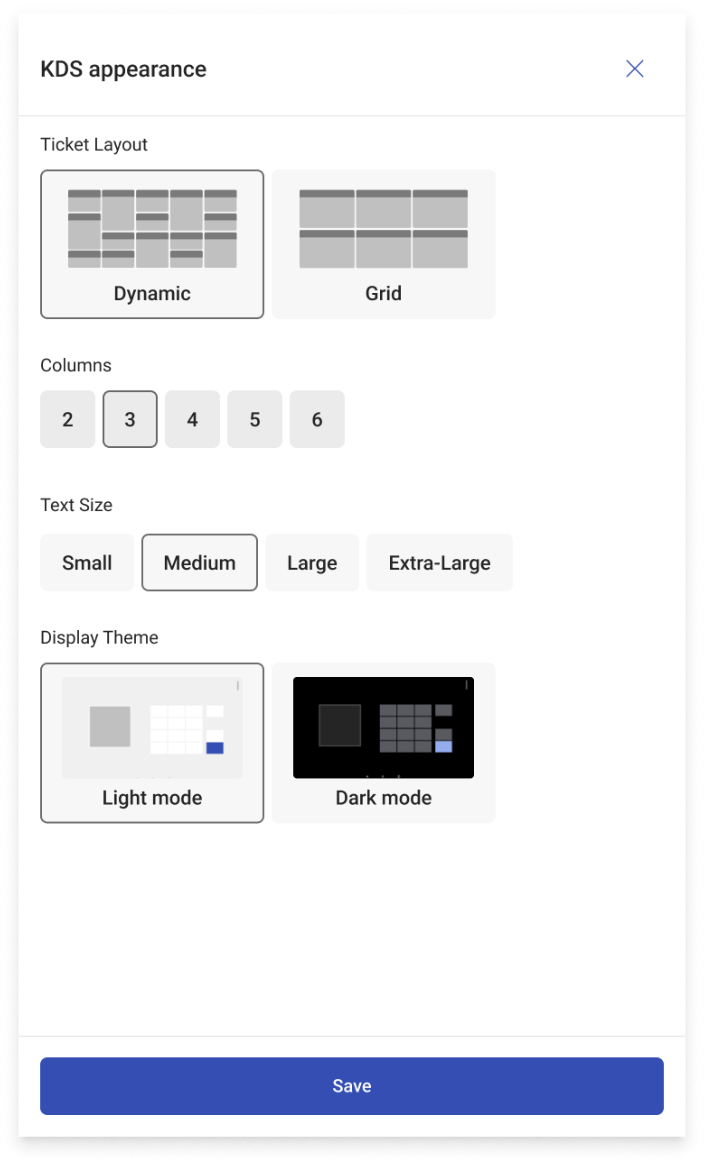
Dynamic layout has tickets of various lengths depending on how many items are on a ticket.
Grid layout has tickets that are aligned with the selected Grid size so the view of tickets is more uniform. Longer tickets can expand multiple grid slots.
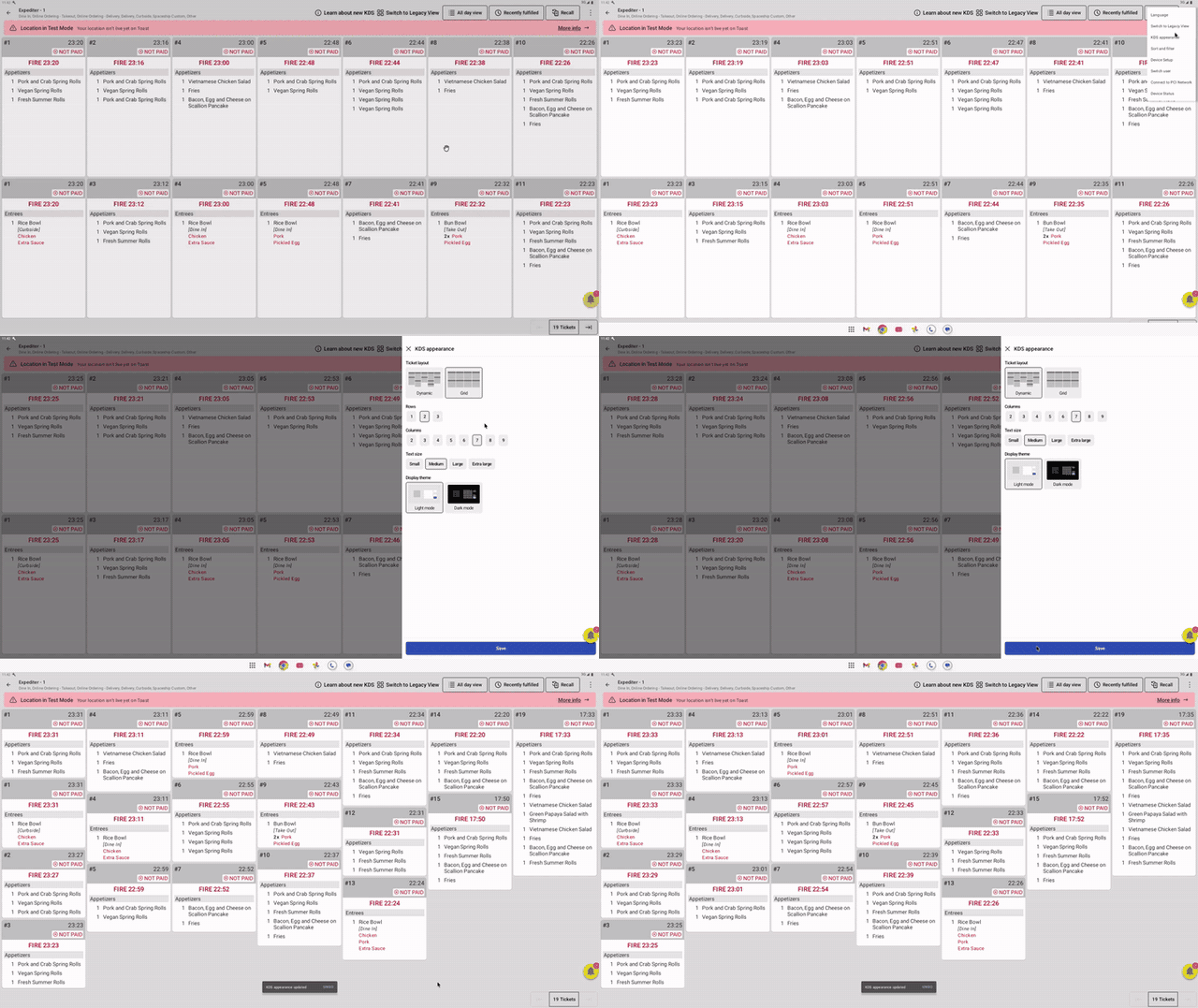
The video below shows a New KDS in grid layout being changed to dynamic layout using the KDS Appearance Pane. You will see that when Dynamic layout is selected, you can not choose the number of rows. This is expected behavior.
If you're using a bump bar with your Toast KDS, the first 10 tickets will have the overlay for order fulfillment via the 1-10 numbered buttons on the bump bar. Learn more about using bump bars with your Toast KDS in these articles: Use a Bump Bar With Toast KDS and Using the bump bar - Toast Platform Guide.
Note: If you need to customize items/modifier colors of your KDS tickets, please read this article: Customize the Appearance of KDS Tickets. Text size can only be changed in your KDS Appearance Pane as described above and is dependent on the number of rows or columns you select as this impacts the overall ticket size. Changing text size independently of this is currently unavailable.
Use the New KDS experience
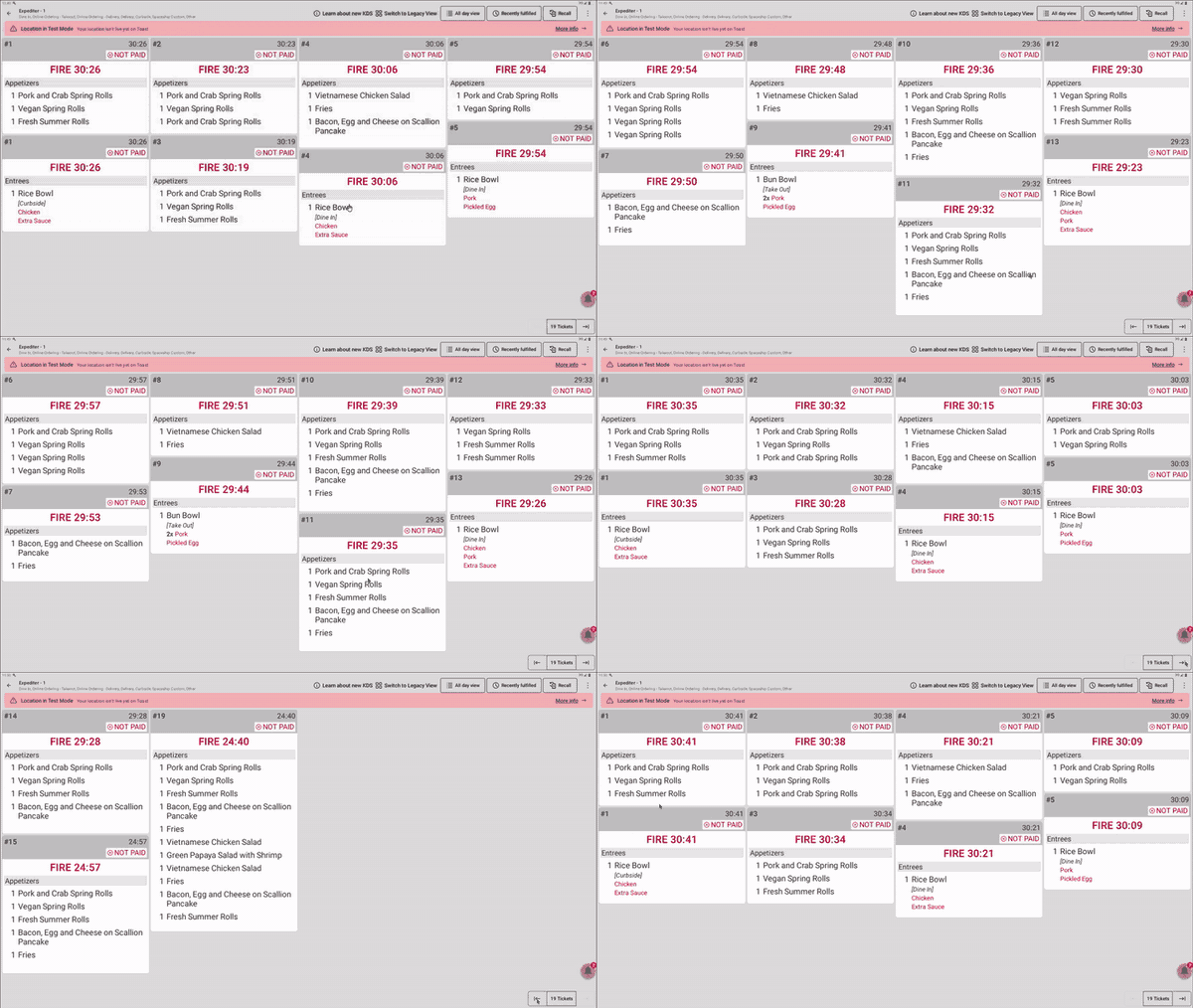
For a complete example workflow using the new KDS experience please check out Toast's technical documentation: KDS Workflow Using Grid View.
When using new KDS view, it is also important to remember the following guidelines:
- Do not use the new KDS view on portable devices. The new KDS view is not currently compatible with Toast Go 1 and Toast Go 2 devices. Using the new KDS view on these devices can result in cropped contents and poor formatting.
- Do not disconnect your local hub device from your router. The local hub device is required for offline mode with local sync. For more information about the local hub device, see Local hub devices.
- Be aware that clearing the app data or uninstalling the Toast POS app on a new KDS view device will prompt you to choose settings that configure the appearance of your KDS device.
New KDS Experience Frequently Asked Questions
Why am I seeing fewer tickets than before on my KDS?
You may see fewer tickets than before because the ticket layout and column count on your KDS are set differently than they were on Legacy View. Within your KDS Appearance Pane, you control your ticket size (width) by changing the number of columns on your screen. The text size options for small, medium, large, and extra large only change font size.
Setting Ticket Layout to Dynamic also fits more tickets into each column, because Dynamic sizes each ticket to the number of items on it.
Also asked as: “There is too much wasted space.”, “There are too few columns.”, “My tickets are too big.”, "How do I make the tickets on my KDS smaller?", "My tickets are too big and take up the whole screen — how do I fix it?", "How do I fit more orders on my KDS screen?"
Do I need to do anything to update to the New KDS Experience? Is there any downtime?
Your KDS will automatically update to the new experience, retaining all tickets with minimal or no downtime.
Where did the KDS View option go in Device Setup?
The KDS View option is removed from Device Setup once your location has been moved to the new KDS experience. This is expected, not an error on your device. Before the move, the setting appears under Setup > Device Setup and can be changed. After the move, the setting no longer appears on that device, and the device stays on the new KDS experience.
Also asked as: "Why is there no KDS View setting on my device?", "The KDS View option is missing under Device Setup — where is it?", "Why can't I find the setting to change my KDS view?"
Can I switch my KDS back to Legacy View?
The New KDS Experience has all the features and functionality of the Legacy KDS, as well as new features that are only available on the New Experience such as Preview Tickets, Assembly Lines, Start Queue, and more. New KDS will be the singular KDS view moving forward for all customers allowing more flexibility and specificity within your kitchen systems.
We can delay the change to the New KDS Experience, however the Legacy KDS will eventually be fully deprecated. To request a delay, please contact Customer Care.
Please include images and videos whenever possible — they help us identify and address missing features.
Also asked as: "How do I get my KDS to show tickets the old way?", "How do I change my KDS back to the old view?", "Can I disable the new KDS view?"
Why did my KDS screens change without me changing a setting?
Your KDS screens changed because your location was moved to the new KDS experience as part of Toast's scheduled rollout. Toast sends advance email notice before a location is scheduled. Because the view is set for each device individually, you may see the change on some screens before others, including handheld devices.
To find the email notices, search your email inbox for “KDS upgrade”. Your emails will have the following subject lines and arrive in your inbox one week, and one day prior to the upgrade respectively:
-
- Email 1: Coming soon: Your KDS upgrades on X date
- Email 2: Reminder: Your KDS upgrade goes live tomorrow
Also asked as: "Was there a KDS update?", "Why does my KDS look different after the update?", "Why did only some of my KDS screens change?"
Why can I only select one column in KDS Appearance?
You can only select one column in KDS Appearance when the display scaling on the KDS device is set larger than the default. In your Android device settings, navigate to Settings > Display > Display Size and set it back to Default, then return to KDS Appearance and set the number of Columns you want.
Also asked as: "Why is my KDS stuck on one column?", "Why can't I add more columns on my KDS?", "My KDS Appearance changes aren't doing anything — why?"
Do all of my KDS devices have to use the same view?
Your KDS devices do not all have to use the same view. The KDS view is set for each device individually, so during the transition you may have some screens on the new KDS experience and others still on Legacy View. Ticket appearance settings such as Columns, Rows, and Text Size are also set on each device, so a change made on one screen does not apply to the others.
Also asked as: "Is the KDS view setting per device or for the whole restaurant?", "Why is only one of my KDS screens different?", "Do I have to change every KDS screen separately?"
What features do I lose if I stay on Legacy View?
All customers will ultimately switch to the new KDS experience, but staying on Legacy View at this time means you cannot use the features that are built only for the new KDS experience. Assembly lines, food runner fulfillment, the partial fulfillment indicator, and preview tickets all require the new KDS experience. New kitchen workflow features are also being built on the new KDS experience only going forward.
Also asked as: "Does assembly line work on the old KDS view?", "Why don't preview tickets show on my KDS?", "What do I get with the new KDS that I don't have now?"
I want to give feedback on the New KDS Experience. Who can I contact?
To provide detailed feedback or if you have further questions, please email kitchenfeedback@toasttab.com.
Additional Resources:
- Get Started on Kitchen Configuration
- Kitchen Display System - Toast Classroom On-Demand Training
- Get Help With KDS Tickets
- Get Started with Toast Kitchen Display System (KDS) - Video Walkthrough