Manage Prep Stations With Toast Multilocation Management
Last updated: Dec 17, 2025, 10:58 AM
- Prep Stations for MLM Overview
- Create Master Prep Stations
- Create Location-Specific Prep Station Versions
- Archive Prep Stations
Prep Stations for MLM Overview
Watch our on-demand Toast Classroom training covering the basics of multilocation management (MLM).
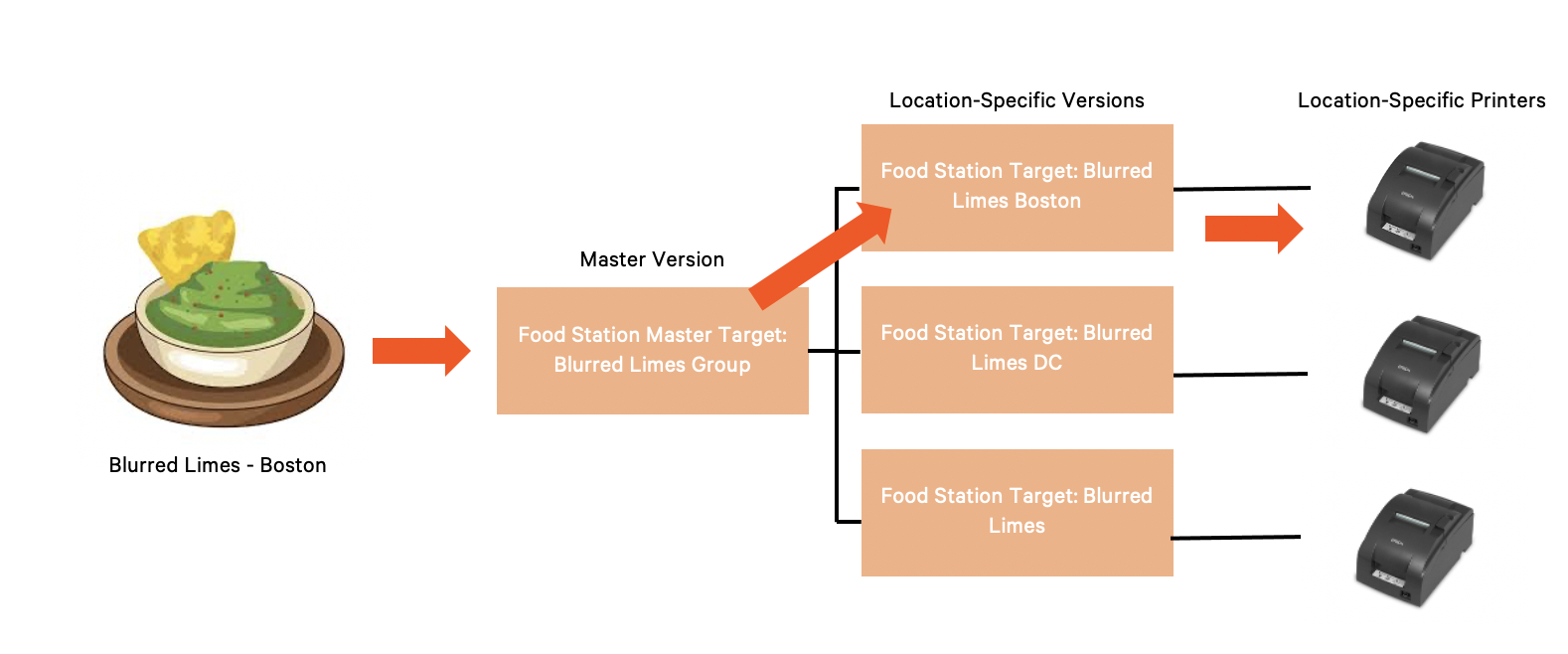
Prep stations for customers with Toast Multilocation Management (MLM) are created at both the corporate and location levels. A master version of each prep station is usually set up for the group as a whole, while location-specific versions are created for each location. Printers must be configured specifically for each location, which can then be applied to the location-specific version.
Note that in order to create a master prep station, you need to have group-level permissions. Check out Manage User Jobs and Permissions with Multi-Location Management to learn more.
In the example below, when a guest orders a House Guacamole at the Boston Blurred Limes location, the ticket gets sent to the kitchen. Toast reads that the item is routed to a master prep station and looks for a location-specific version, and as a result, sends the ticket to the Boston kitchen printer.
Create Master Prep Stations
Creating a master prep station and location-specific prep versions makes assigning prep stations to a shared menu much easier as more locations are onboarded. Assigning the master prep station to menus, groups or items via advanced properties will apply the location-specific versions as well, even though we only see the master being applied.
- In Toast Web, navigate to Kitchen > Kitchen stations > Prep stations.
- Using the You are viewing drop-down on the top right of the page, select the entire group and then select Update to refresh the prep stations list.
- Select +Add (at the bottom of the list of prep stations). A new row will appear.
- Fill out the fields including Station Name, Send to Expediter, and Other Stations.
- Make sure the Target and Owner fields are set to the corporate restaurant group. Toast recommends adding the word "MASTER" to the master prep station as a best practice, especially during the onboarding process.
- Save and publish your changes.
Create Location-Specific Prep Station Versions
Once you've created all of your master prep stations, you'll want to create location-specific versions of each prep station for each restaurant within the restaurant group.
- In Toast Web, navigate to Kitchen > Kitchen stations > Prep stations.
- Using the You are viewing drop-down on the top right of the page, select the entire group and then select Update to refresh the prep stations list.
- Next to the prep station for which you need to create location-specific versions, select the three dots on the far right of the row to open the overflow menu.
- Select + New Version.
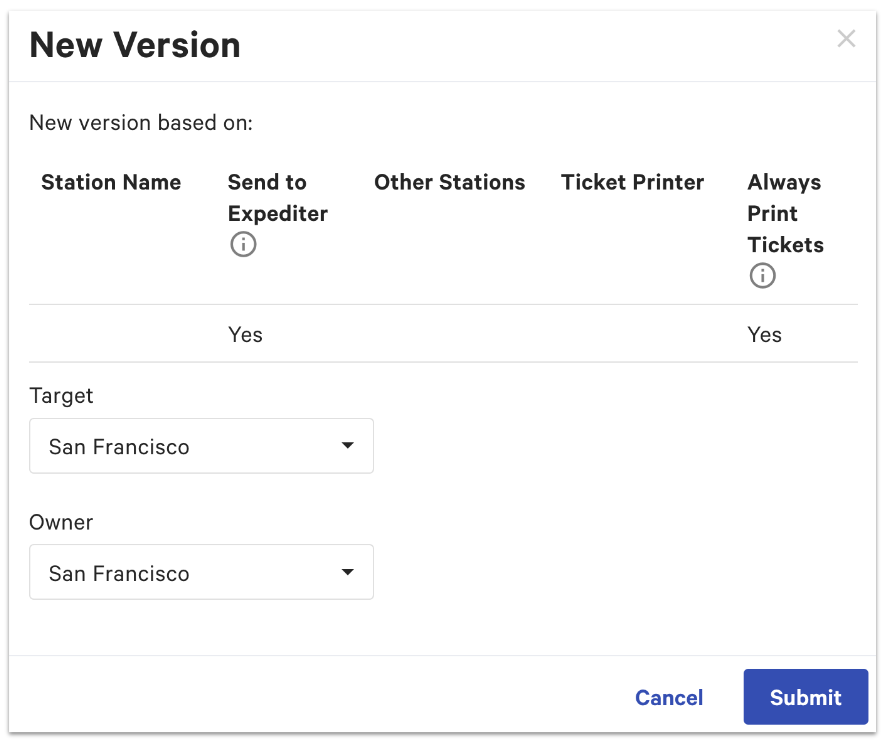
- Use the drop-down to select the Target location. The Owner field will automatically be set to the same location. The Owner indicates who can change and update the information based on the permissions granted to employees, and ideally matches the Target.
- Select Submit. The new version will be added to the prep stations list.
- Configure the new version's properties, including Station Name, Send to Expediter, Other Stations, Ticket Printer, and Always Print Tickets.
- Save and publish your changes.
Archive Prep Stations
With prep stations and MLM, it's important that you're careful when archiving prep stations. Make sure you're viewing ALL locations in the restaurant group, and pay close attention to the Target and Owner of the prep station you're removing since information is being shared at the master level.
- While on the Prep Stations page in Toast Web, select the three dots at the end of the row for the prep station you'd like to archive.
Note: If you're removing a master prep station, be aware that it will not remove the local versions of the prep stations. However, if the master is archived and it's the only one that is assigned to the menu, it will no longer have prep stations assigned to any locations. - Select Archive for the master and for all location-specific versions as well.
- Save and publish your changes.