Manage User Jobs & Permissions With MLM
Last updated: Sep 30, 2026, 2:31 PM
| Some of the processes, pages, and information here regarding employee profiles and permissions will soon be updated. If your experience does not match the information in this article, visit Employee and Job Permission Updates in Toast Web. |
- Permissions Hierarchy in Multilocation Restaurants
- Before You Begin
- Find an Employee's Jobs and Permissions
- Add or Remove a Job for an Employee at a Location
- Grant or Adjust Permissions at Other Locations
- Edit Employee Information Across Locations
- Frequently Asked Questions
- Related Articles
Permissions Hierarchy in Multilocation Restaurants
Toast Multilocation Management (MLM) restaurant groups must have at least one gatekeeper or super user at the corporate level who has access to all Toast permissions at all locations. This person is also called the Administrator or super admin in some Toast articles. Their access is granted by a Toast employee during onboarding.
The gatekeeper role is handled by an Owner, General Manager, Director of Operations, or equivalent role. The permissions granted to managers at individual locations are at the gatekeeper's discretion. For example, the gatekeeper may not want a location's manager to have access to certain Account Admin Access permissions, such as 8.1 Financial Accounts or 8.5 Toast Shop Purchases.
Location managers can grant the appropriate permissions to their staff in two ways:
- By adding a job to an employee's profile (which comes with a set of permissions).
- By overriding and setting individual permissions.
Restaurant Access vs. Restaurant Permissions
In an MLM account, two separate settings control where an employee can work and what they can edit:
- Restaurant Access controls the locations the employee can log into using their POS access code on Toast POS terminals. Selecting a restaurant group selects all locations within it; you can deselect specific locations as needed.
- Restaurant Permissions controls the locations and restaurant groups that the employee can edit within Toast Web. This setting ties directly to the Owner field in Toast Web.
Important: Restaurant Access and Restaurant Permissions are not linked. Two rules to remember:
- Setting Restaurant Permissions to a restaurant group does not automatically give permissions to every location within the group.
- Setting Restaurant Permissions to every location within a restaurant group does not automatically give permissions to the restaurant group itself.
Inherited vs. Override Permissions
In an employee's Permissions section, each permission is either inherited from a job or overridden at the individual employee level:
- Inherited permissions came from a job assignment. They appear as gray checkboxes and are already active. Do not override an already-inherited permission.
- Override permissions were granted (or removed) for this specific employee. They appear as blue checkboxes and differ from the job-based default.
For full inherit-vs-override mechanics, including what to do when the override toggle is grayed out, see Get Help With User Permissions for Toast POS.
Why Owners and Admins Sometimes Cannot Edit Permissions
To assign or edit another employee's permissions in an MLM account, you must hold all of that employee's permissions yourself, plus the 8.2 User Permissions permission at the same location. Being an owner or administrator does not automatically grant this ability.
If even one permission is enabled on the other employee's profile but not on yours, Toast will block the change and may show Sorry, you can't edit permissions you don't have.
If you need full owner-level access for your account, another user at your restaurant who already has owner permissions must update your profile. Customer Care cannot make this change on your behalf — it must come from someone at your restaurant who already holds those permissions, such as the gatekeeper or super user.
For step-by-step troubleshooting of error messages, see Get Help With User Permissions for Toast POS.
Before You Begin
Applies to: Toast Web for restaurants using Toast Multilocation Management (MLM).
Permissions needed:
- 8.2 User Permissions — at every location where you will adjust another employee's permissions.
- 4.10 Employee Jobs & Wages — to add, remove, or change a job (or wage) at a location.
- 4.9 Employee Info — to edit an employee's basic information (name, contact info, POS access code).
- All the permissions you intend to grant to the other employee, at the same location where you are granting them.
What you'll accomplish: Update an employee's jobs, permissions, or basic information at one or more locations within your MLM restaurant group.
Find an Employee's Jobs and Permissions
To review an employee's current jobs and permissions at the location you are signed into:
- In Toast Web, navigate to Team > Employees and search for the employee by name.
- Select the pencil icon next to the employee to edit their profile.
- On the Jobs and Permissions tab, review the Jobs & pay section. The jobs listed here apply only to the location you are currently signed into.
- Scroll down to the Permissions section. Inherited permissions came from a job assignment and appear as gray checkboxes. Override permissions were granted to this employee individually and appear as blue checkboxes.
Expected outcome: You can see the employee's current jobs and permissions for the location you are signed into. To review their access at another location, switch to that location using the location selector in the top-left corner of Toast Web (see Assign Employees to Multiple Locations for the location switcher).
For the full list of permissions and what each one controls, see the Permissions Reference Guide.
Add or Remove a Job for an Employee at a Location
To add a job to or remove a job from an employee at the location you are signed into:
- In Toast Web, navigate to Team > Employees and search for the employee and select the pencil icon to edit their profile.
- On the Jobs and Permissions tab, in the Jobs & pay section, select or deselect the checkbox for the job you want to add or remove.
- Select Save.
Expected outcome: The employee gains (or loses) the job and the permissions tied to that job at the current location. Changes are automatically published once they are saved.
Note: To add or remove a job, you must have the 4.10 Employee Jobs & Wages permission at the same location, and you must hold every permission included in the job you are granting. The user granting a job does not need to hold the job themselves — only the permissions inside it.
For example, if a manager has all the permissions tied to the Key Employee job at Location A but not at Location B, they can grant Key Employee to staff at Location A only. To grant the job at Location B, they must first hold the same permissions at Location B.
To adjust the wage rate tied to a job, you must hold 4.10 Employee Jobs & Wages at the same location as the wage you are adjusting.
Grant or Adjust Permissions at Other Locations
Use this procedure when an employee already has a job assigned, and you need to add or remove a single permission for them at one or more locations — for example, when opening a new location and assigning permissions to existing employees.
Before you grant permissions at another location, you must meet two requirements:
- You must have 8.2 User Permissions at the same location where you want to adjust another employee's permissions.
- You must hold the same permission you intend to grant — at the same location.
Examples:
- A user with 3.7 Void Items / Orders and 8.2 User Permissions at Location A, but not at Location B, can grant 3.7 Void Items / Orders to other users at Location A only.
- A user with 3.7 Void Items / Orders and 8.2 User Permissions at Locations A, B, and C can grant 3.7 Void Items / Orders to other users at all three locations.
To add or remove a permission for an individual employee at a specific location:
- In Toast Web, navigate to Team > Employees.
- Select the edit pencil to open the employee's profile.
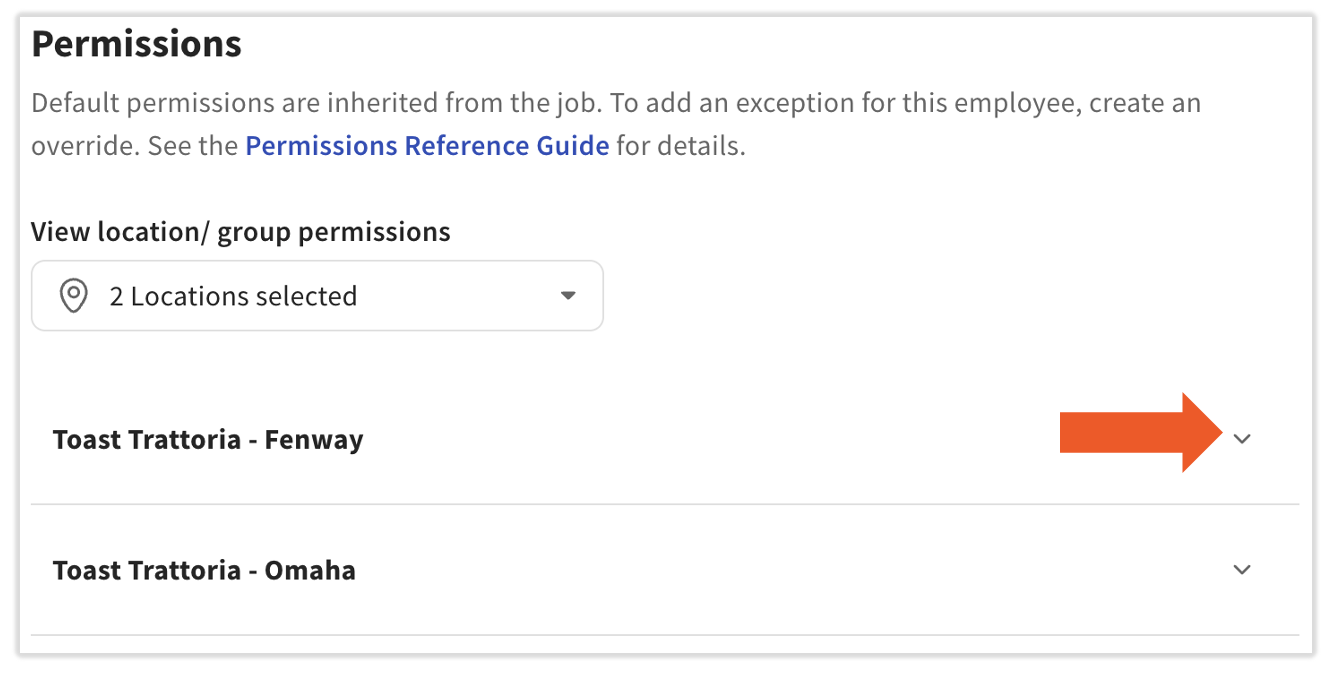
- Select the Jobs and Permissions tab and scroll to the Permissions section.
- Select the v caret icon for the location you want to add or remove permissions.
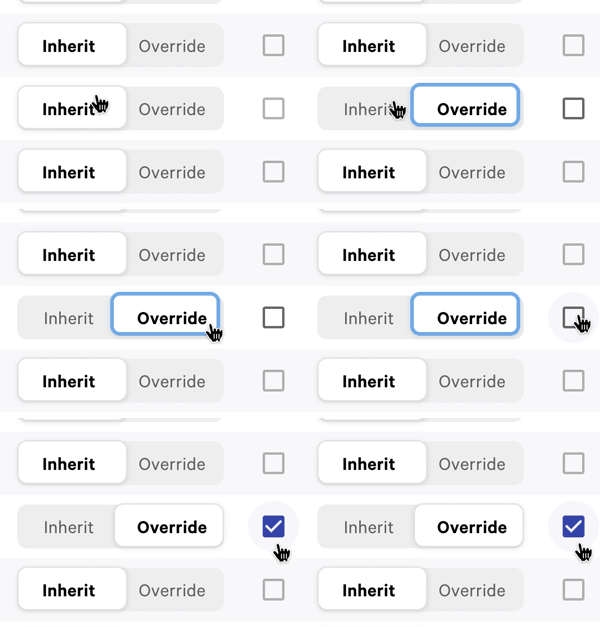
- Once the location is expanded, select Override to gain access to the checkbox (if needed). Whether you need to toggle to Override depends on how this employee's permissions have been set previously, most likely based on the jobs they're assigned to.
- When the checkbox turns from gray to black, select the checkbox to enable the permission (blue check) or clear it to disable the permission (empty box).
- Select Save.
Expected outcome: The employee has the updated permission at the selected location. Permission changes are automatically published once they are saved. If the employee is signed in to a POS device, they may need to sign out and back in (or resync the device) for the change to take effect — see Assign User Access Permissions for the resync steps.
Note: Group-level permissions provide back-end (Toast Web) access only. If an employee also needs to log in on a POS device at a specific location, they must be added as an employee at that location separately — group-level access alone is not sufficient for POS device login. To add an employee to additional locations, see Assign Employees to Multiple Locations.
Edit Employee Information Across Locations
Editing an employee's basic information — name, contact information, and POS access code — requires the 4.9 Employee Info permission. If a Toast Web account already exists for this employee, the email address and password cannot be edited by anyone besides the employee themselves.
To edit an employee's information at another location:
- Confirm you have 4.9 Employee Info at your current location and at the location where the change is needed.
- Switch to the location where the employee's information needs to change, using the location selector in the top-left corner of Toast Web.
- In Toast Web, navigate to Team > Employees.
- Select the employee's hyperlinked last name and navigate to the Profile tab.
- Update the employee's information.
- Select Save.
Expected outcome: The employee's information is updated at the location where you made the change. To make the same change at additional locations, repeat steps 2–5 at each location.
Frequently Asked Questions
I'm the owner, but the system says I'm not an admin. Why can't I edit another employee's permissions?
To edit another employee's permissions, you must hold every permission that employee has, plus the 8.2 User Permissions permission at the same location. Being the owner does not automatically grant this. If even one permission is enabled on the other employee's profile but not on yours, Toast will block the change.
Also asked as:
-
- I am the owner and need permission to do all things, but the system is telling me I need to contact my restaurant administrator
- Who is the superuser/admin for our account?
- How do I find out who the gatekeeper is?
To resolve this, ask the gatekeeper or another existing super user at your restaurant to add the missing permissions to your profile. If there is no gatekeeper or super user set up on your account, please contact Customer Care for further assistance.
For step-by-step troubleshooting, see Get Help With User Permissions for Toast POS.
What's the difference between Inherit and Override permissions?
Inherit and Override describe where a permission came from on an employee's profile.
-
- Inherited permissions came from a job that was assigned to the employee. They appear as gray checkboxes and are automatically active.
- Override permissions were set for this specific employee, separate from any job. They appear as blue checkboxes.
In most cases, you do not need to override an already-inherited permission. Use Override when you want to grant or remove a permission for one employee without changing the job that other employees share.
What's the difference between an Administrator and a Super User?
In an MLM restaurant group, the super user (sometimes called the gatekeeper, Administrator, or super admin) is the employee at the corporate level who holds every Toast Web permission at every location. The super user can edit any employee's permissions at any location in the group. There is usually at least one — often the Owner, General Manager, or Director of Operations.
Other administrators may exist at individual locations with location-scoped permissions, but they can only edit permissions they themselves hold at that location.
How do I find out who the gatekeeper is at my restaurant?
The gatekeeper is set by Toast during onboarding and is the Owner, General Manager, Director of Operations, or equivalent role at your restaurant. To identify the current gatekeeper at your account, ask your restaurant's leadership team. Customer Care does not assign or transfer the gatekeeper role on customer accounts.
If your gatekeeper is no longer with the restaurant and access needs to be transferred, contact Customer Care to discuss options.
I added permissions to the employee, but they still don't have access. What should I do?
Two common causes:
-
- The employee is signed in to a POS device. Have them sign out and back in, or resync the POS device. For resync steps, see Assign User Access Permissions.
- The employee has a duplicate Toast Web profile across locations. In Toast Web, navigate to Team > Employees and search for the employee's name and check for two profiles. Update the profile they actually use to log in.
If the issue continues, see Get Help With MLM Employee Access & Permissions for MLM-specific scenarios.
Can an MLM super user edit any employee's role at any location?
Yes — a super user holds every permission at every location, so they can add or remove jobs and permissions for any employee in the restaurant group. If an MLM super user is unable to edit an employee's role at a specific location, the most common cause is that the Override toggle is in Inherit mode and needs to be switched, or that the employee profile in question was set up by a Toast employee with a configuration that requires Customer Care to adjust.
Related Articles
- Get Help With MLM Employee Access & Permissions
- Assign Employees to Multiple Locations
- Assign User Access Permissions
- Get Help With User Permissions for Toast POS
- Permissions Reference Guide