Manually Update Firmware on Elo V2/V3
Last updated: Sep 16, 2026, 2:21 PM
Question
How do I update the firmware on my Elo V2/V3 terminal?
Answer
Notes:
- Firmware updates are separate from Toast app updates.
- Elo V2 and Elo V3 devices share the same physical hardware. You may see them referenced together as Elo V2/V3. The difference lies in their firmware versions:
- Elo V2 devices use firmware versions in the 3.XX.XXX range.
- Elo V3 devices use firmware versions in the 4.XX.XXX range.
- The Elo V2/V3 firmware upgrade process happens through ToastMobile. There are tiers of upgrades for these devices:
- Devices on firmware below 3.46.302 must first update to 3.46.302 before upgrading to 4.XX.XXX.
- Devices on firmware 3.26.77 or lower will be prompted to install the Elo support application before installing the firmware update.
Steps to Update Firmware
Note: Don't unplug any cables or the monitor while the update is in progress.
- Navigate back to the Toast passcode screen and enter your passcode to view your pending update.
- Note: If the update does not display upon returning to the passcode screen, this may mean that the update was previously displayed and dismissed. In this case, the update will reappear again in 8 hours or you may use the following steps to trigger the update immediately:
- Delete the Toast app (for instructions on how to uninstall an app, see Navigate Your Android Device).
- Reinstall the Toast app (see Install the Toast App for instructions).
- Log in using your Toast email address and password.
- Wait 10 minutes and enter your passcode. When the update prompt appears, select Update now.
- Note: If the update does not display upon returning to the passcode screen, this may mean that the update was previously displayed and dismissed. In this case, the update will reappear again in 8 hours or you may use the following steps to trigger the update immediately:
- You’ll know the update is finished when you arrive back at the Android home screen. To confirm the update was successful, repeat steps 1–4 to ensure the current version reads 4.50.540120051+a or higher.
- If the firmware update continues to fail or you’re unable to update, see Devices on a version of ToastMobile 2.94 or higher below for an alternate way to start the update, or contact Toast Customer Care for help with a device replacement or upgrade options.
Note: Depending on the current firmware version on the device, more than one firmware update may be required.
- Open the Toast app and tap the three dots in the top-right corner.
- Tap Device.
- Review the Firmware Version to see your current version.
- If your firmware version is 3.46.302 or higher, only one update is required to reach the latest firmware.
- If your firmware version is between 3.26.77 and lower than 3.46.302, you’ll need to complete two updates to reach the latest firmware. After the first update completes, repeat steps 1–4 again to install the next update.
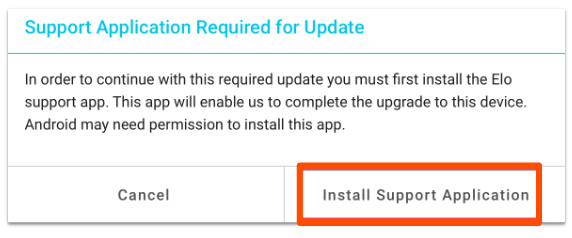
- If your firmware version is 3.26.77 or lower, you’ll need to complete three updates to reach the latest firmware. The first step will prompt you to install the Elo Support Application before proceeding.
- If this occurs, select Install Support Application.
- When prompted, select Next and then Install. The firmware update will continue once this application is downloaded and installed. The update process takes a few minutes, during which time you may see Elo progress screens.
- If this occurs, select Install Support Application.
Devices on a version of ToastMobile 2.94 or higher:
With the release of ToastMobile 2.94, Elo V2/V3 devices now include a way to manually start the firmware update process directly from the ToastMobile main menu. This is useful if the update prompt didn’t automatically appear, or if the standard update steps above didn’t complete successfully.
Before you begin:
- The device must be powered on and connected to the internet (Wi-Fi or Ethernet).
- ToastMobile version 2.94 or later must be installed. If it isn’t on the device, download it from www.toasttab.com/link/apk.
- This applies to Elo V2 and Elo V3 only — these steps do not apply to Elo V4.
Note (Elo V2 devices only): Before starting, confirm the device is in Android Home mode (pink launcher background, standard Android interface) — not EloView mode (blue full-screen takeover with Elo branding and an Elo password prompt). If the device is in EloView mode, it must be factory reset first to switch to Android Home mode.
- Log in and enter your passcode to pin in to the device.
- From the main screen, scroll to the Setup section and tap Elo Firmware Update.
- Respond to the message that appears at the bottom of the screen:
Message What It Means What to Do A permission dialog appears The device needs storage permission to download the update. Tap Allow. On some devices the app may close after granting permission — this is expected. Reopen Toast, pin back in, and tap Elo Firmware Update again. “Update available, check back soon.” An update was found and is downloading in the background. Wait 15 minutes, then tap Elo Firmware Update again. “Update in progress, check back soon.” The update is still downloading or being prepared. Wait 15 minutes, then tap Elo Firmware Update again. “Already up to date.” The device firmware is already current. No further steps required. “Update not available.” No update is currently available for this device. No further steps required. If you expected an update, contact Toast Customer Care. An install screen appears The update is downloaded and ready to install. Proceed to the next step. - When the install screen appears, a 15-second countdown will begin and the update will start automatically — or tap Install to start immediately.
- If a “Support Application Required for Update” dialog appears, tap Install Support Application and follow the on-screen prompts. The firmware update will continue automatically once the support app is installed.
- Do not unplug or turn off the device during the update. It will restart on its own to complete installation — this may take several minutes.
Note (Elo V2 devices only): Updating from Elo V2 to Elo V3 firmware triggers a factory reset. Device setup will need to be completed again. ToastMobile settings restore automatically after logging in and pinning in, but Wi-Fi and other device settings may need to be reconfigured.
If you’re still having trouble:
| Issue | Resolution |
|---|---|
| The app closes or crashes after granting storage permission | This is expected on older devices. The permission was still granted. Reopen Toast, pin in, and tap Elo Firmware Update again. |
| “Update available” keeps appearing after waiting | The download may be slow due to network conditions. Ensure the device has a stable internet connection and wait up to 30 minutes before trying again. |
| The install screen doesn’t appear after multiple attempts | Ensure the device is connected to the internet. Try logging out, waiting 10 minutes, then logging back in and pinning in. Then tap Elo Firmware Update again. |
| “Update not available” but the device should have an update | The update may not yet be targeted to this device. Contact Toast Customer Care with the device serial number. |
| “Storage permission required.” | The storage permission was denied. Go to Android Settings > Apps > Toast > Permissions and enable Storage, then try again. |
Additional Information
The safety and security of your Toast hardware and restaurant is a top priority to us, and thus, we periodically roll out changes to further enhance said security and safety of your hardware and network.
A portion of these changes may require you to update your devices to the latest firmware version available. Use the information in this article to update your Elo V2/V3 accordingly.