Toast Payroll: Manage Employer Contributions for "Deductions-Only" Benefits
Last updated: Oct 20, 2026, 1:48 PM
Question
- Can Toast set up a separate deduction to track my (employer) contribution to an employee's medical deduction?
- Is there a report to track an employer's cost associated with deductions?
Answer
| The instructions in this article should only be used for customers who do not use SimplyInsured or the Toast Payroll Classic Benefits module. These customers will most likely subscribe to the Toast Payroll Essentials package. |
Can Toast set up a separate deduction to track my contribution to an employee's medical deduction?
At this time, we can not set up a separate deduction to track the employer's contribution to an employee's medical deduction. Unlike a 401k, whose match will be a separate deduction code to display on paystubs, Toast Payroll does not track the employer cost of a medical benefit enrollment via a separate deduction. Instead, this is tracked on the Medical deduction itself on the employee's Toast Payroll profile. Once open, navigate to Recurring > Deductions > edit pencil on the desired deduction. (Learn how the new Toast Payroll navigation works by visiting Navigate Toast Payroll Within Toast Web.)
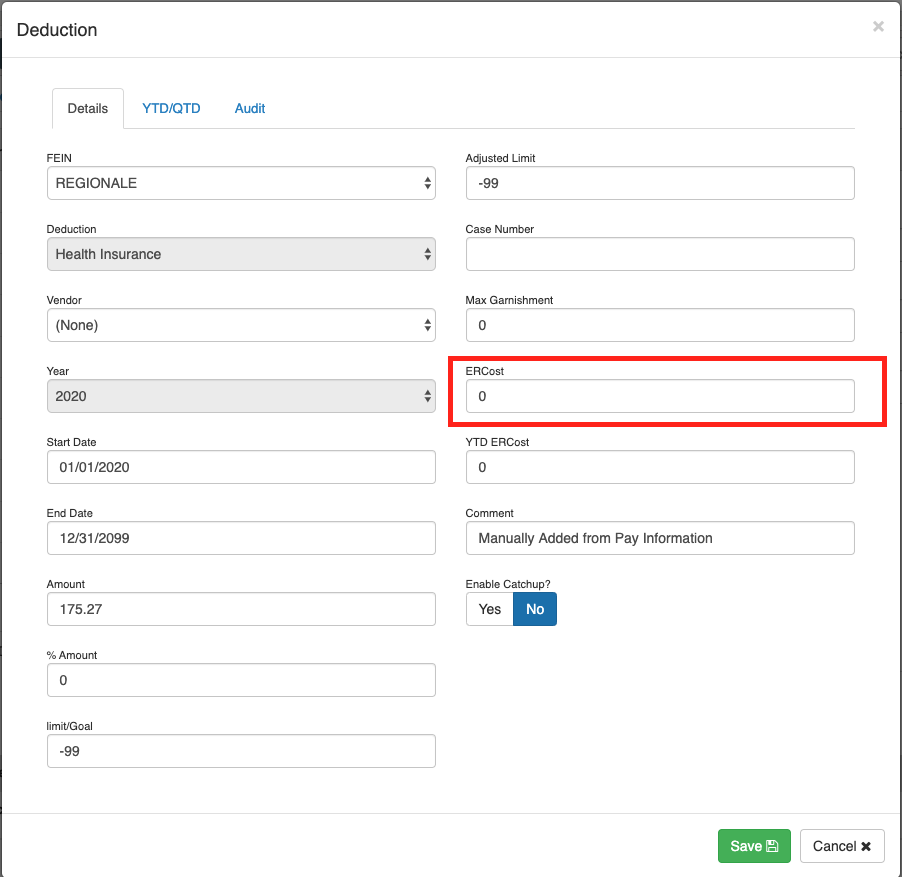
You will need to manually add the per pay period employer cost here on each employee's medical deduction. This will not appear on employees' paystubs, but can be available to you through different sources mentioned below.
Is there a report to track employers' costs associated with deductions?
If a deduction has an associated ER cost setup, then the simplest way to view this information is by logging into the employee's Toast Payroll profile and navigating to Employment > Recurring > Deductions > blue eyeball icon. Learn how the new Toast Payroll navigation works by visiting Navigate Toast Payroll Within Toast Web.
From this page, you will see the deduction's ER cost (per pay period) as well as the YTD ER cost. Additionally, if flagged to "include deductions," then the PEPAR (Per Pay Period Payroll Audit Report) will also show the ER cost (per pay period amount only).
The YTD employee contribution + employer cost will appear on the employee's Form W-2 if the deduction code is flagged to Include ER cost on W2 within the deduction code setup page. To verify how your deduction code is set up, please contact Toast Payroll Support via the blue chat dot in the lower-right corner of any Toast Payroll page.
This content is for informational purposes and is not intended as legal, tax, HR, or any other professional advice. Please contact an attorney or other professional for advice.