Configure Menus for Breweries or Tap Rooms
Last updated: Oct 6, 2026, 2:39 PM
- Menu Best Practices for Breweries or Tap Rooms
- Menu Setup Options
- Use Menu Reports to Track Beer Sales
Menu Best Practices for Breweries or Tap Rooms
Configuring your menu for breweries, tap rooms, or restaurants with large draft lists can seem daunting. With the setup recommendations below, we hope that you will easily be able to set up and manage your beer menu.
The recommendations below can also be used for wine-focused restaurants that may offer guests a variety of sizing options.
Menu Setup Options
Menu Setup Option: Draft Lists
Option #1: If your restaurant or brewery has one size for draft beer, Toast recommends creating either a group or subgroup (depending on how your beverage menu is built) and adding individual items for each beer. If you have canned beer, best practice is to use the label draft after each beer name for both reporting purposes and so the bartender knows which option was ordered.
- Menu: Beverages
- Menu Group: Beer
- Subgroup: Draft
- Item: Toasty Stout Draft
- Item: Bready IPA Draft
- Item: Grainy Ale Draft
- Subgroup: Draft
- Menu Group: Beer
Option #2: Larger breweries or tap rooms might offer different sizes for draft beer (4 oz, 8 oz, 16 oz, etc.). If that's the case, Toast recommends using subgroups for the beer name (e.g. Bready IPA) and the items within that subgroup for the sizes (e.g. 12 oz Bready IPA). Building your beer menu this way will allow you to better track sales and look at reporting. For more information on how to use reports to track beer sales, check out the section below.
- Menu: Beer
- Menu Group: Draft Beer
- Subgroup: Bready IPA
- Item: 4 oz Bready IPA
- Item: 12 oz Bready IPA
- Item: 16 oz Bready IPA
- Subgroup: Bready IPA
- Menu Group: Draft Beer
Option #3: The third option for draft lists uses subgroups for each particular size sold with items within those subgroups for the various beer offerings for that specific size. In the example below, the subgroup is named 4 oz and the items will have the size identifier before the beer style or name.
- Menu: Beer
- Menu Group: Draft Beer
- Subgroup: 4 oz
- Item: 4 oz Toasty Stout
- Item: 4 oz Bready IPA
- Item: 4 oz Grainy Ale
- Subgroup: 4 oz
- Menu Group: Draft Beer
Option #4: The last option for configuring draft lists consists of using the size pricing feature. Size pricing allows you to identify multiple size categories with specific pricing for each size for an item (learn more about size pricing in this Support Center article: Set Your Menu Pricing Strategy). In the example below, the item is Toast Stout Draft and the sizes are Sample, 4 oz, 12 oz, 16 oz, and Growler. Each size then has its own price. You can also have different prices for each size for each item, such as Bready IPA Draft. You will need to select Size Price for the Pricing Strategy setting on the item level to make use of this configuration.
Note: Size pricing is limited with reporting. Menu reports will show the number of beers sold, but would not break down how many of each size were sold.
- Menu: Beer
- Menu Group: Draft Beer
- Item: Toasty Stout Draft
- Size price: Sample
- Size price: 4 oz
- Size price: 12 oz
- Size price: 16 oz
- Size price: Growler
- Item: Toasty Stout Draft
- Menu Group: Draft Beer
If your location frequently changes out your beer offerings, use Quick Edit mode to quickly make changes to your menu directly on your POS.
Back to top
Menu Setup Option: Beer Flights
Beer flights are a great way for your guests to sample what's on tap. You might have different flights for different styles of beer or you might only have one flight. Regardless, it's recommended that items are used to label the beer flight (e.g. Toasty Beer Flight) and modifiers are used for the beer options your guests can choose from. Make sure that the pricing is set at the item level and that the modifier pricing is set to No additional charge. Additionally, make sure your modifier group is set to Multi-select and that a Max # of selections is set to the number of beer options in the flight.
For this scenario, when 86ing or removing a beer as an option, you would need to do so for both the item and the modifier.
- Menu: Draft Beer
- Menu Group: Flights
- Item: Toasty Beer Flight
- Modifier Group: Toasty Beer Flight List
- Modifier: 01 - Toasty Stout
- Modifier: 02 - Bready IPA
- Modifier: 03 - Grainy Ale
- Modifier Group: Toasty Beer Flight List
- Item: Toasty Beer Flight
- Menu Group: Flights
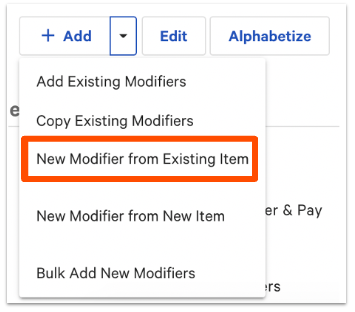
At Toast, we understand the importance of being able to accurately track items and modifiers sold. We highly recommend that you use the feature that allows you to create modifiers from existing items or menu group. In creating a modifier from an existing item, it will tie the inventory counts together and when you have to 86 a beer, it will automatically also 86 the modifier as a result.
When creating a new modifier, select New Modifier from Existing Item.
Menu Setup Option: Growlers & Packaged Beer
Do you offer your guests the option to purchase growlers or packaged beer? If so, let's make sure to add them to your back-end as well.
Growlers: Toast recommends setting up a group called Growlers. Then the items within the group are the beer names. If you also offer the same beer as a draft for on-premise dining, make sure to add a label before or after the name of the beer for reporting purposes (e.g. Toasty Stout Growler).
- Menu: Draft Beer
- Menu Group: Growlers
- Item: Toasty Stout Growler
- Menu Group: Growlers
Packaged beer: For beer to go or packaged, best practice is to set up a separate menu or menu group named Packaged Beer, for example. That will allow you to better track sales in reporting. Each particular package (e.g. Bready IPA 6 Pack) will be used as items.
If you sell a variety pack allowing your guests to mix and match beers at one set price, Toast recommends setting up a menu group for Packaged Beer, then an item for Variety 6 Pack, for example, and each beer option as a modifier. Make sure that the pricing is set at the item level and that the modifier pricing is set to No additional charge. Additionally, make sure that your modifier group is set to Multi-Select and that Max # of selections is set (to 6 in this case). Make sure to add a label behind each item name if you offer the same beer on -premise.
- Menu: Beer
- Menu Group: 6 Packs
- Item: Variety 6 Pack
- Modifier Group: Variety 6 Pack Options
- Modifier: Packaged Toasty Stout
- Modifier: Packaged Bready IPA
- Modifier: Packaged Grainy Ale
- Modifier Group: Variety 6 Pack Options
- Item: Variety 6 Pack
- Menu Group: 6 Packs
Use Menu Reports to Track Beer Sales
Menu reports are integral for the operations of any restaurant. They not only provide operators with an understanding of what items are selling the most or the least, but they're also are important when it comes to the daily operations of a location, especially when it comes to purchasing, inventory, and cost of goods sold.
If the menu for your location is built one of the ways outlined above, you'll be able to easily pull reports that will show you a detailed in-depth look into how your menu is performing.
To learn more about the menu reports available in Toast Web, see this Support Center article: Menu Reports Overview.
Back to top