Use Menu Item Search on POS
Last updated: Aug 27, 2026, 12:49 PM
- Menu Item Search Overview
- Use Menu Item Search on a Terminal
- Use Menu Item Search on a Toast Go®
- Additional Resources
Menu Item Search Overview
Menu item search is a POS (point of sale) tool that allows employees to locate menu items using a search bar. Simply type in the name of the item with the on-screen keyboard and it will appear below, ready to be selected and added to the guest's order.
For restaurants with long, complex menus or brief training periods for new staff members, menu item search ensures the guest's order can be entered quickly with a minimum level of effort from your staff.
If you'd like to remove the menu search bar, navigate to Front of house > Order screen setup in Toast Web. Toggle the Search bar for POS menu setting off, then save and publish your changes.
Note: The search bar cannot be hidden for restaurants using Mode Retail.
Use Menu Item Search on a Terminal
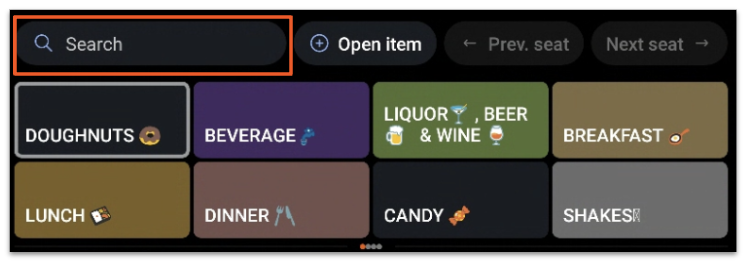
Menu item search is located at the top of the menu section on the ordering screen. Let's see how we can use it to order some chicken soup for our guest below:
- On the ordering screen, select the search bar.
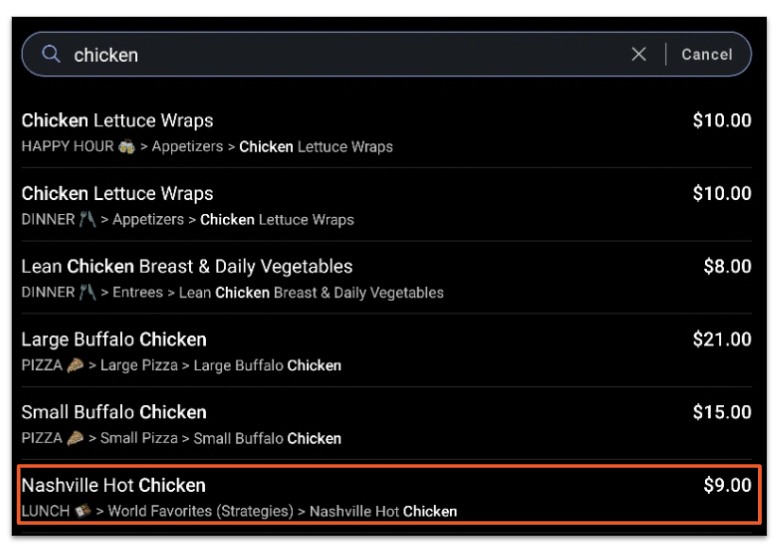
- Type in the name of the menu item. For this example, we will enter "Chicken" to find the Nashville Hot Chicken Sandwich. When entering a menu item name, be sure it's spelled correctly to obtain optimal search results.
- Note: In addition to menu item names that meet the search criteria, the location of the item's button within the POS, the POS Name, and the SKU (Stock Keeping Unit) (if enabled) for the item will appear in the search results. Item names that meet the search criteria but are currently out of stock will appear gray in the search results.
- Note: In addition to menu item names that meet the search criteria, the location of the item's button within the POS, the POS Name, and the SKU (Stock Keeping Unit) (if enabled) for the item will appear in the search results. Item names that meet the search criteria but are currently out of stock will appear gray in the search results.
- Once you've located your item in the search results, select the item name to add it to the guest's check. If the item contains a modifier with required or optional force-show behavior, it will appear after selection.
Recently selected items will appear under the search bar for quick and easy re-order. Use this feature to add another round to a guest's check or easily locate your most popular items on the menu.
Use Menu Item Search on a Toast Go®
How do you search for a menu item on your Toast Go® handheld? Follow the instructions below.
- Select the magnifying glass icon that appears at the top of the menu section on the ordering screen.
- Type in the name of the menu item.
- Select the item to add it to the guest's check.
Additional Resources