Enable and Configure Menus by Service Area
Last updated: Mar 9, 2026, 5:02 PM
Question
- How do I enable and configure Menus by Service Area?
- What are the steps to enable and configure the Menus by Service Area feature?
Answer
With Menus by Service Area, configure each service area to display only specific menus on Order & Pay™. For example, you might only offer Drinks on the Patio, but Food and Drinks inside. This feature enables you to expand Order & Pay to new spaces in your venue and grow sales.
Note: Menus by service area only apply to Mobile Order and Pay™ menus.
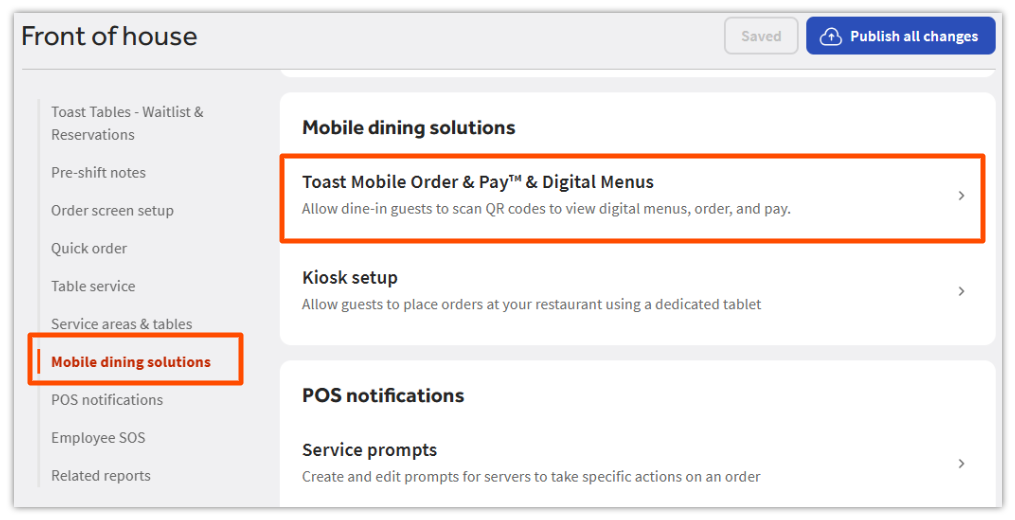
- Log in to Toast Web, navigate to Front of house > Mobile dining solutions> Toast Mobile Order and Pay™ & Digital Menus.
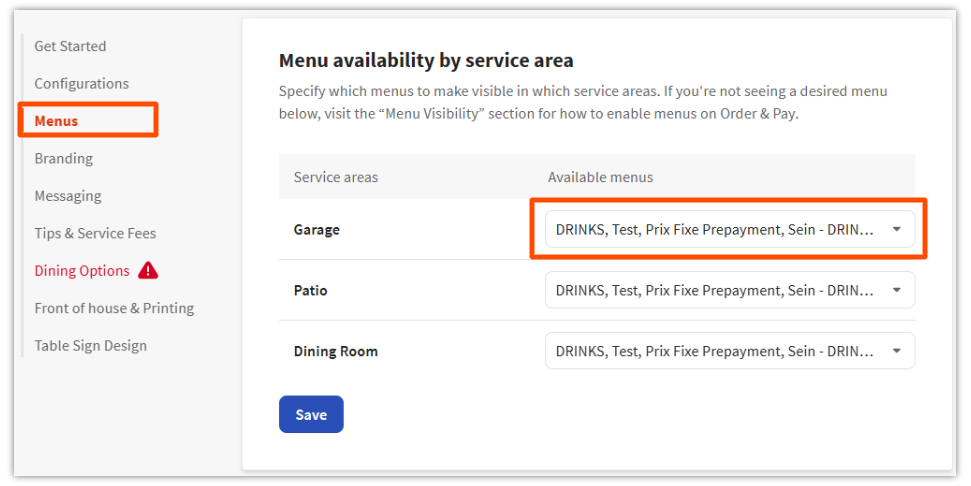
- Select Menus, and scroll down to the Menu availability by service area section.
- Use the dropdown to specify which menus will be available in each service area. Only menus visible to Order & Pay will be displayed in the dropdown. For a refresher on adjusting menu visibility, see Setting Up Toast Mobile Order & Pay™.
- Save and publish the changes.