Troubleshoot Your Toast Ethernet Cable Connection
Last updated: Jul 22, 2026, 10:27 AM
If a wired Toast device shows "No internet connection" or "No network connection," or the Ethernet port has no lights, use these steps to check the cable, port, and switch.
- Before You Begin
- Quick Fix
- What a Healthy Ethernet Connection Looks Like
- If the Port Has a Solid Light but No Blinking Light
- If the Port Has No Lights at All
- If the Device Is Wired but Still Shows No Internet Connection
- If the Connection Keeps Dropping
- If the Network Switch Has No Lights
- Before You Contact Customer Care
- Frequently Asked Questions
- Related Articles
Before You Begin
Applies to: Toast Flex terminal, Toast Flex 3 terminal, Kitchen Display Screen (KDS) device, Toast printers, Ethernet switch, Toast router | Permissions needed: Physical access to the affected device, the cable, and any switch or router in the cable path. No Toast Web permissions are needed.
What you'll accomplish: Confirm whether your Ethernet cable and port are healthy, and resolve the most common physical-connection problems that take a wired device offline.
Quick Fix
Use this table to match what you see to the most likely cause and the first thing to try.
| Symptom | Most Common Cause | Quick Fix |
| Port has no lights at all | Cable is not fully seated, the device is off, or the switch is off | Reseat the cable, power on the device, and confirm the switch is on |
| Device is wired but shows "No internet connection" | Wi-Fi is still enabled, or there is an internet or router issue | Disable Wi-Fi on the hardwired device, then check your network connection |
| Connection keeps dropping | Loose or failing cable, or the device is jumping to Wi-Fi | Reseat or replace the cable and disable Wi-Fi on hardwired devices |
| Switch has no lights or will not power on | Switch power or the wall jack | Power cycle the switch; if it still will not power on, contact Toast Customer Care |
What a Healthy Ethernet Connection Looks Like
Ethernet is the cable that carries data between your Toast devices and your network. Toast uses wired Ethernet for stationary devices such as terminals and KDS devices because it is more stable than Wi-Fi and is not affected by wireless interference, which helps keep your devices online.
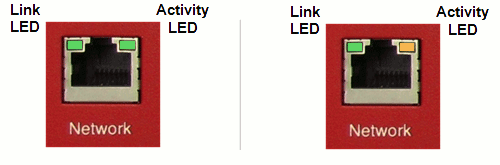
If the Port Has a Solid Light but No Blinking Light
The cable is physically connected but data is not passing through. This is possibly due to an internet service provider issue. Try turning the terminal off and on again or unplug and then plug in the cables in case the connection is too loose.
If the Port Has No Lights at All
No lights on the port usually means the cable is not seated properly, the device is not powered on, or the switch the cable runs to is off.
- Unplug and firmly reseat the Ethernet cable at both ends until it clicks in.
- Confirm the device is powered on.
- Confirm the Ethernet switch the cable connects to, such as a TP-Link switch, is powered on.
Expected outcome: A link light appears on the port and the device reconnects. If the port still has no lights, continue with the switch steps below or replace the cable with one you know works.
If the Device Is Wired but Still Shows No Internet Connection
When a hardwired device shows "No internet connection" or "No network connection" even though the Ethernet cable is plugged in, the device may still be set to use Wi-Fi, or the issue may be with your internet or router rather than the cable.
- On the hardwired device, swipe down from the top of the screen and confirm Wi-Fi is disabled. Stationary Toast devices should use Ethernet, not Wi-Fi.
- Confirm the device is connected to Ethernet in its settings. For the device-side steps, see Verify Your Internet Connection.
Expected outcome: The device reconnects to the network. If every device is offline at once, the issue is likely your router or internet rather than a single cable. See Outages and Disruptions: Troubleshoot Internet or Network Connection Issues.
If the Connection Keeps Dropping
A connection that works and then drops a few minutes later usually points to a loose or failing cable, or a device that keeps switching between Ethernet and Wi-Fi.
- Reseat the Ethernet cable at both ends, and try a different cable if you have one available.
- On hardwired devices, confirm Wi-Fi is disabled so the device does not jump between connections.
Expected outcome: The device holds a stable connection. If devices continue to drop offline while still connected to Ethernet, contact Toast Customer Care.
If the Network Switch Has No Lights
If the cable runs to an Ethernet switch, such as a TP-Link switch, and the switch has no lights, work through the switch itself.
- If the switch is not on, power it off and then on again, or move its power plug to a different outlet.
- If the switch powers on but the network still does not work, replace the cable running to it.
- If the switch does not power on at all, replace the switch.
Note: To add or replace an Ethernet switch, visit Toast Shop.
Expected outcome: The switch lights up and your devices reconnect. If the cable runs into a wall jack and the jack appears to be the problem, the jack may need repair. Repairs to in-wall cabling may require an outside resource such as an electrician, as Toast does not provide service for intensive cable work.
Before You Contact Customer Care
Complete these checks first so Customer Care has what it needs to help quickly:
- Note if you see any lights on the ports
- Reseat the cable at both ends and try a known-good cable.
- Confirm the device is powered on and that Wi-Fi is disabled on hardwired devices.
- Confirm any switch or router in the cable path is powered on.
If the connection still does not work after these checks, contact Toast Customer Care.
Frequently Asked Questions
Should my Toast devices use Wi-Fi or Ethernet?
Stationary Toast devices should use Ethernet rather than Wi-Fi. Toast recommends a wired Ethernet connection for terminals and KDS devices because it is more stable than Wi-Fi and is not affected by wireless interference, which helps keep your devices online. Handheld devices such as the Toast Go® 2 use Wi-Fi instead.
Also asked as:
-
- Should it be on Wi-Fi or Ethernet?
- Are Toast terminals Ethernet or Wi-Fi?
- Can I use a station with just Wi-Fi and no cable?
What kind of Ethernet cable does my Toast hardware use?
Cat5e and Cat6.
Also asked as:
-
- Will a Cat 5 Ethernet cable work for my POS?
- What kind of cable do the printers use?
- Where do I order a new Ethernet cable?
Related Articles
- Outages and Disruptions: Troubleshoot Internet or Network Connection Issues
- Verify Your Internet Connection
- Set Up Your Toast Network
- Set Up Your Toast Router
- Get Help With the Toast Printing Hub