Points and Percentages With Toast Tips Manager
Last updated: Oct 2, 2026, 11:33 AM
Learn how Toast Tips Manager splits tip pools using points or percentages, see worked examples, and decide which method fits your staffing.
- About Points and Percentages
- Tip Pooling With Points
- Points Tip Distribution Example
- Tip Pooling With Percentages
- Percentages Tip Distribution Example
- When to Use Points or Percentages
- Frequently Asked Questions
- Related Articles
About Points and Percentages
When more than one recipient job is in a tip pool, Toast Tips Manager splits the contribution among those jobs using either points or percentages. Both methods control how tips are shared across recipient jobs, but they work differently.
- Points split tips based on shares assigned to each recipient's job and can optionally take hours worked into account, giving you flexibility when your staffing varies day to day.
- Percentages assign a fixed portion of the tip pool to each recipient job, which is then split among the employees clocked into that job either proportionally by hours worked or equally, regardless of hours worked.
If there is only one recipient job in all tip rules of a tip pooling policy, then points versus percentages becomes irrelevant.
The biggest practical difference is what happens when a recipient's job has no one clocked in. With points, that share is redistributed among the other recipients who are clocked in. With percentages, the share returns to the contributor who originally earned the tip. This single difference drives most of the decision, and the rest of this article walks through how each method calculates and when to choose one over the other.
You set this option inside each rule on the Team > Settings > Tip pooling policy page. For where to find it, see the Frequently Asked Questions section below.
Tip Pooling With Points
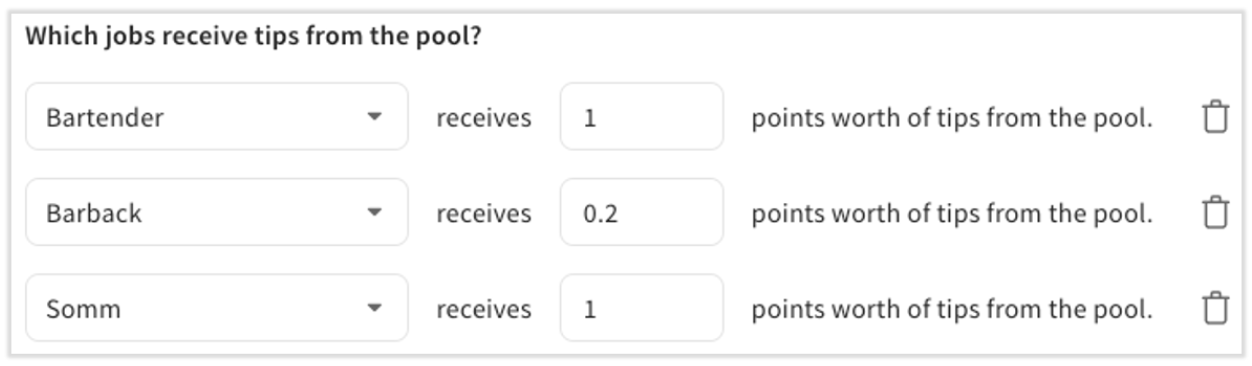
Points are one way to determine how much each recipient's job receives from the pool. With points, Toast Tips Manager considers the number of employees who worked the recipient job — and their hours worked, if Proportionally by hours worked is selected in the Advanced settings of the tip policy — then distributes the tips. You can use decimals for more specific configurations.
Some notes on point-based distributions:
- Points are the default distribution type in Toast Tips Manager.
- Points distribute tips and gratuities based on a ratio. The ratio holds regardless of how many people are clocked in, which is what makes points able to accommodate dynamic staffing.
- Points do not translate into percentages. For example, .2 points is not the same as 20% of the tip pool.
- If no one is clocked into one of the recipient jobs for a full workday, service period, or order, that money is redistributed among the other recipients. (With percentages, it would instead return to the individual check owner.)
- You cannot assign more than 10 points to an individual job, but you can use decimals. If you wanted to use 5 points for one job and 20 for another, you could instead use .5 points and 2 points.
How the calculation works:
- For hourly splitting, the system multiplies each job's points by hours worked, then divides total tips by total points to find the value of one point.
- For equal splitting, the system sums all job points, divides total tips by that sum to find one point's value, then multiplies it by each job's points.
Points Tip Distribution Example
Here is a points-based example to show how the policy works in Toast Tips Manager. This is hypothetical, but you can try it with your own jobs and policy to see if it is the right fit for your team.
Hypothetical scenario for both options below
- The Server contributing job earns $300 in cash and non-cash tips. The contribution percentage is 10%, so $30 goes into the pool.
- Recipient job settings: Bartenders receive 2 points, and Hosts receive 1 point.
Option 1: Points Weighted by Hours Worked (Proportionally by Hours Worked)
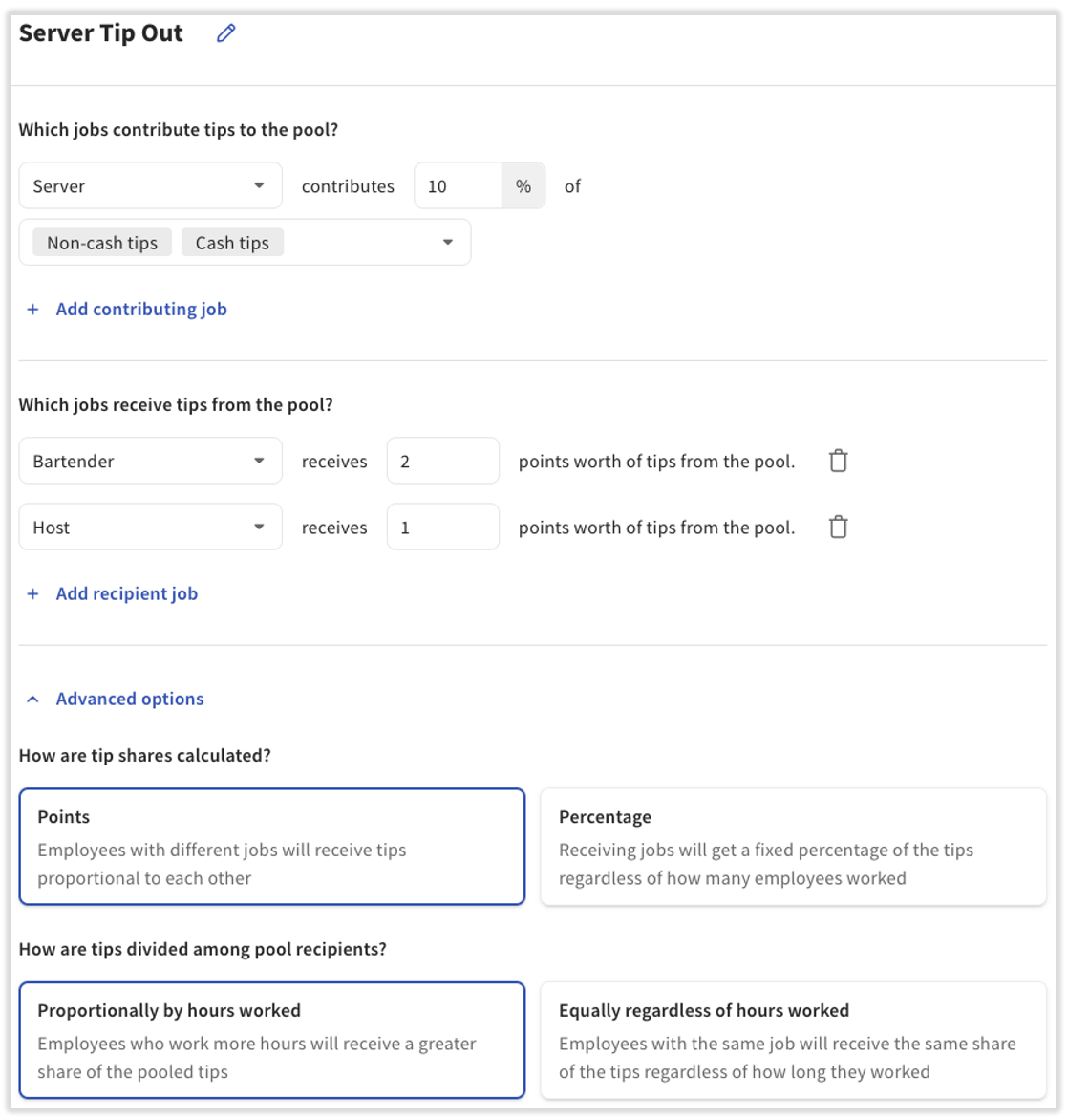
Because you selected Proportionally by hours worked in the Advanced settings of the tip pool, Toast looks at who was clocked in during the period (day, service period, or order) and how many hours each person worked.
Clocked-in staff:
- Bartender A: 4 hours
- Bartender B: 6 hours
- Host A: 4 hours
Point weighting based on hours:
- Bartender A: 2 points × 4 hrs = 8
- Bartender B: 2 points × 6 hrs = 12
- Host: 1 point × 4 hrs = 4
- Total points: 24
Payouts. To find each payout, take the fraction of total points each employee earned and multiply it by the tip amount available to distribute:
- Bartender A: 8 ÷ 24 × $30 = $10.00
- Bartender B: 12 ÷ 24 × $30 = $15.00
- Host: 4 ÷ 24 × $30 = $5.00
Option 2: Flat Per Person (Equally, Regardless of Hours Worked)
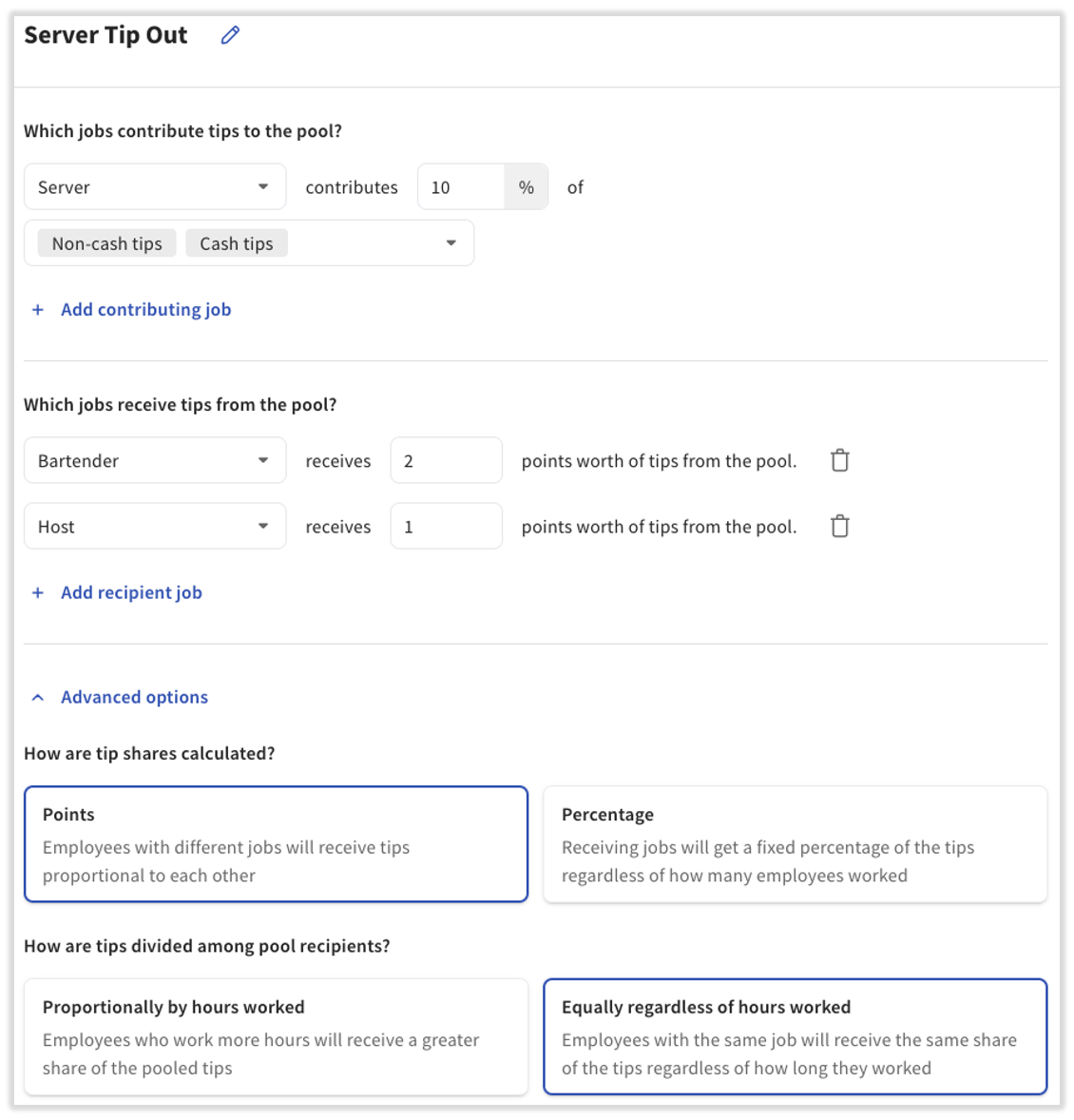
Because you selected Equally regardless of hours worked in the Advanced settings of the tip pool, Toast uses only the points assigned to the recipient jobs and adds them up based on how many employees were clocked into each job.
Clocked-in staff:
- Bartender A
- Bartender B
- Host
Flat points per person:
- Bartender A: 2 points
- Bartender B: 2 points
- Host: 1 point
- Total points: 5
Payouts. To find each payout, take the fraction of total points each employee earned and multiply it by the tip amount available to distribute:
- Bartender A: 2 ÷ 5 × $30 = $12.00
- Bartender B: 2 ÷ 5 × $30 = $12.00
- Host: 1 ÷ 5 × $30 = $6.00
Tip Pooling With Percentages
Percentages distribute a fixed percentage of the tip and gratuity sources to the recipient's jobs. Toast Tips Manager distributes the tips to the recipient jobs first, then distributes what each recipient job received among the employees who clocked into that job.
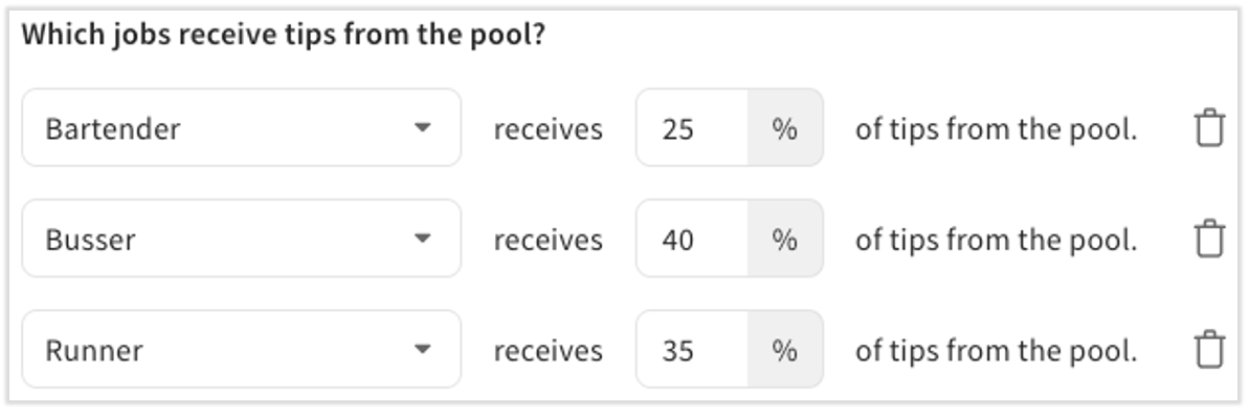
Some notes on percentage-based distributions:
- Percentages are not the default selection. To use them, select Advanced options on your tip pooling policy page by opening Toast Web and navigating to Team > Settings > Tip pooling policy.
- A percentage is distributed to everyone clocked into a recipient job, not to each person. If a job is set to receive 10% and two people are clocked into that job, they divide that 10% between them — either proportionally by hours worked or equally, regardless of hours worked, depending on your policy. It does not mean each person receives 10%.
- If one of the recipient jobs is not working that day, that amount stays with the contributor job that earned the tips originally. For example, if a 35% share is set for Runners and no Runner is clocked in, that 35% is kept by the individual contributor instead of being split by the bartenders and bussers.
- For this reason, using percentages with generic or communal employee tip pooling cards can cause errors and undistributed tips, because the contributor is not a human who can keep the money. For communal drawers, Toast recommends using points.
Percentages Tip Distribution Example
Here is a percentages-based example to show how the policy works in Toast Tips Manager. This is hypothetical, but you can try it with your own jobs and policy to see if it is the right fit for your team.
Hypothetical scenario for both options
- The Server contributing job earns $300 in cash and non-cash tips. The contribution percentage is 10%, so $30 is contributed to the pool.
- Recipient job settings: Bartenders receive 60% of the pool, and Hosts receive 40%.
- Clocked-in staff: Bartender A worked 4 hours, Bartender B worked 6 hours, and the Host worked 4 hours.
Option 1: Percentages Weighted by Hours Worked (Proportionally by Hours Worked)
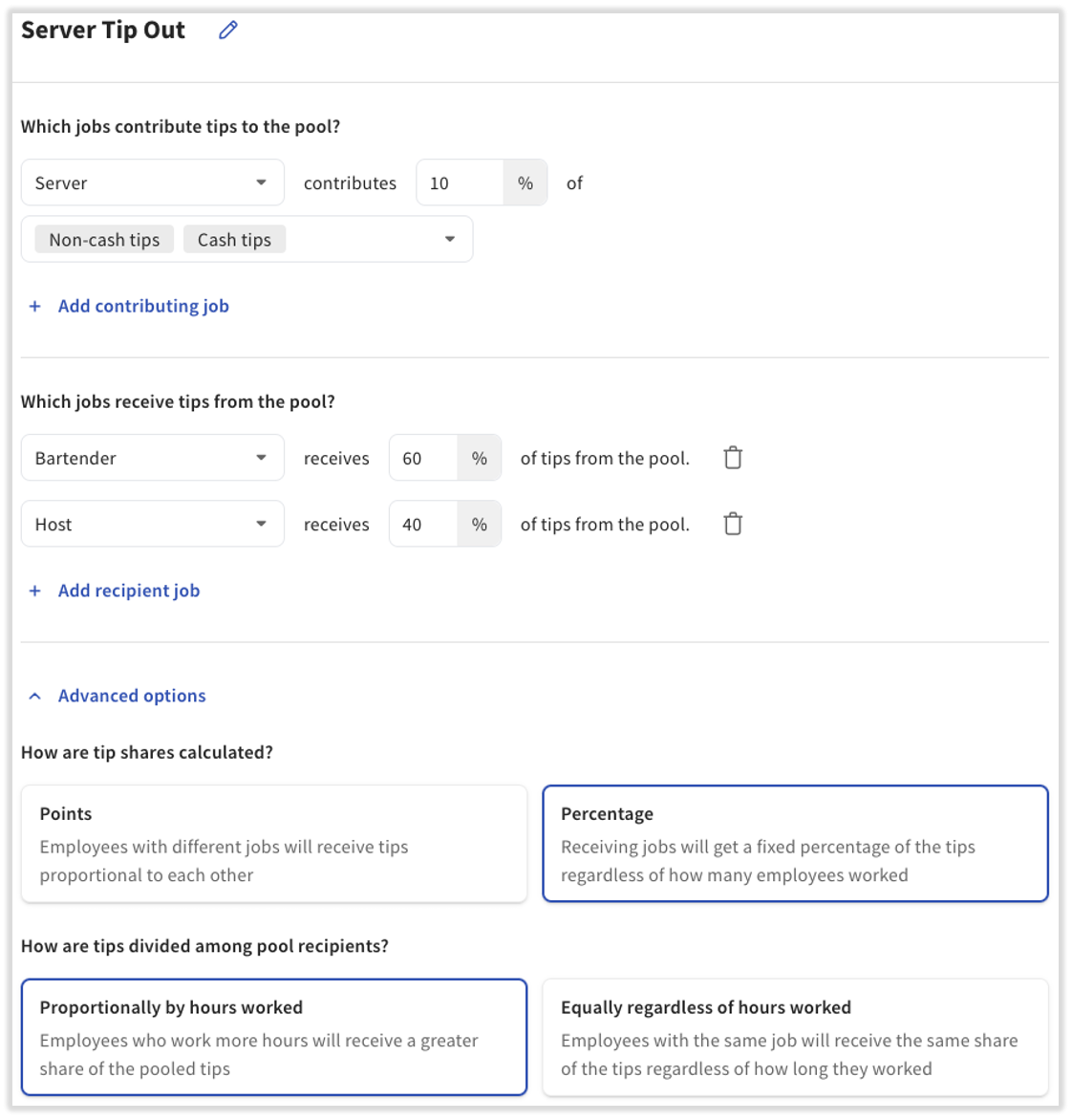
Split the pool by percentage.
- Bartenders get 60% of $30 = $18
- Host gets 40% of $30 = $12
Allocate within each recipient's job based on hours.
- Total bartender hours: 4 + 6 = 10
- Bartender A: 4 ÷ 10 × $18 = $7.20
- Bartender B: 6 ÷ 10 × $18 = $10.80
Final payouts:
- Bartender A: $7.20
- Bartender B: $10.80
- Host: $12.00
Option 2: Flat Per Person (Equally, Regardless of Hours Worked)
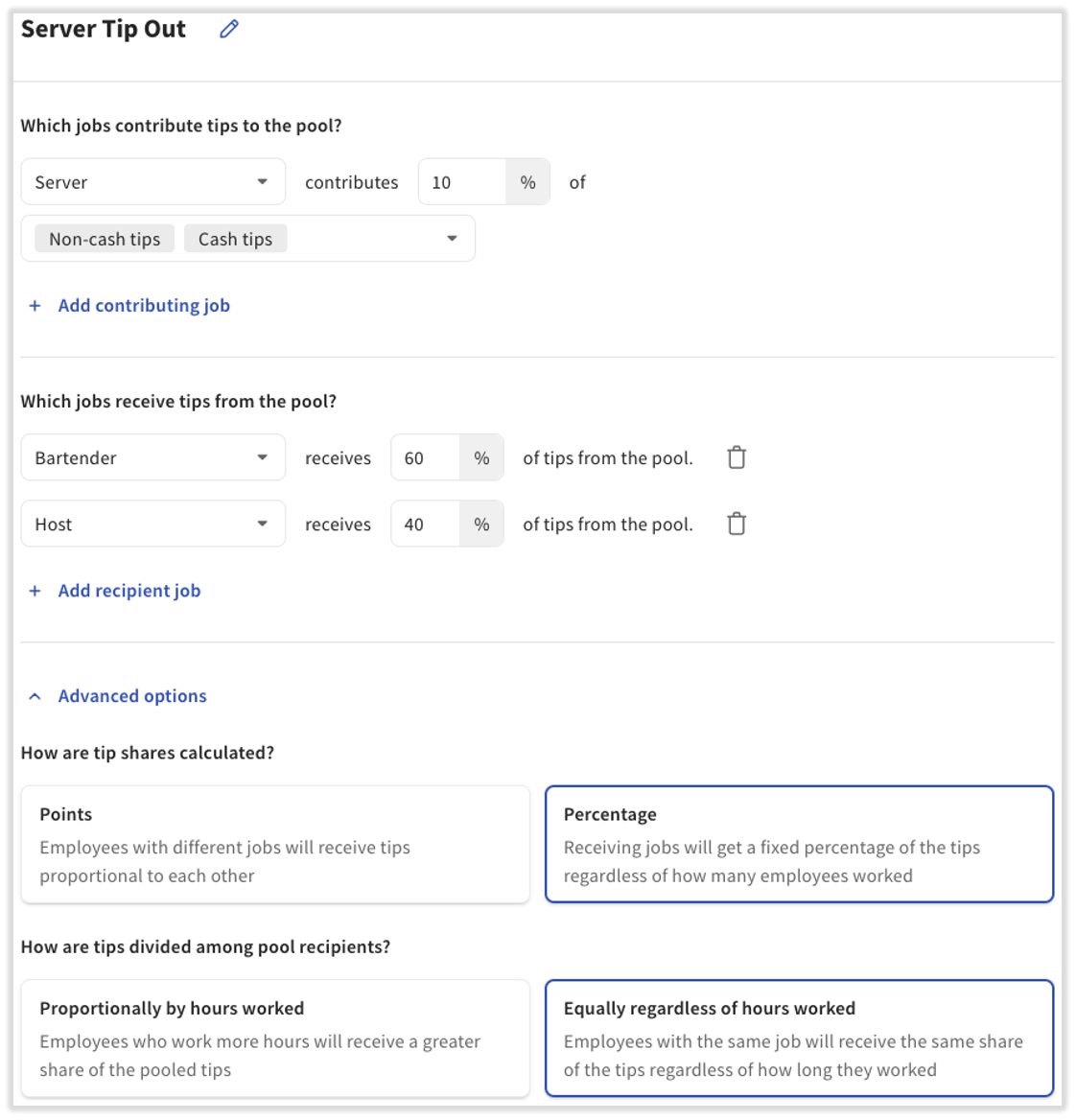
Split the pool by percentage.
- Bartenders get 60% of $30 = $18
- Host gets 40% of $30 = $12
Split flat within each recipient job.
- Bartenders (2 people): $18 ÷ 2 = $9.00 each
Final payouts:
- Bartender A: $9.00
- Bartender B: $9.00
- Host: $12.00
When to Use Points or Percentages
Use this table to decide whether to use points or percentages in your tip pooling policy. If you are unsure, you can build the policy either way and use the Preview button on the tip pooling policy page to test it against a recent day of your own data before saving.
| At my restaurant | Points | Percentages |
| My current tip policy distributes tips and gratuities by percentages | Toast defaults to distributing tips by points. | If a recipient of a tip pool is not clocked in, their tip distribution stays with the original tip earner. For example, if a Server tips out 5% to a Busser and 5% to a Food Runner, but no Food Runner is clocked in that full workday, service period, or order, that 5% stays with the Server. This causes errors when the original tip earner is a generic, non-human employee. If you prefer that the 5% be tipped out regardless of whether the Food Runner is clocked in, consider switching the pool to points. |
| I always have the same number of employees working each day | Points are suggested for both dynamic and routine staffing. | Percentages accommodate routine staffing. If a recipient's job is not present that day, the amount that would have gone to it stays with the person (not the job) that earned the tip. |
| A different number of employees is staffed each day | Points are suggested for restaurants that change their staffing needs from day to day. | Percentages would result in the contributor keeping any tips that would normally go to a recipient's job when that job is not staffed for the pooling interval. |
| I have a lot of jobs in my restaurant | Points let you create a ratio of distribution between your different job titles. | Percentages let you distribute fixed amounts to each job. The percentage is not what each person receives; it is what everyone who clocked into that job divides among themselves. |
Note: Any time you change or reconfigure your policy, Toast recommends reviewing the results of your pools to confirm they match your expectations. Use the Preview feature on the tip pooling policy page to do this.
Frequently Asked Questions
What is the difference between points and percentages in tip pooling?
The difference between points and percentages is how the tip pool is split among recipient jobs and what happens when a job has no one clocked in. Points distribute tips based on a ratio that holds no matter how many people are clocked in, and if a recipient's job is empty that day, its share is redistributed among the other recipients. Percentages assign each recipient job a fixed share, and if that job has no one clocked in, the share returns to the contributor who earned the tip. Points are the default and suit changing staffing levels, while percentages suit routine staffing.
Also asked as:
- What's the difference between points and percentages for tip pooling?
- What do points mean in the tip policy?
- How do points work in tip management?
How do I change my tip pool from points to percentages?
To change your tip pool from points to percentages, open the rule on the Team > Settings > Tip pooling policy page in Toast Web, select Advanced options, and set How are tip shares calculated? to Percentages. Percentages are not the default, so you must open Advanced options to use them. Toast recommends using Preview to test the change against a recent day before you save. For full setup steps, see Plan Your Tip Pooling Policy.
Also asked as:
- How do I switch from points to percentages?
- How do I convert a tip rule into percentages instead of points?
- How do I change the pooled tip format to a point system?
Where do I set points or percentages for my tip pool?
You set points or percentages inside each rule on the tip pooling policy page. In Toast Web, navigate to Team > Settings > Tip pooling policy, open or add a pool, and select Advanced options to choose How are tip shares calculated? (Points or Percentages) and How are tips divided among pool recipients? (Proportionally by hours worked or Equally regardless of hours worked).
Also asked as:
- Where do I adjust tip pool percentages?
- Where do I go to change tip percentages per role?
- How do I access and change tip sharing?
Can I set tip percentages for individual employees instead of jobs?
You cannot set tip percentages for individual employees, because tip pool rules are based on jobs, not on individual people. To weight tips toward certain staff, assign those staff to a specific recipient job and give that job a higher percentage or point value. To give one person a different share, create a separate job for that role and make sure the employee clocks into it. For more on planning jobs for your pool, see Plan Your Tip Pooling Policy.
Also asked as:
- How do I set up individual percentages per staff member?
- How do I allocate tip percentages to individual employees?
- How do I give different jobs different tip percentages?
Why did two employees with the same percentage get different amounts?
Two employees with the same recipient percentage can get different amounts when a recipient job is not present for that service period or day. When a job in the pool has no one clocked in, the percentage that would have gone to that job returns to the contributing job that collected the tip, which changes what everyone else receives. This can happen more than once during a day or service period. If you want shares to stay consistent regardless of who is clocked in, consider using points instead. For more troubleshooting, see Get Help With Toast Tips Manager.
Also asked as:
- Why do some employees get more tips than others with the same percentage?
- Why aren't my percentages distributing evenly?
Related Articles
- Plan Your Tip Pooling Policy
- Get Started With Toast Tips Manager
- Get Help With Toast Tips Manager
- Toast Tips Manager Reporting
- Get Started With Service Charges and Mandatory Gratuity
This content is for informational purposes and is not intended as legal, tax, HR, or any other professional advice. Please contact an attorney or other professional for advice.