Reconciliation Report and Payout Details Overview
Last updated: Sep 17, 2026, 12:19 PM
| The Reconciliation report is currently in limited release with select customers. If you don't see this feature yet, stay tuned for a future update. |
- About the Reconciliation Report and Payout Details
- Required Modules, Permissions, and Hardware
- How It Works
- If Your Payout Doesn't Match Your Sales or Bank Deposit
- Known Limitations
- Frequently Asked Questions
- Why is my payout less than my sales?
- Can I schedule the Reconciliation report or have it emailed to me?
- When will my next payout arrive?
- Where is my deposit? I don't see it on the Reconciliation report.
- What's the difference between Fees and Withholdings?
- What does "Capital loans" cover on the Withholdings row?
- Related Articles
About the Reconciliation Report and Payout Details
The Reconciliation report gives you a single list of every payout Toast has sent to your bank account, along with any instant deposit transactions, for a location and date range you choose. Each row is one payout or one instant deposit.
Selecting any payout row opens the Payout Details report in a new tab. Payout Details breaks that one payout down into card payments, refunds, fees, withholdings (Toast Capital and Easy Pay loan repayments, Toast Delivery Services fees, instant deposit fees, and others), and a transaction-by-transaction list of every payment that contributed to the payout.
The Reconciliation report does not change your payout amounts. It surfaces what Toast already deposited (or withheld) so you can match Toast's records against your bank statement, credit card sales, and Sales Summary.
Required Modules, Permissions, and Hardware
Applies to: Toast Web. The Reconciliation report is in limited release with select customers — if it doesn't appear in your Reports menu, it isn't enabled for your account yet.
Permissions needed:
- Manager or owner access to Toast Web > Reports > Payments
- Permissions 8.1 through 8.7 (Payments reports)
What this report does not require: any POS hardware. The Reconciliation report and Payout Details report are web-only.
How It Works
To open the report, log in to Toast Web and navigate to Toast Web > Reports > Payments > Reconciliation.
Filter, Display, and Export Options
At the top of the Reconciliation report, you'll see date and location filters.
- Use the date drop-down to pick a preset range (yesterday, today, this week, and so on), or select Custom date to choose a specific start and end date.
- Use the location filter if your account has more than one location.
- Use Filter by type to open the right-hand filter sidebar and narrow the rows shown. Select Apply filters to update the table.

The report updates automatically for preset date ranges. For a custom range, select Apply to update.
To export, select the download icon (the down arrow) at the top right. The report downloads as a ZIP file that contains the report as a CSV named Reconciliation report.csv.
Note: To view the report, open the ZIP file first: on a Mac, double-click the ZIP to open it automatically; on a Windows PC, right-click the ZIP and select Extract All. Once it's open, select the CSV file to view it in a spreadsheet program like Excel or Google Sheets.
Reconciliation Report Columns
For every payout or instant deposit in the selected range, the Reconciliation report shows:
| Column | What it means |
|---|---|
| Sent date | The date Toast sent the payment to your bank account, or collected the payment from you |
| Description | The type of payment — Payout for a regular bank deposit, Instant deposit for an instant deposit transaction |
| Account | The last four digits of the debit card tied to the instant deposit transaction (instant deposit rows only) |
| Debit | An amount Toast collected from you |
| Credit | An amount Toast sent to your bank account, minus fees, withholdings, refunds, and chargebacks |
Note: The Sent date is the date the deposit happened, not the date the sales occurred. Sales from one day usually settle one to two business days later, so a payout on the Reconciliation report covers sales from earlier dates. For payout timing rules and the federal banking holiday calendar, see Deposit Schedules Overview.
To open Payout Details for one payout: select the payout row. The Payout Details report opens in a new tab and shows that payout's full breakdown.
To see instant deposit details: instant deposit rows do not open Payout Details — there is no drill-down. For instant deposit reporting, see Instant Deposit Reporting Overview.
Payout Details
The Payout Details report has three sections, stacked top to bottom: a summary, a breakdown table, and a transactions table. The time period the payout covers is shown directly above the summary.
At the top right of the Payout Details page, you'll see a link to Statements. This opens the Processing Statements report — the canonical place to look up monthly card-processing detail and reconcile fee adjustments. For an explanation of the line items on Processing Statements, see Understand the Processing Statements Report.
Summary
The summary shows the totals for the selected payout:
- Card payments — total card sales from guest transactions
- Refunds — total refunds issued in the period
- Fees — card processing fees and instant deposit transaction fees
- Withholdings — Toast Capital and Easy Pay loan repayments, Toast Delivery Services charges, and similar. For daily-billed customers, daily fee deductions also appear here as their own labeled withholding entries.
- Payout total — the amount Toast deposited to your bank account. For monthly-billed customers: Card payments − Refunds − Fees − Withholdings. For daily-billed customers: Payments − Daily fees − Other withholdings − Refunds.

Breakdown table (Fees and Withholdings)
Below the summary, the breakdown table itemizes everything that affected the payout total. Select the caret (arrow) icon next to Fees or Withholdings to expand each row group.
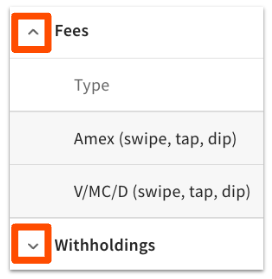
Fees shows total payments, number of transactions, card processing rate, and total fee amount for each fee type.
Withholdings shows the withholding type, a description, and the total amount. Withholdings can include:
- Capital loans — Toast Capital and Easy Pay loan repayments (shown together under this label)
- Instant deposit — fees and transaction information for instant deposit usage in the period
- TDS delivery fees and Driver tips — per Toast Delivery Services order
- TDS service fees — a flat $0.50 per Toast Delivery Services order
- Round-up campaigns that are configured for automatic disbursement
- Daily fee withholdings — for daily-billed customers, daily fee deductions appear as their own labeled entries in this section so you can see exactly what was deducted each day
Transactions table
At the bottom of Payout Details, the transactions table lists every individual transaction in the payout. Each row shows the payment date and time, card brand, transaction type (credit or debit), subtotal, tip, gratuity, and transaction total.
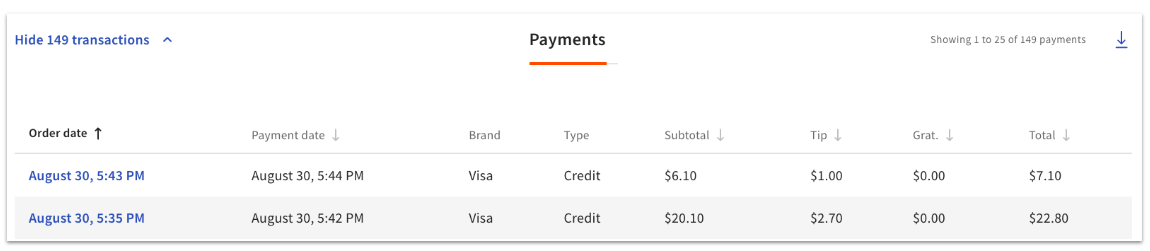
To pull up the Order Details report for a specific transaction, select the order date for that transaction.
To download the transactions table, select the download icon (down arrow) at the top of the table. The transactions table is exported separately from the rest of the Payout Details page.
If Your Payout Doesn't Match Your Sales or Bank Deposit
The Reconciliation report and Payout Details report show you what Toast deposited and why. When the number you see doesn't match what you expected, the difference almost always comes from timing, fees, refunds, withholdings, or batch settlement rules — not from the report itself. The article that helps depends on what you're trying to reconcile.
- My bank deposit doesn't match my credit card sales. See Compare Deposits and Credit Card Sales for the side-by-side procedure comparing Payouts Overview to Sales Summary, plus the most common causes (batch timing, fee deductions, withholdings).
- My bank statement doesn't match my Sales Summary. See Bank Statements and Sales Summary Report Do Not Match for the column-by-column reconciliation walkthrough — including what's in the "Other" column.
- A deposit is missing entirely, or arrived later than I expected. See Get Help With Missing or Delayed Credit Card Deposits for the missing-deposit decision tree.
- I want to know when my next payout will arrive. See Deposit Schedules Overview for the timing rules, weekend and holiday handling, and the federal banking holiday calendar.
Known Limitations
- The Reconciliation report is in limited release; it may not appear in your Reports menu yet.
- Instant deposit rows on the Reconciliation report do not link to Payout Details — there is no drill-down for instant deposit transactions on this report.
- The Reconciliation report exports as a ZIP file. It cannot be emailed or scheduled today; export manually each time you need a copy.
Frequently Asked Questions
Why is my payout less than my sales?
Your payout is less than your sales because Toast deducts fees, refunds, and withholdings from your card payments before depositing the rest to your bank account. Open the relevant payout's Payout Details page to see exactly which fees and withholdings reduced the payout total. For a step-by-step comparison against Sales Summary, see Compare Deposits and Credit Card Sales.
Can I schedule the Reconciliation report or have it emailed to me?
The Reconciliation report cannot be scheduled or emailed today — you export it manually as a ZIP file each time you want a copy. Select the download icon (down arrow) at the top right of the report.
When will my next payout arrive?
Your next payout arrives one to two business days after the sales date, depending on when your batch captures. Batches captured before 9:30 p.m. ET deposit the next business day; batches captured after 9:30 p.m. ET deposit two business days later. Weekends and federal banking holidays push the deposit to the next business day. For the full schedule, see Deposit Schedules Overview.
Where is my deposit? I don't see it on the Reconciliation report.
Your deposit may not yet appear on the Reconciliation report if the sale hasn't settled yet, or if the location and date filters are excluding it. Confirm the location filter is set to the right location, and extend the date range to include one to two business days after the sales date. If the deposit still doesn't appear after that window, see Get Help With Missing or Delayed Credit Card Deposits.
What's the difference between Fees and Withholdings?
Fees are card processing costs and instant deposit transaction fees — costs of accepting card payments. Withholdings are amounts held back from your payout for separate Toast products and services, such as Toast Capital loan repayments, Easy Pay equipment leases, Toast Delivery Services charges, and round-up campaign disbursements. Both reduce your payout total, but they show up in separate rows in the Payout Details breakdown table so you can see exactly what each one is.
What does "Capital loans" cover on the Withholdings row?
The "Capital loans" line on the Withholdings row covers both Toast Capital loan repayments and Easy Pay equipment lease payments — they're bundled together under this single label. To see a per-day Toast Capital breakdown, check your Toast Capital dashboard. For Easy Pay terms, contact Toast Customer Care.
Related Articles
- Payments Reports Overview
- Compare Deposits and Credit Card Sales
- Bank Statements and Sales Summary Report Do Not Match
- Get Help With Missing or Delayed Credit Card Deposits
- Deposit Schedules Overview