Adjust or Refund Gift Card Balance
Last updated: Oct 8, 2026, 12:55 PM
Question
- How do I refund a gift card?
- How do I refund an eGift card?
- How do I cancel an eGift card?
Answer
If you'd like to refund the purchase of a new gift card or the purchase of additional value that was added to a gift card and have this amount removed from the gift card so that a guest can not use it, follow these steps.
You must have access to 3.23 Find Checks, 3.3 Gift Card Adjustment, and 3.8 Void/Refund Payments to perform the steps indicated below. To learn more about user access permissions, including who it should be assigned to, please see this Support Center article: Permissions Reference Guide.
- In Toast Web, navigate to Finance > Payments > Find checks & issue refund.
- Locate the check using one of the tabs shown at the top of the page (Find by Check Number, Find by ID, Find by Customer Info, Find by Credit Card, Advanced Search).
- Once you see the check in question, select the blue Refund drop-down button.
- Refund the check By item(s).
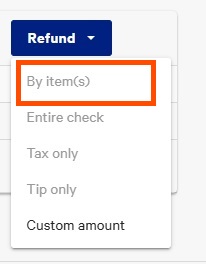
If you'd like to refund a gift card purchase and would not like this amount removed from the gift card, follow steps 1-3 above and then select Custom amount from the Refund drop-down.
Note: Not processing a refund by item will result in the gift card balance staying on the account, ultimately allowing the guest to redeem the gift card later on. If you intend to remove the gift card balance, then processing a refund by item must be performed.
Additional Information
You can also complete this refund on your POS by selecting Find checks & issue refund on the POS, then following the steps outlined above.