Refunds FAQ
Last updated: Oct 14, 2026, 3:34 PM
- Refund basics
- Issuing refunds
- What can and can't be refunded
- Can I issue a partial or custom amount refund?
- Can I refund only a tip, only a tax, or only a service charge?
- Can I issue a refund on a check with multiple payment methods?
- Can I issue a second refund on the same check?
- Can I refund an old check or a restricted check?
- Should I void items when I issue a refund?
- Does the restaurant keep any of the payment if a guest cancels after the order is prepared?
- Permissions and timing
- Refund errors and troubleshooting
- Refunds in reports
- Related articles
Refund basics
How do refunds work in Toast?
Question variants: How do refunds work? How do I refund a guest? What's the refund process in Toast?
A refund reverses a payment in Toast and returns the funds to the original payment method. To issue a refund, locate the original check using Find Checks in Toast Web or on a Toast POS device, select the refund type, and confirm.
For step-by-step instructions, see Issue a Refund. For where refunds appear in reports, see View Refunds in Toast Reporting.
When should I void a payment instead of refunding?
Question variants: Void or refund? Should I void or refund a payment? When do I use void vs. refund?
Use void when the payment was processed today, before the payment has been captured. Use a refund when the payment was processed yesterday or earlier, after the payment has been captured.
Some payment methods cannot be refunded and must be voided instead:
-
- House account payments
- Third-party gift cards (cards not issued by Toast)
- Other payment types (any payment type configured outside cash, credit card, or Toast Gift Card)
If the payment was a house account or third-party gift card, void the payment and apply a new payment method.
For full guidance on the void-vs-refund decision and FAQs about voided items, see Understand When to Void vs. Refund.
Issuing refunds
How do I issue a refund for a credit card payment?
Question variants: How do I refund a credit card payment? How do I refund a card payment on the POS?
Credit card refunds can be issued on a Toast POS device or via Toast Web.
For step-by-step instructions, see Issue a Refund.
How do I issue a cash refund?
Question variants: How do I refund cash? Can I refund cash in Toast Web?
Cash refunds must be issued from a Toast POS device with a cash drawer attached. Cash refunds cannot be issued in Toast Web because Toast Web can not access cash drawers.
For step-by-step instructions, see Issue a Refund.
How do I issue a refund on a Toast Gift Card?
Question variants: How do I refund a gift card? Can I refund a Toast Gift Card?
Toast Gift Cards can be refunded on a POS device or in Toast Web. You can issue the refund by item or as a custom amount refund.
Note: Not processing a refund by item will result in the gift card balance staying on the account, ultimately allowing the guest to redeem the gift card later on. If you intend to remove the gift card balance, then processing a refund by item must be performed.
For step-by-step instructions, see Adjust or Refund Gift Card Balance.
How do I refund a guest without the original transaction (unlinked refund)?
Question variants: How do I issue an unlinked refund? I need to refund a guest but there's no original check. How do I refund a transaction from a previous POS?
The Issue Unlinked Refund option in Toast Web is currently disabled. To issue a refund that is not tied to a specific check (for example, refunding a transaction from a previous POS, refunding a card that was already refunded via Find Checks, or refunding when the original card has expired), contact Customer Care so they can process the refund manually on their end.
For more detail, see How do I issue an unlinked refund to a guest?
How do I refund a Toast Catering & Events order or invoice?
Question variants: How do I refund a catering order? How do I refund a Toast Catering & Events invoice?
Toast Catering & Events orders use a separate refund workflow at Catering & events > Orders > Actions > Refund payment in Toast Web. Refund types for C&E differ from standard restaurant checks: By item, Entire check, Tax only, or Custom amount. Tip only is not available for C&E refunds.
If a C&E credit card payment is still in the authorized state (which lasts up to two days after payment is taken), it must be voided rather than refunded. Voids of C&E credit card payments must be done from the POS Find Checks page, not the Catering & events dashboard.
For step-by-step instructions, see Refund or Void Toast Catering & Events Orders.
What can and can't be refunded
Can I issue a partial or custom amount refund?
Question variants: Can I refund part of a charge? How do I issue a partial refund? Can I issue a custom amount refund? How do I refund part of an online order?
Yes. When you issue a refund, select the Custom amount refund type and enter the specific amount to refund. Custom amount refunds are not tied to specific items, so they affect top-level net sales and tips figures only — they do not break down by sales category, revenue center, or service period.
Custom amount refunds are not available for deferred payment methods (buy now, pay later). For deferred payments, refund by item instead, or contact Customer Care if a custom amount is required. Custom amount refunds are also not available for Toast Local or Toast Takeout orders, where Toast is classified as a Marketplace Facilitator. For those orders, only full check refunds, menu item refunds, service charge refunds, surcharge refunds, and tip-only refunds are allowed. See Understand Marketplace Facilitator Laws for the full list.
For step-by-step instructions, see Issue a Refund.
Can I refund only a tip, only a tax, or only a service charge?
Question variants: Can I refund just the tip? Can I refund a service charge? Can I refund tax only? How do I refund a previous tip?
Yes, for standard refunds. When you issue a refund, you can select Tip only or Tax only as the refund type.
Note: Toast Catering & Events refunds do not support Tip only. C&E refund types are limited to By item, Entire check, Tax only, and Custom amount. See Refund or Void Toast Catering & Events Orders.
Refunded tips appear in the Tips refunded field of the Tips Summary card on the Sales Summary report. Refunded mandatory gratuity service charges appear in the Refunds column of the Payments Summary table.
For step-by-step instructions, see Issue a Refund.
Can I issue a refund on a check with multiple payment methods?
Question variants: How do I refund a check that was paid with multiple payments? Can I refund a credit card and a gift card on the same check?
Refunds on items, entire checks, tips only, or tax only can be distributed across the original payment methods used for the purchase. Each payment method can be refunded up to the amount that was originally charged to it.
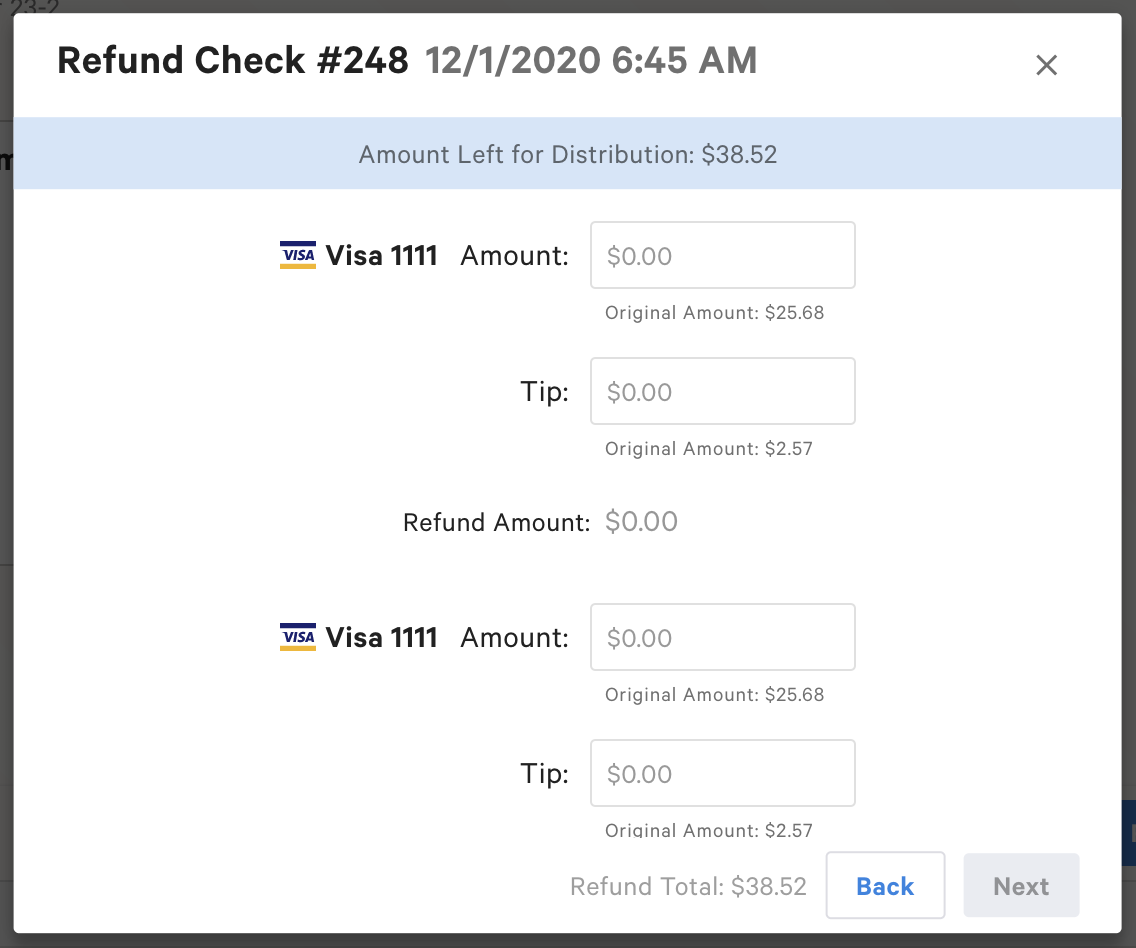
Refund amounts cannot be distributed to other payment types, house accounts, or third-party gift cards — those payments must be voided instead. Refunds for cash payments can only be completed on a Toast POS device. Refunds for credit card payments can be completed on a Toast POS device or in Toast Web.
For step-by-step instructions, see Issue a Refund.
Can I issue a second refund on the same check?
Question variants: How do I give a second refund on the same check? I already refunded part of a check, can I refund more? The POS won't let me enter a second refund amount.
No. Toast-wide restrictions limit refunds to one per payment — if you partially refund a payment, you cannot issue another refund against that same payment later from your end. On checks paid with multiple payment methods, this limit applies to each payment separately.
To issue an additional refund, contact Customer Care with the check number and date, guest's name and phone number, the amount of the refund already issued, and the additional amount needing to be refunded. Customer Care can perform the additional refund manually.
For more detail on a related case (refunding when the system has already processed the maximum allowed refund), see How do I issue an unlinked refund to a guest?
Can I refund an old check or a restricted check?
Question variants: Can I refund a check from a previous day? Can I refund a transaction from a few weeks ago? I can't edit this check, can I still refund it?
Yes, in most cases. Refunds apply to captured payments within 90 days of the original charge. If the check is beyond 90 days old, please contact Toast Care Payments team to request an unlinked refund.
For checks that are restricted or otherwise unable to be edited normally, use the Advanced Check Search option in Finance > Payments > Find checks & issue refund in Toast Web (or the equivalent Find Checks workflow on a Toast POS device). The same payment-method rules apply: only cash, credit card, and Toast Gift Card payments are eligible. Reversing a payment of an other payment type, house account, or third-party gift card is not possible on restricted checks.
If you receive an error when refunding an older check, see "I'm getting an error when trying to issue a refund — what should I do?" below.
Should I void items when I issue a refund?
Question variants: Do I need to void the items if I refunded them? Should I void the order after refunding it?
No. When you issue a refund, do not void the items or the entire order. The refund type you select removes the specific items or the check from the open-checks list automatically, so you do not have an unclosed check at the end of service.
For more detail, see Understand When to Void vs. Refund.
Does the restaurant keep any of the payment if a guest cancels after the order is prepared?
Question variants: What if an order is canceled after it’s already being made? Do we get to keep anything for food already prepared?
Toast doesn’t compensate restaurants for canceled orders. It’s up to the restaurant, based on its own cancellation policy, to decide how much to refund. To keep part of the payment — for example, for food already prepared — issue a custom amount refund instead of a full refund (see Can I issue a partial or custom amount refund? above, including the Marketplace Facilitator exception).
For step-by-step instructions, see Issue a Refund.
Permissions and timing
What permissions do I need to issue a refund?
Question variants: Why can't I issue a refund? I might be missing permissions. What permissions are required to refund a payment?
To issue a refund, your Toast user account must have:
-
- 3.23 Find Checks — to locate the original check
- 3.8 Void/Refund Payments — to issue the refund itself
These permissions are added by editing your employee profile in Toast Web. For step-by-step instructions, see Assign User Access Permissions.
How long does it take for the guest to receive their refund?
Question variants: When will my guest get their money back? The customer says they haven't received their refund. How long do refunds take to process?
Refund processing time depends on the financial institution. Cash refunds are immediate. Credit card and Toast Gift Card refunds typically process within one to five business days.
For Interac customers in Canada, refunds (full and partial) are subject to a 9 p.m. ET daily cutoff. Payments taken after 9 p.m. ET can be refunded until 9 p.m. ET the next day. Cutoff times are automatically converted and enforced in your restaurant's local timezone (e.g., 6 p.m. PT or 7 p.m. MT). Toast checks the cutoff window upfront and blocks refund requests if the window has closed.
For more detail, see Guest Refund Processing Time.
Refund errors and troubleshooting
I'm getting an error when trying to issue a refund — what should I do?
Question variants: I keep getting an error code when refunding. Toast Web won't let me process a refund. My refund keeps saying something went wrong. There is an error message when I try to process a refund.
First, try the basic checks: wait a moment and retry, confirm your internet connection is stable, and verify you have the required permissions (see "What permissions do I need to issue a refund?" above).
If you see a specific error message, route to the matching article:
-
- "This Interac payment can no longer be refunded. The refund window closed at [time in local timezone] on [Date]" — This occurs when an Interac refund is attempted after the daily 9 p.m. ET cutoff window has passed. See Guest Refund Processing Time.
- "Error voiding or refunding" — see Get Help with Payment Processing Error: Error Voiding or Refunding
- "Cannot void or refund payments across test mode boundary" — see Get Help with Payment Processing Error: Test Mode Boundary
- "Payment processor changed" — see Get Help with Payment Processing Error: Processor Changed
- "Cannot adjust payment to $0 - please use a void instead" — see Get Help With Payment Adjustment Error
- "Cannot refund more than the total amount on the check" — see the next Q&A in this article
If the error persists after troubleshooting, contact Customer Care with the check number, payment method, refund amount and type, error message text, and screenshot if available.
What does "cannot refund more than the total amount on the check" mean?
Question variants: Why does Toast say I can't refund more than the check total? What does this refund-amount error mean?
This error means the refund amount you entered is greater than the total amount of the check. Verify the amount you are trying to refund and try again. If the amount is correct and the error persists, contact Customer Care.
My check still shows as Open or won't close after I refunded it — what should I do?
Question variants: The refund went into Open and now I can't close it. I refunded a check but it won't close out. The refund button only shows cash but the original payment was a credit card.
This typically happens when the original payment method requires a void rather than a refund (for example, a house account or third-party gift card payment), or when there are still items on the check that need to be voided. Confirm the original payment method and use the workflow appropriate to it.
If the check was paid by a method that should support refund (cash, credit card, or Toast Gift Card) and the issue persists, contact Customer Care with the check number and date.
For more detail on void-vs-refund, see Understand When to Void vs. Refund.
Can I cancel or reverse a refund I made by mistake?
Question variants: Can I undo an accidental refund? Can I reverse a refund I just issued? I refunded the entire check by mistake, can I get the money back?
No. Once a refund has been issued, it cannot be canceled or reversed. To recover the funds, the guest's card must be re-charged or a new payment must be entered at the terminal.
If the guest is no longer present, contact Customer Care to request a rekey of the original transaction.
For more detail, see Can I cancel a refund?
Refunds in reports
What happens if I issue a refund on a day with no other sales?
Question variants: My report shows a negative number because of a refund — is that right?
Refunds issued on a day without any other sales (or before the restaurant has opened for the day) cause negative values equal to the amount of the refund in your reporting and nightly emails.
For details on where refunds appear in your reports, see View Refunds in Toast Reporting.
Related articles
- Issue a Refund
- Understand When to Void vs. Refund
- How do I issue an unlinked refund to a guest?
- Can I cancel a refund?
- Guest Refund Processing Time
- Refund or Void Toast Catering & Events Orders
- View Refunds in Toast Reporting
- Find Checks
- Get Help with Payment Processing Error: Error Voiding or Refunding