Report on Discounts and Promo Codes
Last updated: Aug 28, 2026, 2:18 PM
Promo codes are a great alternative to having to scroll through a list of several active discounts. It automatically applies the associated discount to an item or check without having to search through discount buttons. However, promo codes don't show up in reporting.
Here is a quick refresher on reporting for discounts and the best way to configure your promo codes for reporting purposes.
Discounts Reporting
The Discounts report shows all discounts applied to orders over a specific period of time. This is also where you would be able to pull a manager comp report, since it will include information on all discounted orders.
- In Toast Web, navigate to Reports > Cash and loss management > Discounts report.
- Here you will see the following sections:
-
- Discount Summary
- Discount Reasons
- Discounts by Approver
- All Discounted Orders
The Profitability column will show you the net sales based on only checks that have a discount applied.
At this time, these reports cannot be sent via email and only the All Discounted Orders portion of the report can be exported for printing. If you wish to print all resulting data that are visible on the page, you can select File > Print on your web browser toolbar.
The Sales Summary report (Reports > Sales > Sales summary) will also show the names of the discounts used along with the total discounted amount and total usage.
Discount name is the name given when the discount was created in Toast Web. Discount reasons are optional labels that can configured to be selected whenever a discount is entered on the POS to help you keep track of why a certain discount was used. To learn more, see this Support Center article: Get Started With Discounts.
Note: For Toast Loyalty customers, redemption of cash rewards will appear as "Cash Reward", formerly seen as "Reward Dollars" until March 30th, 2026. Redemption of item rewards will appear using the configured reward name in Loyalty Settings.
Promo Codes Reporting
In order to track promo codes, Toast recommends creating a copy of an existing discount and naming it the same as the promo code.
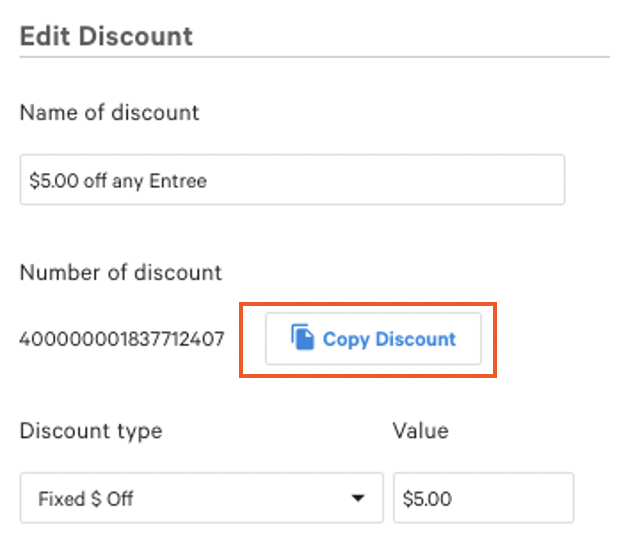
Then, create a new accompanying promo code. That way, on the Discount reports, you'll be able to track the promo code associated with the discount.
Alternatively, you can create the promo code as an Offer through the Offers Dashboard. Each offer's Track & Manage tab shows a Redemptions count for that offer's promo code, providing usage reporting without duplicating the discount. Keep in mind that each offer can only have one promo code, so if you have multiple codes tied to the same discount and want their usage broken out individually, you'll still need to create a separate offer per code.
You can learn more about how to create promo codes and discounts in this Support Center article, Get Started With Discounts.