Toast Payroll: Find Your SUTA/SUI Rate
Last updated: Nov 12, 2026, 12:05 PM
Question
Where can I find the SUTA, SUI, or state unemployment tax rate that was in effect for a quarter's filing in Toast Payroll?
Answer
SUI stands for State Unemployment Insurance and SUTA stands for State Unemployment Tax Account. These refer to the same thing, but different state and local jurisdictions may refer to this by either acronym or might even call it Reemployment Tax. All 50 states + DC are subject to this tax.
The Tax Accounts page under Settings > Payroll > Tax Accounts will display the current SUTA/SUI rate for the selected FEIN and state, but keep in mind that this may not match the rate used at the time a tax package was filed in the past. If you do not see Settings on the left side of the screen, select Payroll from the Toast Web navigation rail on the left to make the Toast Payroll navigation rail appear.
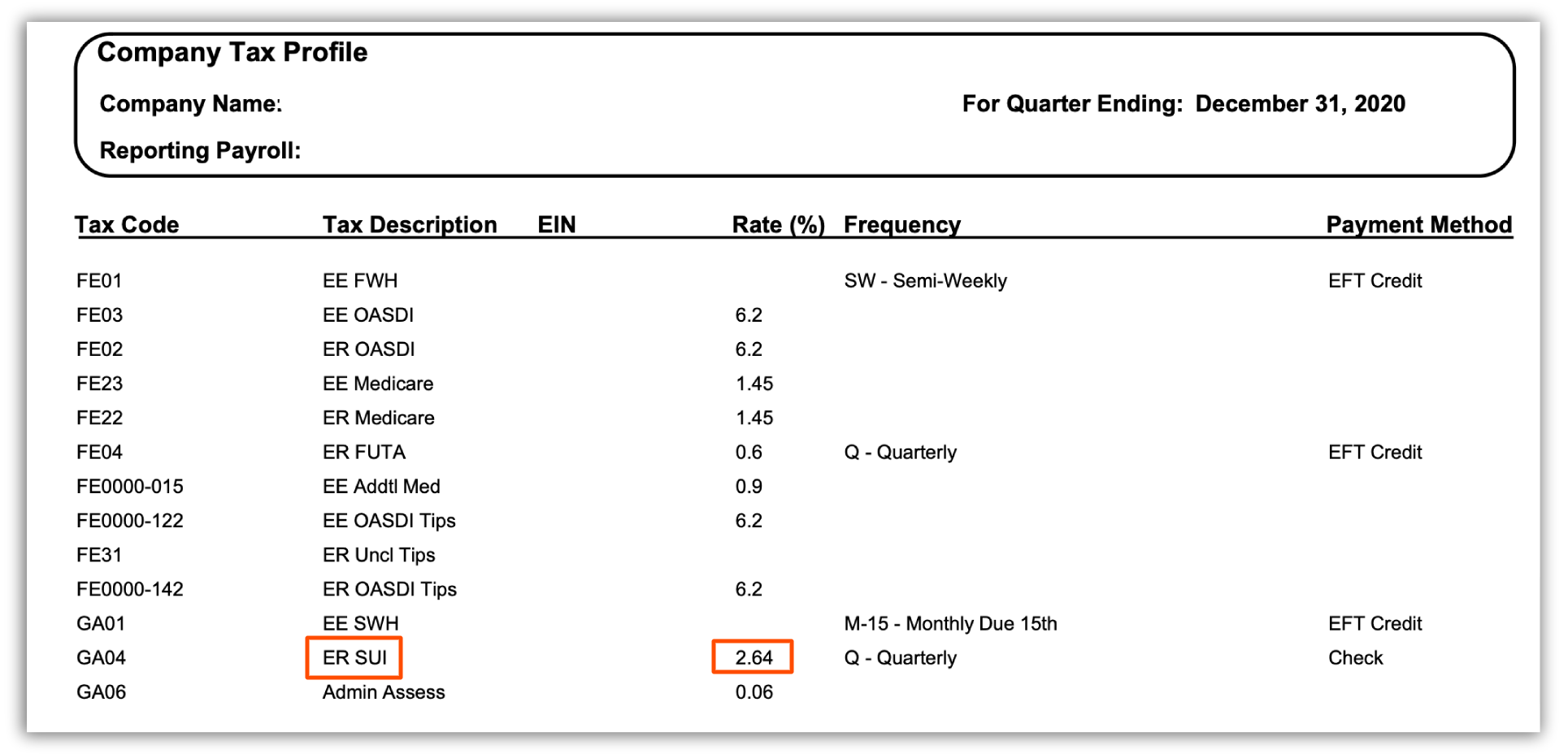
You can find a SUI/SUTA rate at a specific point in time on the bottom of the last page of your Quarterly Tax Package:
- In Toast Payroll, navigate to Reports > Tax Filing.
- When you select Reports in Toast Payroll, you should see a URL that begins with payroll.toasttab.com. Visit Navigate Toast Payroll Within Toast Web to learn how the new Toast Payroll navigation works.
- Select the appropriate Year and FEIN.
- Now select the blue arrow button to download a quarterly tax package.
Why doesn't the unemployment (UI) tax paid match my state notice?
Toast Payroll calculates and pays state unemployment insurance tax using the rate saved in your tax account settings. If the state's notice shows a balance due, check the following:
- Your UI rate: Compare the contribution rate (and any additional state surcharge rate) on your most recent state rate notice to the rate in Settings > Payroll > Tax Accounts. If the rate on file was outdated or incorrect, UI tax was calculated and paid at that rate, and the difference may be owed to the state.
- The due date: The state may show the quarter's amount before Toast's payment is due. Check whether the payment is still pending before treating it as unpaid.
- Your quarter-end totals: Compare your quarter-end SUTA liability in Toast Payroll to the amount the notice lists as paid.
- Contact Customer Care if you need troubleshooting or have questions.
If your rate was wrong, update it in Tax Accounts so future payrolls are correct.
This content is for informational purposes and is not intended as legal, tax, HR, or any other professional advice. Please contact an attorney or other professional for advice.